Desertcart purchases this item on your behalf and handles shipping, customs, and support to Tunisia.
🎥 Capture Every Frame, Own Every Stream!
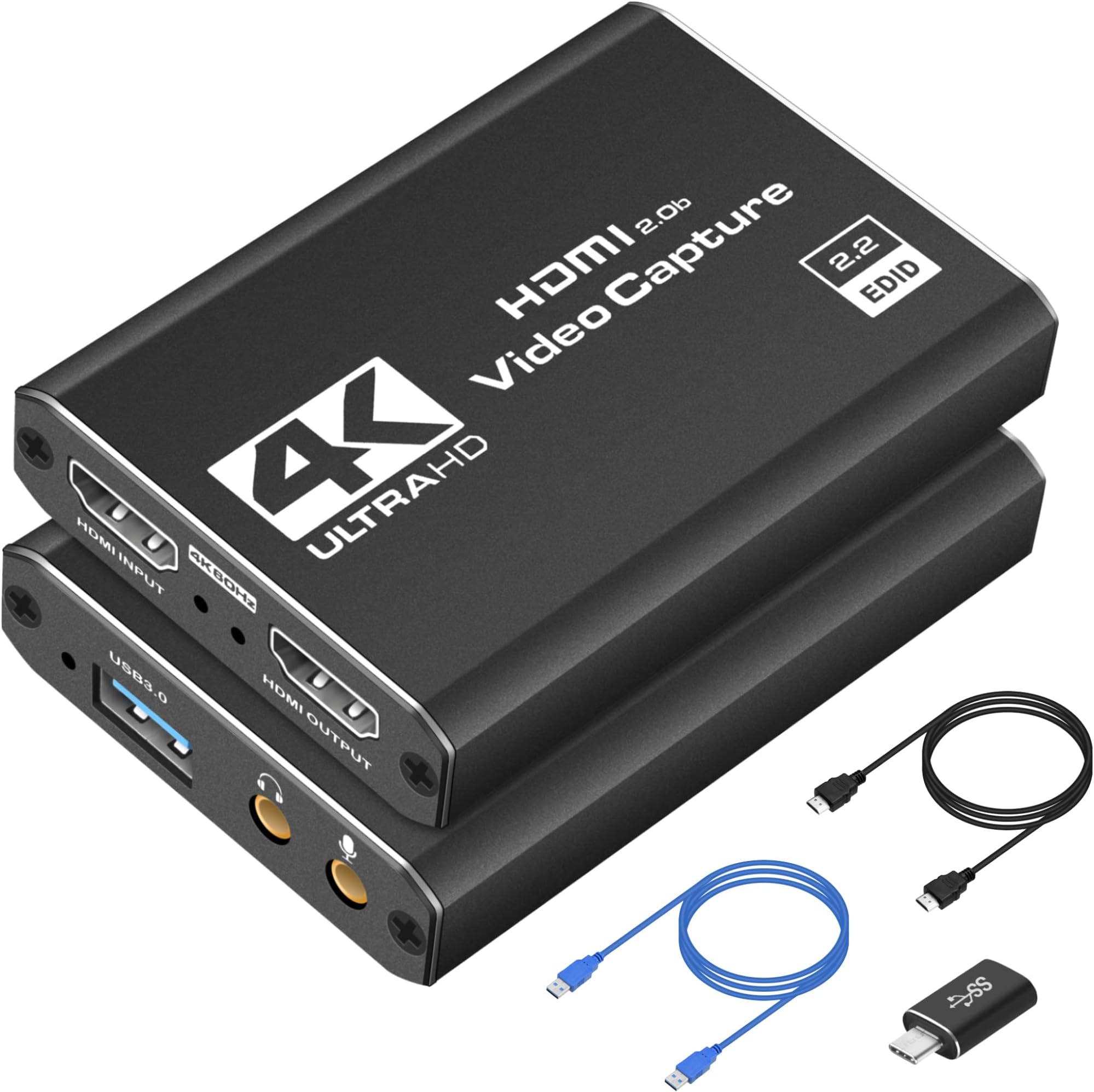
The Dcyfol Capture Card is a compact, USB 3.0-powered device engineered for professional-quality 1080P 60FPS video capture with real-time 4K HDMI preview. Compatible with major gaming consoles, PCs, and cameras, it offers plug-and-play ease with low latency for smooth streaming and recording. Ideal for content creators and gamers seeking crisp, lag-free broadcasts anywhere.


| Antenna Location | Video Recording |
| Asin | B0BWT35QW8 |
| Av Output | HDMI, YUY2 |
| Best Sellers Rank | #3 in Internal TV Tuner & Video Capture Cards |
| Brand | Dcyfol |
| Built In Media | 4K HDMI Capture Card, HDMI to HDMI Extension Cable, USB to Type-C Converter Adapter, USB to USB Extension Cable |
| Compatible Devices | Laptop, MacBook, Personal Computer, iMac |
| Customer Reviews | 4.4 4.4 out of 5 stars (1,019) 4.4 out of 5 stars |
| Hardware Interface | USB |
| Item Dimensions | 1 x 1 x 2.7 inches |
| Item Weight | 0.21 kg |
| Manufacturer | Dcyfol |
| Mfr Part Number | 022 |
| Minimum System Requirements | Compatible with Windows and Mac systems. Requires a USB 3.0 port. |
| Model Name | ozc3 |
| Model Number | ozc3 |
| Number Of Items | 1 |
| Operating System | MacOS, Windows |
| Other Special Features Of The Product | 1080p 60fps Capture, 4K HDMI Real-time Preview, Audio and Video Recording, Compatible with PS5, PS4, Nintendo Switch, Xbox, PC, Mac OS, Camera, Plug and Play |
| Platform | Mac OS X, Nintendo Switch, PlayStation 5, Windows, Xbox |
| Unit Count | 1 Count |
| Upc | 794969796035 |
| Video Capture Resolution | 1080p, 4K video record in 1080P 60FPS |
| Warranty Description | 1 |
User
Great value!
This HDMI capture card delivers smooth, reliable performance for both streaming and recording. It produces sharp 1080p at 60FPS video with excellent audio and video synchronization, so there's no noticeable lag. Setup is quick and hassle-free, making it easy to start using right away. It also works seamlessly with a variety of devices, including Windows PCs, the Nintendo Switch, and the PS5. For the price, it's an impressive capture card that offers outstanding value for gamers, content creators, and anyone looking for an affordable streaming solution.
User
Excellent 4K Capture Card – Easy Setup and Great Video Quality
This capture card works exactly as expected. It was very easy to set up, and the video quality is clear and smooth. I like that it has HDMI pass-through, so I can connect everything without any issues. It works great for recording and streaming, and the build quality feels solid. Overall, it's a great value for the price. I would definitely recommend it.
User
Easy Plug-and-Play Capture Card with Clean 1080p60 Video Quality
I bought this to capture gameplay and camera video for recording and streaming, and it’s been doing exactly what I need.Setup was simple. Plugged it into my computer, connected an HDMI source, and it showed up immediately as a capture device. No drivers, no complicated setup. It works with OBS and other common capture software without issues.Video quality looks clean at 1080p 60fps, which is perfect for streaming and YouTube recording. I haven’t noticed noticeable lag or audio sync problems, and passthrough works as expected so I can still play on my main display while capturing.The unit runs cool, feels solid for its size, and is easy to throw in a bag if you move between setups. For the price, it performs better than I expected.If you need a simple USB capture card for consoles, cameras, or PCs and don’t want to spend a lot, this is a solid choice.
User
Even with a MacBook and a Switch, it works on Discord and Twitch!
I bought this capture card to cast gameplay from my Nintendo Switch to Discord on my MacBook. This works perfectly well for its intended purpose and even gave me the confidence to stream on Twitch! The picture comes through clear and with no latency. I've since used it on other computers, such as my Predator Helios, and casted games like Jack Box with no problems. I am taking off a star for 2 reasons: 1, The connection in the USB3 port is a bit more fragile than I would like. On the off chance that the capture card does move or the connection is broken, the stream freezes and requires a reset to get it back up and running, reconnecting it does not work, you have to reset the input from either OBS or restart a discord stream. This isn't a problem if the capture card stays still, but its happened to me at least 5 times in the past year. 2, There are very minimal options for controlling the volume with this capture card. If you plug headphones into the capture card, it's VERY loud, and even if you have a volume adjuster on the headphones, it doesn't change. Sometimes the output into discord is very quiet and the only solution I've found so far is using obs Virtual camera and connecting my microphone to the capture card, which mean I can no longer control my microphone volume independently from my switch.Despite that, I think this is a great capture card. I was completely new to streaming when I bought this thing about a year ago. It's surprisingly durable and gives a vibrant, clear, picture with no delay! It works on mac and windows, and you really do just plug it in, set up your stream, and play! This is a wonderful tool for beginners and I highly recommend it for Mac users and switch players who are looking for a easy set up without extra buttons or fuss.
User
Extremely high high-quality and videographic autographic is amazing
I don’t usually leave reviews for products, but that’s why I definitely had to the quality feels extremely nice. I thought it was gonna be some type of cheap plastic note. It’s actually full metal has wait to it. The cables are pretty nice too, and don’t feel cheap at all. Now let’s get onto the real deal the streaming/recording. I use this for streaming and recording my content, I have a switch to and I use OBS which you need to install on your computer in order to get your content out of. It’s free to use once you download OBS you’re gonna hit on the bottom ad and then you’re gonna add your capture card and then you’re gonna put a stream from USB port on the very top and the signal goes through very smoothly now to the quality. The video quality is amazing for the price. I mean it’s more than what I expected for this price the colors are actually very similar to the ones in the console. It just makes them a little not too bright like the console but that’s normal. The audio is absolute perfect no crispy audio no echo audio issues pure audio amazing the set up was easy. The only thing was difficult to set up was the OBS to the capture card, but like I said, just follow my steps and you should do it. If you still don’t understand I don’t have trouble look up auditorium on YouTube and you should be running to streaming or capturing videos in no time it’s extremely easy to use. The resolution is amazing works well as intended. The durability feels like it’s gonna last very long as it’s made of metal and not one of those cheap plastic cover covers and the connectivity is super easy and once you have a pair to the OBS app on your computer it will pair automatically as soon as you plug the USB-C onto your computer and you have that open. It will automatically connect now to stream and record videos. You do have to click on your computer to start recording and then you just do anything that you want and then right before you’re done streaming or done finishing the game or recording. Make sure to stop the recording button and yeah, very easy to use extreme high-quality. I’d recommend getting this 100%. I’m definitely getting another one or unless you guys wanna send me another one I will gladly accept it and review it once again an amazing product definitely get this product. Also, I have a switch 2 and a paired perfectly. I was a little skeptical because there were some people here that were saying that it did not pair for me a pair perfectly and quickly. I’m guessing they did not work out the OBS as it’s supposed to so make sure look up a tutorial on how to do that or follow my steps because if not, you’re just gonna get stuck on a black screen you need to activate it first, but it does work on the Nintendo switch 2
User
Pretty good
For $25 this is a steal!!! It works great, and my only issue is getting the sound to work how I want it , but that part is more so a user error. Great quality for the price.
User
Great, inexpensive capture card with a few caveats
I play often on my PS5, and my friends like to watch me play PS5 games on Discord. Since there is no way for PS5 to stream directly on Discord, I wanted a solution that would let me do this. I first tried Remote Play, which worked great, but then realized that I would need to connect my PS5 Controller to my computer, which would have me lose access to Dualsense features (haptic feedback, adaptive triggers, etc.). I then looked online and saw that you could use your PS5 controller wirelessly connected to your PS5 using a second account, so I tried this, but whenever I used Remote Play with this method there would be a really annoying notice on the top of my PS5 that wouldn't go away, stating that Remote Play was connected.So, I looked for a capture card to just go around the mess that was Remote Play. I found this capture card, and I can say that this is a pretty good purchase! Setup was really easy (just plug in the HDMI cable from your PS5 to the capture card, then your capture card to your monitor/TV), and I really appreciated the audio port on the capture card that let me connect my PS5 to my speakers. There is both audio and video capture on the capture card, but there was a small but noticeable audio delay so I just hooked up the card to my speakers with a cable.Just a couple things that make this purchase 4 stars instead of 5: 1) There is no way to adjust the volume from the capture card to my speakers. It is a bit on the louder side, and since I do most of my gaming from the evening to the night, I would prefer the volume to be adjustable. I can just adjust the volume on my speakers, but since they are connected to my PC as well when I'm listening to music or Youtube it affects the entire audio setup as a whole. 2) This capture card doesn't support HDR passthrough, which is a minor but notable setback. My PS5 to my monitor directly has HDR support, but through the capture card does not. Again, not a huge deal but definitely noticeable.All in all, for $30 or so this is a great deal. It does exactly what I need to do (which is get video and audio to OBS) and there aren't any huge delays with either video or audio. The instructions to setup everything on the product page were simple and nice (though I do wish they were included with the packaging) but for $30 you really cannot go wrong with this. If you want to a professional streaming setup, I would probably go with an Elgato, but for use cases like this, it's perfect.EDIT: I just figured out that you can stream the audio directly from your computer to your headphones/speakers, and you can adjust the volume in Windows settings. This is up to 5 stars!
User
Does not work at all.
I bought this video capture card, hoping it would be better than the previous one I had, but unfortunately, it doesn't work at all, and only shows a color bar screen instead. I tried everything I could to get it to work, but despite it all, nothing worked for me. Very disappointing. I thought the problem was OBS, and I thought the problem was the ports I had my cables plugged into, but no, it was the capture card all along. I even used the cables it came with, and it still didn't work. Using a different HDMI cable didn't work either. The settings I set in OBS for this capture card were the exact same as the ones I had set for the previous video capture card, and nope, still didn't work.All i wanted was to use these to cast my PS4's screen onto my laptop's screen, especially for recording purposes. Unlike this one, the other video capture card i have actually functions the way it's supposed to. It's not the best, there is a bit of latency, but buying this one makes me regret making the decision to buy a new one. The previous one runs around 60fps, and this one is supposed to run around 60fps as well, according to the Amazon page.I'm not sure if it came defective, or if I'm doing anything wrong, as it seemed to work fine for other people, according to other reviews, but I refuse to believe I did anything wrong. All I can say is, if you're looking forward to buying a video capture card, I recommend buying a different one.
Trustpilot
1 month ago
1 month ago