Desertcart purchases this item on your behalf and handles shipping, customs, and support to Tunisia.
โก Elevate your home network to pro-level speed and security โ donโt get left buffering!
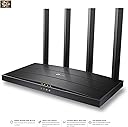
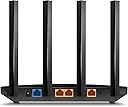
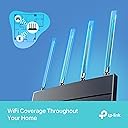
The TP-Link Archer AX12 is a Wi-Fi 6 dual-band router delivering up to 1.5 Gbps speeds with four external antennas and Beamforming for reliable whole-home coverage. It supports multiple device connections simultaneously via OFDMA and MU-MIMO, enhances battery life with Target Wake Time, and secures your network with WPA3 encryption. Ideal for gamers and 4K streamers seeking fast, stable, and secure internet with easy plug-and-play setup.


| ASIN | B0C46RKSYK |
| Antenna Location | Game, 4K streaming |
| Antenna Type | Fixed |
| Best Sellers Rank | 2,213 in Computers & Accessories ( See Top 100 in Computers & Accessories ) 18 in Routers |
| Box Contents | Archer AX12 |
| Brand | TP-Link |
| Brand Name | TP-Link |
| Colour | Carbon Black |
| Compatible Devices | Laptop, Personal Computer, Smart Television, Tablet |
| Compatible devices | Laptop, Personal Computer, Smart Television, Tablet |
| Connectivity Protocol | Wi-Fi 6 |
| Connectivity Technology | Wi-Fi |
| Control Method | Touch |
| Country of Origin | China |
| Coverage | Whole Home |
| Customer Reviews | 4.4 out of 5 stars 3,690 Reviews |
| Data Transfer Rate | 1.5 Gigabits Per Second |
| Frequency | 5 GHz |
| Frequency Band Class | Dual-Band |
| Frequency band class | Dual-Band |
| Has Internet Connectivity | Yes |
| Has Security Updates | Yes |
| Is Modem Compatible | No |
| LAN Port Bandwidth | 1000 Mbps |
| Manufacturer | TP-Link |
| Manufacturer Part Number | Archer AX12 |
| Maximum Upstream Data Transfer Rate | 1201 Megabits Per Second |
| Model Name | Archer AX12 |
| Model Number | Archer AX12 |
| Model name | Archer AX12 |
| Number of Antennas | 4 |
| Number of Ports | 3 |
| Operating System | RouterOS |
| Other Special Features of the Product | Gaming |
| Router Network Type | Wireless |
| Security Protocol | WPA3 |
| Special feature | Gaming |
| Voltage | 12 Volts (AC) |
| Wi-Fi Generation | Wi-Fi 6 |
| Wireless Compability | 2.4 GHz Radio Frequency, 5 GHz Radio Frequency, 802.11ax |
| Wireless communication standard | 2.4 GHz Radio Frequency , 5 GHz Radio Frequency , 802.11ax |
R**4
Fast, Reliable Wi-Fi with Great Coverage
The TP-Link Archer AX53 has been fantastic for our home network. Setting it up was quick and easy, and the AX3000 speed really makes a difference โ streaming 4K videos and gaming online is smooth with no noticeable lag. The dual-band feature helps keep devices stable even when multiple people are connected at once. Coverage is excellent; I get strong Wi-Fi signals in every corner of my house. The interface is user-friendly, and firmware updates are simple. Overall, a reliable router that delivers fast, consistent performance at a reasonable price. UPDATE ITS STILL GREAT
R**N
Great product
Great product, easy to setup, massive boost in range over my standard providers supplied router, loads of additional features and a bargain on sale. Signal never drops out and a big improvement in reliability. After a quick Google search and YouTube video I had it setup in about 10 mins.
M**C
Solid router but firmware update doesnt work via app
I'm on virgin media, they gave me the hub 3 which is absolutely terrible. The wifi kept disconnecting. I complained and they sent me another hub 3 which was just as bad - the wifi kept dropping and I'd have to turn my wifi on and off and put up with stuttering MS teams calls. I suspected it was the wifi signal so I bought this. Setup was reasonably straight forward although the app is kinda basic. You have to put the virgin media hub into modem mode and then connect it to this router and then restart the virgin media hub otherwise it wont work - theres a youtube video on it basically if you search virgin media modem mode - its not the top one but theres one with a guy explaining you need to reset the modem in the correct order. I followed the app and after a little fiddling it worked and the connection has been solid non-stop. No more signal drops, no more MS teams issues. The ONLY criticism is the app on my phone doesnt seem to update the firmware even though it says it does. You begin an update, it completes and then it says the firmware is still outdated and hasn't been applied. It doesnt really make sense.
H**L
Nice and reliable
Really nice and smooth work flow.
D**2
Worth the money
Nice design. Easy to set up. Easy to add a VPN to the router. Out of the box and all set up and configured within 20 minutes. Highly recommended, great price.
P**R
Versatile and easy to use - with free companion mobile app
Positives: * It works as advertised * Its UI is clear, super responsive, easy to use and informative. * Packed with a host of features Negatives: * None so far I replaced my internet provider's own-brand router (Virgin Media Hub 3.0) with this. I put the Hub 3.0 into 'modem mode' and connected this via ethernet cable and got it sorted pretty quick with the setup feature of the router. This product boasts a lot of additional features and they're all very easy to setup and work as advertised. For example, it can easily setup 3 separate WIFI networks for you, your main network, a guest network, and a IoT network (for your smart home devices) to keep everything separate and stop any compromised guest/smart devices from allowing anyone access to your main devices. There is also the 'tether' app you can download or free and link to the router to manage it from the mobile app. If you create an EasyMesh network (using other TP-Link wifi extenders that support EasyMesh) it can also manage the extender devices! Its got a lot of easy to use extra features such as per-device speed limits, setting priority devices, access point mode, as well as all the usual router config stuff.
B**H
Disable The Smart Connect Feature - Then It Delivers. Early Failure After 28 Months Though
No problems with the retailer - arrived quickly, was well packaged, as described etc. NB - I'm using this device as an Access Point (instead of my Sky Q's weedy Wi-Fi), so no comment on the 'router' performance of the AX10. As a Wi-Fi access point I found frequent dropouts of signal, and I was on the point of returning it for a refund. TP Link technical support responded quickly and advised me to disable the Smart Connect feature and since then its been fine. As far as I can tell, Smart Connect seems to gave all of the service to one of my phones, at the expense of everything else, and an internet search found several other complaints along the same lines. You can achieve most of the benefits by using the same SSID & Password for the 2.4 GHz and 5 GHz radio settings, without the downside. If you do that, your phones etc. will self-select the best band as you move round the house. After that fix, it is working well giving me fast Wi-Fi (250 to 500 MBit depending which room), to the latest AX standard, to the latest WPA3 security standard (a dual mode which also supports WPA2 if older devices need it) so a good bit of future proofing at a reasonable price. As the base model its throughput is limited compared to the premium types, but with my Internet throttled to 40 MBit that isn't an issue. This is easily fast enough to saturate that service. It was easy to set up using their Tether app on my phone (took about 10 minutes), which you can use later to monitor the device, amend its settings, update firmware and so on. POST SCRIPT - Just failed after 28 months. The Ethernet connection to my ISP's router has been erratic for a few moths, and failed completely today. The symptom is that the "Internet" light glows orange, and the connection to the internet is lost. Looking on line, lots of other people reporting similar problems with the WLAN connection as well. Speculating, I suspect that there is a cracked solder joint near the socket, because the previous erratic failures all occurred in the small hours of the morning (between 02:00 and 04:) , when my house was approaching its coldest overnight temperature. Same timing today, except that this time the issue was unrecoverable. Looks to me that thermal contraction is the triggering event.
E**S
Brill device! (issues 3 months in)
While at first this was a great new router for me to replace my Virgin one i am now running into issues 3months into using it. PROS: Set up is easy and dosnt take long at all, if you follow instructions you cant go wrong, you have App to download onto your mobile and from there its all systems go and higher speeds! For the value of it too especialy on sale is a brilliant device to help set up. Is also very light and easy to pack away somewhere out of sight out of mind! Cons (3 months later): At first was no issue but then i started noticing wifi was dropping signal completely around 12pm each day for 1 or 2minutes this was fine as rare occurrence but this past week it now has been cutting off connection multiple times throughout the day have had to disconnect it and restart up my Virgin Router and has been zero issues since so beware of connectivity issues in later stages.
M**.
ู ู ุชุงุฒ
ู ู ุชุงุฒ
R**T
compatibility issues if ordering in the USA
product was as described, but the adapter that came with it was wrong. the power supply plug does not match the adapter at all, so i could not plug it into any of my sockets because it literally would not plug into the adapter either. i wish i took pictures because it's hilarious in hindsight i cannot comment on the quality, speed, functionality, performance, or value for money at all, because i literally could not test it. i didn't have any power sources to spare that would have fit either
M**I
pretty good device
Router works perfectly, solved all the problems of deadzone, etc in my house. More than 2x faster if you have wifi 6 compatible devices, went from 180mbps max on my phone to 500+mbps. Pretty good upgrade for $70 if you are still using wifi5 routers and you have wifi 6 devices.
F**S
Excellent. Solved All My Game Streaming Issues
I bought this on a whim and it worked out tremendously well. I always had issues streaming games from the PC and PS5 to the Steam Deck OLED with my old Linksys WiFi 5 router. The stream would always slow down and start losing packets. This router completely eliminated these problems and now I can stream at 100mbps+ without any problems. Highly recommend it if you have a similar setup as mine. The range is also better than my old router. I have a 2BHK, and I would always only get either 0 to 1 bar of WiFi signal in my bedroom. With the TPLINK, I get around 2 and the internet is always stable. The app is nice, but I just use the web admin panel. The internet speed across all devices is fantastic and smooth. I have had no isses with this router for the few days I have owned it.
M**L
Comes with a British plug!!!
It's a good router. If you're buying internationally note that it has a UK power plug.
Trustpilot
1 month ago
3 weeks ago