Desertcart purchases this item on your behalf and handles shipping, customs, and support to Tunisia.
📸 Scan smarter, preserve forever — don’t let your memories fade away!
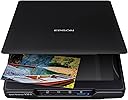
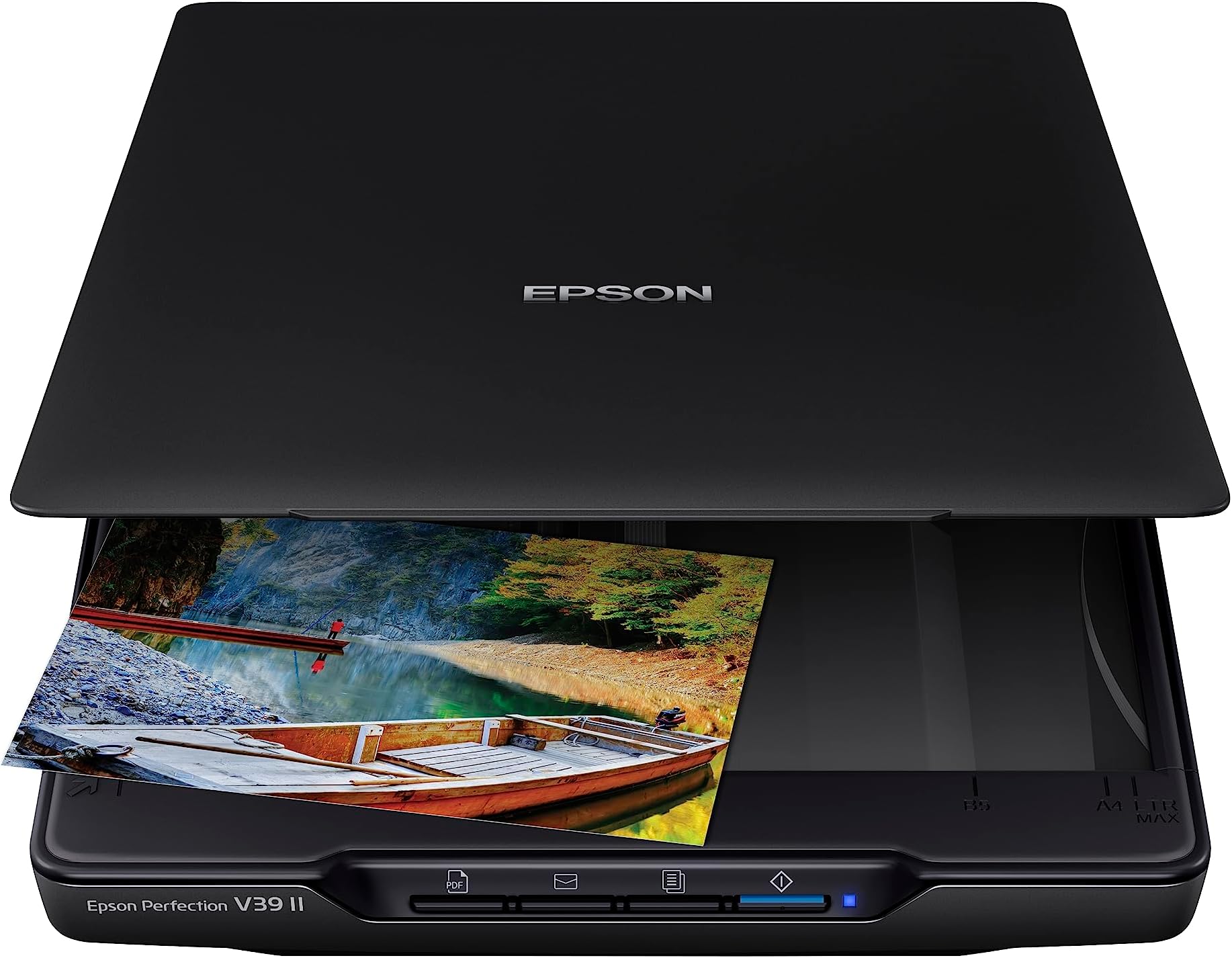
The Epson Perfection V39 II is a sleek, USB-powered flatbed scanner delivering ultra-high 4800 dpi optical resolution for crystal-clear photo and document scans. Designed for professionals and creatives alike, it features one-touch scanning, fast 10-second letter-size scans, and seamless cloud connectivity via Epson ScanSmart software. Its high-rise removable lid accommodates bulky items, while Easy Photo Fix technology restores faded images with a single click. Compact and lightweight, it’s the ultimate tool to digitize, organize, and preserve your most important documents and memories.


| ASIN | B0C35V1CLK |
| Best Sellers Rank | #7,378 in Office Products ( See Top 100 in Office Products ) #4 in Flatbed Scanners |
| Brand | Epson |
| Built-In Media | Item |
| Color Depth | 48-bits per pixel (internal); 24-bits per pixel (external) bits |
| Connection Type | USB |
| Connectivity Technology | USB |
| Customer Reviews | 3.7 out of 5 stars 1,193 Reviews |
| Greyscale Depth | 16-bits per pixel (internal); 8-bits per pixel (external) |
| Item Dimensions D x W x H | 9.9"D x 9.9"W x 1.5"H |
| Item Weight | 3.1 pounds |
| Light Source Type | LED |
| Manufacturer | Epson |
| Media Type | USB |
| Minimum System Requirements | Windows 7 |
| Model Name | Perfection V39 II |
| Optical Sensor Technology | CIS |
| Product Dimensions | 9.9"D x 9.9"W x 1.5"H |
| Resolution | 300 dpi |
| Scanner Type | Document, Photo |
| Standard Sheet Capacity | 1 |
| UPC | 010343976566 |
| Unit Count | 1 Count |
| Warranty Description | 1-year limited warranty |
| Wattage | 2.5 watts |
E**.
Update: Epson V39II software fails to start scanner after sitting idle with Win11
For years I used the Epson Perfection Photo 2400, scanning thousands of photos and postcards. Even thought they were still running, I decided to update because of software conflicts with Win 11. After all, they were around 20 years old. I am elated. These V39II's are quieter and faster than the 2400's. What a great improvement. Should have done this sooner. Update: I have finally given up trying to work with this scanner. Over time, I discovered a serious software glitch. If the scanner turns on (which it always does when my Win11 PC powers up) and sits there unused, at some point it will refuse to start up. At times I have had to plug and unplug the cable, then restart my Win 11 computer which means shutting down multiple apps, only to discover it still won't start scanning. The connecting cable oddly has an out of date flimsy micro usb connector originally used on android phones several years ago. This has been so troubling and a complete waste of my time, I have decided to donate this great machine with trashy software to a thrift store. I have been forced to buy a Canon Lide 400 scanner and much to my surprise it works wonderfully, even better than the Epson. It is just as fast as the V39II and it starts up just like it is supposed to after idling for extended periods o time. The preview image is much larger than the Epson's and it looks sharper with better color rendering. It works so well, I'm sure I will forget the name "Epson." And the connector it uses is a USB C type which is the current standard on android phones.
M**R
DOES NOT WORK WELL WITH MacOS! Ancient tech - don't waste your money.
Worked for one day, then just refused to work at all. Only works with Windows PC's despite claiming it works with Mac. Drivers have not been kept up to date. The quality of scans was ok, but not great (I largely used it for scanning old photos and documents). Included software is primitive and poorly documented. Does not work directly with any other software (such as iPhotos, Google photos, etc. Saved images did not often match the image previews, with sides cut off and lines in the middle of the images.
L**G
Great scanner for the price!
So far I have scanned over 4,800 images and I have been very pleased with the quality of the scans. Not only does it scan multiple images at once, it will often put them in the right direction. And it will still scan an image correctly even if it isn't exactly straight. Sometimes an image may need to be rescanned, but I found this to be only sometimes and with certain images over others. The 4x6 seemed to have the most rescanned and even those were not that many. A few times the images on the scanner bed were scanned all as one image but that was very rare and I found switching to a different selection of images resolved the problem. This occasionally happened with black and white images. Swapping out one of the images for one of color always resolved the problem. The scanner software, despite what some reported, works great for scanning the images and for simple cropping. I really like that you can continue to scan images instead of sending them to your computer after each scan. It makes the process much faster. Additional photo editing would probably best be done in dedicated software. Despite the minor negatives I have mentioned, I still give it 5 stars because it honestly deserves it, in my opinion. No, it is not a professional scanner, but most of us do not need to scan our family photos in a professional scanner. The scans are clear and concise. Exactly what is needed. The scanner is super lightweight and easy to store. And very convenient since it only needs to be connected to your computer and not to a power source. I have had a lot of scanners over the years and honestly I was trying to avoid scanning all of my photos on a flatbed scanner, remembering how torturous it was to get the photo straight in the past. But I am so glad that I took the chance and made the purchase of this scanner.
R**Y
In case anyone else runs into this problem.
I buy the scanner(Epson perfection V39 II), open it up, follow the procedure for my MacBook (sequoia macOS 10.15.X), download it and everything seems fine. It is not. Scanner does not turn on and any attempts result in the blue light flashing for a half a second before turning off. When going through the installation process it can detect it however I can not use it to scan, as it skips over the process for an test scan as well, I delete and redownload the software, buy another adapter to see if that works, use it on another computer. I tinker for another 4hrs before I give up. I go back to the Epson support download page, go to recommended software and decide to go click at the + icon to see what that includes. I go down to drives and individually download the Scanner Driver v.7.82 & Drivers and Utilities. It works. I’m able to now scan, blue light on and everything. Like the product, it’s as advertised but going through the hassle was very demoralizing.
B**R
Wells Well for Low Price Scanner
Works well with Windows 7, and have had no power issues with the USB connection. The scanner goes to sleep with the computer, so no on/off button has not been an issue for me. Wanting to really test it while in was still within the return window, I have scanned 438 photos with only two glitches, both solved by simply restarting the software. The software is pretty basic, but it's perfect for quickly scanning masses of old family photos. I like that it keeps the desired settings for each subsequent scan, and that even if the photos are not placed perfectly square, the scanner squares them up automatically. I wish the cover would stay up while partially open, as an older model Epson Perfection scanner I used did. It is the flimsiest feeling part of this scanner, no doubt made this way to save weight. All in all, pleased with the scanner considering the low price.
V**A
Great device; great value!
This is fantastic! It scans old photos & does a respectable job with them; recognizes documents and makes it so easy to put everything where it needs to go……yes, my printer scans; but it is SO handy to have this on my desk and the price is well worth it!
K**S
Do not waste your money
DO NOT BUY this Piece of crap!!! Doesn't scan, online drivers do not work, so the device doesn't recognize the computer (& vice versa), and nothing I do will make it 'go'. The online drivers keep saying they need to be downloaded & loaded - but the computer doesn't recognize them as valid drivers. Nothing else online gives any assistance to make the computer recognize the device. I got it to work for 5 scans, and then it failed again. Now refuses to recognize the device again. For the 5 scans I did get, there are only 4 buttons, and none of them give the user the ability to active a scan. Who designed this crap????? Every attempt to get customer service assistance also fails. The phone calls give you people not in the US, who have a script to read and absolutely no idea how to help make it work. UPDATE: Finally got it to work, and it will not scan above 600 dpi for old photos in photo mode. I have to take it out of photo mode, and still can't get above 1200 dpi. I can take clearer pictures of the photo with my cell phone!!! I'm not kidding, I started taking cell phone picts, they are a million times better than this scanner!!!!
R**R
A good entry level scanner for your budget conscience comsumer.
This scanner is easy to use, you put your pictures or documents on the scan bed and push a button and you will have the items digitized. Note: you will have to keep the items aligned to the edges of the scan bed especially pictures. I have noted that if the picture is not flush that there will be a little bit of white around the edges. The speed of the scanner is not the fastest but then it is not meant for speed. It is a consumer scanner for personal use with good accuracy for the items scanned. Note: When scanning Black and White photos, Your best bet is to use the "Photo" setting as using the automatic presets will not scan the photos correctly. This is a portable scanner that has a stand on the underside so you can set it on its side to make room on your desk. The software setup is quite easy. Just download it from the Epson Website and follow the instructions of your scanner model for setup. Note: It is not suggested or recommend to connect the scanner to a powered USB hub. You best connect it to your PC/Mac directly.
D**G
Good qyality product
Good quality product, easy to use with the features I was looking for.
R**H
GreT5
Wonderful product. I just wish scan on high resolution was fast. It is easy to use. Good image quality. Value for money. People charge Rs 10 a document at 300 dpi scan.
M**N
Ótimo!
Ótimo produto. Atendeu às expectativas
S**N
Perfect for scanning artwork – Excellent clarity and very easy to use!
I purchased this Epson Perfection V39 II flatbed scanner specifically to digitize my wife's artwork and paintings. When it comes to scanning art, preserving the fine details and accurate colors is absolutely crucial, and I am extremely satisfied with the results this scanner has provided. It has proven to be a high-quality and professional tool for our creative needs at home.The most impressive thing about this scanner is its exceptional image quality. With an optical resolution of $4800\text{ dpi}$, it captures every brushstroke and subtle texture of my wife's work with amazing clarity. We were pleasantly surprised by how well it handles color reproduction; the digital files look very true to the original pieces. The "Easy Photo Fix" technology is also a fantastic feature, as it helps restore and enhance the colors with just one click, ensuring that her memories and creations stay vivid for a long time.In terms of usability, it is incredibly user-friendly. The one-button scanning feature makes the whole process effortless, even for those who aren't tech-savvy. I also really appreciate the compact and lightweight design. Since it is powered via a single USB connection, it doesn't require a bulky external power adapter, keeping our workspace clean and organized. The removable lid is another clever addition, allowing us to scan thicker documents or even bound books without any hassle.Overall, seeing my wife so happy with how her artwork is being preserved makes me very confident in this purchase. It’s an efficient, reliable, and high-performance scanner that offers fantastic value for anyone looking to digitize photos or artwork. If you need a professional-grade scanner for your creative projects, I highly recommend this Epson V39 II. It’s a smart investment in your family's artistic journey!
K**Y
Easy to use but make sure you download the correct software
Easy to use and adjust/edit old photos after you've scanned them. Just make sure you download the correct software according to where it came from (US), not where you live (for international customers).
Trustpilot
1 week ago
3 weeks ago