🔥 Own the game with every click — command, customize, conquer! 🎯
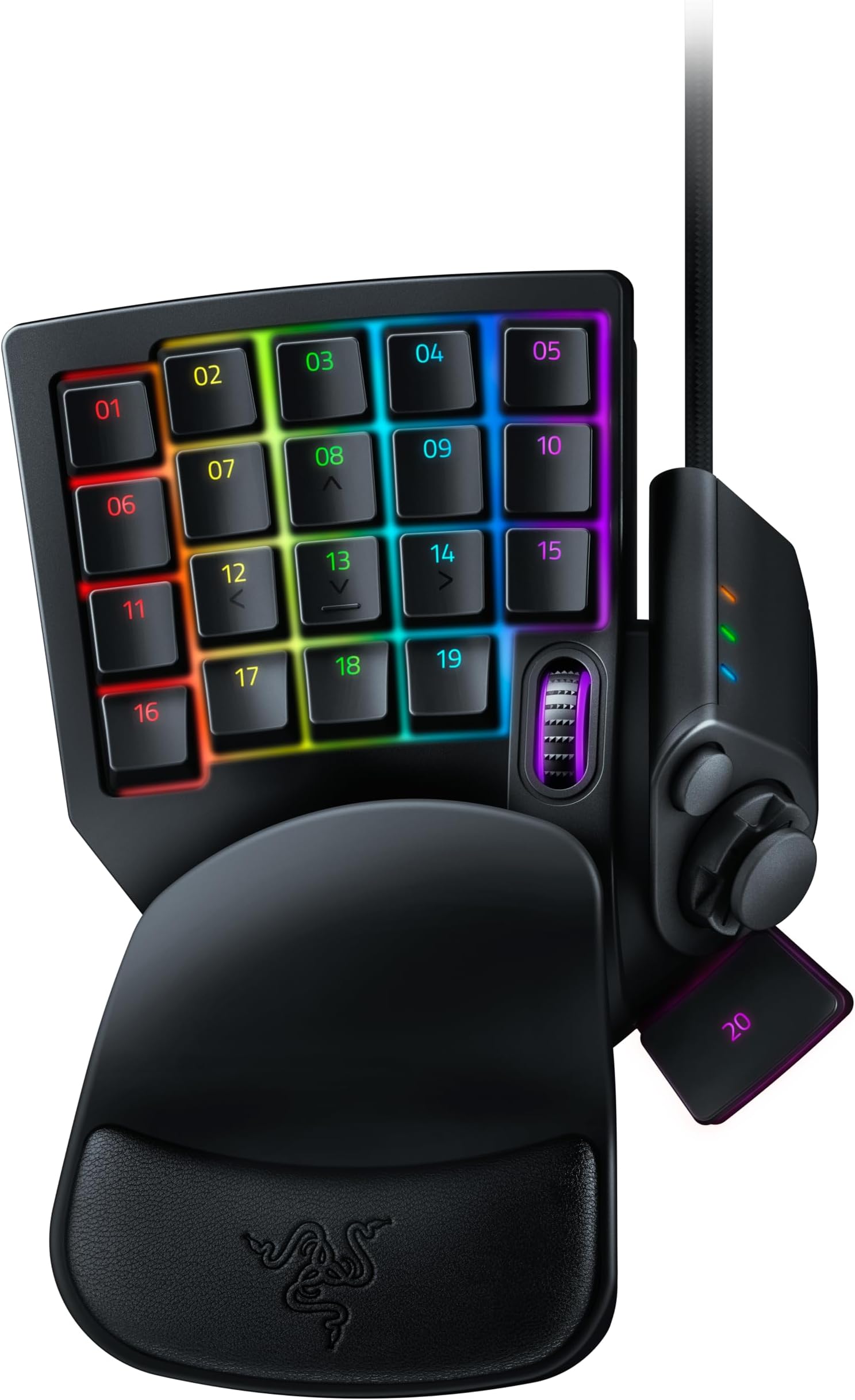
The Razer Tartarus V2 is a compact, high-performance gaming keypad featuring 32 programmable mecha-membrane keys, an 8-way directional thumbpad, and customizable Razer Chroma RGB lighting. Designed with advanced ergonomics including a detachable palm rest, it supports Hypershift technology to double command options, making it the ultimate tool for precision gaming and productivity.


| ASIN | B077T9391Z |
| Antenna Location | Gaming |
| Best Sellers Rank | 1,351 in PC & Video Games ( See Top 100 in PC & Video Games ) 79 in PC Gaming Keyboards 4,489 in Climate Pledge Friendly: Shop All |
| Box Contents | Manual, Razer Tartarus V2 |
| Brand | Razer |
| Brand Name | Razer |
| Button Quantity | 32 |
| Colour | Black |
| Compatible Devices | Gaming Console, PC |
| Compatible devices | Gaming Console, PC |
| Connectivity Technology | USB-A |
| Connectivity technology | USB-A |
| Country of Origin | China |
| Customer Reviews | 4.2 out of 5 stars 4,652 Reviews |
| Enclosure Material | Plastic |
| Global Trade Identification Number | 08886419360179 |
| Hand Orientation | Ambidextrous |
| Item Dimensions L x W x H | 20.3L x 15.3W x 6H centimetres |
| Item Weight | 340 Grams |
| Item height | 20.3 centimetres |
| Keyboard Backlighting Color Support | Single Color |
| Keyboard Description | Gaming |
| Keyboard Layout | AZERTY |
| Keyboard description | Gaming |
| Language | English |
| Manufacturer | Razer |
| Model Name | RZ07-02270100-R3M1 |
| Model Number | RZ07-02270100-R3M1 |
| Number of Keys | 32 |
| Power Source | USB Power |
| Product Features | Mecha-Membrane Switches |
| Product Warranty | 2 year |
| Recommended uses for product | Gaming |
| Special feature | Mecha-Membrane Switches |
| Style Name | Tartarus V2 |
| Switch Type | Mecha-Membrane |
| Theme | Rainbow |
| Unit Count | 1.0 count |
P**D
Great for us older gamers too
I'm an older gamer at 63 and recently after many years in Vr ended up back flat screening with my grandson. I played Fortnite and really stared to enjoy it . However if like me you have trouble being quick fingered and sometimes forget what key does what...Get one of these. Super simple to re program the key strokes to what you want..just select the numbered key you want to copy and click the key on your main keyboard and its done ...very well thought out soft wear for simplicity itself..you can go further and more advanced but I'm happy were it got to and how simple it got there. Now set up its so easy to E open doors or chests...Run,slide or jump like a pro. The other thing is the toggle this replaces the WSAD keys stroked (well runs alongside actually ) so its a bit of a cross between a keyboard and a console controller but it works really well ( I cant do console controllers very well..tend to get a bit fingers and thumbs) . Just to add you can have a few keys do the same job...so I have two buttons that do crouch...so I can find them as both were intuitively were I figured they should be...so I made them both the same..saves forgetting in the heat of the moment . Its working for me anyways..had a few seconds in Fortnite and won a few fights I don't think I would have without this...and ran from a few too ..its easy when you can find the keys Quality wise it seems well made ...I know there is a pro version too but this is fine for me and certainly on par with my G Logic keyboard. I tried a cheaper alternative before I got this and although it worked..its wasn't anywhere near as easy to use and ergonomically no were near. If you are going for something like this..get this one the Razer ...its a bit more £££ but sometimes that's what it takes to get the job done . Happy Gameing
S**T
Great for gaming and apps that benefit from keyboard shortcuts and macros.
I already own a Tartarus V2. Unfortunately, a microswitch failed on the D-pad after 4 years of daily use (I use that switch as "crouch" in fps games.) This was bought as a direct replacement, although I am a little concerned about how long this one will last - that key does see heavy use. Buy with that one negative point in mind. It's an otherwise excellent piece of kit. I play with the mouse and the Tartarus at elbow level on panels attached to the arms of my chair. This means I don't have space for a full keyboard there. The Tartarus is small enough to fit and with its macro, profile switching and key reassignment functions, I have every key I need for every game I play exactly where I need them without having to look at the thing ever. This is a bit of a shame, as the chroma functions are really nice, and again programmable. In terms of price, the mecha-membrane solution to gamers wanting clicky things does have the tactile feel of a mechanical keyboard without being too exoensive. The click is consistent without noticeable mushiness. In previous jobs, I wrote a *lot* and have come to prefer the feel of mechanical keyboards for better typing speed and fewer mistaken presses. While I'm not going to write War and Peace on a Tartarus v2, I still prefer its feel to the Tartarus v1, which I also own.
Z**Y
Best of its breed.
I can't imagine not having one of these now. So much that I bought a second one to stash away in case I break this one. I find the 'mecha membrane' keys to have just the right weight and clickiness. Some people don't like them - ignore them. I use it for WoW, Borderlands, Valheim, DOOM, Elder Scrolls, Spellforce, Dragon Age -in fact pretty much everything where you have to walk about. It's best for first-person shooters and strategy, but you can use it for anything you like. The ergonomics are a point of discussion. I have pretty big hands, and I can't really reach the '05' button without a stretch. But honestly, I've only ever used that key in Valheim. All the other keys fall very naturally under my fingers. However, by keeping a 'rows and columns' system and standard keyboard-sized keys, I think they made things more awkward than necessary. For V3 I think they should make the keys slightly smaller and work on placement even more. That said, it's really a non-issue. For WASD games like WoW and the Borderlands series, all the keys you need are right where you need them. I don't use the thumbstick as much as I thought I would. It's not an axis, it's a d-pad. I prefer to use the WASD keys, but It's a preference and nice option. It's as robust as most computer peripherals - i.e. not very. If I was going to pack it up and go gaming at a friend's house regularly, I'd be very wary, but I'm 50 and have no friends, so it's never going to move off my desk! I expect it will outlive me. Seriously - the Explorer Trackball next to it has been in constant use since I bought it new in 2001. The Tartarus v2 feels better-built. With a Trackball in one hand and the Tartarus in the other, you have a very comfortable gaming setup with no wrist strain, and needing a tiny footprint. You can put them on the arms of your seat and not need a desk. The RGB lighting is amusing. Sometimes I set it to a low-impact red, others I'll have it scrolling madly in a rainbow. It's pointless but fun. A few games (DOOM) do recognise the RGB software and will change the colour with the game. I'm usually so busy trying not to get pwned that I can't say I've really noticed. Bad things? It's not wireless. If it was, the lag might make it less useful for fast-action games, but it's still a great option for strategy. Having the choice would be nice. The thumb 'space' key could be bigger and ever so slightly higher. I keep forgetting it has a scroll wheel. It's three times the price of all the other 'LH keyboards' on Amazon. It's also far better.
R**T
Best Gaming Keypad
had the Belkin n52e then Razer Orbweaver. Now i have this and love it. Only down side is i miss the adjustability of the Orbweaver but don't let that put you off. It's very comfortable and turns of features. I don't like using a keyboard for gaming, just prefer all buttons i need to be in one area and this is perfect. Well built as always by Razer, software easy to install and use. Take it to the next level and get one of these.
A**W
Highly Recommend
Fantastic for a life long controller user!! Makes movement on the D-pad so much easier than WASD. Highly recommend for anyone wanting to transition from controller to mouse and keyboard.
I**N
NOT THE BEST
The Razer Tartarus V2 looks like a powerful tool for gamers, but in practice it falls short in several key areas. The mecha‑membrane buttons are one of the biggest disappointments—they don’t deliver the crisp, satisfying feel of mechanical switches, yet they’re also not as smooth or quiet as standard membrane keys. The result is a mushy, inconsistent experience that doesn’t feel great for fast inputs. The layout is another sticking point. While the numpad‑sized design sounds convenient, the spacing and positioning of the keys can feel awkward, especially during longer sessions. It takes more effort than expected to get comfortable, and even then, some buttons remain hard to reach naturally. Software support is hit‑and‑miss. Synapse offers plenty of customization, but it can be buggy, slow to load, or randomly forget profiles. For a device that relies heavily on macros and remapping, that’s a real problem. Build quality is decent, but not impressive for the price. The wrist rest is fixed and not particularly comfortable, and the overall feel of the unit is more plasticky than premium. In the end, the Tartarus V2 isn’t unusable—but it’s not great either. For the cost, you’d expect better responsiveness, better comfort, and more reliable software.
L**G
Mixed feelings here.
This review is mixed. I bought my first Tartarus V2 in 2018, and that one specifically is still fully functional today, 7 years later. Very easy plug and play setup and the Razer Synapse program is easy to navigate and use. The keypad buttons are comfortable and easy to reach. In 2024 I decided to get a new one to replace the now 7 year old peripheral. It broke in 11 months, the switch inside the thumb stick snapped. I reached out to Razer support as it was still under warranty, after a very lengthy process I was shipped a replacement. The same part snapped in under a month. I have a 7 year old Tartarus that still functions and 2 broken ones in under a year. I don’t know if Razer have built them out of cheaper parts in recent years or what. But I would by an old one if you can because the new ones do not last.
A**N
wow
this bit of kit works so well and it works so well try it you wont send it back
Trustpilot
1 day ago
2 months ago