💻 Cool your CPU, elevate your game!
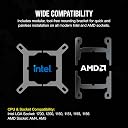
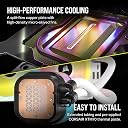
The Corsair iCUE LINK H150i RGB Liquid CPU Cooler is a cutting-edge 360mm AIO cooling solution designed for Intel® LGA 1700 and AMD® AM5 sockets. Featuring QX120 RGB fans with 34 RGB LEDs each, it combines high-performance cooling with a stunning visual display. The innovative iCUE LINK system simplifies connectivity and reduces cable clutter, while Zero RPM mode ensures whisper-quiet operation at low temperatures.


| Air Flow Capacity | 63.1 Cubic Feet Per Minute |
| Asin | B0C6PXT7YF |
| Best Sellers Rank | 5,799 in Computers & Accessories (See Top 100 in Computers & Accessories) 80 in Fans & Cooling |
| Brand | Corsair |
| Compatible Devices | Desktop |
| Cooling Method | Water |
| Customer Reviews | 4.4 4.4 out of 5 stars (1,252) 4.4 out of 5 stars |
| Eu Spare Part Availability Duration | 6 Years |
| Global Trade Identification Number | 00840006665861 |
| Included Components | CPU FAN |
| Item Dimensions L X W X H | 39.7L x 12W x 2.7H centimetres |
| Item Weight | 4.01 Pounds |
| Manufacturer | Corsair |
| Manufacturer Part Number | CW-9061006-WW |
| Material | Copper |
| Max Rotational Speed | 2400 RPM |
| Model Number | CW-9061006-WW |
| Noise Level | 37 Decibels |
| Number Of Items | 1 |
| Number Of Packs | 1 |
| Power Connector Type | 3-Pin |
| Product Warranty | 5 Year Manufacturer |
| Unit Count | 1.0 unidad |
| Upc | 840006665861 |
| Voltage | 12 Volts |
| Wattage | 50 watts |
User
Corsair at it's finest
Bought this to replace the utter shambles that is Corsairs latest iCUE LINK nightmare. As you can see from the pictures I have a small form factor case in Lian Li Snow white mini. This pump is the perfect size to fit and still provide adequate cooling. I have the 360mm in my other my PC and have gamed on it for the past 2 years on Ultra settings with i9 and temps never get past 80C. The newer AF120 fans whilst slightly noiser under load than their predecessors LL120s, they are lovely to look at. Under idle, they're silent.For anyone torn between this and and the iCUE LINK, opt for this one. It works just straight out of the box and the cable management is negligible. Everything is still all tucked away behind the motherboard. 10/10
User
Clean, Quiet and Powerful.. Perfect for a White Build
I’ve been running this cooler for about a year now with the i7-14700K, mounted in the Corsair iCUE 5000X RGB Tempered Glass Mid-Tower ATX Smart Case, and honestly it’s been one of the best parts of the whole build.The first thing you notice is how clean everything looks. The iCUE LINK system actually makes a difference. Instead of loads of cables everywhere, everything chains into the hub, and with the 5000X’s cable management it all comes together really nicely. It’s one of the cleanest builds I’ve done.I went with the white version, and in a white rig it just works. With the tempered glass panels on the 5000X, you actually get to see it properly, and it gives the whole system a clean, high-end look rather than just a standard black setup with RGB.Performance-wise, it’s exactly what you want from a 360mm AIO. It has no problem handling a hot CPU like the 14700K. After gaming on Red Dead Redemption 2, I’ve seen temps sitting around the mid 60s °C, which is really solid. Under heavier loads it climbs, but nothing worrying, and I’ve never seen it throttle.The QX120 fans are genuinely good, not just for looks. They push plenty of air when needed but stay fairly quiet most of the time. And overall, the whole setup is surprisingly quiet. At idle it’s basically silent, and even under load it never gets annoyingly loud, which I didn’t expect from a 360mm AIO cooling a chip like this.Everything is controlled through iCUE, so you can tweak fan curves, pump speed, and RGB how you like. The software does what it needs to do, even if it’s not the best thing in the world.I paid about £124.99 all in, and for what you get, I actually think that’s decent value. It’s not a budget cooler by any means, but considering the performance, build quality, and how clean it makes the setup look, it feels worth it.A couple of things to keep in mind. It’s not cheap at full price, and the iCUE LINK ecosystem does lock you into Corsair a bit. Also, while the cable system is cleaner, it can still be a bit fiddly during the initial setup.That said, once it’s in, it just works. Over the past year I’ve had no issues at all. No pump problems, no weird behaviour, nothing.Overall, it’s been solid. Strong cooling, super quiet, looks great in a white 5000X build, and keeps everything under control without any drama. Definitely no regrets.
User
Great aesthetic for PC
Looks fab in sons PC , cable length good quiet, runs really well. Great price
User
Great piece of kit to use with the iCUE link ecosystem but not without issue
Great product coming from the regular iCUE system ( 10x SP120 fans etc) which needs two wires per fan this was a breath of fresh air.However warning to most folks which seemed to confuse me for a few minutes on installation and looking at the forums have caught a few people out, you have to connect the fans to the radiator and then the radiator to the hub lol or you will, like me and so many others, switch it all on to see the fans doing nothing but the pump going mental lolBar that yeah its good and great for cable management and control (additional temp sensors in the fans are a nice addition), however was it worth changing all the 5000T system to the link system... not really i see no additional benefit beyond the existing and if it wasn't for the fact that i was rebuilding the system anyway i wouldn't have recommended the "upgrade" from existing to the link system.Yes you get temperature sensors in all of your fans but you know what that is a bit of a fad unless you are mega conscious or you will just do what i have (and most others) have just the readouts of importance that you will stick to looking at like package temp and fluid temp really.I brought this on BF offer and got the screen separate as it worked out cheaper overall with the deal discounts and I will say the link version compared to the older H150i I had to upgrade the pump head to the LCD readout was night and day better. Literally just a simple click one off and click the other on , this I cant fault at all :)
User
Corsair of course! Undoubted quality.
This CPU cooler is really great, I have used it on my i9 14900k build, it is keeping temps below 60 at all times, even when gaming. It obviously functions well, the lighting is great, although I had to play around to get all of the lighting in my build to synchronize. This is where Youtube comes to the rescue. Fitting it is easy as long as your case has the space, my Corsair 4000 Airflow RGB only allowed it to be fitted to the front, so check your case first. Noise levels are ok, I have six fans on my build so I am not sure if the slight noise I get is from these fans or from the other three, or perhaps even my graphics card! All in all, a great piece of kit, Corsair really lead the way with these things.
User
Faulty on Arrival and Powered by Pure Disappointment
My Corsair H100i arrived faulty, and of course it couldn’t just fail in a normal way. It doesn’t use standard fan or pump connections like every other cooler on the planet — no, it needs its own special little hub. And that hub was clearly dead on arrival. Plugged everything in, nothing. Not even a flicker of life. I’ve sent it back and ordered a slightly more expensive one because at this point I just want a cooler that actually cools instead of giving me a crash course in cable incompatibility.
User
I guess I got unlucky
Such a shame as was working fine for a week and I always use Corsair products as they usually very reliable and good quality, the pump has failed and caused my CPU to overheat. I've used 3 of these coolers in the past and never had an issue until now , been building PCs regularly for many years so no installation errors.
User
iCUE Link is much better!
The newer Corsair iCUE Link system is so much better than the older one to install and use, the older one will often give issues with the commander which this one does not, way less cables with the new one and super easy to install, again much easier than the old one to instal, performance is much the same but it looks much cleaner and with a lot less wires, see pics of my new install and the old system, I totally reccomend this one if you are looking for something quality, clean looking and easy to install
User
لا تشترونه
فاشل جاني مكسر كل شي
User
Top
Der Corsair iCUE LINK H150i RGB Flüssig-CPU-Kühler (360mm AIO) ist echt klasse! Ich benutze ihn, um meinen Ryzen 7 7800X3D zu kühlen, und bin super zufrieden. Selbst unter hoher Last bleibt die Temperatur bei maximalen 70 Grad, wenn die Lüfter auf Hochtouren laufen.Ich habe insgesamt 4 x 140mm und 3 x 120mm QL-Lüfter verbaut, und die Kühlleistung ist einfach top. Die RGB-Beleuchtung sieht außerdem richtig cool aus und lässt sich ganz einfach über die iCUE-Software anpassen. Der Kühler hält alles wunderbar kühl und läuft dabei leise. Wenn du auf der Suche nach einer leistungsstarken und stylischen Kühllösung bist, ist der H150i RGB auf jeden Fall eine gute Wahl!
User
Le faltan cables
Es increíble que siendo un producto de gama alta, Corsair no haya considerado agregar un cable pcie para poder conectar el enfriamiento a la fuente de poder. Ahora tendré que comprar un cable adicional para que funcione.Si tienes una fuente de poder modular y quieres comprar este producto, primero verifica que cuentes con un cable extra
User
Kolay gelsin
Kurulumu kolay çok güzel ve çok şık beyaz renk olmasıda cezbedici olmasıdır fanları radyatöre takılı geldi teşekürler
User
¡Un gran refrigerador líquido para mantener tu CPU fresca y estilizada!
Recientemente instalé el Corsair iCUE Link H100i RGB en mi PC y no puedo estar más satisfecho con su rendimiento y estética. Desde el momento en que saqué el paquete, noté la calidad de construcción. El radiador es robusto y los tubos son flexibles, lo que facilita la instalación en diferentes configuraciones de chasis.La instalación fue bastante sencilla, gracias a las instrucciones claras y a los accesorios incluidos. En menos de una hora, ya estaba funcionando. Una vez instalado, el rendimiento de refrigeración ha sido excepcional. Mi CPU, que tiende a calentarse durante sesiones de juego intensas, se mantiene a temperaturas muy bajas, incluso bajo carga máxima. Esto me da la tranquilidad de que mi hardware está protegido.Una de las características más destacadas es el sistema de iluminación RGB. La personalización a través del software iCUE es impresionante. Puedo sincronizar la iluminación con otros componentes de mi PC, creando un ambiente visualmente atractivo. Hay una amplia variedad de efectos y colores para elegir, lo que realmente le da un toque único a mi configuración.El nivel de ruido también es notablemente bajo. Los ventiladores son silenciosos, incluso a altas velocidades, lo que es un gran alivio para quienes valoran un entorno de trabajo o juego tranquilo.En resumen, el Corsair iCUE Link H100i RGB es una excelente opción para quienes buscan un refrigerador líquido que combine rendimiento, estética y facilidad de uso. Si estás pensando en mejorar la refrigeración de tu CPU, definitivamente te lo recomiendo. ¡No te decepcionará!
Trustpilot
5 days ago
2 days ago