Buy anything from 5,000+ international stores. One checkout price. No surprise fees. Join 2M+ shoppers on Desertcart.
Desertcart purchases this item on your behalf and handles shipping, customs, and support to Tunisia.
🧹 Elevate your clean game—because your floors deserve a smarter, hands-free shine!
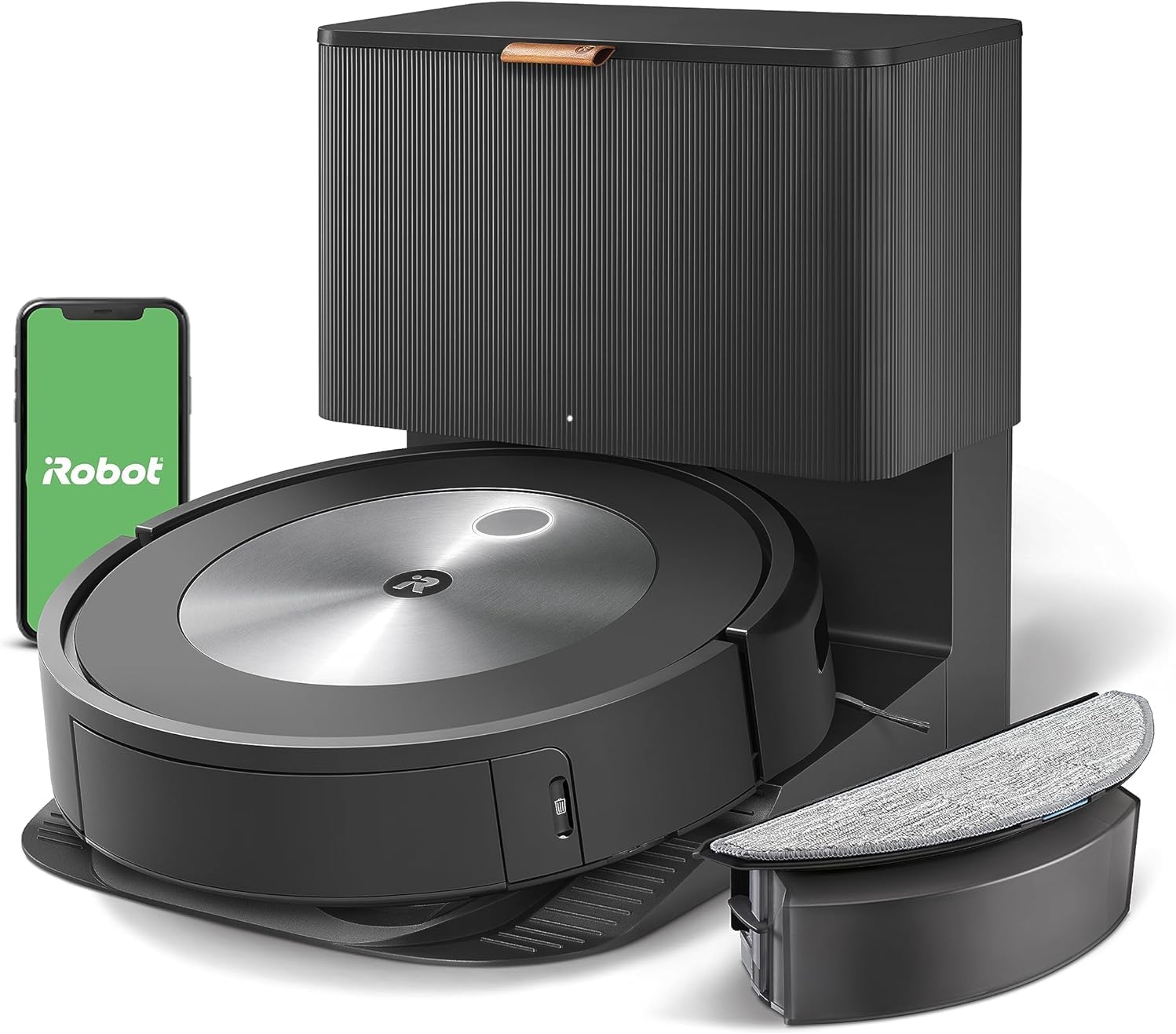
The iRobot Roomba Combo j5+ is a next-gen robot vacuum and mop hybrid featuring a powerful 4-stage cleaning system, PrecisionVision navigation that avoids obstacles like pet waste and cords, and a self-emptying bin that stores up to 60 days of debris. Designed for busy professionals, it offers smart mapping with room-specific cleaning, app and voice control compatibility, and effortless maintenance to keep your home impeccably clean with minimal effort.


| ASIN | B0C4151YK5 |
| Batteries are Included | Yes |
| Battery Life | 180 minutes |
| Battery Type | Lithium Ion |
| Best Sellers Rank | #274,388 in Home & Kitchen ( See Top 100 in Home & Kitchen ) #196 in Robotic Vacuums |
| Brand | iRobot |
| Brand Name | iRobot |
| Capacity | 500 Milliliters |
| Color | Graphite |
| Compatible Devices | Amazon Echo |
| Control Method | App, Voice |
| Controller Type | Amazon Alexa, Siri, Voice Control, iRobot Home App |
| Customer Reviews | 3.9 out of 5 stars 6,223 Reviews |
| Filter Type | Cartridge |
| Form Factor | Robotic |
| Global Trade Identification Number | 00885155040664 |
| Included Components | 1 Clean Base Automatic Dirt Disposal, 1 Mopping Pad, 1 Roomba Combo Bin, 1 Roomba j Robot Vacuum, Dirt Disposal Bag, Filter, Side Brush |
| Indoor Outdoor Usage | Indoor |
| Item Dimensions L x W x H | 3.4"L x 13.3"W x 13.3"H |
| Item Type Name | Robotic Vacuum |
| Item Weight | 3.5 Kilograms |
| Manufacturer | iRobot |
| Model Name | Roomba Combo j5+ |
| Model Number | j557020 |
| Number of Items | 1 |
| Number of Power Levels | 1 |
| Number of Wheels | 2 |
| Other Special Features of the Product | Clean by Room, Obstacle Avoidance, Self-Emptying, Smart Mapping, Vacuum & Mop |
| Portable | Yes |
| Power Source | ac |
| Product Dimensions | 3.4"L x 13.3"W x 13.3"H |
| Recommended Uses For Product | Regular, automated cleaning of large areas in homes with hard floors and carpets, compatible with voice control and smart home devices |
| Special Feature | Clean by Room, Obstacle Avoidance, Self-Emptying, Smart Mapping, Vacuum & Mop |
| Style Name | 60-day Wet Dry |
| Surface Recommendation | Hard Floor, Carpet |
| UPC | 885155040664 |
| Unit Count | 1 Count |
| Voltage | 240 Volts |
A**Y
THIS IS THE REVIEW YOU WANT TO READ
This product is life changing. We searched long and hard for a robot vacuum before choosing this one. Things to note: We have a golden retriever—he sheds, A LOT. This sucks up his hair with ease, and goes back over extra hairy/dirty spots. Our bin probably needs emptied 3 times per cleaning (thanks to our Golden). Not an issue for us. If that bothers you, get the automatic bin disposal system. READ YOUR MANUAL AND CLEAN YOUR ROBOT AND BIN FREQUENTLY, HOW YOU’RE SUPPOSED TO. If you do that, it will work wonders. The one time it left behind clumps of pet hair, like you see in other reviews, was because the rollers needed taken off and cleared. This takes less than a minute to do. Pretty simple, really. Just like anything else in the world, you have to maintain it and take care of it. You have to rinse the bin and let it dry after so many uses, and tap out the filter. It’s not that hard. This also takes less than a minute to do. If you can’t do a small amount of maintenance, you’re the problem. Sucking power is great. It does make a noise, but it’s definitely not loud enough to bother us, at all. I actually feel silly even mentioning that it makes a noise, because it’s not loud or bothersome. Based on other reviews we were worried it was going to be really loud. It’s not, at all. You do need WiFi to run this. If your WiFi sucks, this isn’t the vacuum for you. The battery life could be just a tad bit longer. When it does die, it takes itself back to the home base to charge and takes about 1.5 hours to recharge. Sometimes it can’t finish an entire level before it dies. If in need and in a hurry for a quick clean, I have it clean the rooms I specifically want done first, then have it do the less important rooms last. Otherwise, this really isn’t a huge issue either. There has been a couple times where it couldn’t put itself back on the home base on our upstairs level. This is because the location where the carpet meets the baseboard had a slight slope into the baseboard. This made the front edge of the home base come off the carpet slightly and the robot will not drive up to it if it is not level. Easy fix—make the base level. Seriously people, this isn’t rocket science. Looking back, we have to laugh at some of the negative reviews people left about this vacuum. I question their trouble shooting ability. This iRobot will not cook or do your laundry for you, but it will sweep your floors and keep your house clean if you use it correctly. iRobot i7 is the greatest purchase of our adult life. Hands down. With a new baby, a 6 year old, and a dog.. it makes life so much easier!!!! So glad we got this make and model. Perfect for those of you with pets and lots of hair. You won’t have issues with it if you clean and maintain it how you’re supposed to. We’ve had this product for 1 month at this point. I will update the review if anything goes south.
A**M
Love it!!
We already own one roomba (roomba 860, bought in 2016). WE use the old one 2 to 4 times a weeks and still runs great after 4 years (to my surprise we didn't have to replace the battery yet). However I really wanted to get a new "smarter" roomba to run on the first floor and keep the old roomba on the ground floor to clean rooms in parallel. The roomba I7 has been a game changer. 1) NAVIGATION: the I7 is so much smarter in navigation compared to the old 860. The old 860 was using a random pattern that was very unefficient and very time consuming. The i7 is methodical with parallel strokes and finishing by vacuuming the room edges. It gives me reason to believe all room as been vacuumed and it is a lot faster so can get more job (more sqft) done in the same amount of time. If it runs out of battery during a cleaning it will go back to the dock station, recharge, and resume where he left off: altough we don't really use this feature (we typically plan cleaning runs that are well within a battery charge) it is a nice one. 2) SMART MAPS and APP: the smart map is so useful. No need to baby sit the roomba by putting lighthouse (the light fences) or move it room to room manually. Now with the app I just choose which room I want clean and the roomba undock, goes to the room(s), clean only that room(s) and come back to charge once finished. Making a schedule on the app is very fast and easy. Remote start is also a nice thing (example we checked in the morning that kids have not left stuff in their room and then we can start the roomba after leaving so he does his job undisturbed). We didn't buy the self cleaning station. The price premium was excessive and we didn't think it was necessary. We always clean the roomba after each run (we have a normal vacuum that we use to vacuum the dust bin and the rollers). Said that it is probably a nice feature for families with different habits / needs. The two cons that I have is that a) the dust bin is smaller than the old roomba. Said that it has never been an issue for us. We run the roombas in short task (30 minutes cleaning in average) and we clean it up after each run, so the risk of overfilling is very low for us. Said that it coud be a minus with familieis with different habits. b) it will NOT run in the dark, it needs light to operate (otherwise the camera cannot detect the rooms). Again this is not an issue for us as we always run it during daytime when we are home or in the office. Based on this roomba i7 is a 5 stars for us and we stronlgy recommend it.
J**S
If this thing was a tiny bit smarter, it would be much better!
My biggest issue with the Roomba is that it usually dies from the battery going dead before it makes it back to the charging station. You would think it would learn how far it could get and start for home, but I've had it since August, cleaning 3 times a week plus spot jobs, and it doesn't seem to have gotten any better. I know it knows it is running on fumes because I've caught it a few times in the App saying it was returning home to charge, and had it not make it there. Instead it heads back in the right general direction but wanders off before getting there. If it had gone straight back (or even indirectly back), it would have had plenty of power to reach the charger, but it just doesn't dock, most of the time! I've seen it drive right past the dock, turn around, go into the next room, vacuum for while, and then let out a plaintive bleep and die. All the while the App on my phone saying it's returning to the dock to recharge. Often, when it does make it back, it will resume vacuuming before it is fully charged, and then die. If it had just waited on the charger for another 10 minutes, it would have finished the job! I think this is purely a matter of bad programming. It seems to know how much charge is left in the battery; the little battery icon in the App seems to be fairly accurate. I think the battery is okay. It is new and gives about an hour and a half of run time on a full charge. My house is as lot cleaner after 4 months of running 3 times a week. It does seem to work fairly well, except for its insanely over-optimistic notion of how much more work it can do on the remaining charge in its battery. My biggest peeve is the number of times I have to rescue it and carry it back to its base station because it ran out of battery. (The App keeps track and since Nov 4, it has run 30 times and died with a low battery 10 times and gotten stuck 6 times, so it had preventable problems more than half the time.) Update: 12/23/21. It refuses to vacuum my living room. If I set up a special job, it almost always claims it s path was blocked. But it is perfectly happy to vacuum other rooms that require going through the living room to get there! I have it programmed to vacuum the front rooms in the house twice a week, which includes the living room. Looking at the maps afterward, it shows it vacuuming all the other rooms, but only around the edge of the living room. I think there is some "memory" in it where it thinks it shouldn't be there, or thinks the living room has magically transported itself to another universe or otherwise is totally F'ed up. There appears to be no way to diagnose or reset it. I could erase it's map (basically do a factory reset), but that is a huge pain, especially since I currently have it set to avoid the Christmas tree (which is NOT in the living room, and if the keep-out zone around the tree is causing this problem, then that in itself is a serious error in its programming.) I've tried rebooting it, but that didn't help at all. Roomba's support is useless. Basically, they just read the minimally informative web page at you. It would be quicker and more effective to use a manual vacuum cleaner. Update 1/9/22: it is still refusing to vacuum my living room for no apparent reason. When told to explicitly vacuum the living room, it just skirts the edge and declares itself done in a couple of minutes without actually doing anything. When it does its regularly scheduled set of rooms including the living room, it does the sun porch (adjacent to the living room, where the base station is), traverses the living room to the front entry, then skirts the living room to vacuum the dining room, then returns through the living room to park in the sun porch. I've tried remapping my apartment to no avail. Next step is a complete factory reset, but I don't want to do that until my Christmas tree is down, because the tree causes it problems. and I'll lose my "keep out" zones. --------- July 2, 2024 - I came back here to downgrade the rating, but it is already 1 star. For the last year, it has been getting worse and worse. It constantly requires attention, always get stuck on obstacles it use to negotiate with ease, like very low thresholds and the edges of carpets and the tile area in front of my fireplace, and often gets lost trying to dock to recharge or because (on rare occasions) it has actually completed a job. Often it gets lost within inches of the docking station. The software problems are worse than ever. For instance, it will announce that the charge is low and it is returning to the docking station, but then will wander off into another room, not on the path to the docking station, and the battery will run off because it forgot to recharge. I've actually seen it announce it was returning to the docking station, then hear it in another room, check the status and see it is vacuuming again with very low charge and not having gone anywhere near the docking station. This is clearly a software bug. Sometimes it get stuck on a perfectly level surface and says it is on an uneven surface, to move it and press clean. I DON'T move it, just press clean and it resumes. Clearly, it was NOT stuck. I've cleaned it many times, replaced the brushes and filters, replaced the pivot wheel, tested the main driving wheels as per the instructions, and today, discovered and performed the docking test. It worked perfectly and then got stuck 10 minutes later. On the advice of a friend, I replaced the battery last week. It seems to last longer on a charge but doesn't perform any better otherwise. I've done many reboots and checked for software updates. None available. Yesterday afternoon, I tried to delete and create a new map. After a couple of hours exploring one room, it ran out of battery and said to move it to the dock. I did so, but by then it was getting dark and it never resumed the mapping run as it said it would. This morning, it was fully charged, and the map it produced yesterday looked bogus so I told it to start a new mapping run. It never got out of the room with the docking station, and, over an hour into it, it is stuck again on the 1/16" high lip at the edge of the fireplace hearth. I think it is trying to vacuum up the tiles, which it thinks are dirt, and despite the fact that it is not supposed to do cleaning while on a mapping run. The fireplace (and the thresholds) never used to be a problem. Getting totally lost never used to be a problem. I've replaced all the replaceable parts. The problems all have the stench of undebugged software. I suspect they might have replaced a rule-based algorithm with some sort of generative AI, or some other bone-headed move. If I can't get the mapping run (in my small, single-floor apartment with few obstacles) to work and can't discover any way to reload the original software from 4 years ago (which basically worked), I am going to trash the useless piece of junk. Is it possible to rate something ZERO stars? ---------------- I was just about to boost the rating to maybe 3 or 4 stars, when it struck again! i tried everything to make it work properly, including buying a new battery. It didn't claim the battery was at EOL, but friends who have multiple Roombas told me the problems I was having could be due to a dying battery. So I replaced it. Since i didn't know if it would help, I bought a "compatible" battery https://www.amazon.com/dp/B09KXYNBDQ?psc=1&ref=ppx_yo2ov_dt_b_product_details for about half the price of an iRobot-branded replacement. The battery fit perfectly, has identical specs, charged up fine but didn't solve any of the problems I was having. Tried deleting and creating a new "smart" (i.e. idiotic) map. It kept getting stuck and never finished a mapping run. It could clean okay without a map, but kept getting stuck and could only rarely find its charging station. It would often vacuum at random for an hour or two, announce it we returning to the station for recharging, but never get there. I think this was due to the lack of a map. The vacuuming and battery life with the new battery seemed fine. But without a map, I couldn't schedule it or tell it what rooms to clean. Finally, I tried the last remaining replacement - the tires! The tires are cheap but a little tricky to replace, but I did so. The new tires have a much thicker tread than the originals and some reviewers said this was a problem but they seemed to work fine. The first thing I tried was a new mapping run. It worked perfectly! I then realized I had left a couple of doors shut, so it couldn't map two of the rooms. So I told it to vacuum the rooms on the map. (It had to go back and recharge a couple of times, which worked fine.) Then I opened the two doors and told it to map again. It found and mapped the new rooms and then I told it to vacuum them. Last week, I manually told it to vacuum, half the house on Monday and again Thursday, and the other half on Tuesday and Friday. (There were lots of "return to the base and recharge the battery" events in the course of these two weeks.) Over the weekend, I set up the schedule again. It was supposed to do 1/2 the house on Monday and Thursday and the other half on Friday. Monday evening, I noticed it had not done the scheduled Monday job, but didn't have time to look at it. Yesterday, it also didn't do its scheduled job. The App said it wasn't charged, so I wriggled it on the charger base to make sure it lit up. (Maybe I need to clean the contacts, though I did that pretty recently.) Today I had some time to look at it. The App still said it needed charging, so I made sure it was on the charger base again. The App said it couldn't contact the Roomba, so I restarted the App. (Sometimes this helps. Crappy software.) When I did so, it still said it needed charging, so I went an reseated it again and pressed the "Clean" button. This time is says "Please install an iRobot brand battery and now refuses to charge or do anything else! Back to zero stars for this incredibly annoying, incredibly time-consuming "labor saving device".
S**E
Great vacuum, but could be much better.
It cannot handle more than one map. This seems to be a deliberate deficiency. The claim is that the vacuum cannot load more than one map, but since it is WiFi and there is an app involved, then it could easily have many maps that get loaded based on what level of your home you want to clean. Other than that, it works VERY well and does a great job. It still does a lot of stupid AI movements, but it is much better than 5-10 years ago. iRobot makes very slow advancements in robot technology, but this j series is getting close to being where they should have been a decade ago. Complaints are minor: 1. They advertise it is good for pet hair. it is much better than the older 800 series but still rolls the hair sometimes and leaves it behind for a human to pick up. 2. The mapping is much better but it is still not quite there. It does a lot of things right and is really amazing, but then it will not get under a table because it sees a cord hanging that is not touching the ground, but still in the way. I like it that it prefers to stay away rather than suck up a cord, but it should get better at determining that a cord is high enough to not get pulled. 3. You can send it out for a small job and it picks up the few crumbs that were there but when it returns, it dumps the crumbs into the docking station vacuum. This is so loud and not necessary. It really should only dump the bin if it is full or partially full. Not ignorantly on any return to base. It really is a great product, but with so many years behind them, they really shoudl be doing much better. Competitors are leaping ahead and I would consider a competitor if I already wasn't deep into Roombas.
T**A
Love this, shame it is obsolete now
I have had mine since 2020. Love it Scheduled, maps, row grids, stair avoidance, not self emptying, I empty weekly
T**R
Vacuum worth the money, maybe not the mop
Vaccum: Mapped entire first floor after two runs, map surprisingly accurate. Having the map means you can designate rooms or areas to clean. I divided my large living room into three "rooms" so I can clean specific sections more often than others. Zones work great (i.e., an "avoid" zone around wires). I brought the vac to a different floor and it recognized that, and made a second map for the floor on its own. I have a large dog that sheds a LOT and I run this every morning in the room where he spends the most time, and most other rooms several times a week. Unlike my previous dumb robovac, which pingponged around the house aimlessly, cleaning the same areas over and over until it ran out of battery, and getting stuck in my barstools every time, this robovac goes straight to the area you select, cleans in straight lines, works the perimeter, then returns to base. Never gets stuck. You can tell it to clean several rooms in any order you want, or clean "all." I didn't get the smart base because I read that it got clogged with pet hair, the bags seemed expensive, and I figure I'd be emptying it almost as often, anyway, with all the hair. My pet hair load means I have to empty the dust bin after every room or two, but that's not exactly onerous. TBH, it's kind of satisfying to empty out the bin and see how much hair it picked up. If we didn't have pet hair, the dust bin would probably suffice for the whole house (2000 sf) or more. I have wood floors with a few short-pile rugs. Cleans the wood floors great and the carpets ok. Only complaint is that it's too tall to get under my particular kitchen cabinets so I don't use it in kitchen. The app is great. Alexa commands are inconvenient because it's a whole conversation ("Do you want to start the mop afterward?") and then it usually has some kind of communication issue and I end up grabbing the phone anyway. But the app is easy and you can make favorites so it's just a tap or two to get regular jobs going. This is a sanity saver for me because pet hair drives me mad. In some ways, it vacuums better than a big vac because it really gets under the furniture. However, if the mom-in-law is coming over, might want to pull out the big vac and get in the crevices that this can't get to.The battery life is good and it will vacuum most of the main floor (about 1400 sf) before giving out. Unfortunately, doesn't save enough juice to get back to base (poops out about 15 feet from base) so it doesn't re-charge and resume vacuuming as advertised. Not a problem for me since I tend to vacuum the house piecemeal anyway. I bought it on sale (altho not as cheap as it got before Christmas) and it's worth it. The robomop is a different story. I bought the two bundled. It's true that you can set the mop to start when the vac finishes. HOWEVER, the vac & mop do not share mapping. The mop has to do several runs of its own to make its own map. It will have different "rooms" unless you take a lot of care to ensure everything is exactly the same as the vaccum. And if you create a zone on one ((say, for a Christmas tree) you have to go to the other one and put it on there in exactly the same way. And here's the big problem: if you tell the vac to do Room 1 and the mop to start afterward, the mop doesn't recognize that the vac only did Room 1, and the mop cleans the entire house, not just Room 1. So the "mop after" feature is useless unless you vacuum the whole house first and you want the whole house mopped. Maybe there's a way to do this but I couldn't figure it out. Also, the iRobot floor cleaner, which they say is the only cleaner you can use, leaves streaks on hardwood floors. As other reviewers noted, water does better. So you are limited to water and like to use products that make my wood floors glow. Plus, this mop takes forever and doesn't get up dried on food or other hard stains. And for some reason, my mop doesn't recognize that I put the "wet mop pad" on it, and will only offer to "dry mop" , which is what, exactly? I haven't bothered to try to fix it. Plus, you have to put on the mopping pad and fill the reservoir with water every time. Easier, faster and better to just grab my Bona mop with its great hardwood floor cleaner and make a pass over my floors from time to time. To be fair, the robomop might work better for someone who works away from home and can schedule the vacuum and mop to run while they're gone, and then come home to clean floors. And when I have used it, it does make the floors appreciably cleaner than just vacuuming.
V**T
Works wonderful on luxury vinyl floors and Ruggables!
I love this Roomba. I had an older model that you had to empty. I still have it and use it in my barn office. This one is awesome! I can have it clean all the floors in the morning while I'm having my coffee. I have 4 small dogs and 3 cats living inside and it does better than I can do with my Swiffer or my Shark. I don't think I would use it for carpeting. I use my Shark for the carpeted downstairs. Gone are the giant dust bunnies (I call them indoor tumbleweeds). I also love that it empties itself at it's docking station. The machine is pretty quiet compared to my older model. I will warn that when it empties it is very loud for 4 or 5 seconds. My main floor is almost 1800 ft. of cleaning area. It can clean most of it on one charge. I also like its internal mapping. You can specify rooms so you can clean only the rooms you want. The initial mapping takes a few hours but I only had to do that once. After that, it can find new areas when cleaning and let you know. You can also adjust the boundaries and change the room names. You set up quick links in the program. The only problem I am having is setting it up with my Alexa Echo. It is paired and you can see it in the Alexa app but I cannot get Alexa to respond to a clean command.
T**H
Adequate Cleaning - Not sure it is worth the price
This is the first automated vacuum that I have owned and maybe my expectations are too high. The following review is based on the first two weeks of owning the unit. Cleaning: It does an adequate job. I have tile, carpet, rugs and mats in my home. The unit cleans all of them and I have seen no issues with it transitioning from one surface to another. The reason that I say it cleans adequately is that when the unit is finished and I walk around my home, I have always found something that the unit did not pick up – even though the unit has clean the room and gone over the place where something was missed. It fairness this seems to be an issue with the tile floors and what I have observed is that the spinning arm sometimes flings dirt out of the way instead of into the path of the unit. However my expectation prior to the purchase was that that unit would clean everything which it clearly does not do. I envisioned never having to sweep or vacuum again – which is not the case. I would say the iRobot it more like a helper, albeit one that is a young child (I appreciate the help and effort, but at the end of the day I still have to seep / vacuum myself). I now plan on using the unit for my daily sweep, knowing that on the weekends I am still going to have to break out the equipment and do it myself. Something that I did not anticipate I would have to do when I invested several hundred dollars in this unit. App / Connectivity: After unboxing the unit and charging it the initial set up and connection was fairly quick and flawless. As with most things I purchase that have software and connect to the internet – there was a software update. I followed all of the instructions and prompts and was advised that the update would complete in 10 to 12 minutes….4 hours later I found myself Googling the issue and based on my limited research this seems to be a fairly common issue. The fix was simple enough: hold down the clean button for 20 seconds to perform a reboot – which I did and it fixed the issue and completed the update and I was off and cleaning. However the next day the unit reported that it could not talk to the cloud, which in two weeks has happened a handful of times. I have also experienced issues with the app not connecting to the iRobot servers (ie Cloud). The “fix” that I have tried and seem to work is to either reboot the robot and / or force stop and app on my phone and restart it. There seems to be some issue with the unit / app / cloud connecting and communicating. For those still reading and wondering I have no issues with my internet. I have great up / down speeds and can stream movies and music on multiple TVs at once without any issues (and not I do not have all the TVs on when I am trying to vacuum). My WIFI operates without issue as well and I have tested it in all areas of my home (inside, garage, outside) and have excellent signal strength. I have no issues with my security cameras, sensors or smart “connected” products getting connected or staying connected. The cloud issue is specific to this unit only and as I noted above: Something that I did not anticipate I would have to do (deal with) when I invested several hundred dollars in this unit. Customer Service: Probably the most frustrating aspect of the purchase is dealing with iRobot customer service. Initially I attempted to call, but after a very lengthy hold (In fairness the website did warn about higher than usual hold times and being 2020 I expected no less.), decided that I would just send an email to them and address my concerns. The main issue I wanted to address with customer service was the smart map not allowing me to add a “clean zone” to it. I had read the directions and FAQ and yes the unit had run several times (and) completed the map of the house. Additionally I had walked through the map setup and even added exclusion zones. I had run the vacuum after setting everything up and it worked as expected – however I still could not add a “clean zone” to the map. I explained all of this in detail in my email and when I received a reply it told me that the map was not available unit the unit had completed the mapping (usually 2 complete cleans) and referred me to a link in the instructions. My reply back asked them to READ the email I sent and AGAIN explained in great detail the steps already performed as well as the results and issues. They were nice enough to reply a second time directing me to once again REBOOT the unit and suggesting that I click on several links to read FAQ and articles (no of which addressed what my issue was). I equate this to me calling “AAA” auto club and telling them that I have just run out of gas, they advise that I need to replace my battery – no I just need some gas, maybe you should try rotating your tires………..ugh I just need GAS. Maybe they don’t employ customer service people who have the ability to read or understand emails or they utilize and automated bot – both of which are BAD ideas. Would I purchase another automated vacuum: YES. Would it be iRobot brand: Maybe if they were the most inexpensive of my options and promised not to email me further. Would I try a unit from a competitor: Absolutely – I mean at this point I have already wasted a ton of money on something that does not live up to the hype so what would I have to loose?
B**R
A total game changer for me -- best user experience for an appliance I have yet had
I really dislike vacuuming, and always put it off. Sadly, dust collects as a result. All this has changed now with the Roomba J5+. I love that this appliance arrives ready to use. The bag is mounted in the home base, the filters are installed, even the rotating brush is already in place. It's basically: unpack, position it, install the app and tell it to Go. I cannot think of any devices of this complexity that are that easy to get going with. Major props to iRobot for this terrific startup experience. I love how quickly and easily this thing has integrated into my household. After a couple of mapping runs and tweaks to the map to add Stay Away zones, I added a daily schedule to have it visit all the rooms on the ground floor and then more or less forget all about it. It wakes up every day, zooms around the place, thoroughly sweeps up the kitchen, dining areas and hallways--avoiding the curious cats--and puts itself way. No more annoying random fluff and little particles lying around. No more guilting myself, "I should really get out the vacuum cleaner and tidy this except I'm too busy right now". I haven't tried out the mopping feature yet, but I fully intend to. But even without that this is a fantastic device that I should have installed several years ago.
E**E
Buen producto
Buen producto, llego cerrado, hace su función y es recomendable por los mapas que se pueden configurar
E**O
Pésimo producto y pésimo servicio de garantía
Muy mal producto, dejó de funcionar en menos de 1 año de haberla comprado, la envié a garantía con la empresa Servitec Global Service y su reparación duró 2 meses… ahora me quieren cobrar la revisión y reparación de un trabajo mal hecho. Pésimo producto y pésimo servicio de garantía.
J**N
Horrible low performance product.
Absolutely horrible purchase, waste of money. The performance is not up to par... low suction, it bumps into everything, no object detection, no avoidance, dropped connectivity, never understands commands... overall a poor product...for the exorbitant price paid... I'd like to have a refund and return the item, but it's past the return window of 30 days. I'm honestly very disappointed with the iRobot brand... I expected an upgrade from my entry-level Roomba but it's worse...Competitors in the market come in with a cheaper price and 4 times as much suction power. It's so noisy too. It almost seeks you out to come bump into your foot all the time. They removed the spot cleaning button, why? So dumb. There is no docking button, why? so dumb. They should spend less time on AI mapping (useless) and more time focusing on the basics, sucking up stuff. the mopping feature is basically a microfiber cloth wiping the floor lightly, no motion, streaky finish, it LEAKS, omg it leaks everywhere, so dumb. you have to manually take it out and clean it, so what is the point of paying extra for a "Self empty bin". so dumb!!! I'll never buy an iRobot roomba again. I want a refund on return, but no-one, roomba support or amazon support is willing to do this.
M**M
Huge improvement
It's a huge improvement over my over-10-year-old Roomba! So much smarter! I love how it mapped my floor plan and that it now knows where it has been and where it needs to go to finish. The mopping is so-so but that's not why I got it. I have 2 cats and need it for the mid-week vacuuming. It was a great buy at 44% off!
Trustpilot
5 days ago
3 weeks ago