Desertcart purchases this item on your behalf and handles shipping, customs, and support to Tunisia.
❄️ Stay Cool, Stay Ahead — The Ultimate Gaming Chill Partner
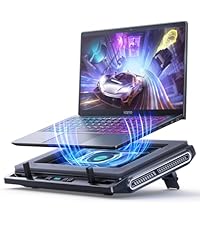
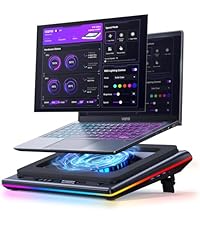
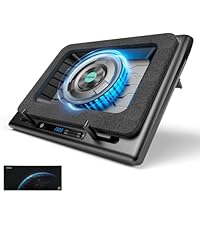
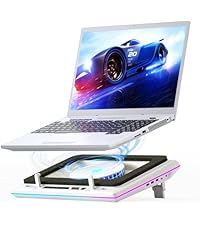
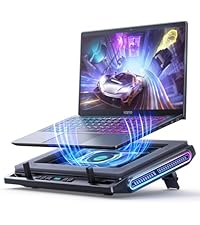
The llano V12 Gaming Laptop Cooling Pad features a 5.5-inch turbo booster fan with airtight pressure chamber technology, reducing CPU and GPU temperatures by up to 44°C within 90 seconds. Designed for laptops sized 15.6 to 19 inches, it includes a 3-port USB 2.0 hub, adjustable fan speed via scroll wheel, and a high-density removable dust filter to protect internal components. The RGB light bar offers 10 customizable modes with memory function, while three adjustable tilt angles enhance ergonomic comfort. With a robust 36W power output and noise levels under 70dB, this cooling pad ensures quiet, efficient performance during intense gaming or professional workloads.


| ASIN | B0C69BVWGB |
| Best Sellers Rank | #272 in Computers & Accessories ( See Top 100 in Computers & Accessories ) #5 in Laptop Cooling Pads |
| Brand | llano |
| Color | Black RGB |
| Cooling Method | Air |
| Customer Reviews | 4.4 out of 5 stars 2,272 Reviews |
| Enclosure Material | Acrylonitrile Butadiene Styrene (ABS) |
| Item Dimensions L x W x H | 16.9"L x 12.9"W x 2.7"H |
| Item Highlight | 5.5 Inch Turbofan, Airtight Pressure Chamber, for 15.6-19in Laptop, Adjustable Speed, Dustproof, 3-Port USB Hub, Black (RGB) |
| Item Weight | 1.8 kg |
| Manufacturer | llano |
| Material | Acrylonitrile Butadiene Styrene (ABS) |
| Mfr Part Number | V12 |
| Model Number | V12 Black (Hub+RGB) |
| Number of Fans | 1 |
| Number of Items | 1 |
| Number of Packs | 1 |
| Product Dimensions | 16.9"L x 12.9"W x 2.7"H |
| UPC | 704444171967 |
| Unit Count | 1 Count |
| Warranty Description | One Year |
A**X
Very impressive
Was skeptical about buying this because of its size and price. I had a small, simple, usb powered 3-fan cooler that I was using which was fine. I don't know how effective it was but it was better than nothing, I suppose. I was worried about the hooks that grasp the laptop near my wrists being an issue. However, thanks to the replies of a number of other users, that is not a concern. I don't even use them as the memory foam gasket is sufficient to hold the laptop in place. This thing can move a ton of air. It can be noisy when you have it wound up, but I usually keep it at 500 rpm. You can hear it, but it's not offensively loud. It keeps the laptop cool during gaming with no concern whatsoever. It requires a DC jack which I didn't think about. It's not a concern for me, just something I did not consider. It's nice to have so many extra USB ports, even if I'm not really using them. It is thick, but the payoff is well worth the extra size. I should have bought this ages ago; it does a fantastic job.
M**.
The most powerful cooling solution for laptops
I have a high powered i9 13th gen gaming laptop with a 4070 GPU and I’ve been looking for a top tier cooling pad to keep it from reaching insanely high temps. This is easily the strongest one available on the market in the west at the moment. There’s another brand I’ve been eyeing for a while but they’ve been having delays bringing their equivalent model to the western market since last year. I was tired of waiting so I looked around stumbled on this one, which literally got added to Amazon 4 days before I bought it and unless you order it directly from China I don’t think you can find it anywhere else. It’s also priced about 25% less expensive than its competitor which is nice. This thing is intense. It cools my laptop anywhere from 8-25 degrees Celsius depending on what I’m doing. The RGB lights are a nice feature too. To the other reviewer, 2800RPM from a 14cm/140mm is a lot of power. The smaller the fan the harder it has to work by spinning faster to create similar wind power. This is plenty of force. Only downside is that it gets pretty loud at the higher ranges. It goes from 300RPM-2800RPM and honestly you’d probably never need to run it at full capacity. But even at 1600RPM it’s loud enough you’d want good noise canceling headphones to improve your experience. This is to be expected from such a power device. It connects by AC Adapter to a wall/surge protector, this isn’t your run of the mill USB powered cooling pad, those are useless in comparison. I guess they could’ve spent a bit more on production to improve the acoustics and have less motor noise from a better fan, but for what it’s supposed to do, it does it perfectly which is cool your machine. Recommended.
N**A
An Excellent, Dependable Laptop Cooling Device
I’m running a kinda old Lenovo P15 Gen 1 with an Intel i9-10885H, 128GB of RAM, 2 NVMe SSDs, and a Quadro RTX 3000 GPU, all of which generate a significant amount of heat under heavy workloads. Since using the llano v12 laptop pad cooler, I’ve seen my GPU temperatures drop consistently by around 10-15°C, which is a notable improvement and makes extended sessions far more comfortable. The airflow can be clearly felt, and the fan goes all the way to 2800 RPM, which is LOUD. The USB ports are a nice addition too; providing extra ones that I don't even need, but are good to have, since I have a Thunderbolt hub. The build quality of the cooler is excellent, and while I did experience a small rattling noise in the first unit I received, it never once impacted the cooler’s functionality. Llano Tech Shop promptly addressed the issue with genuine hospitality and care, helping me out with my issue swiftly. Their customer service left a positive impression and I will certainly be back to purchase more of their items if I need them again! Overall, if you need an effective, reliable way to keep a high-performance laptop running cooler, the llano v12 laptop pad cooler is an excellent choice. P.S. You can even turn the RGB off for all you RGB haters.
D**O
If you truly have a demanding workload on a real GPU laptop, this makes a HUGE difference.
I do VR production and video editing. My PC should not be hotter than the videos I edit. That is not a high bar. That is the bare minimum for a machine that costs more than some people’s cars. I stuck this under a 5090 Scar and it dropped temps about 18–20°C. Not “feels a little better.” More like the laptop stopped trying to become a second light source in the room. Thermal anxiety: gone. Desk: still technically furniture, not a stovetop. The fan is not polite. It is a 5.5" turbofan with opinions. The speed dial is the entire product: • Under ~1000 RPM: household appropriate. You can work. You can think. Society continues. Nobody calls the police. • Over ~2000 RPM: congratulations, you’re on the runway. Full 777-300ER taxiing down Yankee at JFK while the cabin crew is still smiling like everything is fine. Neighbors will form theories. Pets will reassess the lease. Your ears will file a complaint and lose. I run the civil setting for normal work. I go full airport when the Scar is under real load and I care more about frames/thermals than dignity. That trade is not subtle. It is also correct. Fits a big laptop, has a USB hub so you can plug in the usual mess of dongles, RGB if you want your cooling pad to look like it also does nightclubs, and it actually cools. Loud when you ask. Not loud when you don’t. Revolutionary concept. My PC is cooler than the videos again. Order restored. Five stars. Would taxi again... preferably after midnight, or never above 1200rpm unless the silicon is begging for its life.
W**.
It works !
Massive improvement for laptop temps and sustained performance I bought the Llano V12 because my Asus G731 was throttling and bottlenecking after about an hour of gaming. On medium settings, I was pushing around 75 FPS, but performance would drop once temps climbed. After using the Llano V12, the difference is night and day. I ran it at around 400 RPM and was able to game for 4 straight hours while maintaining peak performance the entire time. No throttling, no FPS drops. I was even able to increase my graphics settings slightly compared to before. Out of curiosity, I tested the fan speed above 600+ RPM, and it does get noticeably loud at that point. If you’re gaming with speakers, I’d recommend using headphones at higher speeds. That said, at lower RPMs it’s very manageable and still extremely effective. Overall, I highly recommend this cooling pad if you’re looking to control temps and maintain consistent performance, just be aware that higher fan speeds come with more noise
R**.
Your laptop will never be cooler (10-20°, that is)
Was this expensive? Yes. Is it worth the longevity of your laptop? Also yes. This thing is big, bulky, and loud. It is not something you want to carry around with you. Plop your desktop replacement laptop on this thing, turn it on, and call it good. Right now I have this set to 800 RPM, so limited testing... but with that limited testing, it seems pretty promising. I am running LM Studio for offline AI and working with Gemma models. Without a cooler, HWMonitor tells me that my GPU gets to a peak temp of 91° C. With the cooler set to 800RPM, the peak now hits 73° C. That's right, 18° difference. That is crazy to me. Played Fallout 4 with a bunch of graphical mods to test the same way. With no cooler, up to 87° C. With the cooler set to 800RPM, peak is 71° C. In addition, I noticed that with the cooler temps, my game no longer stuttered and the frame rate was much, much smoother! (Makes sense, as the system would throttle itself to keep from burning itself out.) And with the cooler set to 1200RPM for the heck of it, peak was 67°... but I could definitely hear it over my open-air headphones. Back in the day, laptop coolers really didn't do anything, and in some cases, made things worse. With this design in conjunction with the vapor chamber in my laptop, I can definitely see a huge difference that justifies the cost of this cooler. For noise... I don't exactly have a decibel meter, but I can tell you that 800 RPM sounds like the softer version of an idling rack server and is gentle enough to be moderately loud but that you can sleep to as white noise. (Come to think of it, it is about the volume of those generators.) When you get nearer to 2000 RPM and above, it does sound like a rack server under load in a server room or a data center.) The USB port hub is strange to me. The input is the USB-C port, but they give you a USB-C to USB-A cable. Most USB-A ports are either of the USB 2.0 variety or if you're lucky, USB 3.0 (SuperSpeed), and I know it's a form factor thing, but when I see USB-A vs. USB-C, I automatically think "slower." I have no idea what the throughput is, but I don't imagine that you'll try to push a lot of throughput through the cooler vs. directly from the laptop. I haven't even really played around with the lights yet, but I honestly don't care much for RGB. Definitely would recommend just for the cooling alone.
M**E
Used on overheating, 1 fan down laptop and it stopped overheating even during heavy load!
One of the two fans in my MSI laptop stopped working, which led to serious overheating during medium to heavy use. I decided to order this cooling pad, hoping it would help compensate for the failed fan, and it absolutely exceeded my expectations. Before using this cooling system, I tried running Stalker 2 on high settings, and my laptop lasted about five minutes before shutting itself down due to heat protection. After installing this cooling pad, I was able to play all night with the pad set to only 1,800 RPM out of the maximum 2,500 RPM. My CPU temperatures stayed around an average of 68°C, compared to hitting 100°C within minutes before. This is an excellent cooling pad, especially for a stationary laptop setup. It made a huge difference for my system and has been well worth it.
J**M
This is the one to get for larger laptops, best buttons compared to IETS
UPDATE -- After having streamed with it, like the IETS 600, it's not a perfect solution my computer still runs pretty hot. I'd say maybe there's a 5-10% reduction in temps, I crank it up to about 1800 rpm for gaming/streaming. I do believe this fan is quieter than the IETS 600, another reason to pick this one up. Per the original review below, the power button is rather unpredictable to operate, it usually doesn't work, I'll live with it. Otherwise the color changing buttons are fun, but I can't turn the LEDs off, no key combo I can find does that. -------------- Original review: I had a "cheap" cooler over the years, but lately I'm trying to stream and play games on my laptop. It's a gaming laptop, and it ran really hot, certainly hot enough to get CPU throttling at times, though I never tested for that. We're talking Core Temp reporting peaks of 100 degrees and average temps in the 80s-90s. At rest, with the Llano fan at 1000 rpm, my Laptop 3060 GPU is reporting 37 degrees, as opposed to 48 degrees on the old cooling stand. (the old one is a Thermaltake you can't get anymore) I haven't gamed/streamed yet with the Llano cooling pad, I'm mostly writing this review to constrast this with the IETS 600 cooler using the same MSI Pulse GL76 laptop. BUTTONS -- the plus The reason I returned the IETS 600 cooler, it was working (not as well as the Llano at idle, though). But the button drove me crazy! They are "solid state buttons" meaning there's no movement in the button. It's just sensing your fingertip. On the IETS 600, all three buttons are like this. You'll read below why my laptop was overhanging these buttons, but it was frustratingly impossible to make the buttons do what I wanted on the IETS600. Much improved design is on the Llano cooler pad here, yes the on off button is a bit tricky and honestly as I write this I can't turn the thing off. But the fan control is a roller button, it's great! I can control the fan speed exactly where I want this running, no fuss, no frustration. Honestly I can live with the power button I'll just turn the fan down to 300 when the laptop is off, if I can't get the power button to work. And I have had issues with iPads in the past where at most angles my finger isn't recognized, so maybe I'm weird and the buttons will be fine for you. FIT - a minus on both cooling pads, but you can make it work Here's the real problem with these coolers and they can't really "fix it" unless they make a new foam piece for different laptops. Before you buy this, check out the bottom of your laptop. Do the cooling vents come to the edge of the base of your laptop? Then let's hope it's only on one edge, otherwise this cooler won't work for you. Basically, you set your laptop on the foam base and it makes an air seal. That means ideally there's at least about a 1/2" edge with no cooling vents around the base of your laptop. In my case, on the left side, the vents come right to the edge. In the back, they are within 3/8" of the laptops "rear edge" (the rear base is not a straight line on these MSIs). So this seems to work, I have the laptop barely sitting on the foam in the back, not at all sitting on the foam on the left side (just butted up against the foam to make a seal) and the bulk of the weight is on the right and front edges of the base. But your mileage may vary and you may find you can't use this type of cooler, depending on how funky your laptop base is. RISK -- don't blow up your built in fans If your laptop is anything like mine, apparently the fans are regular maintenance item, like brakes on your car. You just expect them to go out. Mine did after two years, and I replaced them recently. Now think about what this cooling does, it forces air into your laptop. If you force air into your laptop at a high enough rate, you create positive air pressure (higher than ambient pressure). If you are pushing air into your laptop so fast that there's positive pressure, then you're probably making your laptop's fans race along faster than they want to go. I would assume there's a point where the air being moved through the laptop, at higher rpms, will be too much. Bottom Line... So bottom line I strongly recommend this model even with the issues related to funky laptop bases where the cooling vents come to the edge. It cools my laptop a bunch at idle, I'm sure it will work as well as the the IETS 600 or better, but I'll maybe update this once I stream/game with this setup.
K**R
It really works. GPU from 90 degrees to 66 degrees.
My GPU was always at 90 degrees while rendering. Now it's at 66 degrees. But it comes with a price, noise. But you will find the point at regulating the fan intensity, you will not use it at full power all the time, I mean, what if my GPU is at 72 degrees instead of 66 degrees? I have tried many cooler pads, even the small exhaust on the side of the laptop, but nothing really worked. This does. I TOTALLY recommend it. I have a ROG STRIX SCAR II and no need to fry more eggs on it...
L**2
Tout simplement bluffer.
J'étais sceptique, mais au vu des nombreux avis positifs, j'ai décidé de l'acheter. Reçu aujourd'hui et testé dans la foulée, je suis totalement bluffé par les performances de ce support ! J'en avais un autre avant avec 6 ventilateurs qui me faisait perdre à peine 5°, mais celui-là... la différence est astronomique. Avec un processeur i9 Ultra et une carte graphique RTX 5070, mon CPU montait facilement à plus de 90° C. Désormais, après 4h de jeu en continue, il ne dépasse plus les 50 à 55 °C max en étant sur le support a 1500 tour minutes donc loin de sont max. Je valide ce produit à 1000 % et je ne regrette absolument pas d'avoir tenté l'expérience. On verra sur la durée, mais pour le moment, c'est tout simplement bluffant, au point d'avoir du mal à y croire.
R**6
Costoso ma consigliato per i pc portatili da gaming
Il prezzo è alto ma è di ottima fattura. A velocità minima (300) è silenzioso e si può aumentare o diminuire alla bisogna con facilità. Se messo al massimo e il pc è leggero, potrebbe farlo volare via (!), ma ci sono delle leve per evitarlo. Belle le luci RGB . La schiuma densa mantiene fresco il portatile e concentra il raffreddamento su di esso. L'ho provato sia per un portatile 14'' che 15.6'', funziona per entrambi, ma forse è troppo grande per i portatili da 14''.
D**8
This Thing Is An Absolute Beast
For starters, this took roughly 2 weeks to arrive after I ordered it. It was either that or the GT600. The GT600 would have an extended time to arrive due to it being shipped from out of the country (Canada). So I went ahead and ordered this. My laptop is a heavily modified MSi Katana B12VG (Windows 11 Pro, an additional 1TB SSD which is the WD Black SN770 that only has games on it, and 64GB of RAM instead of the stock 16. The reason for 64GB, is because this laptop replaced an 2019 ROG Strix, and it's because of Diablo IV, which I'm able to run with maxed out settings along with raytracing. Laptop has an i7-12650H and a 4070, which does not use GeForce Experience. All the changes to programs and games are made through nVidia Control Panel). I'm also not using the laptop's keyboard and trackpad, instead I use a SteelSeries Apex 7, an Aerox 5 (a standard and the Diablo IV edition, with the Standard Edition used just in case) and an Aerox 9). I also have power profiles since the 12th Gen H series processors cant be undervolted, and those are Extreme (the same as Gaming Mode, with every setting maxed out), Balanced, 99% (disables Turbo Mode), 75%, 50%, 25% and 10% (each cuts the processor speed, with it set to spin the fans up before throttling the processor). With the fans set at 300 (don't know if that's RPM or not), running a Performance Analysis with the power profile set at 25%, for 8 hours playing old Opie and Anthony episodes, and the screen off, the fans never spun up once (normally I'd have the CPU fan on around 2500RPM at about 55-60 degrees Celsius). Normally you'd be looking at the processor fan spinning up and remaining on. But nope. Never came on once. Temps stayed between 35-40 degrees Celsius on the processor and 34-40 degrees on the GPU). Now for Diablo IV, which this is benchmarked against. Slightly increasing the fan speed to 600, the game's temperature dropped 20-30 degrees Celsius (runs about 75-90 degrees on the CPU and 60-80 on the GPU), even after fighting the Herald of Malphas about 27 times (had someone keep activating it), and this is with every conceivable item on the ground. Temps stayed around the 60-70 degree Celsius mark. If I increased the fan speed, it does become more noisy, but I'm using noise cancelling headphones (Sony WH-1000XM4's repurposed for my laptop), so I don't hear the fan for this while playing games. I could probably increase the fan to 700-1000, but once it hits 1000, it starts to sound like a jet engine on an airplane about to take off, and starts to get loud. Speaking of that, I put the thing at 2800, and past 1000, you can feel the air coming out from the laptops vents in the back. You can also slightly feel the air coming from it on the side (if your laptop has a side vent or vents) That's how powerful this thing is. Because of this, I would recommend that the 300 setting be used for general work, and nothing about 1000 for games, unless you live alone. You can comfortably run Diablo IV on a setting (for my rig) at 600-1000 without you standing next to an airplane on a tarmac and that won't bother anyone. The one reason I listed noise level at 5/5, is because at the 300 mark (default), it does not bother you or anyone else. It's only after 1000 that you may get people bothering you that it's too loud. On mine however, there is a bit of a whine that you can hear on the lower settings, but as you ramp the fan to a higher setting, this is less audible, and I've tuned it out. You definitely cannot hear this if you are wearing headphones. Due to that, I will not dock points off. If you decide to get this, you will need to use noise cancelling headphones when you game (it's fine if set at 300, anything higher than 600, you'll need them). All in all, for a mid range laptop like mine, well worth the money I paid for it.
M**N
Superb cooling, if a little noisy
Works perfectly. My son's laptop was barely usable on high FPS games during this heat. Often topping out at 90degrees, even with a cheaper cooling pad. This may not be cheap but it does do the business. Temperatures now around 60, works as a great stand and, if you're that way inclined, a decent disco light setup. It's not quiet, but buy can you hear how it's working. Wish we'd invested in this rather than the bottom end. As long as you have good noise cancelling headphones, you can't go wrong. Have a very happy teenager
Trustpilot
1 week ago
3 days ago