⌨️🖱️ Elevate your workspace comfort and productivity—because your hands deserve the best!
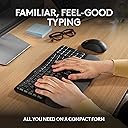
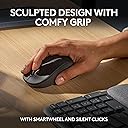
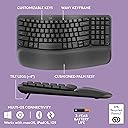
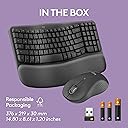
The Logitech Wave Keys MK670 Combo pairs an ergonomic, compact wireless keyboard with a silent, contoured mouse designed for medium to large hands. Featuring a wavy keyframe and cushioned memory foam palm rest, it reduces wrist strain during long work sessions. Connect effortlessly via Bluetooth or Logi Bolt, switch between 3 devices instantly, and enjoy up to 3 years of keyboard battery life. Crafted with recycled plastics, this combo blends sustainability with premium comfort and productivity-enhancing customization.


| ASIN | B0BTNXW6W2 |
| Antenna Location | Business, Everyday Use, Work |
| Are Batteries Required | Yes |
| Best Sellers Rank | #37 in Computer Keyboard & Mouse Combos |
| Brand | Logitech |
| Built-In Media | Battery, USB Receiver |
| Color | Graphite |
| Compatible Devices | Laptop, Tablet |
| Connectivity Technology | Radio Frequency , Usb |
| Customer Reviews | 4.3 out of 5 stars 3,372 Reviews |
| Hand Orientation | Ambidextrous |
| Item Height | 2.16 inches |
| Keyboard Backlighting Color Support | Single Color |
| Keyboard Description | Membrane |
| Keyboard Layout | QWERTY |
| Manufacturer | Logitech |
| Movement Detection | Optical |
| Number of Batteries | 1 Lithium Polymer batteries required. (included) |
| Number of Keys | 99 |
| Operating System | Windows |
| Other Special Features of the Product | Portable |
| Power Source | Battery Powered |
| Special Feature | Portable |
| UPC | 097855191540 |
| Unit Count | 1 Count |
| Warranty Description | 1 Year Limited Hardware Warranty |
P**6
Most comfortable and useful keyboard yet!
Definitely the most comfortable and quiet keyboard I have used to date. The function keys on this are so convenient. Setup is easy and the touch response on the keys feels so natural and so quiet. It is not backlit but that is fine for me because the quality of the keys is worth it. With keyboards being so expensive these days for the gamer sect, this is the perfect value for the rest of us who use the keyboard for data entry purposes. I stumbled upon a function key for print screen that is a gamechanger for me in my work, so I am very pleased.
M**B
Best keyboard I've owned
I have been using this keyboard for work and personal use for 2 days and am loving it so far. It's perfect for my needs and here's why: 1. It has all the functions I need and then some 2. It's just the right size. I was using a separate keyboard for my personal pc than for my work laptop and the other keyboard is much larger, not leaving much room for my mousepad in the desk tray. 3. It connects seamlessly to both, my laptop and desktop so I don't even have to use the other keyboard now! I wasn't looking for that but is a HUGE plus now that I have it setup. You can save 3 connected devices and switch between them using F1, F2, and F3. This was a huge help since I use the same monitor for both devices (I bought an hdmi splitter for that) but would have to use 2 different keyboard/mouse each time I switched. Now I only use 2 different mouses (mice?) which I'll probably upgrade as well. 4. The keys have good response without being noisy. You can hear them, which I prefer, and feel the feedback, also preferred, but you don't have to press hard and don't get the loud click-clack of old school keyboards. 5. It's comfortable to use, at least for me. The palm rest cushion is soft but seems like it will hold up for a long time. The major keys are reachable without lifting my palm and there was minimal adjustment from my much larger keyboard. 6. Very easy setup (I use Windows...can't speak to Mac, Google OS, etc.). As soon as I turned on the keyboard, it paired with my laptop. I had to do absolutely nothing for setup (see note below). The ONLY very small con I have is that it doesn't tell you anywhere in the packaged instructions that you can pair multiple devices. I knew this from another reviewer. Even then, I had to search how to do it, because it's not obvious on the Logitech website. Once I figured it out, it was very easy to do (have your laptop/pc/whatever search for bluetooth devices and hold down the button F1/2/3 button that you want to assign to that device. The device will then discover the keyboard and you're good to go). Other Notes: I would recommend this keyboard to anyone. It's pricier than other keyboards I've bought but I didn't add a con for that because I believe it's definitely worth it. You can change how the function keys work using their application and even setup "smart actions" which will do a bunch of stuff like opening your favorite apps and a bunch of other stuff. All of this stuff is configurable too, although, I haven't tried to use it yet. I just needed a keyboard so I didn't have to use my laptop keyboard but got many features I didn't even know I needed! Get this keyboard!
M**E
Say hello to my new friend
I absolutely love this ergo mini keyboard is how I describe. Not only is it a space saver and very aesthetically appealing, but also I believe it has improved my key stroke. I was always placing my fingers wrong on the flat keyboard and misspelling very often. I still use one finger to reach numbers and other far away keys but I think it is a vast difference and easy to learn. I originally purchased a #1 rated redo key board which appeared so daunting compared to this one. It also took up a bit of room on my limited desk space. This ergo min is very lightweight, easily portable and matches well with the color of my HP desktop. The real work is right around as my classes start soon and I’ll be spending sleepless nights on my computer. This keyboard is the one saving grace that helps eliminate some anxieties. I’ll let you know in the future how goes it. Right now if you’re willing to try something new, this is a good purchase and worth the price. I also purchased the ergo mouse partner, and true to advertisement claim, it is as quiet as a mouse. Literally. And set up did not stump this dummy for long. A quality keyboard, quality mouse, quality purchase.
D**D
Logitech Wave Keyboard
I’ve been using the Logitech Wave Keys for about three weeks now, and overall I’m impressed. My wrists definitely feel more comfortable thanks to the built-in cushioned palm rest and the wave-shaped layout that keeps my hands in a more natural position. According to reviews it “felt immediately natural and comfortable to use”. The wireless connectivity is smooth — I’ve paired it via Bluetooth and also used the Logi Bolt receiver without much fuss. The key noise is very quiet, which is great for shared office spaces. That said, there are a few things worth noting: Because of the ergonomic/wave layout, the key spacing and overall footprint feel a little more compact and “different” than my old keyboard. It took me a few days to adjust. One review noted “the layout is a bit cramped and may take some getting used to.” There is no backlighting, and in lower-light conditions I sometimes find myself squinting to see the legends. The keyboard uses replaceable AAA batteries rather than a rechargeable built-in battery. It’s fine, but I would’ve preferred USB-C charging.
D**D
Typing with a gentle curve
This keyboard makes long work sessions feel softer and sweeter. The wave design and cushioned palm rest are a dream for wrists—perfect for homeschool planning, blog writing, or creative bursts that stretch into late-night tea sessions. I love the subtle rose color, too—it adds personality without being loud. The multi-platform support (Windows/Mac) and dual connectivity (Bluetooth & Logi Bolt Receiver) make it versatile enough for multi-device setups. It’s responsive, quiet, and feels way more luxe than you’d expect at this price point. With 4.3 stars and over 1,000 recent purchases, it’s clearly resonating with fellow creatives and comfort-seekers. If you’re looking for a gentle, ergonomic upgrade with soft curves and serious work ethic, this keyboard totally delivers
J**T
logitech is now a junk brand
I've been a loyal Logitech user since 2005 but I'm finally done. They have been getting worse and worse and now it's just too much. I bought this new version of the Wave keyboard, which was unifying-receiver compatible, only to find that the new one isn't for some reason. So after plugging in yet another USB dongle - which I shouldn't have needed - I then had to download a new version of Logitech's software (that the keyboard needed but the mouse didn't), only to see that the new software BROKE ALL PREVIOUS CONNECTIONS TO ALL DEVICES. When i went back to my Unifying dongle, everything was dead. No keyboard, no trackball, nothing. The new software wouldn't pair anything. In fact, it couldn't even DETECT anything. Tried the old version of the software, and now it's broken too. I then tried Logitech customer support, which basically was the nail in the coffin for me. After being forced to use a chat bot, despite my first instruction to it being 'REAL PERSON NOW', they would not let me even ask for help until I provided them with my whole name (not needed), email address (for what????) and then basically a description of my computer that needed an IT person to fill out (why would logitech need a serial number of all things?????). This felt nothing at all like helping a customer with a problem - it felt completely like it was a data grab. Because, there's nothing on my end that could have caused this. All I did was install their (defective) product. At that point, I was a full day trying to fix this, my rate is over $30 hour and I had an IT person helping me at nearly double that cost. I have over a dozen Logitech peripherals in my house and work space. We spent more money on trying to fix THEIR mistake than we ever spent on Logitech products. So, goodbye Logitech. Although I've used them exclusively for 20 years, I can no longer recommend this company or their products. Customer service is terrible, software is defective, software support is nonexistent, and there is no indication at all that things will improve. ZERO STARS FOR LOGITECH
M**H
Cute
It’s so cute and it’s such a nice color as well as the keys are nice and it does have the FN + B option for pause break if you use it for work Very easily portable if you need to put it in a backpack as it fits however for me, it’s a little too small as it’s like 3/4 of the size of a regular LogiTech keyboard so thats the only reason I’m returning
J**5
Its ok, but a downgrade from K350 combo
replacing the Logitech K350 the MK670 is a downgrade. The wave keyboard retains a slight bump but the wave is far closer to a standard keyboard than the pronounced MK670 wave. Key function is tactilely a pleasure to use. Ergonomics took a backseat. It appears all the functionality is supported but requires a search to find; no more just feeling for the volume controls, zooming, page up/down. The previous large easy to find controls have been mushed into a 'compact' keyboard. Unfortunately. The combo mouse will never be used. What was included in the previous combo, the M510 with customizable side buttons (which is a must have for me) is not included. Another downgrade. The 510 is still working perfectly, unlike the keyboard which has suffered from too many spills and crumbs. So its not horrible but is definitely a downgrade from the previous combo. Will keep as bought 'used-like new' at a very good price, and both the keyboard and mouse are in perfect condition (thanks amazon!) and usable, albeit without usability of previous version.
Trustpilot
1 month ago
1 week ago