


Desertcart purchases this item on your behalf and handles shipping, customs, and support to Tunisia.
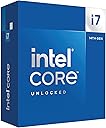
🔥 Power your ambition with the Intel Core i7-14700K — where speed meets unstoppable performance!
The Intel Core i7-14700K is a 14th generation desktop processor featuring 20 cores, 28 threads, and a max turbo frequency of 5.6 GHz. It supports the latest PCIe 5.0 and DDR5 memory standards while maintaining backward compatibility with DDR4 and Intel 600/700 Series chipsets. With 33 MB of cache and an unlocked design, it’s engineered for gamers and professionals seeking high-performance computing with future-ready technology.



| ASIN | B0CGJ41C9W |
| Best Sellers Rank | 6,112 in Computers & Accessories ( See Top 100 in Computers & Accessories ) 11 in CPUs |
| Box Contents | desktops-processors,computer-internal-CPU fans |
| Brand Name | Intel |
| Cache Memory Installed Size | 33 GB |
| Country of Origin | China |
| Customer Reviews | 4.6 4.6 out of 5 stars (1,358) |
| Global Trade Identification Number | 00735858546928, 05032037278485, 05032037278492 |
| Item Dimensions L x W | 11.6L x 4.4W centimetres |
| Item Type Name | ehf not applicable |
| Item Weight | 80 Grams |
| Manufacturer | intel |
| Manufacturer Part Number | BX8071514700K |
| Model Number | BX8071514700K |
| Number of Items | 1 |
| Number of Packs | 1 |
| Platform | Windows 11 |
| Processor Brand | Intel |
| Processor Core Count | 20 |
| Processor Count | 1 |
| Processor Number of Concurrent Threads | 28 |
| Processor Series | Core i7 |
| Processor Socket | LGA 1700 |
| Processor Speed | 5.6 GHz |
| Product Warranty | 3 Year Limited |
| Secondary Cache | 33 MB |
| UPC | 735858546928 |
| Unit Count | 1.0 count |
| Wattage | 125 watts |
J**Y
New microcode has solved the failure issue
The Intel 13th and 14th generation i7 and i9 unlocked CPUs have had a difficult time recently due to overvoltage under idle or light load. Hopefully this has been resolved by the microcode updates. Both CPUs have a reputation for being difficult to cool, and requiring AIO water cooling. Get the cooling right and these are still good CPUs for gaming and productivity. The i7-14700K is a good cost / performance mix and works well with Z790 motherboards. Z890 motherboards have a different socket, and no longer use DDR4 and PCIe Gen 4 NVMe. Although I'm not a gamer, my everyday self-build computers are always gaming motherboards with overclocked unlocked Intel CPUs, as they are reliable. I might have been pushing my luck with this build. ROG STRIX Z790-H Gaming Wi-Fi motherboard, i7-14700K CPU with Noctua NH-D15 air cooler and, Team Group DDR5 7200MHz memory. The Noctua heat pipes clash with the VRM heatsink, so the Noctua big cooler has to be swung through 90 degrees: see the first photo. I use the integrated graphics, so the placement of a graphics card wasn't an issue. The second photo shows the UEFI BIOS screen. CPU at 5900MHz, DDR5 memory at 7200MHz, CPU at 39 degrees C, motherboard at 28 degrees C, XMP1 profile enabled. At idle, it consumes around 45 watts; the PSU is an EVGA 650 P2 Platinum rated. Update 20 March 2025 It has run perfectly since my earlier review, so it appears that the BIOS update has worked. I forgot to mention that the CPU was mounted with a Thermaltake anti-bending frame, so that may be keeping the temperature lower too. More than happy with the STRIX motherboard and Intel CPU. Update 16 September 2025 Still running everyday on the overclocked settings without a problem, even during the hot days this summer.
D**R
Best for gaming!
Great cpu.. very powerful but needs a strong cooler under stress but i dont get to stress it much due to being so strong!
A**N
Fine CPU
I decided to give Intel a try for my new build, so far I've slightly overclocked it and I have no problems with speeds, runs everything I've thrown at it fine so far. Installation was easy as per usual with CPUs, keeps cool under load with my AIO.
N**A
Great CPU
Loving the processor so far. One tip if you are getting this. These 14th- and 13th-gen chips have power-delivery issues that can cause them to stop working over time. Motherboard manufacturers now patch this issue, so be sure to update your bios to the latest version.
L**3
Good
Brill
M**N
Great!
Can game/code/simulate without problems. Doesn't get hotter than 60/70 Celsius with an AIO with most if not all tasks done.
A**X
One of the best value intel options
While AMD has the gaming CPU market pretty much cornered, for people with an Intel-compatible motherboard this is one of the best options you can get. In terms of price / performance ratio this is one of the best mid-range CPUs available and competes with the equivalent price AMD options. The one downside with the CPU is the high power consumption (and therefore, heat production). Out of the box, it runs very hot and my cooler was running at maximum speed (producing a LOT of noise), so I STRONGLY advise undervolting. After a few hours of testing, I managed to reduce the wattage significantly with no real reduction in performance and got it running stably. Overall, I would recommend this CPU if you are constrained on chipset and don't mind doing a bit of manual work to get it running effectively, but if you are building a whole new PC and can pick your motherboard there are several better options available.
A**S
safe bios now hopefully
last upgrade for my LGA1700 from a 12th Gen, waiting until they sorted out the voltage problems, worthy update with a 5700ti
A**M
Asegúrense hacer “Under Volt”
Excelente CPU si armas tu PC desde 0.
A**ー
PCが安定したかも
ローカルAIを充実させるべくRTX5080を導入しましたが、CPUがCore i5-13500KのままではCPUがボトルネックになる可能性があるとGemini君がいうのでLGA1700のソケットが使用できるこちらのCPUをチョイスしました。 リテールファンが付属しないため色々とクーラーを調べましたが、皆さんのレビューを見ると簡易水冷を導入したほうが良さそうでしたのでCORSAIRの簡易水冷も同時に導入しました。 オーバークロックしていないせいかCPU温度はそれほど上昇せず安定した状態で使用できそうです。 AI性能は上がりましたがそれはGPUのせいだし、普段の使用ではCPU交換の恩恵を体感することはできませんが、換装前よりなんとなく安定稼働しているような気がします。 このまま5年くらいはこのPCを使い続けたいですね。
B**S
Out of the box? Hot. Tuned? Not.
The i7-14700K is a beast right out of the box, but it runs hot. In our build, stock settings pushed Cinebench multi-core temps up to 90 °C, and the system was clearly working overtime to keep things cool. The performance was solid around 28,600 points, but it was not power efficient. After undervolting, the difference was night and day. Temps dropped to 71 °C under the same Cinebench load, with barely any loss in score (28,450). We also saw similar results in 3DMarkCPU temps dropped from 87 °C to 70 °C, and the score only dipped slightly. Even single-core performance held steady, but temps still improved from 72 °C down to 64 °C. What stood out most was how much quieter and smoother the system ran. Undervolting didn’t just help with temps, it brought balance. It gave us full power when we needed it, without feeling like the system was under stress. additionally, to support the 14700K properly, we used the Thermalright LGA1700-BCF contact frame in place of the stock bracket. It gave us more even mounting pressure and helped reduce CPU temps by a few degrees while avoiding the common warping issues with LGA1700 sockets. Cooling was handled by the Thermalright Frozen Warframe S360 AIO The 14700K is great, but it’s aggressive on voltage by default. If you care about thermals, fan noise, or just want your system to last longer, **undervolting is a no-brainer**. In our build, it made all the difference — better efficiency, same power, less heat. Wouldn’t run this CPU any other way.
C**S
how many extra frames this thing will squeeze out
I don’t game, so I can’t tell you how many extra frames this thing will squeeze out of whatever people are shooting at this week. What I can tell you is that the Intel Core i7-14700K is a beast for real desktop work. I run video editing, 3D scanning, 3D printing software, photo work, and enough browser tabs to qualify as a bad habit. With 20 cores, 8 P-cores and 12 E-cores, it just keeps moving. Yes, it runs hot when you really lean on it, and if you let the motherboard feed it 253 watts, you had better bring a serious cooler. But that is the price of having this much horsepower sitting under the desk. For everyday work it barely notices what I’m doing, and when I hit it with a heavy workload, it gets up and goes. If you only browse the web and check email, this is ridiculous overkill. If you edit, render, scan, encode, multitask, or simply enjoy knowing your computer is waiting on you instead of the other way around, good times. :-)
F**N
great buy
both worked perfect as intended. recommend
Trustpilot
1 month ago
2 months ago