Desertcart purchases this item on your behalf and handles shipping, customs, and support to Tunisia.
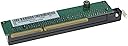
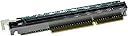
🚀 Elevate your Lenovo Mini PC — Expand, Upgrade, Dominate!
The Wobeater Replacement Expansion Riser Card (01AJ940) is a PCI Express x16 adapter designed to expand the connectivity of Lenovo ThinkCentre and ThinkStation Tiny models. Compatible with Windows 7, 8.1, and 10, it enables users to add high-performance PCIe cards such as GPUs or network adapters, enhancing the mini PC’s capabilities with a straightforward plug-and-play installation.
| ASIN | B0CCS1738B |
| Best Sellers Rank | 274,720 in Computers & Accessories ( See Top 100 in Computers & Accessories ) 456 in USB Port Cards |
| Brand | Wobeater |
| Brand Name | Wobeater |
| Compatible Devices | Laptop |
| Compatible devices | Laptop |
| Customer Reviews | 4.7 out of 5 stars 44 Reviews |
| Hardware Interface | PCI Express x16 |
| Hardware interface | PCI Express x16 |
| Manufacturer | Wobeater |
| Manufacturer Part Number | 01AJ940 |
| Model Number | 01AJ940 |
| Operating System | Windows 10, Windows 8.1, Windows 7 |
| Style | Classic |
| Style Name | Classic |
| UPC | 617230424423 |
C**.
Essential piece for expanding Lenovo Mini PC
Essential to expand Lenovo Mini PC for adding extra pcie network card. Works great for BSD and Linux.
N**S
Works with m720q and MSI RTX 3050 Low Profile--Black screen? Here's how to fix
For anyone getting black screen on first load up, follow these steps with HDMI or DP connected to motherboard: -Above all, make sure you have latest BIOS installed -Connect to motherboard by HDMI or DP with graphics card in -Seat GPU in adapter correctly and all the way, and seat adapter nto PCIE port on motherboard all the way down -Boot into BIOS and go to --"Devices" > "USB Setup": "USB Legacy Support" is Disabled --"Devices" > "USB Setup": "USB Support" is Enabled --"Devices" > "PCI Express Configuration": "ASPM Support" is Disabled --"Security" and make sure "Secure Boot" is enabled Save and Restart with F10 then you should load into windows now. Install Nvdia drivers for RTX 3050 then restart and check that it's reading with GPU-Z. Remove HDMI or DP cable from motherboard and move it to GPU's HDMI or DP slot and you're done.
D**7
It’s exactly it’sneeded for adding a
Works perfect to meet my little Lenovo thinkcentre m720q in a portable gaming pc.
S**A
Great fit!
Great fit
A**I
Perfect for mini gaming pc
Works perfect for the gpu and just need to make a customer cover for the gpu but works great
Trustpilot
2 months ago
3 weeks ago