Desertcart purchases this item on your behalf and handles shipping, customs, and support to Tunisia.
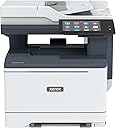
🚀 Elevate your office workflow with Xerox Versalink C415—where speed meets smart sustainability!
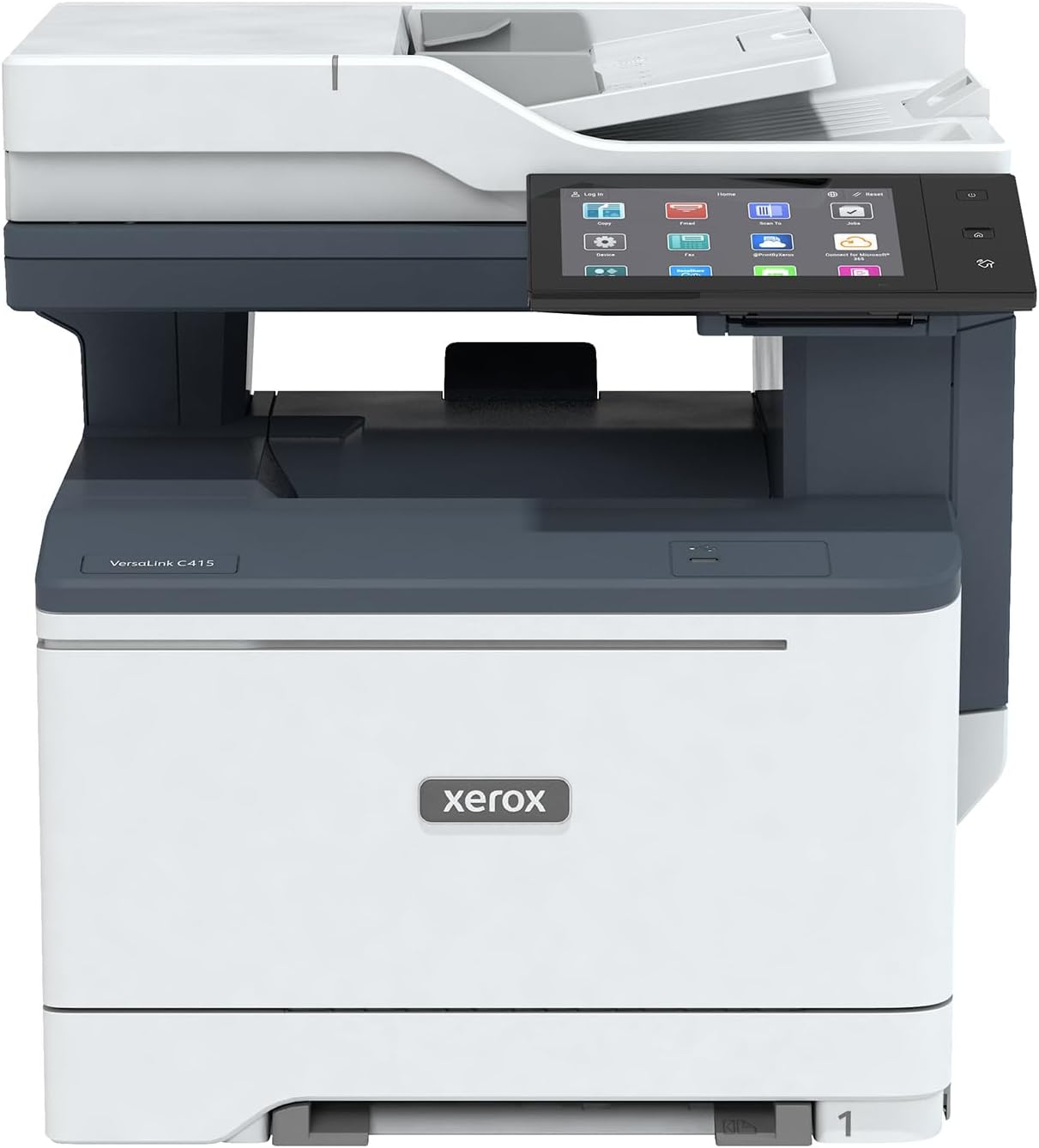
The Xerox Versalink C415dn is a robust A4 colour laser multifunction printer designed for small teams (2-10 users) with a fast 40 ppm print speed, automatic duplex printing, and a large 7-inch touchscreen. It supports wireless and mobile printing, integrates with cloud services, and is built with eco-friendly materials. Ideal for offices demanding reliable, high-quality colour output, seamless digital workflows, and real-time remote management.


| ASIN | B0CHMV7ZXW |
| Additional Printer Functions | All In One |
| B&W Pages per Minute | 40 ppm |
| Best Sellers Rank | 81,590 in Computers & Accessories ( See Top 100 in Computers & Accessories ) 89 in Laser Printers |
| Box Contents | Software & Documentation CD, Starter Toner Cartridges: 2,000 Capacity Cyan / Magenta / Yellow & 2,400 Capacity Black, Xerox C415 Printer, UK Power cord, Installation / Product safety / Quick use Guide |
| Brand | Xerox |
| Brand Name | Xerox |
| Color Depth | 24 bpp |
| Color Pages per Minute | 40 ppm |
| Colour | White/Blue |
| Compatible Cartridge | Xerox |
| Compatible Devices | Laptops, PCs, Smartphones & Tablets |
| Connectivity technology | USB, Ethernet, Optional Wireless: 097N02470 |
| Control Method | Touch |
| Customer Reviews | 3.6 out of 5 stars 29 Reviews |
| Display Type | LCD |
| Dual-sided printing | Yes |
| Duplex | Automatic |
| Hardware Interface | USB |
| Initial Page Print Time | 6.8 seconds color/6.2 seconds black-and-white Seconds |
| Ink Colour | Colour |
| Item Dimensions D x W x H | 47.5D x 47.8W x 49.1H centimetres |
| Item Type Name | Multifunction Printer |
| Item Weight | 27.1 Kilograms |
| Manufacturer | Xerox |
| Maximum Copies Per Run | 1 |
| Maximum Copy Resolution Black and White | [At least] 1200x1200 dpi |
| Maximum Copy Resolution Color | [At least] 1200x1200 dpi |
| Maximum Copy Speed Black and White | 40 ppm |
| Maximum Print Resolution Black and White | 2400x600 dpi |
| Maximum Sheet Capacity | 1450 |
| Maximum Supported Paper Size | A4 |
| Maximum print Resolution Color | 2400x600 dpi |
| Model Name | Xerox Versalink C415 |
| Model Number | C415V_DN |
| Model Series | C415 |
| Model name | Xerox Versalink C415 |
| Network Connectivity Technology | USB, Ethernet, Optional Wireless: 097N02470 |
| Number of Drivers | 2 |
| Number of Ethernet Ports | 1 |
| Number of Trays | 1 |
| Other Special Features of the Product | Auto-Duplex, Network-Ready, Mobile Printing: Apple AirPrint, Mopria, 7-inch tablet-like intuitive user interface, App enabled |
| Output sheet capacity | 150 |
| Paper Size | 97 x 148 mm to 216 x 356 mm Millimetres |
| Print media | High-resolution paper, Paper (plain) |
| Printer Output Type | Colour |
| Printer Type | Laser |
| Printing technology | Laser |
| Processor Count | 1 |
| Product Warranty | 1 year manufacturer |
| Resolution | 2400 x 600 |
| Scanner Type | Flatbed |
| Specific Uses For Product | Office |
| Total USB 2.0 Ports | 1 |
| Total USB 3.0 Ports | 1 |
| Total USB Ports | 2 |
| Warranty Type | Limited |
R**K
Not really for home users.
This is no doubt a good printer. However it's a pain to setup and it insists on printing a test page everytime you turn it on. Which if your only printing the odd page here and there, eats up a considerable percentage of your paper. Have google'd to try and sort this. But have had no joy.
K**Y
Effective printer for my small office
I have a small office and I needed a printer that will be able to effectively handle the printing, scanning and copying and I would like to mention that since using it, it performed well with no issues so far. I asked our technician to install it to make sure that it is everything installed correctly. In terms of the quality of the printed output, the results are very good, especially with pages with many images and text and documents such as contracts and reports with sharp letters and clean with no smudging or irregularities with the toner used. I also print colour documents such as presentations, charts, and flyers, and the colour output is vibrant and accurate, with blues and reds being particularly clear, rather than washed out, which makes a big difference when showing clients these types of documents. The printer runs quietly and performs all the tasks in an effective and quick manner so I can print large files or double-sided documents during the day without any distracting noise, and the duplex printing also helps to reduce waste, which is something I appreciate as a user. Scanning is another feature that I use frequently, particularly when I need to scan multiple pages and send these straight to my email or cloud storage, which is quick and seamless without having to scan individual pages one by one. So far this printer has been working perfectly and I have nothing to complain about even though it is on the expensive side, but I consider it a good investment.
U**T
Review of Xerox VersaLink C415DN Printer: Missing Wi-Fi Adapter
I recently purchased the Xerox VersaLink C415DN, expecting a hassle-free setup for my home office. While the printer itself performs well and delivers high-quality prints, I was extremely disappointed to find that the Wi-Fi network adapter was not included in the box. This omission was not clearly communicated by the seller, leaving me frustrated upon discovering that the printer could only connect via Ethernet or USB out of the box. For a device in this price range, Wi-Fi functionality should either be included or explicitly stated as an additional purchase. Having to now source and purchase a separate adapter is both inconvenient and an unexpected expense. This lack of transparency from the seller has left me feeling misled, and I would strongly advise others to double-check the specifications and included components before purchasing. If Wi-Fi connectivity is essential for your setup, be prepared for extra costs or consider alternative models that offer it as a standard feature.
A**R
Premium Office Printer
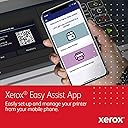
Title: "Xerox Versalink C415dn A4 40ppm Colour Multifunctional laser Printer with Duplex 2-Sided printing - Print/Scan/Copy/fax - All In One" Current Price: The price is £739.90 which is a significant investment but standard for a high volume, colour laser multifunction device. Review: Setting up this printer is surprisingly easy for an office machine especially with the Xerox Easy Assist App on your phone. The functionality is fantastic. The printer is fast printing out 40 pages per minute and the single pass scanner makes digitizing documents quick and efficient. The large seven inch touchscreen is intuitive to use for everyone in the office. The one thing that keeps this from being perfect is that the wireless connectivity is not built in and requires a separate adapter which adds to the initial setup cost. This is already a VERY expensive printer with expensive ink/toner, already needing modules that cost hundreds is too much.
A**R
A good but imperfect printer
After years of using ink jet printers that cost a fortune to run, with the ink that seems to drain like nothing else, I opted for a laser option, I wanted scanner functionality. I do work from home, and also my son is taking his GCSEs, and prints a lot. This printer is more of a small office printer than a home printer at around 50cm x 50cm x 50cm and 27kg. It is a big printer to have in your lounge. Setup is pretty easy on a wired network. It is a network infrastructure device, so is really designed for Ethernet connectivity rather than Wi-Fi, and whilst Wi-Fi is possible, it is an add-on that costs more money. Turning the printer on for the first time, it takes a few minutes to get going, and it goes through some basic questions like language on the screen, then it gives the option to download an app to your phone by scanning a QR code, and you can then continue setting up from there. The only snag I hit was downloading the computer software, as my browser tried to open it and display it rather than saving it. Printing is very fast, even two-sided, taking three to four seconds for both sides of a page, it is also very quiet for a laser printer. Text print quality is exceptional, as you would expect at this price. Colour prints on normal paper are good, but on the warm side. The toner that comes with the printer should last around 2,000 pages or so, and in my use, that seems accurate. Scanning is good, and has many options, I mainly scan directly to my laptop, but you can also scan to a USB drive, or NAS. There is an option of scanning to third party cloud providers, but this is an extra cost, and there is no iCloud option. On the subject of online functionality, mine constantly gives an error about connecting to 'Xerox Remote Services datacentre' but doesn't really say how to fix the issue. Thankfully, this does not seem to affect normal use. I have no idea why, but every so often, the scanner seems to burst into life despite nobody touching it. This makes a bit of noise. I only use the main paper tray, which takes 250 sheets of A4, oddly it doesn't sit flush, which at this level is a bit disappointing.
A**S
few downsides but overall quite happy
For some £740 at the moment I have ordered it, this printer offers a full-fledged color MFP with duplex, scanner and fax to boot, all in a compact case. First impressions, the printer is really compact and takes up little space for its capabilities. The setup took about 20 minutes: I connected it via Ethernet cable, and then installed the drivers on the computer. The touch screen is 7 inches diagonally, really simplifying the printer management, all the functions and navigation within the menu are quite simple and intuitive, I understood everything even without the instructions. Printing works as stated in the ad, it really prints 40 pages per minute, both color and black and white. The quality of color printing is good for office tasks, but the photos are of average quality. Automatic duplex works without failures. The scanner with an automatic feeder is capable of handling large volumes of documents. Integration with cloud services is especially convenient, all scans are immediately automatically uploaded to Google Drive and are ready for use and transfer from there. The downsides are of course the expensive cartridges, but not only are the cartridges expensive, their resource is usually small, but on the other hand, you can always use cheaper cartridges from third-party suppliers, and again, you will not be able to get the quality of the original print. There is noise during operation, but this is not critical at all. A couple of times there were failures with the mobile application, it lost connection with the printer. During the entire time of use, the printer never hung up, the paper did not jam. In principle, regardless of the above, I am very pleased with this printer.
S**M
WIFI IS OPTIONAL EXTRA
This is a professional printer/scanner that is far more than I ever would need. First off, this thing is very heavy, the printer plus packaging weighed at just over 32kg so make sure you're expecting that when setting it up. I can't comment on the longevity of the toners but can confirm that it prints perfectly printed documents and I've even tried photos which gave great sharpness and colour accuracy. Scanner works great as well and I didn't have any problems with connecting to my PC by HARDWIRING. However, and this is a big however, I cannot in good conscience rate a printer highly when it costs this much and makes WiFi an additional addon. The module is not all that expensive, but at this price, it feels completely wrong to not include it and although the quality of the product is worthy of 5 stars, the greed of not including WiFi needs to be highlighted.
P**R
High-quality office printer with intuitive controls – Wi-Fi needs optional adaptor to work
The Xerox VersaLink C415 is a solid and efficient colour laser printer that works particularly well in small to medium office environments. The print quality is excellent, delivering sharp text and vibrant colour output that stands out whether you’re printing reports, flyers, or routine documents. One key thing to note is that this model does not include built-in Wi-Fi. If you need wireless connectivity, you’ll need to purchase the separate Xerox Wi-Fi adaptor (097N02470). However, if you can connect via Ethernet, setup is straightforward, and the network integration is stable and fast. The 7-inch touchscreen interface is intuitive and user-friendly, with a layout that makes it easy to navigate settings and access functions without IT help. You can also use the Xerox Easy Assist app for mobile management and real-time support. Like many Xerox machines, the downside is the cost of genuine consumables, which are on the higher end. That said, there are generic toner options available which help reduce running costs, especially for offices with high-volume printing needs. Overall, the C415 is a smart choice if you prioritise print quality, reliability, and ease of use – just be prepared for the extra cost if you want Wi-Fi. Pros: Excellent print quality Reliable and quiet operation Intuitive touchscreen and mobile app support Great for networked office environments via Ethernet Compact and professional design Cons: No built-in Wi-Fi – requires optional adaptor Genuine toner is expensive Best suited to users with Ethernet connectivity
M**O
Pantalla amplia y facil de utilizar
Muy funcional, tengo varias impresoras y esta sin duda un caballo de batalla, buena calidad sin llegar a lo extraordinario, bastante rápida, el escáner de doble cara es fabuloso, no voltea la hoja solo la jala y de una pasada escanea ambos lados, también cuenta con vidrio si se quiere hacer manual, al ser láser puedo estar tranquilo de dejarla y volverla a utilizar sin que se tapen los cabezales
I**E
Pas de carte WIFI livré avec l'imprimante !
Bonjour, l'imprimante est indiqué comme étant en Apple AirPtint, Mopria et Wi-Fi Direct hors le module n'est pas livré avec ? Ce n'est pas normal !!
I**N
The product is far from what it claims to be
Unfortunately, the product is far from what it claims to be. From the very beginning, it has been almost impossible to configure anything — from scan-to-email features to much simpler settings. Almost every time the paper tray is reloaded, it loses its default settings. Either this is a very difficult product to use, or I happened to receive the rare exception to Xerox perfection.
X**O
mécontent
impossible a la mettre en fonction pas de notice en français
M**S
Schrecklich
Am liebsten würde ich null Punkte vergeben. Schrecklicher Service und keine Unterstützung. Der Drucker erkennt die Toner nicht und das bei den Preisen. Vom Kindenservice eine Reperatur angeboten bekommen, da ich dieses Problem aber schon mit einem anderen Modell hatte, ist diese Marke für mich gestorben und ich wollte eine Rückabwicklung. Das kann sich so kein Unternehmen leisten, was bringt da eine Reperatur. Echt schade, dass Kundenfreundlichkeit so klein geschrieben wird und das bei den Preisen
Trustpilot
5 days ago
2 weeks ago