Buy anything from 5,000+ international stores. One checkout price. No surprise fees. Join 2M+ shoppers on Desertcart.
Desertcart purchases this item on your behalf and handles shipping, customs, and support to Tunisia.
🚀 Elevate Your Visual Game: Mirror in 8K, Play in Style!
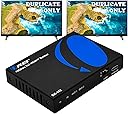
The OREI BK-102 HDMI Splitter is a compact, high-performance device that duplicates a single HDMI 2.1 input into two outputs supporting up to 8K@60Hz and 4K@120Hz. Featuring smart EDID management and broad compatibility with major OS and devices, it ensures stable, lag-free UltraHD signal mirroring ideal for gaming, home theaters, and professional multi-display setups.


| ASIN | B0CMZ8B6N2 |
| Best Sellers Rank | #134 in Audio & Video Selector Boxes |
| Brand | OREI |
| Cable Type | HDMI |
| Color | 1X2 8K HDMI Splitter |
| Compatible Devices | Projector, Television |
| Connector Type | HDMI |
| Connector Type Used on Cable | HDMI |
| Customer Reviews | 3.8 out of 5 stars 167 Reviews |
| Global Trade Identification Number | 00850031132658 |
| Item Type Name | OREI 8K HDMI Splitter 1 X 2, Duplicate/Mirror Any HDMI Signal UltraHD Supports Upto 4K @ 120Hz EDID HDCP 2.3 - (BK-102) |
| Manufacturer | OREI |
| Manufacturer Contact Information | [email protected] |
| Mfr Part Number | BK-102 |
| Model Number | BK-102 |
| Number of Ports | 2 |
| Packer Contact Information | [email protected] |
| UPC | 850031132658 |
| Warranty Description | 1 Year Warranty |
P**N
Solved my Linux 8k HDMI out dev. state transition issues
I do have maybe a "bit strange" use case for this, which is dealing with the connection of the Nvidia graphics card output to multi-monitor (3x32" 4k, and a 8k Samsung TV used as large monitor) setup with multiple computers, mostly in Linux (Fedora KDE). Where this came in was to have a stable EDID shown to the NVIDIA card, which helped to workaround issues caused from the switching transitions (whether switching computers or from screen locks, monitor power off transitions etc.). It "should not" be needed here, but it is presently the only way I have gotten this to work perfectly on all scenarios. I am not using split function at all, it is 8k in/out towards the Samsung, but I am using the EDID settings switch which "hides" the monitor info as well as presents stable config to a monitor. It also fixed some strange behaviors on display on normal use and improved the switching times. Perfect fix for my somewhat special case at least until Linux HDMI support catches up.
J**D
OREI BK-102 HDMI Splitter
So the TL;DR of my review is that the OREI 8K BK-102 HDMI Splitter is an excellent compact device that’s great for when you need to use a single input signal on multiple screens without sacrificing features especially at full HDMI 2.1. This particular splitter is rated for 8K60Hz in a 1 in 2 out configuration this means that for one signal input you get 2 outputs this allows you to mirror a single input across 2 displays at the same time. This is especially useful if you wish to use a single device on multiple screens and would like to reduce wear and tear on the input device. The construction is high quality metal with sturdy inputs. In use the device can be noticeably warm but it’s well ventilated and doesn’t seem to cause any operational issues even with hours of use. With the device being HDMI 2.1 compatibility with modern devices is very simple. I am using this device with my PS5 Pro so that I can simultaneously output on my 27” Alienware (AW2725Q) 4K 240Hz QD-OLED monitor and my 55” LG C2 OLED 4K120Hz TV. In my use case there’s no noticeable difference between the splitter and native connection this is true while using HDR, VRR, ALLM and 120Hz output. I’ve noticed no perceptible input delay but lack professional grade tools to measure latency in a direct capacity. Despite not advertising it directly I was also pleasantly surprised to learn the device supports 1440p as well. Testing with the PS5 Pro shows it supported 1440p at up to 120Hz with VRR, HDR and ALLM. Sound quality also seems unaffected when compared to native connection but as I use PCM or headphones I am likely not stressing the audio output in a meaningful way. I love that the device is so incredibly compact while not sacrificing on features. For a 2.1 splitter from a well known brand value is more than good for what the device accomplishes. It’s worth noting that you need to be mindful of the cables you use and their lengths especially with HDMI 2.1 signals as that can cause a lot of issues which might likely explain some of the negative reviews. It also seems there was a different model of the BK-102 at one point which had been refreshed so the negative feedback might be from earlier model listings. Also I’ve seen visual quality be mentioned but with this particular splitter if the output devices aren’t matching resolution it’ll downscale output to the lowest resolution in the chain example if you’re using a 4K TV and a 1080p monitor it’ll be 1080p across the TV and monitor not 4K on the TV and 1080p on the monitor. Overall highly recommend OREI’s 8K splitter if you have a use case like mine.
J**N
Easy plug-and-play, but image quality took a hit.
The delivery was quick and everything was packed well. The device is easy to use and setup. Unfortunately, I ran into a couple issues with this device when setup with a PS5 outputting to a large 4k OLED display and 4k desktop monitor. The issues below had workarounds, but best case scenario was sacrificing image quality on my large OLED. First problem: Severe discoloration on the desktop monitor when it was connected to output 2. Everything was purple with hazy shadows smearing across the screen. Additionally, the computer speakers I have connected to the monitor were outputting oddly, with sound effects missing and audible crackles. Switching the monitor to output 1 fixed both problems. The next issue isn't as severe, but it would bother me if I continued using the product. The colors on my larger display were washed out, way less contrast, and fuzzy on the edges of characters, level art, etc. The framerate was still very high, but the overall visual quality takes too much of a hit when plugged into the splitter. Which is odd because the quality on the smaller monitor was fine (after sorting out the purple screen issue). Using the splitter in my situation would only be acceptable if I was ignorant of the image quality my display was capable of without it. I tried using different cables, matching video settings, toggling other settings, but nothing could get the quality to match a direct connection. The images I attached depict the difference in image quality when connected to the splitter and when not. These images don't do either enough justice compared to seeing in person. However, it should at the very least show how drastically the visuals change with the device. The last picture is of the monitor when it is plugged into output 2.
F**L
Plug & Play
Worked right out of the box. Plug and play. Using for primary 4K TV and two other TVs connected wirelessly, one 720p and one 1080p. With the previous two splitters I tried, I was unable to use DolbyVision on the primary TV (max HDR10+), but with this splitter, no issue.
A**S
Good product
Need this to mirror one into my tv and one into my capture card. Without this product, I would need to have the pc always on in order to play on my tv. However, this eliminates that as it outputs two signals at the same time. Plug in and play, no need to set up. The picture quality and the sound quality is good as well, nothing being diminished as far as I can tell. There would be the occasional screen going a little haywire, but nothing like a simple unplugging and plugging back the power source can't fix.
C**.
Great till suddenly broke
I’ve had this for exactly 2 months and when I was playing yesterday all was well when suddenly it lost connection to all the ports besides the power and it won’t read any of them anymore. I’ve provided a photo of when it worked vs now, the lights don’t come on. Update: I was sent a new one and it’s working perfectly. Even if it were to break again I’d still give 10/10 for the amazing customer service.
A**R
Looks great, sounds great, but has a big drawback...
I'm giving this a 3 star, but lets call it a 2 and a 1/2 star for the sole purpose that is dose everything I need it to do.....when it's working. Almost daily I have to unplug all the cables and plug them back in for the second output to turn on. Sometimes even both outputs won't come on, but I would say 95% of the time it is only the second one. I don't know if I can justify the price when this is a daily issue, and sometimes can happen more than once a day as well. For what it does, it's great, and I love it for that, but I am also very disappointed in how it will not work consistently, and instead consistently needs to be reset. What confuses me is the one I had before this worked flawlessly, but I needed to upgrade to 4k with HDR and 120hz. All that being said, the picture looks great, nice sharp and clean, and the audio is also very good. I'd love to give this a 5 star, but the constant resetting of the product to get it to fully work is holding that rating back for me. I assume this is a deal breaker for a lot of people nowadays and patience is something we are losing from day to day, I will just deal with it for now though until better come out down the line that will hopefully function better.
B**6
Does not work with capture card
The product itself seems fine, but the strict HDCP modes on it means it doesn't work well with my XR1 capture card. I can't record my PS5 games with this.
R**.
Bom Spliter
Liguei no Receiver, cumpre o spliter de imagem e distribui o som de todos os aparelhos ligados no spliter , mas o SOM da TV earc perde com esse spliter e não comunica com Receiver…. Nesse caso os Apps da TV necessariamente precisam ser usados com auto falantes da TV e não com sistema de som da casa…. Mas o restante ( PS5/Nintendo / Bluray comunicam perfeita com DOlby Digital … HDMI 2.1! Ainda assim vale investimento
T**M
Does exactly what it says it will do.
So far works really well. I use it for PS5 game play full resolution out to my monitor and output 2 back to my Atem Mini Pro with usb c out to MacBook Pro streaming via OBS to twitch and YouTube. The dip switch settings are very useful allowing you to copy resolutions and also use mixed mode output for downscaling as needed. It does get a little warm but that is to be expected given its compact size.
Trustpilot
2 months ago
2 weeks ago