Buy anything from 5,000+ international stores. One checkout price. No surprise fees. Join 2M+ shoppers on Desertcart.
Desertcart purchases this item on your behalf and handles shipping, customs, and support to Tunisia.
🖨️ Elevate your office game with smart, speedy, and secure printing — don’t get left behind!
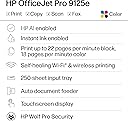
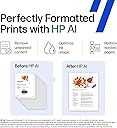
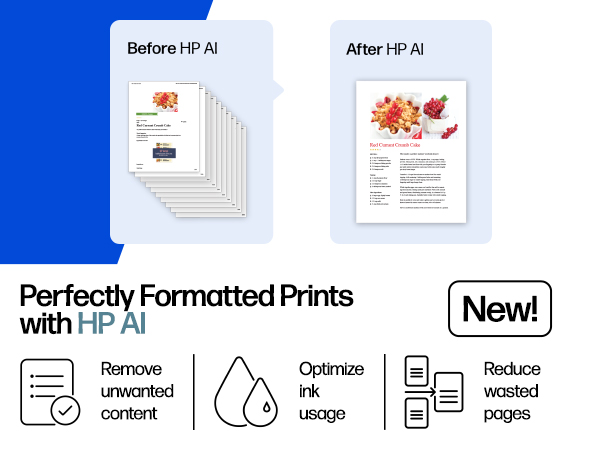
The HP OfficeJet Pro 9125e is a versatile all-in-one inkjet printer designed for busy offices, delivering fast color and black-and-white prints up to 18 and 22 ppm respectively. Featuring AI-enabled formatting, wireless dual-band connectivity, a 2.7-inch touchscreen, automatic duplex printing and scanning with an auto document feeder, plus a 250-sheet tray, it streamlines professional document workflows. It includes a 3-month Instant Ink trial and robust security with HP Wolf Pro, all wrapped in a sustainable design using over 40% recycled plastic.


| ASIN | B0CFM82NS2 |
| Additional Printer Functions | All In One |
| B&W Pages per Minute | 22 ppm |
| Best Sellers Rank | #1,610 in Office Products ( See Top 100 in Office Products ) #13 in Inkjet Computer Printers |
| Brand | HP |
| Built-In Media | HP OfficeJet Pro 9125e AiO Printer; HP 936 Setup Black Ink Cartridge; HP 936 Setup Cyan Ink Cartridge; HP 936 Setup Magenta Ink Cartridge; HP 936 Setup Yellow Ink Cartridge; Regulatory Flyer; Ink Caution Flyer; Power Cord; Setup Poster; Reference Guide [For more information about fill and yield, see http://www.hp.com/go/learnaboutsupplies ] |
| Color | Cement |
| Color Depth | 24 Bits |
| Color Pages per Minute | 18 ppm |
| Compatible Cartridge | HP Instant Ink Compatible Cartridges |
| Compatible Devices | Laptops, PC, Smartphones |
| Connectivity Technology | Ethernet, USB, Wireless |
| Control Method | App |
| Controller Type | Android |
| Customer Reviews | 3.5 out of 5 stars 3,476 Reviews |
| Display Type | touchscreen |
| Dual-sided printing | Yes |
| Duplex | Automatic |
| Hardware Interface | Ethernet, USB |
| Initial Page Print Time | 11 Seconds |
| Ink Color | Black, cyan, magenta, yellow |
| Item Dimensions D x W x H | 13.48"D x 17.3"W x 10.94"H |
| Item Type Name | Inkjet printers |
| Item Weight | 22.3 Pounds |
| Manufacturer | HP |
| Maximum Copies Per Run | Up to 99 copies |
| Maximum Copy Resolution Black and White | Up to 600 dpi |
| Maximum Copy Resolution Color | Up to 600 dpi |
| Maximum Copy Speed Black and White | 21 ppm |
| Maximum Media Size | 8.5 x 11.7 in |
| Maximum Print Resolution Black and White | 1200 x 1200 rendered dpi Dots Per Inch |
| Maximum Sheet Capacity | 250 |
| Maximum print Resolution Color | Up to 4800 x 1200 optimized dpi on HP Advance Photo Paper 1200 x 1200 dpi input Dots Per Inch |
| Model Name | New Version |
| Model Number | 403X0A#B1H |
| Model Series | 9120 |
| Number of Ethernet Ports | 1 |
| Number of Trays | 1 |
| Other Special Features of the Product | 2.7" Touch Screen, 250 Sheet Paper Tray, Auto Document Feeder, Double Sided Scanning |
| Output sheet capacity | 250 |
| Paper Size | 8.5 x 11;8.27 x 11.7;8.5 x 14;7.16 x 10.12; Inches |
| Power Consumption | 5.06 Watts |
| Print media | Paper (plain) |
| Printer Connectivity Type | Ethernet, USB, Wireless |
| Printer Output Type | Color |
| Printer Type | Inkjet |
| Printing Technology | Inkjet |
| Processor Count | 1 |
| Resolution | 1200 x 1200 |
| Scanner Type | Easy slide-off glass, dual pass 2-sided ADF |
| Series Number | 9120 |
| Special Feature | 2.7" Touch Screen, 250 Sheet Paper Tray, Auto Document Feeder , Double Sided Scanning |
| Specific Uses For Product | Office |
| Total Usb Ports | 1 |
| UPC | 196337284807 |
| Unit Count | 1.0 Count |
| Warranty Description | One-Year limited hardware warranty with option to extend to two-years with acceptance of HP+ Offer. For more information, please visit us at support.hp.com |
| Warranty Type | One-Year limited hardware warranty with option to extend to two-years with acceptance of HP+ Offer. For more information, please visit us at support.hp.com |
| Wattage | 100 watts |
J**H
Great all-in-one machine at an economical price
I wasn't expecting a lot from the OfficeJet Pro 9125e. I've had several other home printers in the past, including a laser printer (great because it uses dry toner which doesn't have the issues an inkjet printer typically has, but is only able to print black and white). I've had several inkjet printers, but they all end up having clogged print heads or something that renders them useless after a short amount of time. I thought I'd give this a try, as it could replace my other printers. It's meant for a small office, as it has pretty high duty cycles. I don't print a lot; usually recipes, legal documents, and coupons. I may start printing some newsletters for an organization I'm in, so this may work out well. It can print borderless pages, which would make some nice newsletters! Setting up the printer was fairly straight-forward. The printer was packaged nicely, in a bag with a handle that allows you to pull it from the box easily. The included quick-start guide tells you to plug it in, turn it on, select a language and country, and then go to a URL to set the printer up on your computer or phone wirelessly. The first step is to open the paper tray and load the paper. Adjusting the paper tray for letter-sized paper was a bit confusing, as there are little tabs you have to press to adjust the size of the paper tray. It wouldn't shrink down to the size of the paper, so I just pushed the paper all the way to the back and pushed the tray in. The printer then said it was checking the paper, and said it was successfully loaded. Installing the ink went fine. Then it wants to print an alignment page. Once printed, you put it on the scanner bed, and it scans. That went fine as well. Finally, install HP Smart Printing on the computer and scan for new printers. It didn't find it on the first try, but did on the second. Connecting was quick and easy. It even got the wifi password from the computer. Once connected it automatically updated the firmware. I didn't realize it, so I tried printing something and couldn't. Then the printer chimed and said the firmware was updated. Print quality is fantastic, as is the speed of printing. I enrolled in the HP+ and Instant Ink trial. I got an email saying my new ink cartridges were being shipped, even though I don't need them yet. I'll probably cancel the Instant Ink after the trial, as I don't print a lot, but it may be worthwhile for people/offices that do. Time will tell if the print heads last. Hopefully!
O**H
UPDATE: The set-up was horrendous, but operating is virtually impossible.
Remember the days of plug and play? Well they are over if you purchase this printer. It is a direct line into your wallet if you want to do anything. You must pay to have wireless printing. You must pay per page if you use too much ink. You can ONLY use HP ink; so even if you want to take the risk you cannot. Every feature is a problem to enable. I've yet to find a solution to having faxes go to a file and NOT print. (I think that is a feature only available for more MONEY). This printer is noisier than the old dot matrix printers. The scan quality is significantly lacking (only 300dpi). Paper handling works occasionally - and stuck pages are easily destroyed and challenging at best to retrieve. The touch screen is so small you might need a child to make selections (otherwise you will find yourself trying multiple times to get what you intended). And if you just want to USB it to your desktop you are in big trouble. HP Big Brother NEEDS to be connected to this printer for almost any function to work. Seamless is a word that HP has removed from its vocabulary (as is plug-and-play, simple, cost effective, user friendly, customer oriented, etc.) HP should be embarassed by the greed it is displaying. A company that was once built on pride and quality had deteriorated to selling big-brother controlled junk. What I would give for my old HP OfficeJet Pros. They were hard working, reliable, high quality, and feature rich. Simple to set up, seamless integration, and handled most tasks with ease. In both cases, they were replaced because the paper handling deteriorated over time. Not an easy fix. SIMPLY DO NOT WASTE YOUR TIME OR RESOURCES ON THIS. ***ORIGINAL POST*** I've owned over 10 HP printers over the years and this is the first time I have ever had any challenge trying to set it up. This wouldn't even print or do anything until I jumped through hoops setting up an HP account, forced to promise never to use ink other than genuine HP, and having to log in just to scan a page. HP should be embarrassed making a product so insanely challenging to use out of the box. It's not like they don't charge a fortune for ink which I have always bought thinking it will be the best in the long run. What a terrible way to lose the confidence of a very, very long time loyal customer. My last HP printer. Goodbye.
J**L
Fantastic Home Office System System- HP OfficeJet
The HP OfficeJet Pro 9120e Series is a fantastic option for home or small business. It is a durable printer that quickly produces quality documents. A unique item for this multi-device system, it has both a scanner and duplex document feeder. I can't wait to test that. A few key items during the setup. * The printer cartridges are in slots. The installation felt like it has to be more precise than other models. Once the cartridges are recognized, then the print heads were easy to align. * The HP Smart wizard was very simple and seemed straight forward to me. * Once the printer was on the Wi-Fi, it was very easy for all devices in our household to connect. * Unfortunately, I missed the time limit sign up for HP+ which, their service that includes 3 months of Instant Ink and an extra year warranty. You have to sign up within 7 days of setup. Usage: 1. On first activation, the printer takes a few moments to align the printer cartridges. This may seem loud in a very quiet room. After the first time, I expected the setup noise. 2. My power cord seems a bit touchy. A slight bump and the printer turns off. I'm going to try a cord replacement since it is a standard type. 3. The control panel has a fantastic pivot option. You can adjust it to better and operate the panel. No more neck strain from reading the panel. Overall, I'm enjoying the print speed and quality with the HP OfficeJet Pro 9120e Series. I can't wait to see what else it is capable of once I get comfortable with the machine.
T**J
Great printer, but keypad is useless.
The HP OfficeJet Pro 9125e was surprisingly easy to set up. From unboxing to printing my first page, it only took about 15 minutes. The wireless setup was smooth, and the HP Smart app made connecting it to my devices simple and painless. Print quality is sharp, and the speed is more than enough for my home office needs. My only real complaint is the keypad on the printer itself. It’s so tiny that typing in Wi-Fi passwords or entering any kind of text feels clumsy and frustrating. Most of the time, I avoid using it altogether and just rely on the app, which thankfully works much better. Overall, this is a solid printer that does its job well, but HP really needs to rethink the design of that keypad—it’s almost useless.
A**A
Pictures turn out amazingly good!
I first printed a recipe, which printed fine. Next, I looked at my pics in the hp app. I clicked on 2 to print. I hit the button, and they instantly shot out. My mouth flew open, and I questioned how? I had just clicked the button! My husband and I were amazed with the quality. Our old printer of another brand never prints anywhere close to that good or nearly as fast. It would have taken much much longer to print them on our old printer. My husband set it up on his phone. Then, he printed our insurance cards and a ticket to a show. They both printed quickly. I was messing around in the hp app, and printed some cards and coloring pages. They all printed in great quality. I've since printed more recipes, some vet records, and other papers. I'm loving the quality and quickness. I'm not sure how the whole paying for ink monthly will work. I'm not sure if it'll be cheaper or not. Our old printer didn't have the option to print on 2 sides. We haven't had one of those in yrs, so I like that we have that option back in the house. I forgot when I was printing recipes that I had that option again. I guess I'll have to print them again if I want them double sided. My daughter will be using it lots to print stuff for school. It was very easy to use the screen then the app to follow setup steps. It prints better than my old printer but the cost is cheaper. I don't know how. I say it's a good value for the money. I haven't had it long enough to see how well it will function over time but for now it is working great. It came with 3 months of free ink and 1 month of free paper. I've already received both in the mail. I canceled the paper, but it says I will be billed for October, even though there is still plenty of time before then. If I get billed for a month I won't be using the paper option I won't be happy. That makes me believe, if you end up canceling the ink, you'll still get billed. I don't think you should be if you cancel it early enough like I did on the paper. If I get billed for paper I won't receive for the following month I will cancel the ink. I will not support that. The weight of the printer isn't too bad. I'm able to pick it up myself and move it. Overall, if you print lots of normal random stuff like I do, I think you'll like this printer. I'm amazed with the pictures, and they weren't even on picture paper! I've got a cricut, so I can't wait to see how well it prints stuff for my cricut when I need stuff printed.
L**Y
Received a Used, Refurbished Printer Instead of a New One
I was excited to try the HP OfficeJet Pro 9125e Wireless All-in-One, especially because of its reputation for fast color printing, dual-sided scanning, the 250-sheet tray, and the convenience of the HP Smart App and 2.7” touchscreen. Unfortunately, the unit I received was in unusable condition right out of the box. When I powered it on and tried to set it up through the HP Smart App, the printer immediately showed that it was already configured, which should not happen with a new device. Before I could continue, the machine made a loud grinding noise, followed by an alert that the ink cartridges were depleted. When I opened the cartridge panel to inspect it, the cartridges had been installed incorrectly, and they actually sprang outward toward my face, which was both alarming and unsafe. This alone made the device impossible to use. I spent hours working with HP tech support, and after going through multiple troubleshooting steps, it became clear that the printer had significant internal issues and could not be set up properly. It was ultimately determined that the device needed to be returned. What makes this so disappointing is that I chose this model for its strong list of features — 18 ppm color / 22 ppm black print speeds Automatic 2-sided printing and scanning Auto document feeder Dual-band Wi-Fi HP Wolf Pro Security 3 months of Instant Ink with HP+ activation However, none of these features could even be tested due to the condition of the unit I received. I was genuinely looking forward to using this printer for work, but the experience was extremely frustrating, unsafe, and time-consuming. I hope future units are inspected more carefully so customers can experience the performance this model is supposed I will give you an update as soon as I order a new printer again. I truly feel like this would be the perfect printer for my needs.
C**C
Quality and Simplicity
Ok first of all please do not take these reviews to seriously as you know not what experience or knowledge they have on product to begin with. I read them and most of the bad reviews on connectivity issues are caused by multiple wireless trying to print at same time or printer is updating software and is busy. Then you may also find that their individual wifi is a poor setup to begin with, like signal is poor due to how it is all setup. It could not be any easier to hook up a printer than this. 15 minutes after removing from box it was hooked to my wifi and printing from computer as well as my Samsung Note 25. It did take twice to hook phone up as first time it did not take. But they had excellent directions thru whole process. A very nice printer out of the box.
K**E
Prints fine, but requires internet and OEM ink, and is flimsy
I recently decided to buy a new HP printer because my beloved 12-year-old HP8600 Plus is now old enough that the company no longer supports it. Unfortunately, they don’t seem to make a directly comparable OfficeJet in my price range at present, so I decided to try the HP9125e, as the steep price discount offered on the day I bought it helped to make up for the lack of some features I wanted. This is just my first impression of the printer, as it will take a while for me to get used to the differences, and only time will tell how reliable it is. I will attempt to update my review later when I'm more familiar with its performance. But, overall, I’m sad to say that I wish I’d bought something else. As everyone who’s ever owned a printer knows, it’s not the cost of the printer itself that matters most, it’s the ongoing cost of the replacement ink. Unlike every previous HP printer I’ve owned, the 9125e only takes OEM cartridges. It won’t work at all if you put in a non-OEM cartridge! I don’t see that mentioned in the printer specs on Amazon, and I would have bought something else if I’d realized. I rarely buy OEM cartridges because they’re so exorbitantly expensive. Now, to stay within my budget, I’ll have to start shopping around for a good deal on secondhand OEMs and someplace local to refill them. My bad for not remembering to research the ink, too, but I’m still not happy about the expensive surprise. This seems to be to help railroad buyers to subscribe to the Instant Ink service. If I understand the terms correctly, the included starter ink cartridges won’t even work unless you subscribe. (For that reason, I did not use them, so I can’t confirm it.) If you do subscribe, they will stop working anyway if you’re not connected to the internet! In fact, the printer doesn’t even have a port to connect directly to your computer, so no way to print without the internet that I can find. This makes both the printer and the service poor choices for someone like myself who has frequent outages. The free 3-month trial also seems pretty worthless now that I realize in hindsight that I won’t actually use enough ink in 90 days to be sent any replacements. My other issue with the service is that there's no way to plan ahead for a big print job because they send ink based on what you used 3 weeks ago, not what's happening now, and suddenly doing an uncharacteristically big job (if you somehow have enough ink on hand to make that happen) will get you fined a bundle for going over your subscription plan amount. Not a fan of the Instant Ink Service at all. Instead, I got some non-subscription cartridges, but I still had to fight with the printer to get it to accept them, even though they were new OEMs. As I mentioned, the 9125e is a step down for me, as it lacks features my older HP OfficeJet printer had. For example, it doesn't have any SD ports. The touch display is ridiculously tiny; almost half the size of my old one (2.7" down from 4.3"), making it much harder for me to read and use. The paper output tray only accommodates 60 pages when I'm used to 150! Yet, both printers have the same 250-page input tray and are rated for up to 25,000 pages per month, so why put such a low-capacity output tray on the 9125e? It says it has a USB 2.0 port, but it's covered with a sticker and doesn't seem to work, making wifi the only way to connect. The in general also feels a lot more flimsy than older HP printers, especially the paper tray, and it's so loud I thought it was broken the first time I tried printing. And unless I'm missing something, it seems you can't scan without the app, which I hadn't planned to use very much but now seem to be tied to. While I have lost some features with this move, I'm happy to say both the memory and processing speed are far better than my old printer. The memory is 512 MB, which is a nice step up from my old printer's 128 MB. The 1.2 GHz processing is a huge step up from the clunky old 360 MHZ. It's also about 7 pounds lighter with a slightly smaller footprint, which made maneuvering it into position on top of my 5' file cabinet easier. As for the print quality, it's rated as being "laser comparable." I've never owned a laser printer to compare, but my old printer was rated the same, and the print quality appears to be fairly similar. So while the 9125e works well enough as a printer, its multiple shortcomings have dampened my initial enthusiasm. I wanted a well-built, sturdy printer that connects to my devices and prints the things I ask when I need them, not a flimsy, noisy printer that only works when the net is up, with an attached service that fines me through the nose for daring to use the printer I've paid for only when I need it. I own the printer, and I should be able to connect it directly to my computer and use it without HP sticking their noses into everything I print and dictating what Ink I use. I agree they should have the right to refuse warranty coverage if I've used a non-OEM cartridge, but there is no good reason to lock me out of using a printer I've fully paid for just because I want to use other brands of ink outside of the warranty or when my internet is down.
A**R
Return not available bad option printer
Very bad item
A**R
Works very good
Works perfectly
R**E
Cumple con lo que promete.
Todo muy bien, excelente calidad de intensión. lo único que no me gusta es que aunque si imprime en tamaño oficio, solo escanea documentos en tamaño carta. Everything is fine, excellent quality of printing. The only thing I don't like is that although it does print in legal size, it only scans letter-sized documents.
Trustpilot
3 days ago
2 months ago