Desertcart purchases this item on your behalf and handles shipping, customs, and support to Tunisia.
🎛️ Elevate your sound game — mix, stream, and create like a pro!
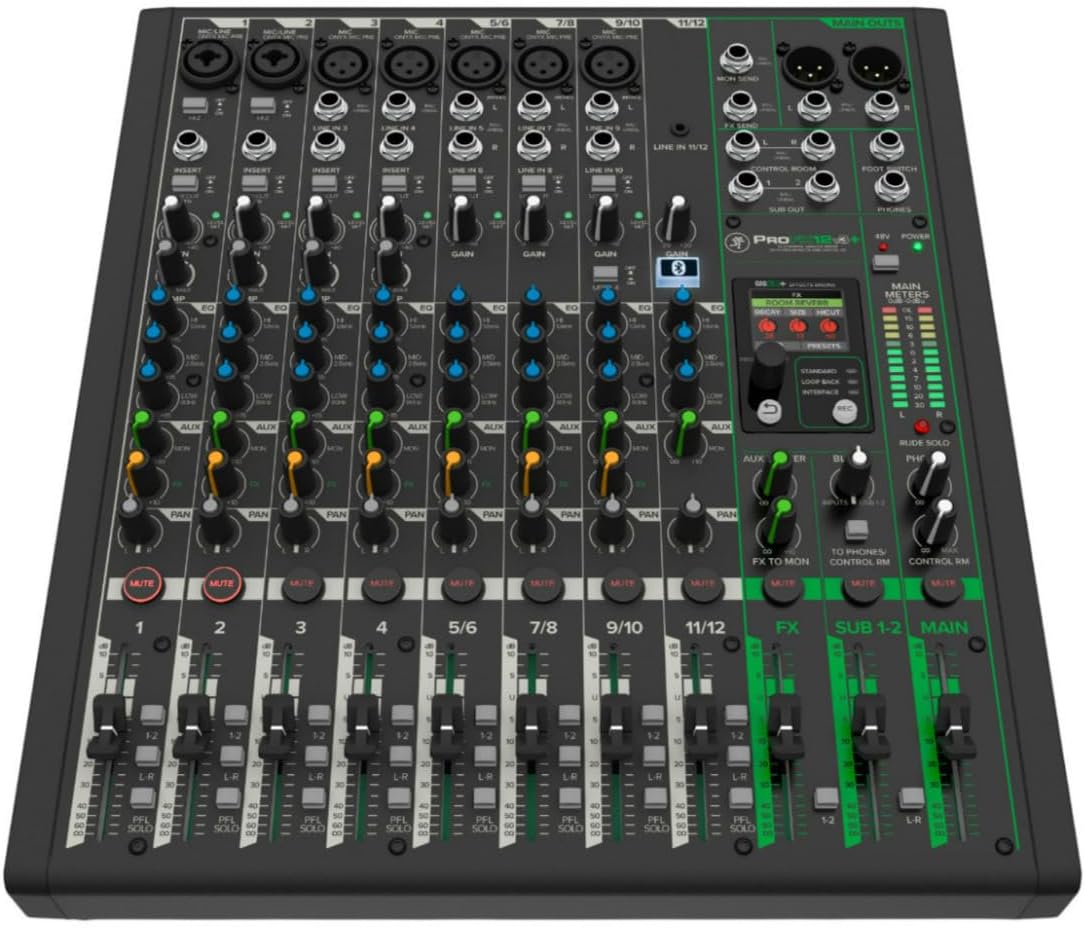
The Mackie ProFX12v3+ is a 12-channel professional analog mixer and USB-C audio interface delivering pristine 24-bit/192kHz recording quality. Featuring premium Onyx mic preamps, switchable USB recording modes, a bidirectional Bluetooth channel with Mix Minus, and an upgraded GigFX+ effects engine controllable via a full-color LCD, it’s designed for seamless streaming, podcasting, and live performance setups. Compact yet powerful, it’s the ultimate centerpiece for modern home studios and on-the-go creators.


| ASIN | B0CP69PFB1 |
| Audio Input | XLR |
| Best Sellers Rank | #1,145 in Musical Instruments ( See Top 100 in Musical Instruments ) #4 in Unpowered Recording Mixers |
| Brand | Mackie |
| Brand Name | Mackie |
| Connectivity Technology | 1/4", USB-C, XLR |
| Customer Reviews | 4.3 out of 5 stars 146 Reviews |
| Frequency | 192 KHz |
| Global Trade Identification Number | 00810128260930 |
| Item Dimensions D x W x H | 13"D x 4"W x 14.8"H |
| Item Type Name | audio mixer |
| Item Weight | 7.9 pounds |
| Manufacturer | Mackie |
| Manufacturer Part Number | 2056099-00 |
| Model Number | ProFX12v3+ |
| Noise Level | 60 db |
| Number of Channels | 12 |
| Number of Items | 1 |
| Output Connector Type | 1/4", USB-C, XLR |
| Power Source | Corded Electric |
| Product Dimensions | 13"D x 4"W x 14.8"H |
| UPC | 810128260930 |
| Unit Count | 1 Count |
| Voltage | 12 volts |
| Warranty Description | 1-year all inclusive, nontransferable. |
L**Y
Great little Mixer
Great little mixer. FX a little lacking but for the price I cannot complain at all. Good routing options, quality and even connects via Bluetooth
W**L
Solid inexpensive mixer
24/192 The audio output is good. Listening to various audio tracks and comparing it to DACs/AMP's I own, it keeps up. I've tested a couple of the tracks and the faders, buttons, and knobs work as expected. Once I downloaded and installed the USB Drivers, the USB-C interface worked flawlessly. Compressor was mentioned by another user, it does work, just extremely subtle in its effect, to the point it is worthless. I've tested out the other effects and they work. For input, I tried the SM7B with a CloudLifter. It does introduce noise but its not overwhelming. I haven't tried using the SM7B without the cloud, but I'll update once I give it a chance. Right now I'm just getting it setup. Power cable was a bit short for my needs, not the end of the world but I had to get creative during the setup for this initial review. Like I said earlier, I also needed to download the USB-C drivers from Mackie's website, so its not exactly plug & play with Windows 10. Not a deal breaker again, just part of the setup process. This, compared to my old 8 Channel mixer, is leagues better. A lot has changed and it seems like the music industry is really catering to pod casters and streamers, making it fairly simple to setup one of these devices to your computer. Right now I am happy. I'll continue testing and exploring and updating the review as I discover more. Thanks for your time, hope this helped. Update 8/27/2025: I was able to use both the included recording software (Waveform13) and Reaper with this. My first impressions with Waveform were not great. That could be my fault though since its a bit different than Reaper. I'll give it a more fair shot and learn the work flow they're trying. Till then, all I can say is both applications work. I also used the bluetooth to take a couple of phone calls just for fun and the wife wasn't amused. It works though. Finally used the SM7B without the Cloudlifter and its better without. The Gain and Fader will be near max, but it introducing way less noise.
T**.
Gigging peace of mind!
Superior quality, ease of use!
F**R
Just what I needed
Works fantastic. Much needed for my studio. Great price by supplier!
F**O
NO LA COMPRE SI ES PARA COLOMBIA
"DO NOT BUY IT IF YOU LIVE IN COLOMBIA. EVEN THOUGH THE WARRANTY IS VALID, IT DOES NOT COVER YOU BECAUSE IT WAS NOT PURCHASED FROM THE AUTHORIZED DISTRIBUTOR FOR THE COUNTRY. I ORDERED MY MIXER ON AMAZON, AND AFTER 6 MONTHS OF USE IT DEVELOPED FAILURES ON OUTPUTS 1-2, WHICH NO LONGER PRODUCE ANY AUDIO. I CONTACTED THE MANUFACTURER, BUT THEY REFERRED ME TO THEIR DISTRIBUTOR IN COLOMBIA, AND THAT DISTRIBUTOR INFORMED ME THAT IT WAS NOT POSSIBLE TO REPAIR OR REPLACE IT BECAUSE THEY DID NOT HANDLE THE IMPORT PROCESS. FOR THIS REASON, I DO NOT RECOMMEND BUYING THIS EQUIPMENT TO BRING INTO THIS COUNTRY—IF IT TURNS OUT DEFECTIVE, LIKE MINE DID, NOBODY TAKES RESPONSIBILITY."
J**Z
Excellent
Does everything it says flawlessly. Set it up in minutes. Only drawback it doesn't allow you to set a default effect preset. Sounds amazingly clear
M**Y
Nice mixer
For its price, I (so far) I'm very happy with this ProFX12v3+ mixer. I have one issue, but I can work around this issue using this mixer's Bluetooth feature. I contacted Mackie support. They state this is a Microsoft (Windows 11 OS) issue. I will explain my issue ... One usage (important to me); I want the person on the other end of my Skype conversation to hear my microphone, my direct electric guitar and background music (that I add via my Windows 11 OS's "Windows Media Player [WMP]"). Meaning, my Windows computer is running Skype and WMP, while I have my Mackie mixer attached via USB. Above: This works, until I press the play button on WMP. Then, the other Skype user, only hears a garbled sound. When I pause WMP, the other Skype user can (then) properly hear my microphone, my direct electric guitar and background music (that is fed into my mixer's Bluetooth channel). I get the same issue when playing YouTube audio using a browser, instead of my WMP. Everything I hear via my mixer's headphone setup is good (including hearing the other Skype user's audio). The other Skype user's audio comes into my mixer via my mixer's USB channel (from my Windows 11 computer). I have "Loop Back" active (although "Standard" mode acts identical). My microphone and my direct electric guitar are plugged into the mixer's strip channels. Again; What I hear is always good. What the other Skype user hears is garbled (in the above described situation). It would be nice if (both) I and the other Skype user could hear all audio my Windows 11 OS generates (via USB). Above: This is supposed to be the ability, but (apparently) I have discovered one compromised situation.
N**L
Unit appeared used.
When I opened the box, it appeared it has been used! All knobs are not turned to “0’! The unit supposed to sealed in a plastic when you open it. Mine was not. It appears to be it was already used for demo! that’s my opinion! I’m disappointed! This is not what I expect! I know the looks of its new.
し**み
良い卓
素晴らしい商品でした。 音質や性能的にもプロ仕様だと感じました。 私は映像・音響編集環境のメインミキサーとして購入しました。 1点、USBでMacのPCに繋いだ際、ただ繋いだだけでは標準の1/2chのみ出力されて、3/4では出力しないので注意が必要です。 ミキサーでは9ch(だったかな?)をusb入力に割り振れると書いてありますが、Macの3/4chしか受け入れておらず(ほぼDAW専用)、Mac標準出力の1/2chはモニターとヘッドフォン出力にしか回せず、フェーダーでコントロールできません(メイン出力・Subにも回らない)。ノブのみでコントロールできます。 なので私はMacに別のオーディオインターフェースを繋いでからこの卓に入れて、他のCDプレイヤーやBluetoothなどをこの卓にまとめてモニタースピーカーから出すという使い方をしていて、Macにusbでこの卓をオーディオインターフェースのように繋ぐやり方はしていません。
T**S
I’m satisfied.
I rated 5 star because I’m happy with it. Highly recommended.
J**S
Calidad y garantía
Magnífica
R**O
Rock solid build
worth the money.
D**S
Excelente potencia
Llevo apenas ocupandola en dos ocasiones pero y lo que he checado es que tiene mucha potencia
Trustpilot
2 weeks ago
5 days ago