Desertcart purchases this item on your behalf and handles shipping, customs, and support to Tunisia.
🚀 Unlock triple-display productivity and leave single-screen limits in the dust!
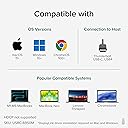
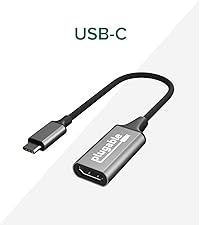
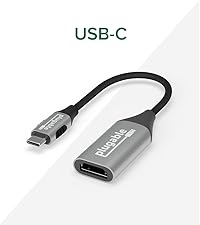
The Plugable USB C to HDMI Adapter enables MacBook M1 through M5 and other USB-C devices to connect two 4K 60Hz external monitors simultaneously, overcoming native Mac display restrictions. Compatible with macOS, Windows, and ChromeOS, it requires DisplayLink drivers on Mac for extended multi-display setups. Compact and powered via USB-C, it’s ideal for professionals seeking enhanced productivity with triple-screen workflows, supported by lifetime expert assistance.


| ASIN | B0CS8D3KF2 |
| Best Sellers Rank | #72 in Audio & Video Connectors & Adapters #124 in Computer Cable Adapters |
| Brand | Plugable |
| Color | Space Grey |
| Compatible Devices | Driver Installation required. |
| Connector Type | HDMI, USB Type C |
| Customer Reviews | 4.3 out of 5 stars 582 Reviews |
| Finish | Matte |
| Item Dimensions | 3.1 x 2.4 x 0.6 inches |
| Item Weight | 4.16 ounces |
| Item dimensions L x W x H | 3.1 x 2.4 x 0.6 inches |
| Manufacturer | Plugable |
| Mfr Part Number | USBC-6950M |
| Model Number | USBC-6950M |
| Number of Items | 1 |
| Number of Ports | 2 |
| Package Quantity | 1 |
| Specific Uses For Product | Monitor |
| UPC | 819927013372 |
| Unit Count | 1 Count |
| Warranty Description | 2 Year Limited Parts and Labor |
| Warranty Type | Limited |
R**.
Perfect for 2024 Macbook Air M3 multi display
I ordered this Plugable USB C to HDMI Adapter after researching how to set up 2 external monitors to my 2024 Macbook Air M3. Setup was simple. Connectivity was a breeze! Plug it in, go to the website listed on the sticker on the adapter to download the required software, install software (Plugable website has a video to walk you through this as well as step by step instructions with screenshots for those that would rather read them), plug monitors into the adapter via HDMI cables, then finish by arranging the screens in the orientation you prefer. Very easy and I'm very happy with how well this works. One of the best perks of this adapter is it allows you to setup a 3-display configuration (2 external monitors PLUS the laptop display). I like that I don't have to use the laptop in clamshell mode (laptop closed). It is powered by the laptop so it doesn't need an additional power source. The resolution is great! It is fairly small so it doesn't take up much room at all on my desk. For $89, I find this to be a good value. I could have spent more time researching but I'm glad I pulled the trigger and just bought this. Saved me time and effort. Highly recommended for anyone looking for a multi display adapter. Also, it overcomes Apple's native screen limit (at least on my 2024 Macbook Air M3.
J**.
Got Triple Monitors Working on My iMac
I bought this to run two external monitors on my 2025 iMac and overall it accomplished exactly what I needed. I now have all 3 screens running and working together. There are a couple quirks worth mentioning. The external monitors do not always wake up automatically when I sit down at the computer, but it’s manageable and not a huge issue for me. Also, on Mac you do need to allow screen recording permissions in the system settings for these adapters to function properly, which wasn’t immediately obvious at first. Once everything was configured, though, it worked well and solved the problem I was trying to fix. If you’re trying to expand monitor support on a newer iMac, this definitely does the job.
G**T
worth trying before getting a new computer but not perfect
I was hesitant based on other reviews but this has worked perfectly for my needs. All the little complaints people have are true but I probably only spend an extra 2 minutes a week getting this to play nice with my monitors compared to using a windows machine. Beware-- you can't stream any paid movie services AT ALL when using the software, HBO etc wont work.
M**T
Works as described
Been using this for almost a year and no issues at all with my MacBook Air 15" M2 2023. Downloaded the software and plug and play. Paired with (Dual Monitor Mount for 32 27 24 22inch Screens, Gas Spring Monitor Stand for 2 Monitor, Full Adjustable Monitors Desk Mount with C-Clamp&Grommet Base) and (2) Acer 27 Inch Monitor- KB272 and I cannot complain. Does take up one of the USB-C ports so if you have multiple requirements for additional devices I would spend the extra money and get the larger hub from Plugable that allows for more USB slots. Not cheap but they make great products from my experience.
L**S
Good til it wasn’t
Good til it wasn’t! This worked pretty flawlessly for the first 10 months. At month 11, it would randomly stop working from time to time- usually when I had a super stacked work day. Today, just a year and a few days after I bought it, it died for good. I’ve noticed a couple of reviews with the same experience, so do your research and if this is the one, add the protection plan!
M**X
I wouldn't waste your time on this product.
This never worked for my 2022 M2 Macbook Air. I was never able to drive more than one VGA monitor. Plugable took a week to even respond to my request for support and then suggested more expensive HDMI to VGA converters that did nothing to improve the situation. Then another 2 days elapsed before support follow up. I gave up and returned everything to Amazon and advised Plugable. The next day I received an email asking me to post a review. They need to be careful what they wish for.
N**T
Works 90% of the time
I need two external monitors for work. This device is a good solution for my Mac M2 which would only support one external monitor. It works really well most of the time for work usage. Video quality is good and there is rarely a lag or "ghosting" on the screens. The only problem I've had is that the external monitors freeze periodically when I'm host a video conference, which I do often - several times a day. I use Zoom for work and I'm not sure where the problem is. I've read a lot articles blaming DIsplayLink, Zoom and the Mac. I've tried several options people have suggested, none of which work for me consistently - change my Mac settings, reboot my computer, etc. THe only solution I've found is to unplug the device from my Mac for a moment then plug it back it back in. If I'm sharing my screen via Zoom, which I do most of the time, I have to start the share again. Then all is good, at least for a while. Despite the freezing issue, this is a good device that works for me most of the time. The disruption when it does freeze is minimal and I can get it to recover quickly. Perhaps they should change the device name to Plugable/Unplugable to be more accurate.
B**7
Saved my life
I had tried much more expensive similar products, but none of them worked. As an IT/Cyber expert, I upgraded my home office with the intention of working remotely. I wanted to connect large, curved monitors to my laptop, but I could only connect one monitor at a time. I even consulted a specialist in TV mounting who had experience with similar projects. He informed me that my main laptop was not designed to work simultaneously with four monitors. This product was recommended to me by ChatGPT after I explained my experience with all the previous methods I had tried, some of which had cost hundreds of dollars. This was my last resort, and I had no big hope at that point. But then, to my surprise, all I had to do was plugged it and worked! I almost cried with joy.
D**E
Works to extend extra monitor on MacBook Air M2
I was pretty disappointed to find out my new MacBook Air M2 only supported one external monitor natively. This worked out of the box and I can have 2 external monitors plus the MacBook monitor. Very easy set up, much cheaper than upgrading to higher spec MacBook or buying a whole new docking station. Recommended
C**E
Parfait pour Mac
Fonctionne parfaitement pour ajouter deux écrans sur un Mac
Y**S
Amazing
amazing. fixed my screen issues. now i can run 2 additional monitors on mu Powerbook. even the apple adapters couldn’t solve the problem
Y**H
良い!
Macbook Air M2用に購入して実際に使ってみるまでは若干不安でしたが、全く問題ありません。 専用のアプリDL必要ですが、すぐ完了しますし、UIもシンプルなので何か難しいことをする必要もなし。 映画を流しながら作業することもあり、最初試してみたのですが、 やはり他のレビューにも書いてある通りサウンドだけど流れて、映像画面は真っ黒で何も見れませんでした。 ですが、解決方法があります。下記のステップで解決しました。ご参考までに。 ↓↓↓↓↓↓↓↓↓↓↓↓↓↓ ChromeやEdgeを使用している場合は、以下の手順で設定を変更してみてください。 1.ブラウザの右上にある「設定(三点ドット)」をクリック 2.「システム」または「詳細設定」を選択 3.「使用可能な場合はハードウェアアクセラレーションを使用する」をオフにする 4.ブラウザを一度完全に閉じて再起動する
G**P
Works Flawlessly, Trivial to Set Up
I tried a cheap MST adaptor that claimed 2 x 4K @ 60Hz but couldn't make it work with my Geekom GT2 Mega. This DisplayLink based unit works flawlessly, even via a USB3 hub. If I watch 1080p 60Hz video full screen on it, it consumes about 4% CPU - not bad at all. It does run hot (the manufacturer states that the cooling design means that this is a feature as it tightly couples the heat-generating chipset to the aluminum case - which is believable). I have attached one 60mm x 60mm heatsink to each side and used those as stands to orient it vertically and now in runs cool to the touch, even under heavy load. Not strictly necessary, but every 10C reduction approximately doubles the life expectancy....
Trustpilot
1 month ago
1 month ago