Desertcart purchases this item on your behalf and handles shipping, customs, and support to Tunisia.
🎉 Elevate your workflow with precision, comfort, and style!
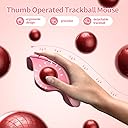
The seenda Wireless Trackball Mouse combines ergonomic design with advanced optical tracking and multi-device connectivity. Featuring a thumb-controlled trackball, adjustable DPI, and rechargeable battery, it offers precise control and comfort for extended use. Compatible with Windows, Mac, and Android, this pink mouse supports seamless switching between three devices via Bluetooth or USB, making it ideal for professionals seeking efficiency and style.


| ASIN | B0CQT68QV4 |
| Additional Features | Ergonomic Design, Wireless Mouse with Roller Ball, Thumb Control, Multi-Device Connection |
| Antenna Location | Ergonomic Trackball Mouse for office, home, travel use |
| Best Sellers Rank | #133 in Computer Mice |
| Brand | seenda |
| Built-In Media | charging cable |
| Button Quantity | 6 |
| Color | Pink |
| Compatible Devices | Pink Ergonomic Mouse Compatible for Windows, Mac OS, Android Computer, Laptops |
| Connectivity Technology | Bluetooth+USB Multi-Device Ergonomic Mouse |
| Customer Reviews | 4.4 out of 5 stars 1,395 Reviews |
| Enclosure Material | Plastic |
| Finish | Smooth |
| Hand Orientation | Right |
| Manufacturer | seenda |
| Mfr Part Number | MOU-301 |
| Model Name | MOU-301 |
| Model Number | MOU-301 |
| Movement Detection | Optical |
| Movement Detection Technology | Optical |
| Number of Batteries | 1 Lithium Ion batteries required. (included) |
| Number of Buttons | 6 |
| Operating System | Compatible with Windows, Mac OS, Android |
| Power Source | Rechargeable Batteries |
| Range | 10 meters |
| Special Feature | Ergonomic Design, Wireless Mouse with Roller Ball, Thumb Control, Multi-Device Connection |
| Style Name | Modern |
| Theme | Video Game |
| Unit Count | 1 Count |
| Warranty Description | 1 Year |
S**S
My favorite mouse so far!!
I have small hands. They're 6.1 inches. I was worried this mouse would be way too big, like the logitech my boyfriend has. To provide some context, this is not my first trackball. Trackball mice have a learning curve where you get used to them. They may feel strange or not work quite how you expect initially, so I suggest giving your first trackball mouse or two a week of trying before you throw in the towel on them. You'll occasionally have to pop the ball out and clean the bearings, but that's standard maintenance for all trackball mice, and only takes a moment. I've had 2 trackballs of my own prior to this one, and I've used my boyfriend's. His mouse is for large hands. A lot of mice are made for large hands. That's why it upsets me some when I see the reviews for this mouse complaining it's too small. It's not for you!!! Let me have my mice that fit small hands!!! :D This mouse would also work very well on medium hands, and large hands could also use it, but if you have very large hands, you have a lot more options than I do. It's perfect. I was worried it would be too big, but it isn't! One month into using it, I worried it being rechargeable would be an issue. It's not. You can charge it while you use it, and it's so easy to remember to plug it in when you're done. But regardless, the charge lasts a long time.. Over two weeks at least, but it's never run out of battery for me yet, so it's much longer than that. With my last trackball, the scroll went out of it a month after buying. This one has shown zero signs of any issue with that, either. I love the color. I use this mouse for both gaming (Red Dead Redemption, Little Big Snake, No Man's Sky, ect) and Photoshop, and it works very well for both. I was also concerned about buying an "off-brand" mouse, which wasn't among the big mice you hear about in the trackball community. I think Seenda should be given some more credit. I bought the 5 year warranty offered, but so far I am very pleased with this mouse and I hope they never stop making it. The only adjustment I would request is adding one additional programmable button so I can have an Enter button like I had on my last mouse. This has two additional buttons instead of the 3 I am used to. However, it's not something I'm too worried about, as my keyboard is in easy reach. I like the scroll wheel being round. It scrolls smoothly, without clicking as some mice do. It's easy to get the hair out of (so far). The only potential issue I can see with it is over the long term the rubber on the scroll wheel holding up without becoming sticky. But that won't be an issue for years, if it becomes one. The rest of the mouse is plastic (except the trackball, and that's a good thing). The mouse is accurate and great for my uses, which require precision. On the prior mouse, I could never make straight lines, only soft curves. But I can with this, and across the whole screen. I don't use the Bluetooth connectivity feature, as I prefer to hook it directly to my laptop via the usb connector is has, but I doubt I would have an issue with it considering how well it's doing on everything else.
N**A
This might be the best mouse I've used!
This mouse is great! I have joint and muscle pain in my shoulders and wrist that were aggravated with the other style of mouse. The seenda trackball mouse has helped lessen it a bit, especially when paired with a wrist rest. I'm on my laptop frequently for university, and it works great with SolidWorks and ArcGIS--it would probably also work well with other software that requires some precision. My favorite features are: - feels comfortable for smaller hands (my palms are ~6.7" across) - fast Bluetooth connection - quiet clicking noises - fast and responsive trackball - long lasting battery with ability to still use mouse while charging - trackball allows for high precision I'm very happy with this and would recommend it to others who are looking for an ergonomic mouse!
H**Y
Love it!!
I love this mouse. My whole office set up is pink ant it adds the perfect touch. It is great quality, ergonomic, light weight, and the perfect size for my large hands. It works perfectly.
C**N
Nice trackball mouse, drains battery like crazy, recharges fast
Love the trackball mice, hate moving a mouse about, keep hand in place, move hands between keyboard and mouse without a thought of where I left the mouse. Decent mouse, the trackball works well. However, I've found this burns through the battery fast. Overnight, it shuts itself down, have to press the buttons on it a few times to get it to light up, but come the second weekend back, the mouse is dead. But, the positive side, this is internal battery, USB plug in, it is recharged in about an hour or so, and working for the next couple of weeks. The USB plug from my mouse location to the PC tower is short, so really doesn't interfere with placement. Nice color, good mouse, just be aware of the need to plug and recharge often, at least that is mine. I'd recommend, just for the color alone.
A**R
Reliable rechargeable trackball that feels just like Logitech
Of course my battery-powered Logitech trackball died in the middle of the night, when someone was sleeping in the room with the spare batteries. I wanted a rechargeable model to avoid that situation in the future. This trackball was $70 cheaper than the equivalent Logitech, which made it an easy choice. My current setup is a MacBook Pro connected to a Mokin Displaylink dock, using the MacBook like a tower (closed), with two LG 32ML600M-B monitors, and a keyboard plugged into the dock. The trackball connects via Bluetooth directly to the MacBook and I use it for several hours a day doing spreadsheet work, web research, and general productivity tasks. Pros: Familiar feel: I’ve been using this style of trackball since 1996, and this one feels identical to the Logitechs I’ve used for decades—very comfortable and intuitive. Good battery life: Easily gets 5+ days on a charge, and it works fine even while plugged in and charging. Smooth performance: The trackball is smoother than my previous one (at least for now, I’m sure it will get rougher like the Logitechs do). Multi-device switching: The trackball can pair with up to three devices, and switching between them is simple with a physical button and indicator lights. Adjustable DPI: It's easy to change the DPI sensitivity to match your workflow or screen setup. USB receiver storage: The USB dongle has a built-in storage slot on the bottom of the trackball, which is super convenient for travel or switching devices. Fun color option: I love the pink color—it’s cheerful without being overwhelming. Cons: Wakes inconsistently via Bluetooth: Unlike my old Logitech, which would automatically reconnect when waking the MacBook, this one usually needs me to press the device switch button on the bottom to get it going. It’s a small annoyance, but worth it for not having to deal with batteries. I’d definitely recommend this trackball, especially for longtime Logitech users looking for a rechargeable option at a lower price. It’s a nearly identical experience in hand, with added benefits like multi-device support, easy DPI control, and clever design touches like USB receiver storage. While the wake-up issue over Bluetooth is slightly annoying, it’s a fair trade-off for ditching disposable batteries at this price point. One note for Mac users: the description mentions limited support for the forward/back buttons. I don’t use those features, so I haven’t missed them. For basic navigation (left/right click, scroll wheel, and trackball), it works great.
A**R
Purple Precision
I've never used a trackball mouse before, but I love this thing so much! I primarily work as a video and photo editor and I love the precision this mouse gives me. My thumb hurt a little the first few days of using it, but the stress was minimal and I adjusted really quickly. I love the DPI button. I love even more that it is USB-C rechargeable so goodbye disposable batteries. The final selling point was the BT connection. I can use this mouse with my computer, my laptop, my tablet, my phone. My options are limitless. Bonus! This mouse is purple and matches my keyboard pretty closely. This mouse was a gift for myself when I did a desk refresh and did a purple desk haul.
L**E
Works great; feels familiar and it's a great color!
I've used trackballs for years, so long that now if I try to use a "regular" mouse, it's awkward. I've even bought my own trackballs to use at work so that I could use the same device at home and work. Up until now, all of my TBs have been battery operated, which was sometimes a hassle at work since our office never seems to have any spare batteries, so I love that this eliminates that hassle. When Prime Days were getting near, I started looking up trackballs since my older one at home was starting to get a little flaky, so I wanted to be prepared with a backup. Was I surprised when I stumbled on this brand, and it came in my very favorite color! It was on sale; I sat on it, and it went off sale. A few days later it was back on Prime Day sale, so I jumped on it, telling myself I could always return it. Nah, that ain't gonna happen! I tried it at first on my home laptop and it connected very easily via Bluetooth. The next day I took it to work to try. It connected flawlessly with the dongle (our IT dept disabled BT on all of our desktops for security). It works great in both environments. It is so similar to my "L" brand one that I could there was barely a learning curve, at least once I figured out the buttons for device selection. It did take me a little while to try to match up the DPI setting so that the TB felt the same as my old, familiar one. (I do agree that it would be nice if the DPI button was placed somewhere it would be a little safer from accidental bumps, because all of a sudden I'd notice the speed changing). I love the color, which makes my otherwise boring desk more colorful. My office mates all approve of the appearance. I already decided on day one I was keeping it, so I quickly broke out my paint stick to put my name on the underside, so that it couldn't accidentally disappear. (I trust my coworkers, but the office is too easily accessible to everyone else). I had occasion to contact their customer service department and was very impressed. I asked if I could get a pdf of the user manual to keep on the cloud because I always end up losing the paper ones. I wrote it in the evening, and the next morning the pdf was in my inbox. I wrote a thank you note for the quick service and got another prompt response saying "that's what we should do". I'm impressed! One request to the manufacturer - please consider making more colors. I never know what to buy my brother for Christmas, but he loves bright green, so I'd hop on a green one if you'd consider making those. All in all, very happy after two days use. If anything changes, I'll update.
S**.
so far, so good
3 STAR REVIEW: i wanted to love this mouse so much because it matches my desk set-up. set up was very easy (i used the 2.4hz dongle specifically), but adding it as a Bluetooth device also seemed very easy. i was able to adjust the DPI, which I love in my other computer mice, but the fact that it adjusts randomly when I'm using it is not great. The track ball is also smooth and quiet, but not always responsive. I feel like i have to kind of press the track ball to make sure that my mouse responds accordingly. I like the added buttons for additional features, but they weren't that important for me. I'm really debating on returning this, but i think I'm going to test it out a couple more days to see. EDIT; UPDATED to 4 STARS: I think the DPI is what was affecting the track ball sensitivity. since setting up and adjusting it to the highest setting (i believe its 1200), the mouse has worked better. I'm not pressing the track ball anymore and and the mouse is still responding. leaving it at 4 stars because I noticed when I locked my computer, the mouse did not respond on my lock screen but once i unlocked it, it responded just fine. not sure if that was a one-off glitch or that's just what it does.
A**Y
Same as the full price brand
Excellent device, as good as the full price brand but at a fraction of the price
X**A
Comodo y buen producto
Me gusta mucho, mi tunel carpiano se desinflamo al mes de usarlo. Si tiene una curva de aprendizaje para usarse, sin embargo es bantante practico y es bastante cómodo.
G**A
Not satisfied
Before the mouse was okay but after a period of time the Bluetooth no longer working and it only works wen the the otg is plugged into the computer secondly the cursor slows
A**K
I love this mouse of happiness !!
Five stars! This mouse is everything I needed. It’s incredibly comfortable for all-day use, tracks flawlessly on my Mac, and the color is beautiful. It’s wireless, reliable, and perfect for anyone upgrading their desktop setup. Highly recommend!
L**A
Excelente
Una opción económica y muy buena ante MX ergo de Logitech
Trustpilot
2 days ago
3 weeks ago