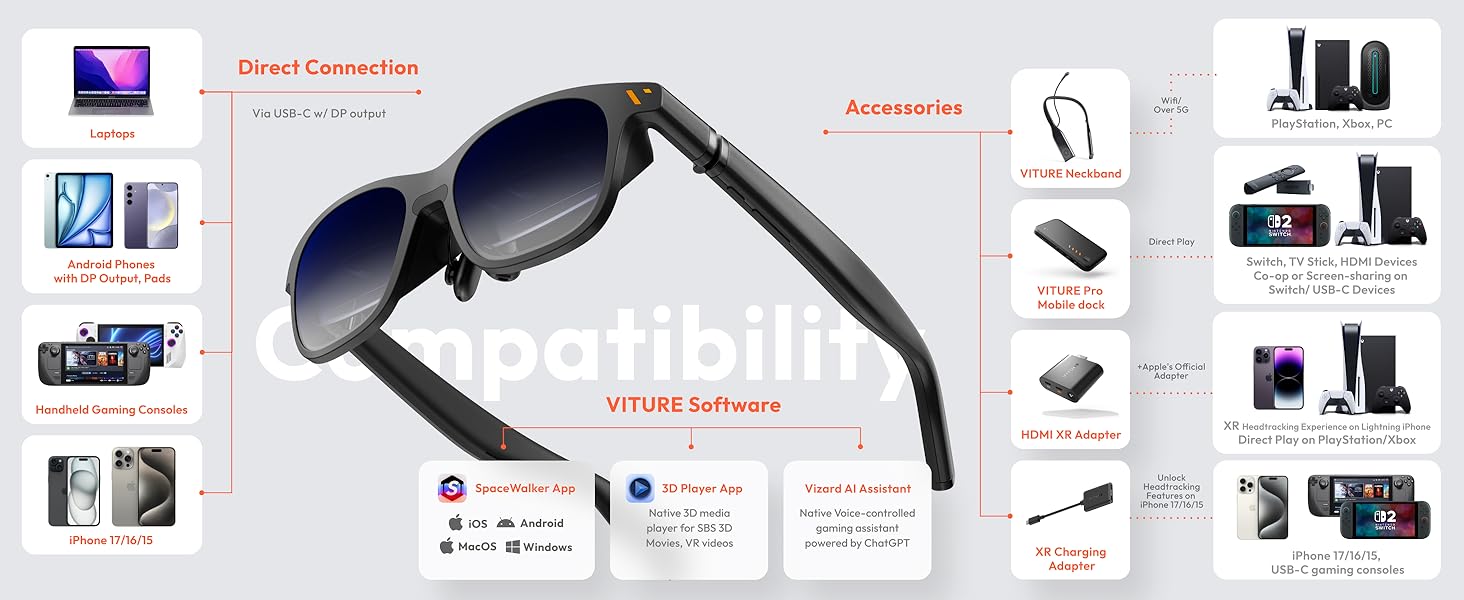
🕶️ Elevate your reality—see sharper, play harder, work smarter.
VITURE Pro XR/AR Glasses deliver a groundbreaking 135" 120Hz OLED display with over 1000 nits brightness, tailored myopia adjustments, and advanced electrochromic film for ultimate light control. Engineered with Harman stereo audio and universal USB-C compatibility, these glasses redefine immersive XR experiences across gaming, productivity, and multimedia on iPhone, Android, Mac, PC, and more—all housed in a durable aircraft-grade metal frame.


| ASIN | B0D3LRH8G4 |
| Additional Features | 3DoF, Adjustable Electrochromic Film, Multiple Screens, Spatial Video/ Spatial Photo, VR Videos |
| Age Range Description | Adult |
| Band Color | Black |
| Band Material Type | Silicone |
| Best Sellers Rank | #14 in Video Display Glasses #5,472 in Home Theater Accessories |
| Brand | VITURE |
| Built-In Media | Anti-Clip Hair Cover, Charging Cable, Glasses Case, VITURE Pro XR Glasses, Nose Pads (4 sizes: 1, 2, 3, and 4) |
| Case Material Type | Resin or Metal |
| Clasp Type | Buckle |
| Closure Type | Buckle |
| Color | Jet Black |
| Communication Feature | Wireless, Wired |
| Compatible Devices | Smartphone, Tablet, Gaming Console, PC, MAC |
| Compatible Phone Models | Compatible with Android devices, iPhone 17/16/15 (not included iPhone 16e & iPhone Air) |
| Connectivity Technology | USB |
| Controller Type | Button Control |
| Customer Reviews | 4.0 out of 5 stars 2,676 Reviews |
| Display Type | OLED |
| GPS | No GPS |
| GPS Geotagging Functionality | No GPS |
| Human Interface Input | Buttons |
| Item Dimensions | 6.3 x 1.85 x 2.13 inches |
| Item Dimensions D x W x H | 6.42"D x 1.88"W x 2.11"H |
| Item Weight | 78 g |
| Manufacturer | VITURE Inc. |
| Maximum Display Brightness | 4000 nit |
| Metrics Measured | 34D/VR |
| Model Name | V1241 |
| Model Number | VITURE Pro XR Glasses |
| Operating System | Nintendo Switch, PlayStation, XBox, iOS, Android,macOS, Windows |
| Resolution | 1920 x 1080 per eye |
| Screen Size | 135 inches |
| Shape | Oval |
| Special Feature | 3DoF, Adjustable Electrochromic Film, Multiple Screens, Spatial Video/ Spatial Photo, VR Videos |
| Sport Type | Baseball, Cycling, Run, Walking |
| Style Name | Modern |
| Supported Application | Productivity, Multimedia, Sports |
| Supported Satellite Navigation System | GPS |
| Target Audience | Unisex Adults |
| UPC | 850047431332 |
| Unit Count | 1 Count |
| Warranty Description | 2 Years |
| Warranty Type | Standard/Full |
| Water Resistance Level | Not Water Resistant |
| Wearable Computer Type | Smart Glasses |
| Wireless Provider | NET |
S**N
The best purchase ever. 1 of a kind
I freaking LOVE this item. Like LOVE LOVE! I will say this is my best purchase to date on Amazon and I buy too much crap each month for my own good. Now let’s get to the good stuff. (Transparency: similar review going to the neck band & controller since it was a 3 in 1 deal) I am a tech geek and I love to try various products from cost effective to top of the line. I work in tech after all so it makes sense. This is my second pair of AR glasses by first were Xreal which was purchased through Amazon as well. The virtue glasses: The fit is so much more comfortable than my xreal air if you ask me. It’s snug but not tight so I can move well with them. I ran with both pairs of glasses and this one was very seamless in motion. I love have the prescription adjustment so I can wear this and see WELL with or without my contacts. I am above -3.00 on both eyes so to see it clear is amazing. The nose piece fits great. I don’t find it to be heavy at all. The adapter which I received which I’m not sure from this or the neck back but works well with my android phone and I was even able to use a the converter for my iPhone. I think it sits well on the bridge of my nose. Clean sleek look. If I wasn’t wearing the neck band it would look like regular sun glasses. Device control buttons very easy once you read the directions and honestly I have no complaints. Of course we all want VR glasses in sunglasses for but for a start this works well. It’s so comfy to lay down and watch tv or move around with seeing my surroundings if I want to. Audio is loud and very clear. To the designers- Maybe a camera feature to record and take videos might be nice in the future. Cough cough lol Now the neckband. Is it needed no but do you want it YES! I can access not only my work environment but my other desktops easily with the Remote Desktop app. I like working in the sky space with the 3 screen Display option but since the neck band is technically an android device you can do split screen in android mode which works just as good. The neck band connected to my WiFi easily, phones easily and any controller I am using. I have a mini wireless palm size keyboard with mouse and it’s almost seamless. (The keyboard is on the cheaper side so I won’t ding it for that) when using the hand gesture option; it’s pretty cool to not have to use any devices to use neckband but there’s def a lot of work that needs to be done. But come on it’s the first of its type to release and it does a pretty decent job. I don’t just game on this bad boy, I store everything from my work, class courses, writing scripts, watching movies from a far or even close and so much more. It’s literally my phone, tablet, laptop all in one with tons of storage space. Virtue is a great assistant. Works just as good as Gemini and Siri with getting me to my apps, research , etc. I don’t think the neckband is heavy at all. Barely notice it’s there unless I’m trying to lay on my side. I love how with the neck band I can minimize the screen to a specific corner and the control actions are no duplicated. It gives it more of advance experience and really makes you feel like you’re in the future. I recommend buying the glasses and the set. My only recommendation is I wish it did E sim so I can just put my cell service or WiFi directly on it without a hot spot but I can’t complain honestly. It keeps me engaged, I can work anywhere it runs fast and it’s my new fav gadget that I use for majority if my day. Oh yea, it’s awesome to connect to the glasses. No long piece running down your side which would be extremely annoying. Lastly the controller. Great touch. Nice to have this as an option if you don’t want to use your phone. Connects to the neckband easily. Works great with my Xbox cloud account. Took several tries to figure out why I couldn’t use the controller to play my games but hint hint hold L & R same time to switch from stick mode and game mode. Is this part necessary no but am I happy to have it yes. The controller also allows you to go right to Home Screen, back options between apps and a few other features. To sum it all up, for the price for all of this together this was a great purchase. The neckband is literally putting them to the top of the AR/XR glasses game. I would not only recommend it but I can say most will love it if you’re not just buying it for movies and gaming. You can get cheaper for that but this bad boy right here is a straight up Experience!
J**.
Significant Improvement Over Original Viture Glasses
I like the fact that everything I wanted improved on the original Viture One Glasses has been improved. The screen is bigger (I wouldn't want it any larger) , the screen is brighter (Also adjustable), the screen is sharper (especially around the edges), the sound is 5db louder (with recent update & can raise or lower), & the lenses tint darker (blocking out almost all light). Others complained about the fit, but while I think the fit isn't perfect, I like the fit & find it comfortable for around 3 hours straight then I take a break. Just like sunglasses fit, everyone's head, face, & eyes are different. So, I think they did a really good job to accommodate everyone for a happy median. The quality of these glasses, just like the original Viture Ones, is excellent craftsmanship. I think they can improve the fit by making an increased variety of nose pieces either with new purchase of glasses or buying just an increased variety nose piece set. Nose piece cushions could be a little more comfortable maybe by exploring other materials like memory foam, different foam/rubber ratio combination, or maybe some slip resistant neoprene like covering over the nose contact area. Also, the screen should be able to be moved vertically up or down more tailor screen placement if in between nose pieces (I don't have this problem but I've read someone else has. I think that the next model glasses should be 4k @ 120hz to push it to the next level. The tinting feature should also be further improved to block out 100% of light. I dont know if they can do it or not, but it would be cool to have a cable that's magnetic connector from glasses to a full hdmi (to eliminate the adapter). It would also be nice to have volume & brightness control on separate glasses frame arms instead of 1 up & down control buttons with shared function on same glasses frame arm. I also think these are the best xr glasses on the market & hopefully Viture stays on top (& I think they will). Last but not least (by far) Vitures customer service is #1 out of any company I've dealt with thanks to Emily (give promotion). She is very friendly, knowledgeable, helpful, & irreplaceable (especially nowdays)! Thank you & I really appreciate these new Viture Pro Glasses as I don't have to lug out a big tv into my truck as I'm an over the road truck driver.
W**N
Painfully Close to Perfect with a Fatal Flaw
Summary: What I wanted: A wearable computer monitor/TV. I basically got that. Just not as wide an input support as would make them perfect. Don't expect clear text near the edges of the display. Why I wanted it: Video gaming and having a computer monitor that fits in a pocket. Mostly got that too. What these are NOT: Virtual reality glasses. Augmented reality glasses. Full Review: -------------- The Fit: 5/5 I have a slightly wider than average face. These glasses are a bit tight to put on initially, but relax into a good position once you grapple them around your skull. My discomfort was momentary. There is enough give in the opposite direction on the hinges that for me the comfort is excellent after the initial push to get them in place. They rest securely but do not squeeze. I'm certain they could be shaken off, but not casually. Overall ergonomics feel very good once they're at rest. No sharp bits, no uncomfortable seams anywhere that rests on skin. Bizarrely lightweight. Connecting cable is in a fantastic place to stay out of the way. Very comfy. Appearance: 2/5 The glasses have a thick, satin finish black plastic appearance. Not shiny or particularly dull. Fingerprints from handling the frame do show, but only from close up and under angles of light normally reserved for inspection. I'm unsure what the material of the shell is, but feels like plastic. The electrochromic lenses work fantastically. Honestly, a super cool feature. No need for a lens cover. They go from just lighter than sunglass darkness to what seems like welding goggles dark immediately on power-up. This can be toggled with a small button on the left frame. I used these exclusively in well-lit rooms and had zero trouble with light interfering with the picture. Kind of ugly, but not what I got them for. Display: 4/5 These were almost perfect. A sharp image where individual pixels are actually fairly difficult to pick out. Nice and bright colors with a built in brightness adjustment rocker button. Deep blacks. I used it at a little less than half brightness and it's excellent there--bright and crisp as a 30 inch monitor 3 feet from my face. My eyes remaining relaxed the whole time. Top and bottom of the image are nice and sharp almost all the way across. The adjustment knobs for myopia are nice and sensitive, very granular! But there's a flaw. There's always a flaw. The Viture Pro seems to be designed with a VERY narrow interpupillary distance range for best use. As far as I can tell, roughly 62-64mm or so. Mine is 67. This means the left and right edges of the otherwise amazing display are a blurry columns as the optics and my eyes are juuuust off the angle for the picture to be pixel perfect. Text in the left and right edges of the display and to a similar extent the corners are quite blurry from this distortion. Just the outside couple of inches in my illusory 30 inch monitor, but enough where reading text gets difficult. If my eyes were a few millimeters closer together it would probably work amazingly. Instead, I'm left with only above average. Unlike the knobs for individual focus per eye, there's no way to adjust this distance between the pupils at all. It's hard molded into the width and shape of the glasses themselves. It's the fatal flaw in an otherwise incredible display. I was crushed. It'll probably be what forces me to return them. If your eyes are a little closer together than mine and fall in the magic interpupillary sweet spot, you're in for an incredible treat. The rest of us should wait for the next model, where I hope they add a dial to make the glasses a little slimmer or wider so our eyes line up perfectly with the prisms. Sound: 3/5 There are speakers built into the arms of the glasses, and I'll admit I was quite pleased with their ability to reproduce a relatively good sound. They do lack a bit of accuracy because they're tiny little things, but I was overall very pleased with the illusion of real speakers. It's nowhere near as tinny as I feared a speaker that small would be. It also does a pretty good job of not being clearly audible from more than just a foot or two from the glasses. You can tell there's a sound there, but not exactly what it's saying. Not bad! Volume is controlled by the volume system of the host device or computer (or steam deck in my case.) Accessories: 4/5 The glasses come with a very defensive case, and their magnetic USB-C cable that makes it all work. It's not a standard wire, so keep it safe. The case does thoughtfully provide a little compartment that holds this wire inside so that you won't lose it easily unless you lost the whole thing. I appreciate little touches like that. I do ding it slightly for not molding in a convenient little spool to wind the wire around in the case, you sort of have to hand-spool it each time and it's always a little bit the wrong size and you need to do it again. There's a bit of poor placement of the interior case magnet too, it tends to let the wire bunch above it and makes it trickier to pack the case correctly. That's mostly a convenience nitpick. Also the interior material of the case seems like it would soil very easily from just human skin oil, so bear that in mind. Device Compatibility: 3/5 The glasses alone are compatible with most computers that have Displayport over USB-C. This is things like most laptops, the Steam Deck and similar "game-computers" and quite a few apple devices. It does not translate to many computers that lack this ability, or similar GPU capacity in the CPU. Also essentially NO TVs without a separately sold $130 accessory the company sells. If you don't have a computer or smartphone style device to host it, it does NOTHING alone. It has no battery or power source on its own. It absolutely NEEDS to be hosted by another USB-C machine to do anything. Make sure you know that. I'll upload some various photos and a video of the electrochromic lens in action for the curious.
D**O
Solid choice for FPV drone use
Rather difficult to setup for everyday, regular use. But these do in fact shine at the one thing I purchased them for: turning my Mavic 3 Pro drone into an FPV ship, which is possible through the DJI RC Pro. For those wondering, you can simply plug the VITURE's into the USB-C port of the RC Pro, and you instantly have gorgeous video on the glasses. From what I can see, the DJI RC Pro 'HDMI settings' do in fact correspond to the USB-C video data as well, so I am getting a good solid 1080p60 output to the glasses. It's brilliant! No obnoxious and clunky converters, and spaghetti piles of cables, just a simple, clean, and fun plug and play. It was almost too east - I was sort of surprised. The screen is unreal. Very, very good for this, though I'm spoiled after years of Pico, Quest, and GearVR... VR has a very high FOV.. This is not VR. BUT if you're looking to simulate having a massive display while flying your drone.. These are the glasses for you!! Nose piece options sort of complicate things.. They could be better. I go with the plain V one. And that's the only one that allows me to view the bottom of the screen. But it does work. Very cool, I can't complain. The SpaceWalker app is very nice on the Android platform, and Windows. It allows you to simulate external displays on Windows, which is quite a cool niche. It does work well. I have used it and it is very practical for everyday use, and although this was not my original intent, I have found myself enjoying that quite a bit. Again, simple USB-C combined with the simple software is very easy. Motion stability seems good. Again, perhaps not quite on par with Quest and Pico, but for the tradeoff of AR vs VR, weight, etc, I am impressed. Only real 'complaint' is that I wish these were bigger, and I wish they were more adjustable. Specifically, the X-axis - it seems the screen is too low on my face simply because my face is too WIDE for the adjustments. But, one thing I did notice is that after a week or so of use the glasses tended to loosen up a bit and fit better. Overall, I recommend these, but they are tools, and as such, the user must understand their limitations to get the best use out of them.
J**N
Very disappointing....
I bought these based upon the glowing reviews I see posted here (and on the web). Don't believe everything you read. These glasses will only be useful in very specific, marginal use cases. If you enjoy portable gaming or enjoy watching movies on the go, then have at them. Neither use IMO is worth the cost of these glasses. I can see where they'd be useful if you travel frequently; about the only thing I could find a use for was watching movies. However, even that was not a pleasant experience. Let me elaborate... I read the reviews prior to purchasing and saw how some people said the glasses were very tight, but in most of those cases, the reviewer would state it was likely because they have a large head. Well, I don't and these glasses were still painful to wear for more than 1/2 hour. They are way too small and feel like they've been designed for a child. The arms of the glasses press painfully against the side of the head and are headache inducing. My much heavier Oculus is more comfortable to wear for longer periods than these are. One thing I don't see discussed often is the cable. It is quite short, and, it being magnetic, is proprietary. So, I feel like I'm tethered to what ever device I am using, either my phone or my laptop. I suppose I could accept that if the experience was good, but it was not. The app they provide really provides no additional functionality unless you desire multiple virtual screens; you may as well forgo it and just use screen mirroring. I feel Viture had a huge opportunity here to make the device much more useful but instead just created an app to say they had an app. The immersion 3d app, on the otherhand is interesting and looks quite good. The reason I'm giving this 3 starts instead of 1 is simply because, at its core, the screen itself looks very nice. It is bright and sharp and quite clear for 1080p. That is really the only good thing I can say though. It is good for movies and maybe games (I couldn't try the games - the cable is too short to connect to my desktop and I don't play games on my mac). I wouldn't try this for productivity though. Using my macbook pro, the text did not appear any bigger than that on my 14" in screen and was blurrier and harder on the eyes. I can't imagine trying to code with these things on! So, to wrap it up, these glasses have no functionality on their own; they're basically a 1080p monitor attached to your face. I see a lot of potential if Viture would invest more time in the software and app experience but there would still be those niggling issues of the short cable limiting mobility and connectivity and the sheer discomfort of wearing them. Maybe in a couple generations they'll be something actually worth what they charge. But for what you get out of them, I'd say they are worth no more than $250. Returning mine. Really not worth the investment.
H**Y
A clamp on my head and a clamp on my wallet... pass. Don't believe the marketing. Not even close.
This product was a disaster. You spend a lot of money expecting what’s advertised, and the effect ends up lame and boring. The glasses were uncomfortable, like a clamp on my head, just to put two screens in front of my eyes. It did create a “tiny movie screen” effect, but it fell short of what's advertised. I returned them the same day after asking myself if the price was worth it. It was absolutely not. I knew that right away. Text was blury and hard to read. I couldn't see the lower half of my screen without squinting. The overall effect was ruined because I just couldn't see me wearing these for very long. I tried to enjoy them but it didn't seem to me that it was worth it at all. I will say that the internal screens looked nice. The problem is the generic approach this company took. It’s better than some cheaper options, sure, but VITURE tries to compete with XReal and they aren't even close. I returned these and bought a more expensive product from a competitor. The difference was night and day. My use case was simple: plug into an RTX 4090 and get a movie-size screen instead of using a TV. This wasn’t for me. I’d look at other options and consider spending more money for a better product. You'll be glad you did. UPDATE: VITURE reached out about this review and we talked. My opinions haven’t really changed about the product or its overall effect. I was surprised VITURE cared enough to follow up, and I applaud them for reading feedback and responding. It was good to see they care about product feedback and customer experience. I’m grateful they tried to help, but my conclusions about the product stands. I can’t recommend this product for my use case (using it with an RTX 4090 as a second, private, immersive screen).Maybe it's better at working on a phone or a Nintendo Switch or something else. It just doesn’t stack up to XReal or the marketing VITURE puts out there about it. In my opinion, if I have to download apps or use a secondary expensive device to the glasses to get it to comeclose to what XReal offers out of the box, then this mainly serves as a cheaper alternative to XReal’s AR glasses but it's barely barely comparable. The glasses were uncomfortable. It felt like a clamp on my head. The glasses connection cable uses a strange proprietary connection that detaches easily because it's held in with magnetic force. The corners of the screen are blurry, and the “movie screen” as a second-monitor effect isn’t really as great as advertised. The screens inside the glasses are nice when you look at them in the center but looking outside of the center... things get blurly and degarde. It's not a floating monitor that exists virtually like they advertise it to be. It's literally two monitors that follow your head which I found to be disorienting. Don't get me wrong, VITURE customer service was friendly, but this was not the right AR glasses for me. *UPDATE 2* I gave it away to my elderly father as a birthday gift. He liked the gift but even he couldn't find a real use for them. Another expensive novelty gift to sit next to his computer he'll never use. This isn't even being sold anymore and honestly I'm not surprised.
F**E
Changed how I play games
Pros: > works perfectly with steam deck > def brighter than the viture one, which I had before this > the max volume is plenty loud. you can also wear headphones (without connecting them or turning them on) as a way to boost volume by containing the sound. You can achieve the same effect by cupping your hands over your ears and you'll know what I mean. I can hear super clearly on the lowest volume setting doing this > Even though the steam deck only ouputs at 60fps, the picture is so much smoother on the viture pros. When playing a 40fps game, there is a very noticeable difference in motion smoothness vs using the built in screen. > in a way, this is the nicest screen I have in my house. I dont have an OLED TV and the only other OLED screen was my phone. I have to say, the colors look really good. The reds just pop like i've never seen before Cons: > The edge screen blurriness is improved, but not solved, at least for me. I think you really need to position the glasses perfectly to get edge to edge clarity. It doesnt really bother me too much but it definitely bothered me more on the viture ones. > My spouse as a smaller IPD and said that no matter how the classes were adjusted, they would always see double. I'm not sure if there are IPD limitations but I have no other way of understand what's going on here. Overall, I basically use these exclusively for my steam deck because I dont have the pro dock (contemplating if its worth $130). Being able to lay down totally comfortably and play games is so awesome. Sitting at my desk to play games feel kind of weird now and a bit of a chore. I still do but nothing beats the comfort of laying down with a controller in hand and playing on a big colorful screen wherever is most comfortable. I often sit on a chair in my kid's room while I wait for them to sleep and play some games. They can't see the screen, and barely see the light so it doesnt bother them and I'm having a blast while I wait. game changer!
L**N
Exceeded my expectations exceptional image clarity and great sound quality
So far really impressed with these glasses brings a whole new dimension, my wife is no longer upset while I watch you tube etc late into the night. Image quality is fantastic and the sound is great too, very little sound bleed to others.
D**E
These are life-changing.
I’ve been loving my original Viture One XR glasses since they arrived because they gave me back my ability to enjoy TV, movies, and videogames comfortably again after some chronic neck pain I’ve begun experiencing. When I heard there was a new model coming out I knew I needed to get a pair right away! Since the original version has been so good, I’ll recap what’s stayed the same: The glasses are the exact same comfortable size and form factor, they weigh about the same, and they come with the same nice hard-shelled travel case. They continue to use the same reliable magnetic connector instead of USB-C, which is a very good thing because that type of connector isn’t designed to be robust enough for constant movement and slowly becomes loose and unreliable over time. This is based on my experience with my old Rokid Air glasses which were amazing for about a month until the connection started to become unreliable and began constantly cutting out whenever I moved my head at all. DO NOT buy glasses that use USB-C if you value your money! In addition, the new Pro glasses remain compatible with all the original Viture accessories I have on hand like their extension cable and play-and-charge adapter. It’s also still natively compatible with the generic USB-C Thunderbolt extension cables I’ve tried, and you’ll probably need one if you plan to use these with a desktop computer. Input lag remains near-zero; I could swear these actually display content very slightly ahead of my phone’s built-in screen, but that.. shouldn’t be possible, right? Probably just my eyes getting tricked somehow. The main things that have changed are the viewing size of the projected display, the maximum brightness, and the maximum refresh rate. Of these changes, the brightness and refresh rate are the standout improvements by far. I can tell the field of view is a bit wider but it doesn’t jump out at me; it’s nice to have, but that feature alone isn’t worth upgrading for. I gave my old and new XR glasses to a friend to compare and he didn’t even notice that the new version has a larger picture, but the much greater brightness stood out to him right away and the greater motion fluidity was obvious. And it’s a little thing, but one of my favorite improvements is the addition of an on-screen display for brightness and volume adjustment. One other very welcome improvement is that they appear to have corrected the original version’s incompatibility with generic HDMI to USB-C adapters. On my PC at least, I can now use a cheap $20 adapter instead of Viture’s own adapter. I’m very happy to see this! Your mileage may still vary though - I can’t speak for every adapter out there. The much greater brightness seems to be facilitated, at least on Steam Deck, by accepting an HDR signal and tone-mapping it onto the displays’ native 8-bit panels while taking advantage of their incredibly wide brightness range. This does result in some color banding if you’re looking for it, but overall the effect is really outstanding and could easily be confused with true HDR. HDR videos from my Pixel 8A look great too. And speaking of phones, you should consider a smartphone copy of Alien: Isolation and a gamepad clip to be a mandatory purchase with these glasses! The experience is almost as good (BAD! TERRIFYING!!!) as playing it with the virtual reality mod on PC! Although the displays are native 1080p, they can also accept a wide range of other resolutions all the way down to 640x480, making them broadly compatible with just about any device you plug them into. The new 120hz option at 1080p is really fantastic. In addition to the obvious ability to play at higher FPS, this new high refresh rate is also evenly divisible for gaming at 30 FPS, 40 FPS, and 60 FPS, all with reduced input lag and no screen tearing. For movies and TV shows, 24 FPS also evenly divides into 120hz which should eliminate judder. The only thing I’d like to see added here is a 720p 120hz option for added convenience in some niche cases. On Steam Deck, be sure to enter the Settings -> Display menu and specify the output to be 1080p @ 120hz or else you won’t get the benefit of the higher refresh rate. Steam will still automatically limit games to displaying at 720p unless you adjust their launch properties, but relatively few games actually run well at higher resolutions on the Deck so I’ve rarely bothered with this. Unfortunately Steam OS (especially the current beta version as of the time I’m writing this) does have some annoying issues with external displays, but from what I can tell Valve’s aware of this and it should hopefully be fixed soon. Currently you’ll need to manually select 1080p @ 120 after you put the glasses on, then remember to set it back to 800p (or below) BEFORE unplugging them or else the Deck gets confused and fails to re-activate the built-in display. As far as I know, this specific issue isn’t a problem with the current “stable” version of Steam OS though. Just as with Windows, some games also don’t like it when display outputs are changed, so don’t count on being able to plug and unplug the glasses without restarting your game. One of the things I was most excited about with AR glasses was my expectation that they’d improve mobile devices’ battery life. After all, with the big built-in screen turned off, surely battery life would be better… right? Unfortunately this doesn’t appear to be the case. With my Steam Deck OLED completely idle in offline mode and simply viewing a full-screen screenshot in my Steam gallery, here’s how many watt-hours were consumed over the course of an hour: Internal display, max brightness: 5.94 Wh Internal display, min brightness: 5.45 Wh Viture One, max brightness: 6.23 Wh Viture One, min brightness: 5.73 Wh Viture One Pro, max brightness: 6.46 Wh Viture One Pro, min brightness: 6.23 Wh As you can see, at maximum (non-HDR) brightness, the built-in screen actually used the least power, and even at their minimum brightness the Pro glasses still use more battery life than the Deck OLED’s built-in screen at maximum (non-HDR) brightness. I’m quite surprised and honestly more than a little disappointed at my findings; I even repeated the tests to be sure I hadn’t recorded my numbers wrong, but they’re correct. To be fair, the perceived brightness of the XR glasses right in front of your eyeballs is quite high, so “low” on the glasses might be comparable to “high” on the built-in screen. On the upside, Steam Deck OLED has a 50 Watt-hour battery (Deck LCD = 40 Wh) so the reduction in battery life won’t actually be very large, probably only ever measured in minutes. It seems there must be a lot of busy electronics crammed into these tiny glasses. If you want to improve battery life, I highly recommend picking up Viture’s play-and-charge adapter which allows you to plug in an external power supply or battery while keeping the glasses connected. It doesn’t cost very much and completely eliminates battery anxiety. Since I now have two pairs of Viture glasses I also got their splitter hub which happens to include a sizable built-in battery pack of its own. After using this with my friends a few times I can strongly recommend picking up this accessory if you can afford it. It’s terrific for local multiplayer games or sharing a movie whether you’re on a couch at home or, as I found, on rainy days while camping. The only thing I’d change with the splitter hub is to add more output ports. Two is nice, but four would be perfect for party games or watching movies together as a family. I still highly recommend it, and the built-in battery adds considerable longevity to portable PCs or Nintendo Switch. Since these glasses are so good now I can really only nitpick or suggest improvements that current technology doesn’t yet allow: The built-in speakers are good but could be a bit louder to help with very quiet content. Some way to adjust IPD would make the glasses usable by a much wider range of face shapes, though it would also add undesirable bulk, so offering a few different chassis sizes might be a better option in the long run. Rather than including multiple different-sized nose cushions in the box, I’d prefer a built-in adjustment knob (similar to the existing myopia correction knobs) that raises or lowers the glasses’ bridge somehow. It might be hard to make this robust enough without adding too much bulk, but would help to make the glasses even more universal. The ability to tilt the front of the glasses up or down would help with viewing angles depending on the user’s face shape. A competing pair of XR glasses already has this feature so it’s certainly a possibility. Variable refresh rate on the glasses would be the holy grail of portable displays and it would completely eliminate this common gripe with the Steam Deck. Higher resolution like 1440p or the addition of true native HDR and 10-bit displays would, needless to say, be a terrific upgrade whenever these displays become available. Something I’d really like to see that should be fairly easy to add (maybe even in a firmware update?) is a built-in display scaling feature for people whose face shape means they can’t easily see all four corners of the screen. I seem to be a lucky one - my face shape allows me to easily see all four corners of the Viture Pro display perfectly, but two of the people I shared them with had difficulty with this. Pretty much any device you plug these into will offer output scaling as an option you can adjust anyway, but it would be a nice quality-of-life improvement to have your screen size preference saved to the glasses directly and never need to be adjusted once set, similar to brightness or volume. Now the big question: should you buy these? Personally, I see XR glasses as being the eventual replacement to televisions and monitors. They’re comfortable, they work ridiculously well, and the price is less than half that of the cheapest OLED television you can buy today despite offering a similar or better viewing experience. However, you’re going to be gambling that they work well for your face shape, which is far from guaranteed. You’ll notice the reviews for XR glasses rarely fall in the middle, they’re always “THESE ARE AMAZING!” or “THESE ARE TRASH!”, and different face shapes are the reason for this huge polarization. Steam Deck and most other things you plug them into offer the option to shrink the viewable display if need be, so if you can’t see the whole screen comfortably you can always make use of that option. But if your interpupillary distance (IPD) is simply too wide or narrow, they’ll probably be useless to you. Your IPD should be near the human average (63mm) for optimal comfort and usability, but plus or minus a few millimeters shouldn’t be a problem. I personally think it’s absolutely worth the gamble to try a pair, especially with Amazon’s free return policy. The Pro model is definitely the better product overall, but its upgrades don’t benefit all use-cases. If you already have the original Viture XR glasses, it’s a tough call. The slightly larger viewable display with the Pro model comes with the downside of the screen appearing to be slightly lower resolution, so if your primary use is productivity then I’d say no, stick with the base model. Rather than selling mine, I plan to keep my original Viture glasses semi-permanently connected to my PC for this very reason. The Pro model’s increased brightness, color vibrance, and refresh rate is such a huge improvement for visuals that I think they’re the perfect upgrade (or first-time purchase) for primarily entertainment users - and that’s why my Pro pair will probably be connected to my Steam Deck for the foreseeable future. They’re both excellent but have different strengths. Whichever you feel suits your needs better, definitely buy a pair. It probably sounds silly, but these changed my life. My chronic neck pain is gradually easing as the months roll by, since I can finally both work and relax in comfort again. It’s rare I’ll be a shameless cheerleader for a product, but this is one I’d absolutely recommend to anyone.
S**E
Miglior compagno di viaggio
Questi occhiali diventeranno il vostro miglior compagno di viaggio e non solo. Li ho provati durante un volo di 9 ore e si sono rivelati all'altezza delle aspettative, schermo bello grande, luminoso, con le lenti auto oscuranti che vi concedono maggior contrasto, perfetti per film e per giocare. Nessun affaticamento anche dopo diverse ore grazie anche ai naselli a zero pressione. Ottima l'app e la possibilità di usare il proprio smartphone come mouse.
A**S
Great
Great
S**N
Super Teil!
Die Viture XR Brille hat mich echt positiv überrascht. Schon beim Auspacken merkt man, dass sie hochwertig verarbeitet ist. Das Design wirkt modern und unaufdringlich, sodass man sie auch in der Öffentlichkeit tragen kann, ohne komisch angeschaut zu werden. Besonders cool finde ich, wie leicht sie ist – man vergisst fast, dass man überhaupt eine Brille trägt. Die Bildqualität ist gestochen scharf und Farben wirken richtig lebendig. Auch nach längerem Tragen hatte ich keine Probleme mit den Augen oder dem Nacken. Für Filme oder Serien ist die Brille ein echter Gamechanger, weil man quasi einen riesigen Bildschirm vor sich hat. Auch fürs Zocken ist sie super geeignet, vor allem unterwegs. Die Bedienung ist erstaunlich einfach, selbst wenn man nicht so technikaffin ist. Besonders gefällt mir, dass sie mit verschiedenen Geräten kompatibel ist – vom Smartphone bis zur Konsole. Der Sound ist klar und räumlich, sodass man richtig in die Inhalte eintaucht. Insgesamt fühlt es sich an, als hätte man ein kleines Heimkino immer dabei. Ich hätte ehrlich gesagt nicht gedacht, dass so viel Technik in so ein kompaktes Gerät passt. Für mich ist die Viture XR Brille aktuell eines der spannendsten Gadgets, das ich in den letzten Jahren ausprobiert habe. Ich kann sie jedem empfehlen, der Spaß an neuen Technologien hat und Entertainment auf ein neues Level heben will.
山**兎
半年間使用した感想
はじめてのARグラスでこれ選びました。 ジャンル問わずゲームを遊びますが、格ゲーやFPSでも問題なく使えて驚きました。モニターの使用頻度は誇張無しで1/100くらいに減って、仰向けになって使うので腰痛くなくなりました。 音が素晴らしいです。どういうわけか立体的で奥行きを感じるのでせっかく買った2万円のイヤホンを使わなくなりました。ただ高音が苦手っぽいような? 画面は1mくらい先にある感覚です。モニターを使ってるときとほぼ変わらないです。 個人的には高評価ですが、半年間使って不満に感じることもでてきました 【不満点】 ▪️グラスを密着させないと端がぼやける ちょっとでも隙間があると画面端が若干ぼやつく ▪️マルチディスプレイ化?の機能いらない 耳にかける部分のボタンを長押しすると右目と左目で2画面表示にできる。視界がぐちゃぐちゃになる。必要に応じて片目パチパチ?無理 ▪️専用コードなのに予備がない 専用コードなので壊れたら終了なのこわい あと使用後は皮脂がつくからアルコール除菌ペーパー使ってます
Trustpilot
5 days ago
2 weeks ago