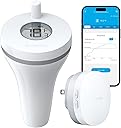
Desertcart purchases this item on your behalf and handles shipping, customs, and support to Tunisia.
🌊 Dive into smart pool care with precision and peace of mind!
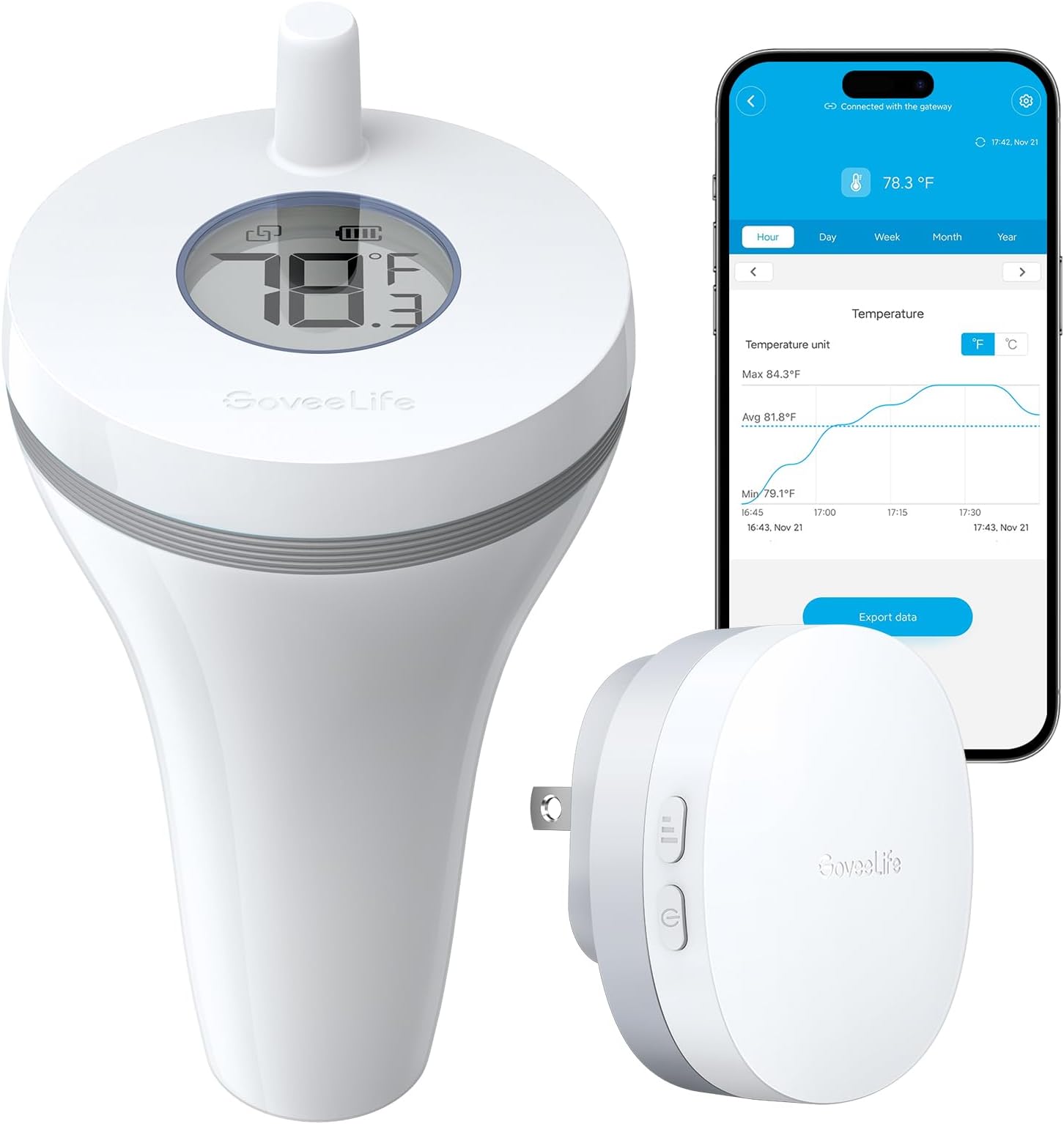
The GoveeLife WiFi Pool Thermometer P1 offers professional-grade, real-time water temperature monitoring with a robust 328ft Wi-Fi range and IPX7 waterproof durability. Its fast 2-second refresh rate and ±0.9°F accuracy ensure you never miss a beat in pool maintenance. Designed for indoor and outdoor use, it supports up to 10 sensors via a gateway, provides smart app alerts, and stores up to 2 years of data for trend analysis. Powered by long-lasting AAA batteries with low battery notifications, it’s the ultimate tool for millennial managers who demand convenience, reliability, and smart home integration.


| ASIN | B0CXDWQB9F |
| Additional Features | App Companion, Fast Refresh, High Accuracy, Low Battery Indicator, Waterproof |
| Age Range (Description) | Adult |
| Age Range Description | Adult |
| Best Sellers Rank | #8,440 in Patio, Lawn & Garden ( See Top 100 in Patio, Lawn & Garden ) #8 in Pool & Hot Tub Thermometers |
| Brand | GoveeLife |
| Brand Name | GoveeLife |
| Color | White |
| Connectivity Technology | Wi Fi |
| Customer Reviews | 3.9 out of 5 stars 1,742 Reviews |
| Display Type | Digital |
| Global Trade Identification Number | 00810127732896 |
| Immersion Depth | 5.9 inches |
| Included Components | Pool thermometer, WiFi Gateway, Loop rubber*2, Fixed rope |
| Indoor Outdoor Usage | Indoor, Outdoor |
| Item Length | 5.9 inches |
| Manufacturer | GoveeLife |
| Model | B5109 |
| Model Name | Smart Pool Thermometer |
| Number of Batteries | 2 AAA batteries required. (included) |
| Outer Material | Plastic |
| Part Number | B5109101DE |
| Power Source | Battery Powered |
| Product Care Instructions | Hand Wash Only |
| Response Time | 2 seconds |
| Reusability | Reusable |
| Style Name | RF Gateway + 1 Sensor |
| UPC | 810127732896 |
| Unit Count | 1 Count |
| Upper Temperature Range | 70 °C |
D**.
No more "test dipping"—reliable, accurate, and great range!
I have been using the GoveeLife Smart Pool Thermometer, and it’s a total game-changer. Here is why it’s worth the buy: • Rock-Solid Connection: The Wi-Fi gateway is the "secret sauce." Unlike Bluetooth versions that disconnect the moment you go indoors, this stays connected through walls, so I can check the temp from my couch. • Highly Accurate: I cross-checked it with a manual thermometer, and it’s spot on. The app updates every few seconds, which is great for watching the pool warm up. • Smart Features: I love the Alexa integration—I can just ask for the temp while getting ready. The app also sends me a notification if the water hits certain temps. • Excellent Customer Service: I had an issue with the sensor, and their support team was fantastic. They were incredibly helpful and had a very fast turnaround time on my inquiry. They sent a replacement almost immediately. It’s rare to find a company that responds that quickly these days! Pro-Tip: Make sure you screw the cap on perfectly straight and tight to ensure the waterproof seal stays 100% effective. If you want to stop walking out to the pool just to check the water, get this. It’s reliable, easy to set up, and the company clearly stands behind their product.
E**B
Duck Pond Approved!
So, I've been essentially torture-testing these things in my duck pond for over a year now. And frankly, I am super impressed. I honestly never bother to write reviews, but I feel like this company's sensors are underappreciated. To get this level of functionality and capability at a reasonable price has truly impressed me. My Setup: The gateway is plugged into a ground-level indoor outlet with a stone wall surrounding it. (The building's exterior wall is all stone and maybe 4 to 6 inches thick. This is the main reason the gateway is inside, the Wi-Fi just can't handle the stone wall at all.) The two sensors are over 60 feet away from the building and at different elevations. One at ground-level for surface temperature and the other at the top of the waterfall for pump outlet temperature. (The waterfall is probably 3 to 4 feet above ground-level.) Observations: Connectivity - For the most part, I really don't tend to have any issues with signal strength. The ducks do sometimes nudge the surface sensor into a corner behind "the island" which causes the signal to drop. But I usually just wait for them to nudge it back into the open again. The waterfall sensor on the other hand doesn't have the slightest issue. The added elevation really helps the connection. Battery - I am still only at the 1 year mark, so I can not confirm the stated battery life yet. Though I have noticed that the battery level has a small impact on signal strength and that poor signal strength drains the battery slightly faster. As their battery level drops the signal strength seems to slowly degrade. (Note that this is normal behavior.) It is hardly noticeable though. I only noticed because of my two sensor setup. The surface level sensor, which is often bullied by my ducks, tends to have to work harder to connect. And as a result, seems to be at a lower battery level. (For reference, the waterfall sensor states it is at 3/4 bars and the surface sensor started it was at 2/4 bars recently.) Waterproofness - Today I decided to crack open the surface sensor for the first time since buying it. (Mostly for the heck of it, but also to measure the batteries. They had only dropped 0.2-0.3 volts, which is very impressive.) And after removing a lot of the algae and dirt (the thing felt like a bar of soap it was so slippery), I opened it to find the inside exactly the same as how I left it when it was first closed. It was bone dry and a pristine white that I forgot it once was. Conclusion/Summary: I can't seem to overstate how impressed I am with these things. They are surviving my pond with no issue. So when I pulled up the product page today (to check which battery it used before grabbing my multimeter), I was shocked to see it only had four stars. I just had to throw my two cents in. Ultimately, if you think this will work for your application, then I would go for it. It is definitely not the cheapest, but it makes up for that. I haven't found any fault in their claims yet.
M**S
Good little pool and hot tub temp gauges.
Pretty sweet little devices to be able to see the pool and hot tub temps. Only reason for the 4 stars is some intermittent connection issues. The main hub accidentally got unplugged and it took like 3 days to randomly reconnect. Not sure what that was all about, but I also didn't have time to address it. So 3 days of not working in 60 days, with 45 mins setup. Worth it.
C**S
Great while it lasts but disappointing longevity
Worked great for about 9-10 mos. Great peace of mind that my hot tub wouldn’t power-off & freeze while away in the dead of winter. Unfortunately, the display then started failing & it began having random connection issues. At just over a year of use, it failed altogether with water intrusion & the plastic edge of the battery compartment became brittle & broke so it would no longer hold the batteries in place. Because I have other Govee products & I don’t want to download yet another app, I’m going to purchase a replacement & give it another try but as other reviewers have stated, it does seem to have a durability/longevity problem…so we’ll see.
H**.
Must-Have Smart Thermometer for Water Monitoring!
The GoveeLife Smart Pool Thermometer has been an absolute game-changer for monitoring water temperatures! I use it for my hot tub and ice bath tub, and it’s been incredibly accurate and reliable. The thermometer is easy to set up, and the WiFi Gateway ensures that I can track the temperature remotely through the app, no matter where I am. One of the best features is the remote app notifications. I get an alert on my phone if the water temperature goes above or below my set range, which gives me peace of mind when I’m away. Whether it’s for a fishbowl, pond, or pool, the IPX7 waterproof design ensures it works flawlessly even in outdoor conditions. The thermometer is precise and has helped me keep my water at the perfect temperature for everything from relaxing in my hot tub to ensuring the ideal conditions for my fish. The battery life is impressive, and I love that it’s a low-maintenance product that just works. I highly recommend the GoveeLife Smart Pool Thermometer for anyone who needs a reliable, easy-to-use thermometer for pools, hot tubs, ponds, or any other water feature. It’s been an essential addition to my setup!
A**R
Easy to pair. Works as intended. Will update review after a few months of use.
Easy to setup. It’s much better if you make an account with Govee first when you download the app. Also, better if Bluetooth is on and have your WiFi login handy. Go to the app and add the wife gateway. The instruction manual is simple to understand. Setting up the WiFi gateway first is great. Great range. I plugged it inside the house. After gateway setup, then I setup the thermometer sensors. Best to set it up first close to the gateway. It’s tough to unscrew the sensor open as they should be, to help make it waterproof, as it’s suppose to float. Add the batteries by sliding the battery cover that’s inside the thermometer top. Follow the arrow direction on where to slide the battery cover. This might sound implied but sometimes common sense is not so common. In the app, it will show the sensors. Press the small button that’s inside the thermometer sensor next to the battery. You will see in the app which sensor you pressed as its name would blink. Pick that name/sensor in the app then it’s paired. I changed the name of my sensor by going to that thermometer’s specific setting, then tap the old name and delete and type in the new name. You can also change the reading of the temperature on the top part of the thermometer by pressing the button twice quickly (same button you pressed to pair the thermometer”. It was quick and direct to the point. I also paired it with my Alexa. In the Govee app, I went to my profile. Go to Voice assistant and pick either Alexa if you have prime. It will ask you to link it. It helps if your Govee WiFi gateway is connected to the same WiFi as your Alexa stuff. You can also do google assist if you have google stuff.
T**M
Excellent Wireless Thermometer
Excellent wireless pool or spa thermometer. I'm using it in an inflatable hot tub though it could be used in a pool or even a pond. It seems accurate out of the box but there is also an option to calibrate it in the app. Connecting the gateway to my network and the sensor to the gateway was super easy and intuitive. I've never used a govee product before and didn't even need the manual to connect it. It works well and the range is great too. I'm a little disappointed by the screen on the thermometer though. After a few days in the hot tub it almost looks like the screen is beginning to show signs of etching. It's still easy to read but has a hazy whitish streaks over it. I thought I'd try to clean it later but I don't think that's going to make a difference. It's smaller than expected which is great and it floats well. Oh it eve came with the 2 necessary triple A batteries. I was impressed by that. Overall I'd definitely recommend it and may buy another one for the pond we have.
J**E
Works well but a pain to pair!
Contrary to other reviews, this pool thermometer is not at all intuitively paired. It is easy enough once you figure it out but the directions are very limited and badly need improvement. The thermometer works great once you get it paired though and can be accessed via Alexa or other home devices. This pairing is not intuitive either lol! So here are the instructions which can save you a headache! First download the Govee app (there is a QR code in the tiny instruction manual. First thing that needs improvement: larger font size!!) and set up an account. Then connect your phone to your 2gb wifi connection. Then go back to the Govee app and ignore all the different kind of devices listed and just hit the little + button in the top right corner. It will then connect with your gateway device first (that’s the round thing that plugs into the wall) and hopefully it will flash blue. Then you just short press one of the two side buttons, not the reset button (that one you use if it doesn’t flash blue), and the gateway should be connected. (Instructions say to hold the button down for 5 seconds but that is incorrect; it’s a short press!) Then the app should automatically find the pool thermometer device itself and you need to have the battery cover off to hold down the button next to the battery compartment for three seconds. Then it should be connected! It will look like you need to hit “add” the device button at the bottom of the app, but you don’t. That’s just if you want to connect another thermometer. So then the app and the thermometer should show the water temperature. If you want to connect it to Alexa, then you need to go into your profile (head and shoulders icon on bottom of Govee app to the right) and then go to Voice Assistant setting. Then you hit Alexa or whatever you have and link the Govee skill to your Amazon account and Alexa right on the Govee app (don’t try it on the Alexa app, it won’t find the Govee skill for whatever reason). Then you can ask you-know-who what your pool temperature is! Cool! There are also Govee widgets available for iPhone and iPad that will show you the pool temperature as well (and possibly Apple watch app coming??) The app will show your pool temperature over time, not really sure why you need that lol. Obviously I just started using it, but I will update my review if it conks out prematurely. It does come with an extra gasket, which is nice because we all know chlorine is pretty toxic to everything. But so far very handy! I have had a pool for 20 years and have gotten to the point where I only go in if the water is above 82 degrees. So this is a very handy device, so I don’t have to take my heavy pool ladder down and walk up the steps to drag out the old manual thermometer every time I want to know the pool temperature. It may show a higher temperature than it really is, because this thermometer is only about 6 inches deep, and sometimes there can be a layer of hotter water at the top of the pool under the solar cover, but again I will update review if it isn’t accurate. Convenient device once you figure out how to pair everything!
M**N
Very happy swimmers
3 weeks into the season and no issues. Love being able to see the temps from anywhere.
J**.
Provides reassurance hot tub is still working when -30c outside
Been using one of the sensors in my hot tub for about a month now and seems to be working as expected. I like to be able to check the temp especially when it is -30C outside.
I**A
Be aware, GoveeLife will not provide support
Purchased in April, the thermometer stopped working by the end of July. Contacted GoveeLife for support but the answer was that they cannot help since I didn't purchase the thermometer from their official website. Consider buyingbitvfrom their website if you expect support from them.
Trustpilot
2 weeks ago
2 months ago