Buy anything from 5,000+ international stores. One checkout price. No surprise fees. Join 2M+ shoppers on Desertcart.
Desertcart purchases this item on your behalf and handles shipping, customs, and support to Tunisia.
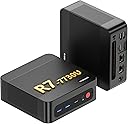
๐ Mini PC, Mega Power โ Dominate Work & Play in 4K!
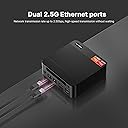
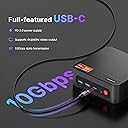
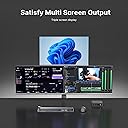
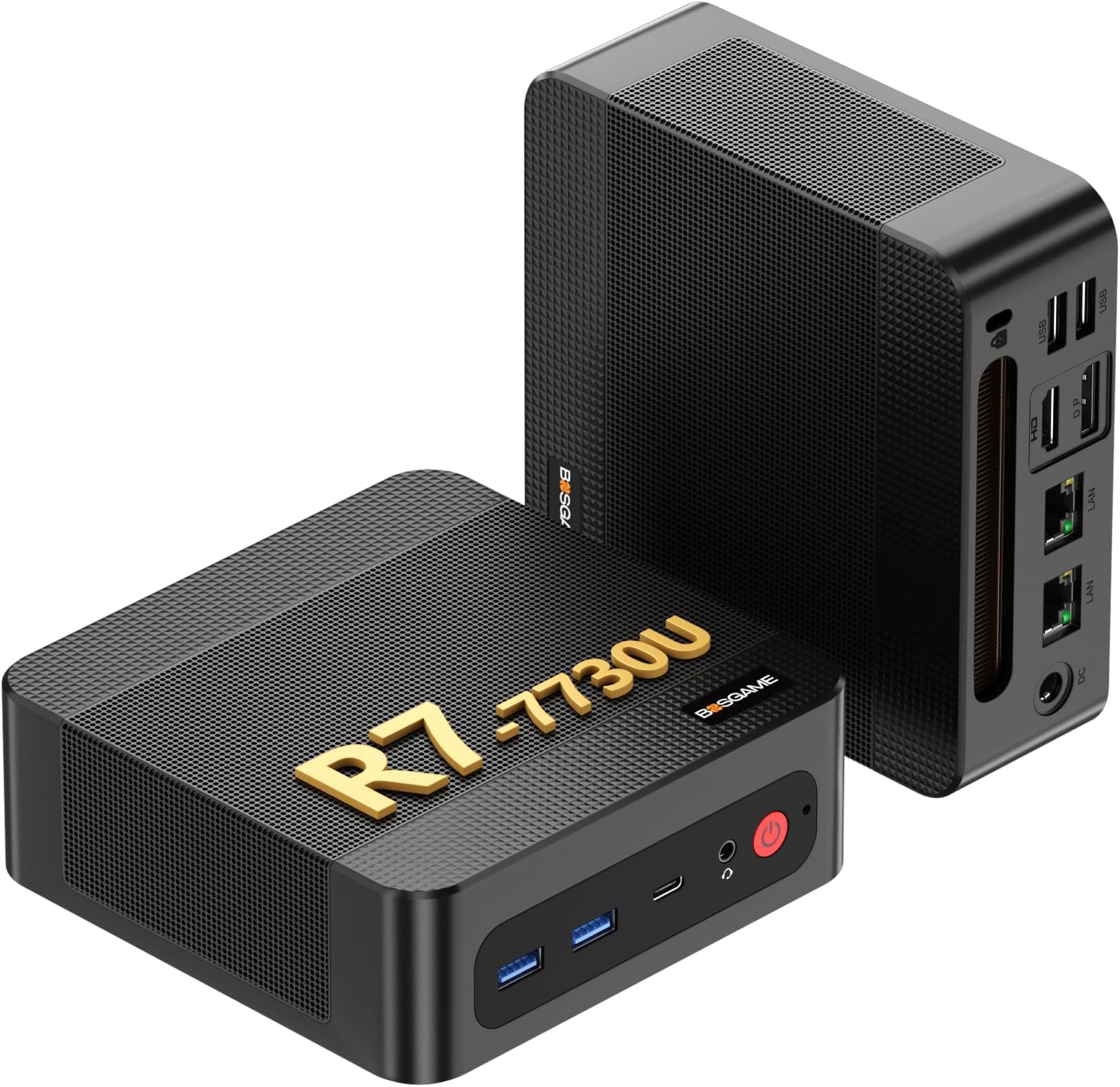
The BOSGAME P4 Mini PC is a compact powerhouse featuring an AMD Ryzen 7 5825U processor with 8 cores and 16 threads, turbo boosting up to 4.5GHz. Equipped with 32GB dual-channel DDR4 RAM and a blazing 1TB PCIe 4.0 SSD, it supports triple 4K displays for enhanced productivity and immersive visuals. Dual 2.5G LAN ports alongside Wi-Fi 6E and Bluetooth 5.2 ensure ultra-fast, stable connectivity. Ideal for professionals, gamers, and creatives seeking a sleek, versatile desktop solution.


| ASIN | B0DBYB71GJ |
| Additional Features | Triple display outputs |
| Aspect Ratio | 16:9 |
| Best Sellers Rank | #2,249 in Computers & Accessories ( See Top 100 in Computers & Accessories ) #77 in Mini Computers |
| Brand | BOSGAME |
| Built-In Media | 1x P4 Ultra Mini PC |
| CPU Model | AMD Ryzen 7 |
| CPU Model Number | 5825U |
| CPU Model Speed Maximum | 4.5 GHz |
| CPU Speed | 2.0 |
| Cache Memory Installed Size | 16 GB |
| Cache Size | 16 GB |
| Color | Black |
| Compatible Devices | [Wide Range] |
| Connectivity Technology | Ethernet, HDMI, LAN, Wi-Fi |
| Cooling Method | Passive |
| Customer Reviews | 4.3 out of 5 stars 313 Reviews |
| Display Resolution Maximum | 3840x2160 |
| Display Type | LCD |
| Graphics Card Interface | PCI Express |
| Graphics Card Ram | 16 GB |
| Graphics Coprocessor | Radeon Graphics |
| Graphics Ram Type | DRAM |
| Hard Disk Description | 1TB PCIe SSD |
| Hard Disk Interface | Solid State |
| Hardware Interface | 802.11 b/g/n, DisplayPort, Ethernet, HDMI, USB Type C |
| Keyboard Description | Standard QWERTY keyboard |
| Keyboard Layout | QWERTY |
| Manufacturer | BOSGAME |
| Memory Slots Available | 1 |
| Memory Storage Capacity | 16 GB |
| Model Name | P4 |
| Model Number | P4 |
| Model Year | 2026 |
| Native Resolution | 3840 x 2160 |
| Number of Component Outputs | 3 |
| Operating System | Support Win-11/ubuntu/Linux |
| Personal Computer Design Type | Mini PC |
| Power Plug Type | Type A - 2 pin (North American) |
| Processor Brand | AMD |
| Processor Count | 8 |
| Processor Series | AMD Ryzen 7 |
| Processor Socket | Socket A |
| Processor Speed | 2.0 |
| RAM Memory Installed | 16 GB |
| RAM Type | DDR4 SDRAM |
| Resolution | 3840 x 2160 |
| Screen Size | 75 |
| Style Name | Minimalist |
| Total Expansion Slots Quantity | 1 |
| Total Number of HDMI Ports | 3 |
| Total Usb Ports | 4 |
| Unit Count | 1.0 Count |
| Video Output | HDMI |
| Video Output Interface | HDMI |
| Video Processor | AMD |
| Warranty Description | 1 year manufacturer warranty |
| Wireless Compability | 802.11ax |
| Wireless Network Technology | Wi-Fi |
| Wireless Technology | Bluetooth, Wi-Fi |
E**R
Well its been almost a year, 10 months
Well, I have had this device for 10 months now. Its been running well, although trying to play even simple games on it has been frustrating. However I did fins a fix which i have been using for a little over a month, and it is running smother and better than it ever did. I installed a Linux distro on it, specifically i installed the latest stable LTS Pop!_OS on it, while i have been partial to Manjaro in the past i decided to see if Pop!_OS would work well, and wow it is very clean and the system runs smoother than it ever did with Windows installed on it, even right out of the box. What attracted me to this device originally was its size, minimal desk space, or in my case counter space. Its small and compact making it easy to move around or hide behind other things, like the TV for instance. The size makes it convenient to move and use, making it quite versatile for a few fast setup applications. The multiple display connection ports, LAN, and USB ports make this thing very handy for its size too. But I will say that Windows does not let this little beast do its thing, Windows runs too many background processes and seriously bogs the poor thing down. Even trying to do simple things with windows running, like watching videos, or playing simple games, like Houseflipper, or Inscription on Steam, made the system almost unusable, and made any kind of game play just unbearable. But about a moth or so ago, i got fed up with windows because it insisted on doing updates while i was trying to do an online Teams meeting for work and well it was just bad all the ways it could be. Made it seem like is was using a POS machine, which i knew it shouldn't be running that bad. So i backed up files that weren't backed up already, and did a full clean install of Pop!_OS, and the improvement was noticeable from the moment the machine booted back up after install. First, boot-up was fast, and there were no issues logging into the device, connecting to the home network was smooth, fast, simple, there were no pop up ads, or notifications trying to get me to install this or that, or a million stupid updates or other background processes slowing me down. So just to see how well it was going work after, I installed steam, and installed houseflipper and inscryption, both games ran smooth, and clean, absolutely zero lag. So i decided to really see what i could do, i installed a bit more graphics heavy games, No Mans Sky, Borderlands 3, and Palworld, and i was shocked, all three ran wonderfully, i wasn't able to play these games with Windows installed as the OS, there was no way, those games were absolutely unplayable under Windows. But with Pop! Linux and steam installed, this little machine turned into a beast!!! I don't know why I waited so long to remove windows from this little machine, but that's probably my only gripe about this machine, is it comes with probably the worst possible operating system installed. There are plenty of other Linux distros out there that would probably work well without issue on this device, Like I said I'v used manjaro before, and still do on an old Acer desktop i got back in 2019, but just wanted to test out Pop!_OS this time and was very surprised! So overall this is a great machine, but I would suggest removing Windows OS if you actually plan to use this machine for anything.
M**O
Nothing Mini About this PC!
Wow, what a game changer! The BOSGAME P4 Mini PC is well worth the purchase. Set up was quick and easy. The quality output to a high resolution monitor is astonishing, along with the anticipated speed of the AMD Ryzen 7 and 32 GB DDR4. This is a quality gaming PC that makes MS Office, paint and video software, worthy for those ready to step out of the traditional desktop computer. After hours of work, the mini pc remained cool to the touch and virtually silent, which is another reason why I encourage you to consider this purchase in your future!
L**N
Great product but I had to do a clean windows install shortly after using it the first time.
This is a fast, compact computer. It does everything I want it to do and is surprisingly fast. However, at some point shortly after getting it configured, it stopped being able to download and install windows updates. I tried every suggestion to fix it but it didn't work. I created Win 11 Pro install media on a USB stick. I booted into it, deleted all the partitions, and reinstalled Win 11 Pro. This worked well and, so far, it is working great. Minus one star due to having to clean install. I may have been able to use the recovery partition but I prefer doing a clean install with MS install bits. Less chance of crapware from the vendor.
L**Y
Great Customer Service
It's a shame. It was a nice, quiet little powerhouse that worked so well for a month, but now it will constantly go to a black screen multiple times a day. I've tried swapping out cables and monitors, but the only thing that works to get it back on track is a hard reboot, which is endlessly frustrating when I'm in the middle of a project. Autosave has its limits. Seems the USB ports still function, as that's where my mouse and keyboard are plugged in, but that does me no good. Is it a faulty HDMI port, or a hardware issue? I've no idea. I donโt think I can recommend this device. UPDATE 10/15/25: Seller reached out and was kind enough to replace the unit. I did pay to ship it back, but that's small potatoes to avoid having to take it somewhere for repairs, or even having to purchase an entirely new PC. Excellent customer service!
W**V
Little Mini Packs a Punch for Great Value on the Dollar!
I love these powerful mini desktop computers! I purchased these to run my NDI workflows for live production events. I've also been able to use them easily for games like Roblox, which is all the kids care about these days. Wifi connectivity works perfectly fun, although I prefer making use of the built-in ethernet ports. Port capacity is enough for my applications, but if you need more, you can easily daisy chain additional usb hubs.
W**G
Works well and speedy
I use this mini Windows 11 PC as a media server. It is plugged into a TV and works great!! Plenty of ram and storage. It has a dedicated graphics chip which I have not really stress tested. Furthermore, the cpu seems to not get too taxed by my constant usage. It has not given me any troubles. I highly recommend this mini pc.
B**A
I really wanted these to work.
I wanted this mini-computer to work. I ordered the one terabyte 32 gig option. I am replacing an older computer that is still functioning albeit slow. After hooking everything up I started the unit and it gave a message on the screen that it was adjusting the monitor for the best picture. Great! Then it quickly showed โno signalโฆโ I rebooted several times with the same result. Although I knew all the cables were good, I systematically replaced all of them one by one. No difference. I could not hear then fan turn on, it tried to boot but nothing. I tried escape and F7 but no response. I contacted bosgame via email. Their response was pretty timely. They asked a few questions, I gave them answers and they said to exchange it thru Amazon. I received the replacement unit two days later. I was astounded that the second computer did almost the same thing. Ground hog dayโฆ The only difference is the replacement flashed to the language page for a millisecond and then, you guessed it โno signalโฆโ I thought this really canโt be happening? So, I rebooted it at least a dozen times with the same result. Just to reassure myself that there was not some cable or keyboard or mouse issue I tried another known good keyboard and mouse. Same result. I reinstalled my old slow PC and everything worked fine. So, do NOT under any circumstance buy one of these. They are pure Chinese junk.
J**Y
Best PC I've ever owned
It's a really good PC and it being so small kinda awesome that it puts out the power needed to play games like rd2 fallout4 even MMORPGs it's quite and the 32 gigs and integrated graphics card is all you really need plus the 1 tb storage helps if you have a ton of games you need to install I like and it has to be one of the best computers I have ever owned. Worth the money and worth buying.
S**N
Mini PC
Despite size it is a good compact pc, complex, powerful, wonderful use of Bluetooth, easy to work with.
K**R
Great little device but can have a loud fan
So far works great! I use this mainly for 3d modeling and is very quick. Biggest complaint is the fan on the bottom is very loud but I have some spare quiet fans so I just disconnected the bottom fan and place the unit on one of my own. I have been monitoring the temperature and it has been perfectly fine.
A**O
???
Iโm not very happy at the moment. The computer itself is good, but I keep ordering a new computer and receiving a used one instead. Iโm currently working with the vendor and hope to have this resolved soon
T**T
So far so good. Check plastic panel inside bottom. I recommend removing it.
I have the ryzen 5 7640hs with the 16gb ram, 512gb. So far so good. Almost identical inside to a beelink Ser5 Max, I previously owned. First week. I opened it up and removed the plastic panel inside the bottom and the fan inside. I felt it was pushing pressure against the board. I also got a separate ssd heat sink and attached it to my ssd. Seemed like leaving the plastic the original was just going to roast my wifi card like a marshmallow it was under the heatsink that was originally covering it and the ssd slots. I also did a fresh windows 11 install with a copy I created separately on a USB drive. Haven't done alot of gaming just yet however I have it all set to high performance. (settings in bios, and windows) and Im not experiencing crashes or anything. I personally think plastic plate inside the bottom is what's causing long term issues for some users, it puts alot of pressure on the motherboard once it's screwed down, and basically turns the ssd drive into a tiny oven.
S**M
Almost exactly what I hoped for
Benchmarks show it is very fast, matching my impression from using it for one week. I don't use it for gaming, but for programming and video, it is great. I would have preferred two HDMI ports, but a $15 DisplayPort-HDMI adapter fixed that and I'm using it with two monitors. Following their instructions, setting it up was easy. I attached it to the back of one monitor with the provided mount.
Trustpilot
3 weeks ago
3 days ago