Buy anything from 5,000+ international stores. One checkout price. No surprise fees. Join 2M+ shoppers on Desertcart.
Desertcart purchases this item on your behalf and handles shipping, customs, and support to Tunisia.
🖤 Elevate your build to iconic status with the Thermaltake Tower 600 — where style meets unstoppable performance.
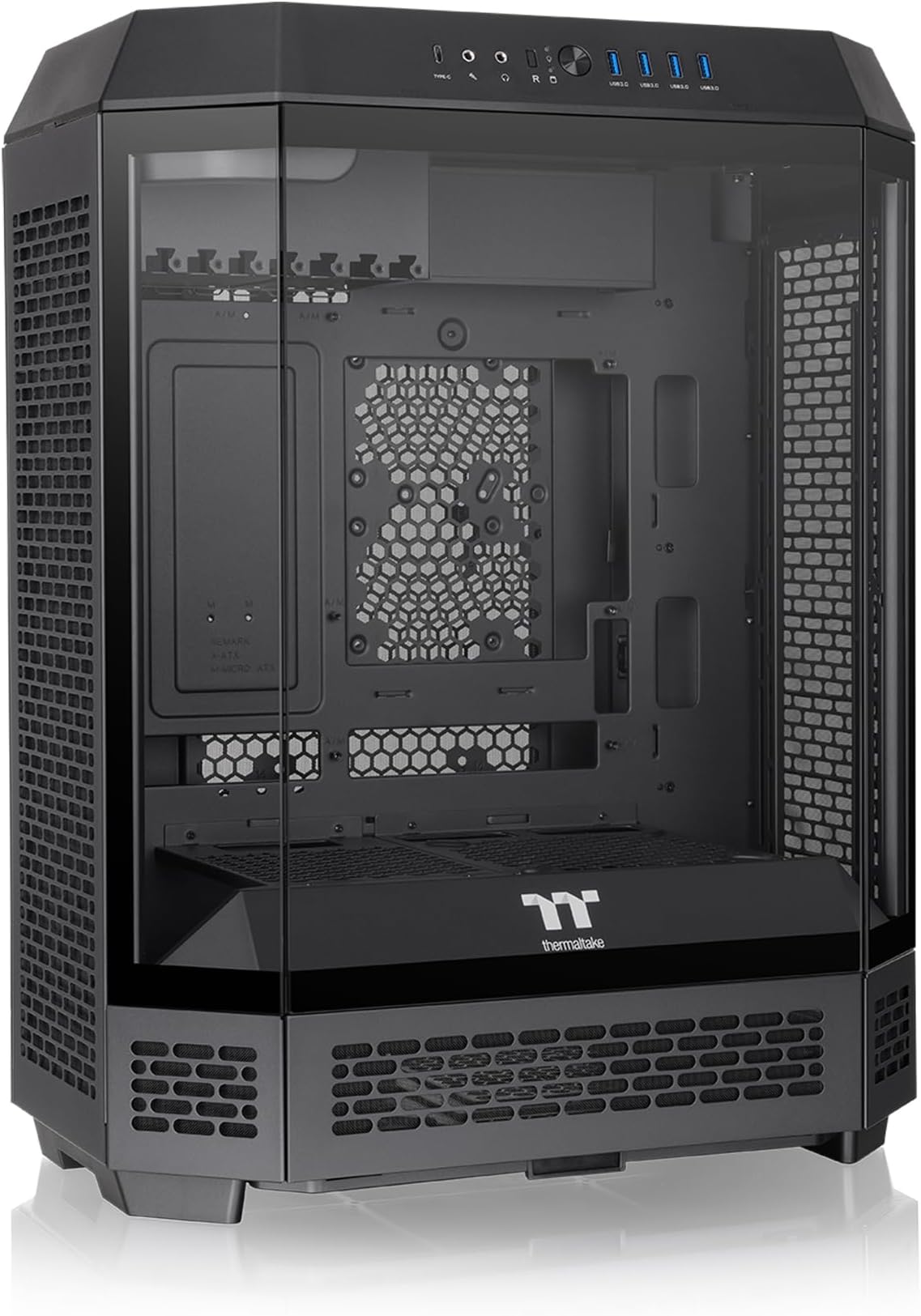
The Thermaltake Tower 600 Black Mid-Tower ATX Case features a distinctive octagonal shape with three tool-free tempered glass panels for effortless access and stunning visibility. It supports hidden-connector motherboards from top brands, up to nine fans, and radiators up to 420mm, ensuring superior cooling. Rotational PCI-e slots provide versatile GPU installation options, while front I/O includes USB 3.2 Gen 2 Type-C and four USB 3.0 ports. Designed for high-end builds, it offers a clean, cable-managed interior and a 3-year warranty, making it a premium choice for professionals who demand both aesthetics and performance.


| ASIN | B0DF6RXQTX |
| Antenna Location | Business, Gaming |
| Best Sellers Rank | #50 in Computer Cases |
| Brand | Thermaltake |
| Case Type | Mid Tower |
| Color | Black |
| Compatible Devices | ATX Motherboards, Micro ATX Motherboards, Mini ITX Motherboards, 3.5-inch HDDs, 2.5-inch SSDs, PCIe expansion cards, ATX Power Supplies, CPU Coolers up to 210mm, GPUs up to 400mm |
| Cooling Method | Air, Water |
| Customer Reviews | 4.4 out of 5 stars 233 Reviews |
| Enclosure Material | Tempered Glass |
| Fan Size | 140 Millimeters |
| Hard Disk Form Factor | 3.5 Inches |
| Internal Bays Quantity | 6 |
| Item Dimensions D x W x H | 11.28"D x 16.54"W x 21.65"H |
| Item Weight | 21.4 Pounds |
| Light Color | RGB |
| Manufacturer | Thermaltake |
| Material | Tempered Glass |
| Mfr Part Number | CA-1Z1-00M1WN-00 |
| Model Name | Tower 600 Black |
| Model Number | CA-1Z1-00M1WN-00 |
| Motherboard Compatability | ATX |
| Number of Fans | 3 |
| Other Special Features of the Product | Built-In Fan, Dust Filter |
| Power Supply Maximum Output | 550 Watts |
| Power Supply Mounting Type | Rear Mount |
| Recommended Uses For Product | Business, Gaming |
| Supported Motherboard | ATX |
| Total Expansion Slots Quantity | 7 |
| Total USB 2.0 Ports | 1 |
| Total USB 3.0 Ports | 4 |
| Total Usb Ports | 5 |
| UPC | 841163095256 |
| Warranty Description | 3 Year Manufacturer |
W**E
An engineering marvel!
I had a full size tower to the side of my computer desk. I wanted to downsize to a mid-tower so that the case would fit under the desk. This case had the right size, and looked great in pictures. I'd have to give up my Blu-Ray burner, since this case has no drive bay cutouts. I haven't used that drive in a year, meaning it wasn't an issue. I ordered the color they call 'Matcha Green', with the optional LCD. Once I unboxed this case, I began to see how vast an improvement it was over what I had previously. Nearly every panel attaches with magnets or push clips. No screws. Only two small 4" panels don't come off. Space is tight, despite the larger size. Removing all panels makes installing components (almost) trivial. More on that below. There are channels for routing cables, lots of cutouts for going from front to rear, and enough fan options to make a hovercraft. Only two fans on the top are included. There are a few fan mounts that have the two sets of holes for four screws, but primarily the fans install on rails. Put them wherever on the rail you want! The case supports the new 'hidden connector' motherboards. Mine is an old-style ATX, but it worked fine. Very clever engineering went into the drive mounts. There are no bays as such. The drives mount to thumbscrew panels on the underside of the motherboard tray. The resulting case, with lights on full display, impressed even my wife (who wishes the computer gear was in some closet). My liquid cooling system is fairly simple and left plenty of height. The LCD is still on order. The case comes with two base panels for this. One has the cutout for the LCD, the other does not. And, did I mention that there are multiple mesh screens that slide out for cleaning? What's there to say on the negative side? * I had to remove the power supply mounting bracket in order to install the power supply, then put the bracket back. There was physically no way to squeeze a standard size power supply in otherwise. * This again is ingenious engineering, but is a pain as well: the motherboard mounts such that the back panel connectors are at the top of the case, totally invisible from the outside. You route cables out through a hole in the back of the top cover. After I had the installation complete and got ready to attach cables, I looked at that internal connector and wondered if I'd need medical instruments to access connections. Then I noticed the 2nd half of the cleverness here: unscrew a single thumbscrew, and the entire top fan assembly lifts out. Awesome! * Getting access to the GPU connectors was more problematic, as they're further 'in'. With my dexterity-missing fingers, I did have to use a pair of thin needle-nose pliers. Some smart people really did their homework on this case. You just have to disassemble it to REALLY appreciate it.
A**A
Truly A Showpiece
I love this case. Everything about it is a showpiece, so it's meant to be on full display on a desk or other sturdy surface. Don't hide this beauty under your desk or off in a corner! If you have a lot of RGB elements, they will really shine in this case. Pros: - Great visibility, you can see everything from the top mounted fans to the PSU cover on the bottom - Very sturdy glass panels that are press-to-release (like your grandma's old curio cabinet doors) - Compatibility with different sizes and configurations of case fans and radiators - Airflow! There's so much room for airflow and the sides are all protected by mesh covers - Sideways motherboard mounting gives a refreshing new look to an existing build - Hidden compartment on the back of the top panel for wires to run to the back of the motherboard, makes for a very clean looking build - Should fit almost any chonky or long GPU as long as you take one of the removeable metal coverings on the bottom off - Has the option to buy add-ons such as a screen for the bottom front panel and a stand to display the case on its side Cons: - Standoffs are low quality and the holes for them may not be machined right, I had to replace many standoffs with extras I had and even then, some had to be forced into the holes because they hadn't been machined properly - Back wiring can be an issue, especially if you have any kind of limited mobility in your hands. Lots of tight spaces, especially if you need to use the hard drive bay - If you don't buy the add-on screen for the bottom front panel, you may see wires through the mesh depending on how you wired your system - Very difficult to wire the PSU unless you have one with side-facing or angled connectors - You can't have Wi-Fi antennas installed on the back of the motherboard with this case, they will not fit. If you have an antenna that sits away from the motherboard it will be fine, but antennas that come directly off the back of the motherboard will not fit. I suggest using Ethernet for this case - Cannot put a radiator at the top of the case, only on the sides - Will need a splitter for the USB ports on the front of the case for most motherboard models unless it has two inputs for case USBs All in all, I'm really glad I bought this case even though the price made me feel a bit sick. I would not suggest it for beginners since the motherboard is rotated 90 degrees and can cause some issues with running wires, and the fans up top are a bit awkward. I can't attest to the fans that came with the case because I didn't use them, I already had case fans on hand that I used instead. Quality control on the hardware (screws, standoffs, etc) could be better but as long as you have extras on hand, it shouldn't be a big deal.
C**N
Moderate Sized Glass sided case nice for RGB available in several colors
Handsome, quality made, will accept a long graphics card without sagging. The motherboard is installed oddly with the I/O up, not to the side. This is aggrivated by needing to pop the top off of the case, unscrew the top mounted fans, and pull them out of the way to thread cables into the I/O or the graphics card. If you don't swap cables about often it's not a problem, but if you need to change connections often it's a pain in the a**. Note I have a black one but they are available in several colors.
J**N
Beautifully unique!
I purchased this case after getting a 5090 and being concerned about its sheer weight of it hanging on the PCIe slot I knew there had to be a better way. Ultimately I stumbled across this case with its unique rotated motherboard design and knew it was perfect. Building: Space - I found there to be plenty of room to adequately manage my cable runs and still have remaining room for airflow. My 5090 fits with enough space to not pinch the 12vhpwr cable. Also there are smaller magnetic plates on the back that allow you to run the cables through their channels. Airflow - With the ability to have 3 120mm fans on the left and right side of the case both supporting a radiator should you want on top of space for 2 160mm fans on top and 2 160mm on the bottom, airflow is perfect. And I have to give a massive shout out to thermaltake for the fan trays making installation and maintenance simple. Along with thru included dust covers cleaning will be a breeze. Best of all in my opinion is the tool-less maintenance panels. They are either magnetic or held in with a push to lock system. Power supply… this is the one area I had the most difficulty with. There just isn’t enough space to accommodate the cables for the system. I feel like I had to stuff them in the bottom of the case. I have to highly recommend a modular supply as otherwise there will be too many cables in the way. My only other complaint is how the cables that will be plugged into the motherboard for peripherals like mouse and keyboard are pretty tight. Not a huge concern but if you tend to plug and unplug a lot of things from your computer the front io is going to be the best bet. This brings me to front io. With 4 usb 3.0 ports and 1 usbc port you really shouldn’t have difficulty with plugging things in. Lastly you have a headphone and microphone jack offering a wide array. Overall, I thoroughly enjoyed building in this case and find it to be ascetically pleasing on the desk. It checked my major concern of fitting a 5090 and in a way I don’t have to worry about GPU sag. I highly recommend the case especially considering its price and will likely buy another for my Girlfriends computer.
N**.
Great case but be warned
Pros: Very easy to remove panels and gain accessibility Lots of fan and radiator space* (see cons) Removable dust filters on every ingress point Lots of tie down points and places to stow wires Unique look with lot's of room for upgrades Cons: It's the only case that I know of that requires you to take it partially apart in order to hook up your cables to your I/O and GPU. It's not difficult, the lid literally just pops off, but it can be a pain. If you have a full ATX MB, you may have to get thin (15mm) 120mm fans for the left side if you decide to place fans there. I nearly snapped some of the motherboard connections trying to fit standard size 120mm fans. If you planned on putting a radiator on the left side with a ATX MB, I guarantee it will not fit. Comes with a replacement panel to accommodate a LCD screen at the bottom front, but good luck finding one.
C**N
Need an Elite PC Case? Thermaltake Tower 600 in Future Dusk is the one for you!
What a great case! First of all, I love ThermalTake products! Anytime the budget allows, I search for them. The Thermaltake Tower 600 in Future Dusk is next level in airflow and cooling. A ton of case for the money, very quiet and is so easy to build in. Great for BTF, Rear Connect, Stealth motherboards and offers something different than just ordinary builds. I love it! With space for 13 fans, the airflow is perfect for cooling it all down to ultimate performance levels. Very Functional and Happy looking!
A**L
The best case period!
Its been a while since my last Case upgrade. I was using an old school Coolermaster HAF case, however after picking up an Asus 9070XT card, my old case wouldn't fit the new card. I opted to upgrade to this case due to the unique tower design and aesthetics. Aside from the awesome looks this case has soo many handy features. The magnetic panels and slide out bottom filter make cleaning and maintenance super easy. My last case I had to basically disassemble the case and panels to access the filters. This is soo much easier. Cable management is also super easy, plenty of space and the channels with removable panels on the back make it easy to change out things without disassembling the whole build. I opted to orientate the GPU to the side view. You'll need the 130mm 90 degree riser that Thermaltake sells. Of note with this length you'll have to use the PCIE bracket slot that brings the card to the most front of the case. If you want to recess the card back from the panel you might need a shorter length riser as the 130mm pushes the card all the way to the front near the glass, you could probably bend it to push the card back however I didn't opt to. Also when orienting the card this way you won't be able to put a rad or fans on the left side as the GPU riser bracket gets in the way. I made the mistake of getting 3 additional fans for the left side opposite of my AIO. You probably could fit 2 fans underneath the Riser bracket but I chose not to put any for aesthetic reasons. Aside from the that this case is very much recommended.
J**E
Not the case you want for running AIO cooling
Thermaltake should be embarrassed. DO NOT buy this case if you're using AIO cooling. Thermaltake markets this case as capable of accomodating two 360mm radiators, but you have to install the radiators UPSIDE DOWN. This will accelerate the wear of the pump, and will cause premature failure of your AIO hardware due to the intake of air into the liquid cooling loop. Gamer's Nexus released a video FOUR YEARS AGO showing how air-gaps in AIO cooling can permanently destroy your pump and threaten to burn out your hardware as a result. Video is titled "Stop Doing It Wrong: How to Kill Your CPU Cooler (AIO Mounting Orientation) ", and 18:00 minutes into the video it clearly shows you what can happen when you mount your radiators incorrectly. Specifically, how Thermaltake instructs you to mount them in their manual. I ended up getting a Cooler Master Masterframe 700, and now I feel like I made the right decision. It easily accommodated my dual 360mm AIO setup; the open air design makes cleaning super easy; and it's got a unique look with everything mounted and the RGB popping off. The Cooler Master case does require assembly, but the end product is way more capable than this incompetent case.
P**N
Perfect
Perfect, package arrived in perfect condition.
M**L
Check your motherboard
Adore this case. As someone who hadn’t built a PC before I was worried that it would be difficult to work with but all the detachable parts made it really easy to get to the more hard to reach areas. There’s plenty of room inside and made for a very simple assembly. One thing I will warn people interested in this case is that the case’s front 4 USB slots require your motherboard to have more than one usb 3 slots. Because of this I’m only able to use 2 of the 4 slots and the usb-c slot doesn’t work. The airflow and cooling on this case is great, it comes with fans in the top hidden away as well as multiple areas with dust filters for air to be released easily. Overall I’d say that this case was great value for money, easy for beginners and a cool look compared to the standard case.
N**S
Easiest case I've ever built in and absolutely gorgeous!!
It was an absolute JOY to build in this case, and I got to do it twice because I replaced my mobo shortly after transferring to this new tower. Pros: - Removable panels (absolute game changer and worth the price alone - never buying a case without this feature again), and the fact that they're all magnetic is perfect. No need to mess with screws. - Best cable management I've ever had - Easy to build in (see above) - it's the first time I didn't have to squeeze my fingers into tight spaces at odd angles to get things done - Absolutely stunning, just look at it! Cons (kinda): - Back panel (of the mobo) is at the top and covered by the top of the case and the top fan, both of which need to be removed to access it. (I don't have too much of a problem with since I don't fiddle with those cables super often and I like the extra dust protection, but you will find it irritating if you unplug-replug a lot of things) - Lack of drive bays (there are 3 tucked into the back (easily accessible) and it's absolutely gorgeous - I just wish it had more, I have a lot of drives and they're kind of just floating back there) Overall I find the cons very minor inconveniences. I don't regret this purchase for a single second! It's more money than I've ever spent (or even considered spending) on a tower, but considering the last tower I had lasted 10 years through several builds, I consider this an investment. Highly recommend!
C**E
Lots of room to work in
Lots of space to work in. Easy to manage cables. Tons of fan space for cooling. A great case if you are looking for something with form and function.
K**S
Bigger than it seems
Love it, works well, it is both big and small at the same time. For some reason my initial order was delayed a few times and then cancelled with no reason, but the "reorder" worked fine.
Trustpilot
3 days ago
5 days ago