Desertcart purchases this item on your behalf and handles shipping, customs, and support to Tunisia.
🚀 Power your AM5 build with elite speed and seamless expansion!
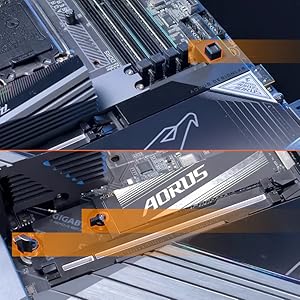
The GIGABYTE X870E AORUS Elite WiFi7 motherboard is a premium ATX board designed for AMD Ryzen 7000 to 9000 series processors. It features a robust 16+2+2 power phase design, supports DDR5 memory up to 256GB with AMD EXPO, and offers four M.2 slots with thermal guards for high-speed storage. Equipped with PCIe 5.0, dual USB4 ports, and 2.5GbE LAN, it ensures cutting-edge connectivity. The EZ-Latch system simplifies installation, making it ideal for both first-time builders and seasoned pros seeking future-proof performance.


| ASIN | B0DGVBM73J |
| Best Sellers Rank | #16 in Computer Motherboards |
| Brand | GIGABYTE |
| CPU Model | Ryzen 7 |
| CPU Socket | Socket AM5 |
| Chipset Family | AMD |
| Chipset Type | AMD X870E |
| Compatible Devices | Personal Computer |
| Compatible Processors | AMD Ryzen 7000 series , AMD Ryzen 8000 series, AMD Ryzen 9000 series |
| Customer Reviews | 4.4 out of 5 stars 254 Reviews |
| Graphics Card Interface | PCI Express |
| Item Dimensions L x W x H | 13.4"L x 10.8"W x 3.3"H |
| Main Power Connector Type | 24-Pin |
| Manufacturer | GIGABYTE |
| Memory Clock Speed | 5600 MHz |
| Memory Slots Available | 4 |
| Memory Storage Capacity | 8 TB |
| Mfr Part Number | X870E AORUS ELITE WIFI7 |
| Model Name | X870E AORUS ELITE WIFI7 |
| Model Number | X870E AORUS ELITE WIFI7 |
| Number of Ethernet Ports | 1 |
| Number of Items | 1 |
| Number of Ports | 14 |
| Platform | Windows 11 |
| Processor Socket | Socket AM5 |
| RAM Memory Technology | DDR5 |
| Ram Memory Maximum Size | 256 GB |
| System Bus Standard Supported | PCIe 5.0 |
| Total Number of HDMI Ports | 1 |
| Total PCIe Ports | 4 |
| Total SATA Ports | 4 |
| Total Usb Ports | 10 |
| UPC | 889523045237 |
| Unit Count | 1 Count |
| Warranty Description | 5 Year Manufacturer |
M**A
Upgraded to AM5 and never looked back one bit!
Loving this motherboard as it was a huge step up in performance compared to my previous TUF Gaming X570-Plus WiFi motherboard. Since this was my first time building a PC from scratch, this motherboard makes things much easier thanks to its easy installation, the included instructions in the box, and even it’s easy access to each port you need to connect to this motherboard. The way this motherboard looks is absolutely amazing from top to bottom, and while the BIOS can be hard to understand at first, it will get easier once you get used to it after a while. I also love the debugging tool in this motherboard as it can either detect which errors you are having, or the current temperatures of your motherboard. All in all, I’m really loving this! I have a 9900X, and the performance is amazing compared to my past motherboard paired with a 5900X. The move from AM4 to AM5 was worth it thanks to this motherboard’s easy installation, great performance, and ease of use. I have never looked back since my upgrade, and I greatly recommend this to new PC builders who are building an AM5 PC!
M**E
Easy assembly, and room to expand
I'm a software engineer, but this was my first computer build. I picked this board because it looks like it has a lot of functionality for the price. I'm not a gamer, but having a board that can handle a high end processor (AMD Ryzen 7), lots of RAM, and a high-end video card (if I want) was important. This seemed to be a good pick, and many of the reviews indicated the build was easy. My build went very well for my first time. There were a couple of minor hiccups--I got an error code about RAM on my first boot, but a reset got me to the BIOS easily. The Bluetooth was not connecting to my keyboard and mouse, but a software update cleared that issue for me. Assembly was very easy. Having just wrestled with a different PC with an M2 drive and the tiny retention screw, I really appreciated the built-in retention cam and the integrated heat sink. The boot time is super fast, and the integrated graphics card is doing well for my uses at this point. It's nice that I can start using this PC for development work, and if I decide to get into machine learning at some point, I can upgrade to add an external video card. Overall, I'm very happy with this board, and my first build went together with nearly no issues.
P**D
Just built today, no issues. No chipset heatsink issues.
I can't say how long it will last, some people complain it didn't last for them. But for first time build, it went perfect. Just installed today and had no issues. It has great expansion capabilities. Three full sized PCIE slots. Four M.2 slots. The primary M.2 slot has a heatsink UNDER the M.2 slot, which is nice. It has four SATA ports, which sounds on the low side, but that's all the chipset supports. I had an ASUS motherboard with only two SATA ports and I returned it. It has Wi-Fi 7, which is great. It has a nice snap-in antenna rather than the screw on antenna. One thing that was nice about the ASUS was that it had a large lever for the main video card slot eject, rather than the little tab that most motherboards have, such as this one. But that is about the only feature that I've seen on other motherboards that this is missing and it's not a deal breaker. Other than that, this has about everything you could need. There were reports that another Gigabyte model motherboard has issues that some were built with the chipset heatsink installed improperly and chipsets overheating. I went ahead and removed the chipset heatsink and it was fine. Of course, I had to replace the heatsink compound since I took it apart. And I think it was for the best, as the original compound seemed dry and crumbly. So, I put higher quality heatsink compound. But it probably wasn't necessary, the original probably would have sufficed. AMD said that the Zen6 will still use the AM5 socket, so this motherboard should be good for the next generation CPU, assuming it lasts long.
K**N
Recommended, but wifi does not work in Win 10
I recommend this motherboard. With the caveat that wifi/bluetooth does NOT work with Windows 10. If you need that, look for an Intel PCIe card. First, the negatives. - I'm deducting a full star for the Wifi 7 not working in Windows 10. Gigabyte cut corners on this expensive motherboard by using RealTek wifi, who has no plan to support Win 10 (considering it's EOL in Oct 2025). They could have used Intel's wifi chip which has Win 10 support. So far, I can't find any way to disable it in BIOS so it permanently shows up as an yellow triangle in device manager. - The ASMedia USB Controller driver does not have a driver download on their page. Some quick searching had me download it from a different manufacturer's website (for an ASUS threadripper mobo). The ITE USB driver would not install, but that did not seem to matter. - The motherboard manual (PDF) was missing some key information that I had to separately research. First, do I need to plug in both CPU power connectors? And if not, does it matter which one I use? Answer is no on both counts. Second, there were insufficient instructions on the Q-Flash functionality. Notably, the USB drive has to be formatted FAT32 (which can only be used for partitions 32GB or less) and the BIOS file has to be renamed to gigabyte.bin in order for Q-Flash to run. I shouldn't have to find this kind of info on forums. - Junkware auto-installer enabled at the BIOS level. This is really inexcusable. Make sure to turn it off in the BIOS before installing Windows. Find it in Advanced Mode, Settings, IO Ports, Gigabyte Utilities Downloader Configuration, set to Disabled. - M.2 thermal pad instructions are confusing. - BIOS is organized poorly (but looks pretty I guess). The positives - The Debug codes and power/reset buttons are invaluable. If there is a boot problem, there's at least an error code to search. I actually did have an issue. The board would not display to an old GTX 660, but the CPU's on-board video worked. Aesthetic builds might need to cover the code display. - Lots of USB ports in a good mix - 4x M.2 slots. It's unfortunate that 2 of the M.2 slots are bifurcated with the main GPU PCIe slot (and 1 is connected to chipset which will cause increased latency). But most other x870e motherboards do it the same way. And it shouldn't matter for current GPUs. - Memory training seems pretty quick. The one I received was Revision 1.2. Overall, I'm happy with this motherboard and I recommend it.
M**I
Loads of perks make it worth the price.
This isn't a cheap board, that's for sure. The deciding factor for buying an X870E board over something like a B850 was the amount of USB ports. I always have a lot plugged in and this board doesn't disappoint. Besides that, it's incredibly sturdy and building with it was a breeze. I especially love the debug code display; it's immensely helpful for troubleshooting. I currently have it set to display my CPU temp once my PC is booted. As for things I don't really like -- the placement of some of the front panel connectors. Specifically the HD Audio and USB 3.2 connectors. They're at the very bottom of the board which put a bit of strain on my cables. I was able to get a 90 degree adapter for the USB 3.2 cable but I couldn't find anything for the HD Audio cable. It's not a huge deal though. It's also slightly irritating that the board includes 4 M.2 slots, three Gen 5 and one Gen 4, but using more than two reduces the GPU lanes to x8 rather than x16. I bought a PCIe to M.2 adapter and plugged it into the second to last PCIe slot to get around this. Definitely something to know before you buy. Overall it's a solid board! I'd definitely recommend it if you're looking for a mobo with lots of features to complement a high end build.
S**M
Fantastic Motherboard – Easy Assembly, High Quality, and Seamless Experience!
I recently completed my PC build using this motherboard, and I couldn’t be happier with the overall experience. The build process was incredibly smooth — installation was straightforward, the layout was intuitive, and all the connectors and headers were well-placed and clearly labeled. Even as someone doing a full custom build, I had zero issues during assembly. The quality of the board is excellent — it feels solid, well-built, and reliable. BIOS setup was simple and responsive, and it handled all my components perfectly right from the first boot. I especially appreciated how hassle-free it was to connect everything, from the CPU cooler to the GPU and memory, without any awkward angles or tight spaces. Overall, this motherboard made my entire PC building experience easy and enjoyable. It’s a great choice for anyone looking for performance, durability, and a truly user-friendly design. Highly recommended!
K**C
HORRIBLE MOTHERBOARD DO NOT BUY
This motherboard was nothing but issues. First of all it came with defective audio ports which I was so conviently able to debug after the WHOLE pc was built. wifi seems to work ok. the boot speed took around 3-4 minutes PER BOOT. SO LONG!!!! Not even just the first one. WHO HAS TIME FOR A 4 MINUTE BOOT TIME??? It was easy to install though but so is every ATX motherboard. got an asrock one and it works perfectly. the AUDIO ports came completley fried and unusable. I hope there is no damage to my speakers. returned this right after I got it. DO NOT BUY!!!!!
R**D
Great motherboard even with minor issues.
Works great. Once you get driver's installed it connects perfectly. My only issue was slight damage to the io sheld (outer package not damaged) which didn't effect the performance, and I had a false VGA error light which was cleared with a reset with a restart and again does affect performance. It looks great, fits pretty well and speeds have been perfect.
J**N
Coming from America is fine
Excellent motherboard all the way from America. I was worried about it having a problem during shipping. But it not only came from further away, it was cheaper than buying it in the UK by £50!
Y**Y
ممتاز
ممتاز
A**A
Très instable, décevante
J'ai eu une Aorus de chez Intel il y a quelques année que je détestais à cause du bios, visiblement gigabyte n'a pas progressé dans ce domaine, toujours le long démarrage surtout si on fait une modification au bios, en plus de ça il y a que 3 branchement pour les ventilateurs, et F-panel pour branché les boutons du boitier date des années 2000, pas un led, MSI est bien meilleur sauf que chez AMD leur carte réseau Ethernet est nul. Le grand défaut, elle n'est pas du tout stable, dés que je lance un jeux, la carte Wi-Fi et Bluetooth se déconnectent, obliger de faire reset bios à chaque fois, très décevant
E**X
Go for it...
Super fast delivery. Works great. Totally worth using it in your dream build. Go for it.
J**Z
Buena tarjeta madre
Es una buena tarjeta madre, perfecta para armar una pc para jugar y no tener que preocuparse por actualizar componentes en varios años. Recomiendo leer las especificaciones y comparar con otros modelos antes de comprar, en especial porque se comparten lineas entre el puerto PCIE x16 de la gpu con 2 de los puertos para ssd. Sin embargo, considero que es una buena compra para los que quieran tener una tarjeta madre de alta gama, aunque algo cara, sin llegar a los precios altos de otras marcas.
Trustpilot
1 month ago
1 month ago