Desertcart purchases this item on your behalf and handles shipping, customs, and support to Tunisia.
⚡ Future-Proof Your Network with ASUS RT-BE92U – Speed, Stability, and Security in One!
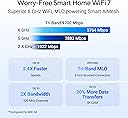
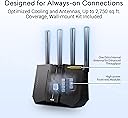
The ASUS RT-BE92U is a cutting-edge WiFi 7 tri-band router delivering ultra-fast 9.7 Gbps speeds via new 320MHz 6 GHz channels and 4096-QAM technology. Designed for professional-grade home and business use, it features dual WAN with AI failover, mesh networking, and advanced IoT management through Smart Home Master. With built-in Trend Micro AiProtection Pro, it offers subscription-free, commercial-level security. Its versatile connectivity, including USB 4G/5G tethering, and extensive coverage up to 2750 sq ft make it a future-ready powerhouse for seamless, secure, and lightning-fast internet.


| ASIN | B0DHWCQ3FP |
| Antenna Location | Business, Gaming, Home |
| Antenna Type | Fixed |
| Best Sellers Rank | #85 in Computers & Accessories ( See Top 100 in Computers & Accessories ) #9 in Computer Routers |
| Brand | ASUS |
| Built-In Media | Power Adapter, Quick Start Guide, RJ-45 cable, RT-BE92U WiFi 7 Tri-band Router, wall mount kit |
| Color | BLACK |
| Compatible Devices | Personal Computer |
| Connectivity Protocol | Bluetooth, Wi-Fi |
| Connectivity Range | 2750 square_feet |
| Connectivity Technology | Bluetooth, Wi-Fi |
| Control Method | App, Push Button, Voice |
| Controller Type | Wi-Fi, Bluetooth, Voice Control |
| Coverage | 2750 square foot |
| Customer Reviews | 3.9 out of 5 stars 594 Reviews |
| Data Transfer Rate | 5764 megabits_per_second |
| Frequency | 320 MHz |
| Frequency Band Class | Tri-Band |
| Item Dimensions L x W x H | 11.3"L x 4"W x 9.73"H |
| Item Weight | 1.7 pounds |
| LAN Port Bandwidth | 9700 Mbps |
| Manufacturer | ASUS |
| Maximum Upstream Data Transfer Rate | 5764 megabits_per_second |
| Mfr Part Number | RT-BE92U |
| Model Name | RT-BE92U |
| Model Number | RT-BE92U |
| Number of Antennas | 4 |
| Number of Ports | 5 |
| Operating System | ASUSWRT |
| Other Special Features of the Product | 320MHz channels in the 6 GHz, Alexa Compatible, Internet Security, VPN, AiProtection, WiFi 7 (802.11be), Wirelss router, AiMesh Node, Access point, Media Bridge, Repeater Mode |
| RAM Memory Installed | 1 GB |
| Router Firewall Security Level | High |
| Router Network Type | Tri-Band |
| Security Protocol | VPN, AiProtection, WPS, WPA/WPA2/WPA3 Enterprise |
| Special Feature | 320MHz channels in the 6 GHz, Alexa Compatible, Internet Security, VPN, AiProtection, WiFi 7 (802.11be), Wirelss router, AiMesh Node, Access point, Media Bridge, Repeater Mode Special Feature 320MHz channels in the 6 GHz, Alexa Compatible, Internet Security, VPN, AiProtection, WiFi 7 (802.11be), Wirelss router, AiMesh Node, Access point, Media Bridge, Repeater Mode See more |
| UPC | 197105580633 |
| Unit Count | 1 Count |
| Warranty Description | 3 year |
| Wi-Fi Generation | WiFi 7 |
| Wireless Communication Standard | 802.11.be, 802.11ac, 802.11ax, 802.11n |
| Wireless Compability | 802.11.be, 802.11ac, 802.11ax, 802.11n |
J**N
Easy set-up, very fast, feature rich. I am impressed so far!
So far so good! I got this for my home network wanted something full-featured without the subscriptions. My previous device would stutter and take a while for the decent picture when watching youtube and netflix. I hooked this up behind my ISP firewall (currently doublenatting) and notice the speeds are great I can stream music, while wife on video conference call and I can run a speed test with my phone all at the same time with no interruptions! My last firewall would stutter when I launched a new application from another device on occasion. I like that I can check status from my phone. I just set this up a few minutes ago so still playing with the settings. I did have an issue not able to log into the device after I changed the Wifi Password, should not be related but affected my login. I had to power cycle the device and then it all came back. I am using the USB port by connecting it to a spare 4 tb Hard Drive where I keep my music and back up files. So far everything is working well. Wi-fi speeds are decent. Most of my gear runs wifi 6 and MIMO, backwards compatibility is not an issue.. I have not tested any of the filters. The wall mount a bit flimsy but it works but hard to hide the wires, Wish the USB port was at a different angle, so it does not push the bottom out when mounted on the wall.. I worked for 24 years with Cisco network devices and firewalls, this was easy to set up, has a help on each menu and a setup wizard. It then lets you go pretty granular into the settings. I think they did a nice job on this one. Asus is from Taiwan not mainland China so hopefully it does not leak data.
A**R
A beast of a router.
This router works. I've read all the negative reviews and just can't believe it. I bought the router and never had a problem. It had the lastest firmware installed. This unit is fast. The speeds i was getting was wow. Now I have a 1Gb plan and was getting more than that. I've done speed test thur various sites and all came really close to one another. The stability of this router was very good quality thur out my home. Up stairs down stairs didn't matter. My wifi connection was great. Couldn't be happier. The app that you have to DL is very good. It gives you alot of info and options. I was able to update the firmware to the lastest that just came out. Everything went like clockwork. Now I did have to reboot it once done . Otherwise it has worked perfectly. I've had no problems. But I will update if something comes up. If your on the fence about this one ,I say go for it . This router is a good one for anyone who's looking to upgrade there old unit.
J**N
Downgrade from My "Free" ISP Router for Gigabit Internet
I bought the ASUS RT-BE92U expecting a major upgrade for my fiber connection, but it is consistently worse than the BGW320-500 router provided by my ISP (AT&T). In real-world testing, this WiFi 7 beast delivers less than half the speed at the same distance as the ISP router. Where I used to get 600Mbps, I am now struggling to hit 200Mbps. Even more frustrating, I am the only 6GHz network in my area, so there is absolutely no overlap or congestion like you find on 2.4GHz or 5GHz, yet the performance is still abysmal. Even on this "clean" 6GHz lane, the speeds do not come close to the ISP router. Sitting right next to the unit with only one device connected, my ISP box hits 900Mbps while the ASUS caps out at 400Mbps at best. The hardware and software compatibility is equally disappointing. I updated the drivers on my laptop and used an iPhone 16 Pro Max with WiFi 7, yet neither device could reach the "crazy" speeds promised on the box. I even tried manually creating a dedicated network with 6GHz to isolate the signal, but I still ran into the same issues of getting half the speed of my old setup. Finally, the app layout is kind of "jank" and unpolished. It actually did not provide the same level of customizability as the ISP’s web GUI. I believe that if you wait a bit more this router will get better and be able to be good, but right now I would just wait or if you want to be an early adopter look for a more expensive one. You kind of get what you pay for. If you have high-speed fiber, stick with the "free" box for now. This is currently an expensive, buggy mess. TLDR Coverage: Awful Value for money: Okay * Ease of Use: Good Ease of Setup: Okay ** Customization Options: Okay ** Streaming capability: Okay ** * : Value for money is a little subjective here depending on if you get it on sale or not. You do get what you pay for, but at this point with the software issues you really don't. ** : If they can fix their software issues these can move up to good or amazing
K**R
Great router for experienced users on a budget
Easy to setup, other than one issue where the online manual didn't have the updated menu item name. Small footprint, and a lot of features for the price. I saw that a fair number of people were reporting dropped connection issues. A possible cause for this is a known issue with Samsung and Apple mobile devices not working well with MLO (after a while they freak out and start dropping connections and otherwise make internet connections unrealiable). If you don't absolutely need MLO, try disabling it if you have it enabled. Update: A week later. During initial setup and for a few days later I did experience occasional router reboots. But, after a few days the system has stabilized and no further reboots....yet. Not sure what is causing the reboot, nothing definite showing up in the logs. Otherwise, I'm loving this router. It was so easy to setup different virtual networks, especially the one for VPN. Not sure if I could recommend this router for the inexperienced user, but if you have any experience setting up routers etc. I can give this a big thumbs up!
B**N
ASUS RT-BE92U Great Router at a very Generous Price...Buy it and Do Not Believe the Bad Reviews
Was skeptical about purchasing this router... Setup was easy as the Asus app is very easy to use. On the routers initial firmware from the box...it is reluctant to disconnect you from the internet but, with latest firmware update...the router is steady and can easily handle multiple wired and wireless connections. I do have several streaming devices (10) including gaming and especially I am able to work from home without any disconnection issues from a server. Asus MLO feature was the initial culprit issue... it was included on the bandwidth and many of the devices just aren't ready for 6g or wifi7. If you are on the fence about this router...don't be. It is awesome and very customizable. You can disable MLO or disable wifi7 or disable 6g... and then use it when you want or when devices catch up to wifi7 or 6g. The latest firmware update included a check box to MLO under the Professional tab to allow the user to uncheck the option to include or dis-include the 6g band...user also has the option to separate the bands (smart connect). I hope that this review helps those wondering about this issue. It is the users fault as to why this router has bad reviews...the router is powerful and is awesome and is fully customizable as is all of ASUS products...not limited or generic. User has the choice as to what the routers capabilities are and what the router is being used for...goal of the user.
A**0
Be92U+AX86u AIMESH works with Xfinity XB8 in bridge mode
I bought this unit because I already have an Asus AIMESH setup using Arris modem, it was working great for Comcast 1g plan; however, I recently upgraded to their 1.3g and the Arris modem can only support up to 1g, I can configure Lan aggregation with both model and router, but it barely gets over 1g because the overhead associated with this set up. With Xfinity's recent promotion of their gateway and unlimited data bundle, I took the plunge and signed up for that, I basically get their XB8 gateway for free. So, my setup is to use Xfinity XB8 in bridge mode (disable their router), and use Asus BE92u+AX86u as a mesh combo unit. This combination works fine for me, I am getting the line speed at the router of 1.3-1.5g, and stability seems to be good for the week or so I have the new set up, the other important benefit is my network is 2.5g from router to switch to all the wired device, it is fast enough to cover all the basics. There is a bit of challenge when set up Xfinity XB8 as a bridge, it initially did not pass the DHCP IP address to the router, therefore you get no Internet from the router side, to solve this issue, I asked Grok AI, and it provided detailed solution (set clone MAC address from a working laptop connected to the XB8) which solved the problem. All in all, the unit BE92U is stable, I am using Merlin latest firmware, I am happy if my purchase.
J**K
From 76 to 381 mbps. Happy.
I just installed this router. My favorite pc connects by WiFi and is 40 feet, 4 walls and a refrigerator away from the router. My speedtest.net of my last router, a couple of days ago, was 76 mbps. It is 381 mbps now with this new router. My last two routers were a Netgear and a Microtik WiFi 6 AX1800s. They both slowed to a crawl. I replaced the Netgear with the Mikrotik and when the Mikrotik slowed I replaced it with the old Netgear which had been reset pending donation and got the old speed back for 6 months but it slowed again so I got this. I didn't use the ASUS mobile app to set it up so I have no comments on that. I'm used to manual set ups so I chose that since it would be faster and less problematic for me. After experiencing how good the router's software is I suggest you use the ASUS mobile app as they seem capable. If you decide to set this router up manually here's my eperience: Have your old network name and password at hand before starting. I connected my pc to the router with an ethernet cable then set it up manually at IP 192.168.50.1. I couldn't reach 192.168.50.1 at first but restarting my PC after attaching the ethernet cable and using Firefox (instead of my favorite, Vivaldi) as a browser let me connect. If you set it up by wifi you'll need to add the router's network to your PC for temporary use so you can connect to the router for setup. That network's name is on a sticker on the bottom of the router, mine was ASUS_XX (the XX was a number). I like the router's app, pretty straightforward, straight to the cheese. It prompted an update to the latest firmware version. I set it up using my old network name and password so I didn't have to update most of my client devices, they don't know anything has changed. The set up will prompt you to create a separate IoT (Internet of Things) network in case your smart devices aren't compatible with WiFi 7. I have a Google Chromecast HD device that needed this IoT network. Its menus worked but it couldn't stream programs until I changed it to the IoT network. An ONN streamer, a Ricoh scanner, a Brother laser printer, a GE dimmer and some Echo Dots were compatible with the WiFi 7 networks.
T**O
First time disappointed in an ASUS Product.
Over the years I've had a few ASUS routers and considered them reliable until I got this model. Even though they fixed some initial problems with firmware updates it still has some issues occasionally. My most recent issue is that the 5Ghz band just went down for no reason. I had to fiddle with some settings and few restarts to get it back to work even though it was working fine before. I have a feeling this might happen again. The positive, and the reason I got this router is that all ports are 2.5G and its highly customizable from the web UI which I much rather use than a mobile app. Some of the other home routers like the TP-Link have a very limited web UI which forces you to use the Mobile App to configure it which can be annoying for someone like myself that likes to customize the settings ( use Merlin ). Bottom line as of right now, stay away from the model. First time ASUS has disappointed me. At this point I'm pretty much stuck with this router and just hope they come out with more firmware updates to resolve the rest of the issues I am experiencing. --- UPDATE Nov 2025 -- I have finally given up on this router after the 5GHz randomly would disappear while working. I've had to reboot the router 3 times in the last 2 days to get 5GHz back ( and probably 2.4ghz ). I've been in IT for almost 30 years and it's not like I don't know what I'm doing. I have given up on new firmware update that would actually fix all these issues, nothing really has come out since i got this. At this point its a total loss since I can't return it and have totally lost all respect for Asus products. Older models were so solid so this has been a big disappointment. Today I ordered some Uniquity equipment to replace my setup. Do yourself a favor and avoid this product as it has been a frustrating experience.
W**A
Muy recomendado
Excelente producto Cumple su función
M**D
exellent wifi 7 device
very nice the vpn from sharksurf is compatable and good
S**Y
Perfect smart Home router.
Here’s my review. I purchased one open box to replace my Bell modem as I switched to EBOX Internet. The Nokia Becon 3.1 is terrible. You have to be right beside it to get full speed. The moment you move to a different room or floor you lose 50-70 percent speed. It does not penetrate through floors or walls well. Even though it shows full signal. After doing research I came across this router open box deal. I purchased 1 to start. Placed it in the same spot as the Nokia router. Did my speed test again and the speeds only dropped 20 percent going to the 2nd floor. Speed penetrates through walls and floors much stronger than the Nokia router. However. I want to utilize the full speed on 6ghz on all floors which is where the other 2 routers come in open box and added 1 to each floor. I now how full 6ghz speed throughout the entire house. Once you have the entire mesh system setup and begin adding devices. If you have a smart home with 40+ switches, camera, HomePods, it’s important to name them as you connect to the internet in the ASUS app. Because to fully utilize the system it’s important to bind each device to the router you want to lock it to prevent roaming to a weaker signal. Another thing I noticed. Each open box had someone else’s wifi setup to a single network. It combines all 3 bands into 1 network. I don’t recommend this because you won’t utilize full speed at times it will connect to 2.4 ghz instead of 5 or 6 which makes it very slow. For the price. You can’t go wrong with this mesh setup. Another thing to add. If you are with EBOX. Completely disconnect unplug and put back in the box the crappy Nokia beacon. You can’t even disable the wifi it’s annoying. Connect main fibre modem directly into the ASUS router and setup PPPOE information in the ASUS web gui. I currently have 58 devices connected and my ram utilization is 69-71% these are future proof ai nodes. In the future when it’s time to upgrade the main unit to a 4x4 mimo. It will still utilize full wifi 7 speeds as ai nodes. This router is 2x2 mimo on 5ghz and 6ghz 3x3 for 2.4ghz ideal for smart home devices. Best bang for your buck right now With my internet speed capped at 1gbps it doesn’t make sense to purchase a high end router yet.
Y**W
Connectivity is not stable at all.
I have to return the router as its connectivity is extremely unstable in my case. My situation: I live in a stacked townhouse (two floors) with Bell 3 Gbps service; I have 5-6 devices, non of which can support Wifi 7 (best can do Wifi 6E). I use the router as AP to enhance wifi coverage and get my place ready for any future wifi 7 device. The router's signal is strong enough to cover my entire home (when it works) but my phone and computer would frequently lose connection without any reason, particularly when I resume my phone/pc, change location from the first floor (where the router is) to the second, or start a heavy load downloading/uploading. I have to reconnect wifi multiple times a day; the speed is better when newly connected but gets worse as I use. I tried troubleshooting and did some research. With this router, many have complained about similar problems and warned that tri-band/wifi 7 is very new and still requires constant improvement. I've also tried different setup, e.g., turn off wifi 7 mode, turn off roaming assistant... to improve stability, but the problem persisted. So be ware of the challenges embracing new technologies.
G**O
Una basura
Una basura, muy descepcionado de ASUS con este router, falla a cada rato, se desconfigura, no fucniona como ai-mesh
Trustpilot
4 days ago
3 weeks ago