Desertcart purchases this item on your behalf and handles shipping, customs, and support to Tunisia.
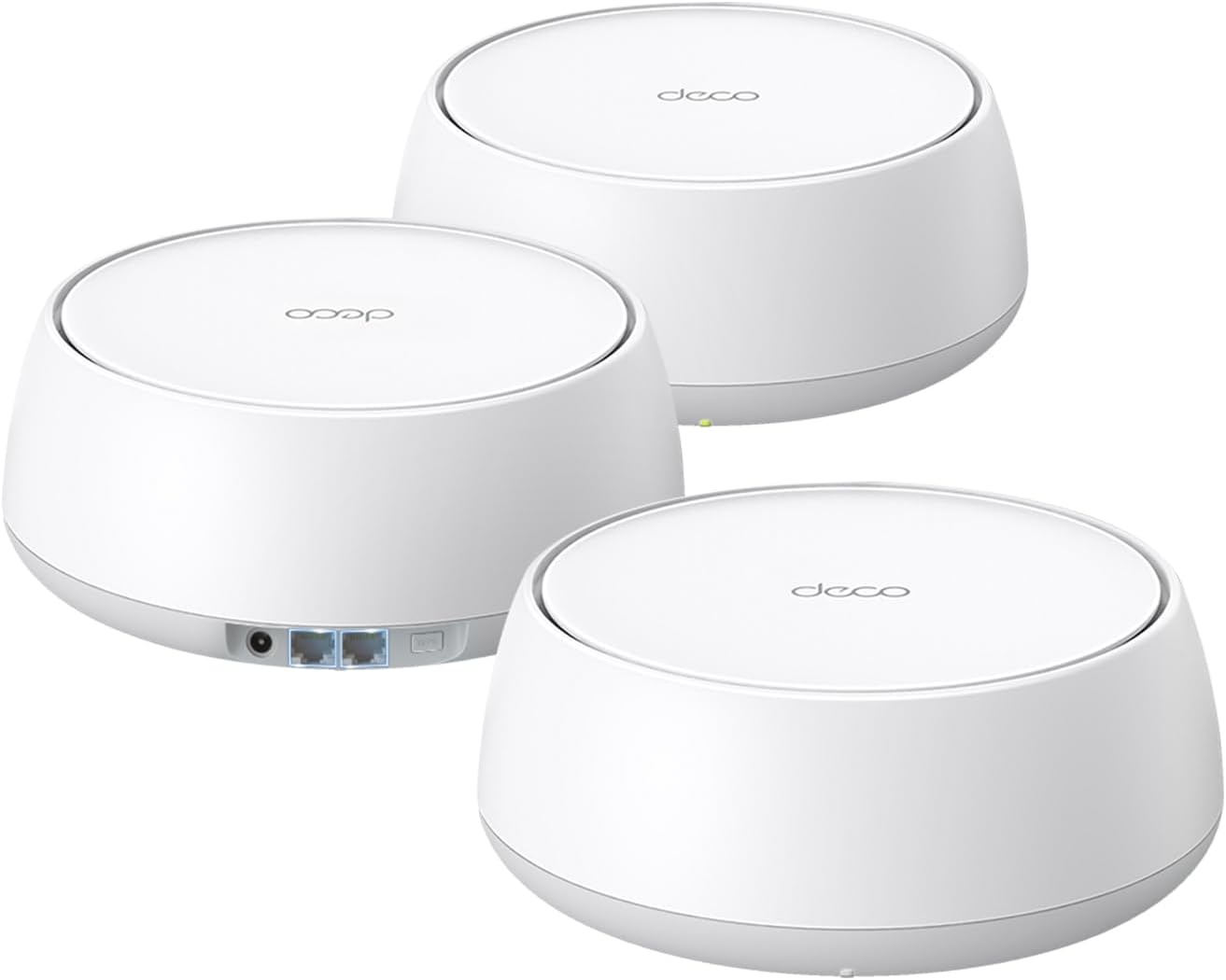
🚀 Future-Proof Your Home Network with TP-Link Deco 7 BE25 – Speed, Coverage, and Security in One!
The TP-Link Deco 7 BE25 is a cutting-edge WiFi 7 mesh system delivering up to 5 Gbps dual-band speeds and seamless coverage across 6,600 sq.ft. Equipped with 4-stream BE5000 technology, dual 2.5G Ethernet ports for wired backhaul, and AI-driven seamless roaming, it supports over 150 devices simultaneously. Enhanced with robust security features including VPN support and TP-Link HomeShield, this 3-pack system ensures fast, reliable, and secure connectivity for modern smart homes and demanding digital lifestyles.


| ASIN | B0DKVDZXSN |
| Antenna Location | Home |
| Antenna Type | Internal |
| Best Sellers Rank | #2 in Computers & Accessories ( See Top 100 in Computers & Accessories ) #2 in Whole Home & Mesh Wi-Fi Systems |
| Brand | TP-Link |
| Built-In Media | 1 RJ45 Ethernet cable, 3 Deco BE25 units, 3 Power adapters, Quick Installation Guide |
| Color | White |
| Compatible Devices | Gaming Console, Personal Computer, Smart Television, Smartphone, Tablet |
| Connectivity Protocol | Wi-Fi, Ethernet |
| Connectivity Range | 6600 Square Feet |
| Connectivity Technology | Ethernet, Wi-Fi |
| Control Method | App, Remote, Voice |
| Controller Type | App Control, Voice Control |
| Coverage | 6600 square foot |
| Customer Reviews | 4.4 out of 5 stars 1,090 Reviews |
| Data Transfer Rate | 5000 Megabits Per Second |
| Frequency | 5 GHz |
| Frequency Band Class | Dual-Band |
| Has Internet Connectivity | Yes |
| Is Modem Compatible | Yes |
| Item Weight | 3.3 Pounds |
| LAN Port Bandwidth | 2.5 Gbps |
| Manufacturer | TP-Link |
| Maximum Upstream Data Transfer Rate | 5000 Megabits Per Second |
| Mfr Part Number | Deco BE25(3-Pack) |
| Model Name | Deco BE25(3-Pack) |
| Model Number | Deco BE25(3-Pack) |
| Number of Antennas | 2 |
| Number of Ports | 2 |
| Operating System | OpenWRT |
| Other Special Features of the Product | Alexa Compatible, Guest Mode, Internet Security, Parental Control, Remote Access |
| Router Firewall Security Level | Advanced |
| Security Protocol | WPA-Personal, WPA2-Personal, WPA3-Personal |
| Smart Home Compatibility | Smart Home Compatible |
| Special Feature | Alexa Compatible, Guest Mode , Internet Security, Parental Control, Remote Access |
| UPC | 810142820318 |
| Unit Count | 3.0 Count |
| Warranty Description | 2 Year Manufacturer |
| Wi-Fi Generation | Wi-Fi 7 |
| Wireless Communication Standard | 802.11.be, 802.11ac, 802.11ax, 802.11g, 802.11n |
| Wireless Compability | 802.11.be, 802.11ac, 802.11ax, 802.11g, 802.11n |
M**O
Easiest connection and super coverage
No more dead spots! Easiest installation I’ve ever experienced! Plugged them in, connected the main by Ethernet cable to my Xfinity router, gave them a name and password and off they went. All three connected to each other flawlessly and I now have solid WiFi throughout my 2800sq. ft. home; even to my outside cameras.
O**T
Great wifi all over my house now and no more lag!
This is getting as 5 star review for now. We'll see how it's doing in a couple of years. I had another brand that was working perfectly until this last firmware update that broke my internet. I get 990 or so upload and download speeds on my ISP's router but the old mesh dropped them to 150/90 at worst and 300/500 at best before even getting to the internet. I did everything to fix it until I learned that it was a firmware bug that affected my specific ISP's router. This is when I did more research and the Deco got the best reviews of all mesh network systems (that I can afford). It took me very little time to configure everything and as soon at it was up and running the Deco tested at 920-990 both upload and download speeds. I am on fiber and never should have gotten lag, but now I get no lag at all no matter what is going on in my house.
R**A
Excellent price and flawless operation in a mid-spec WiFi 7 mesh system.
Seems to work flawlessly, setup was a breeze, and the app works with no surprises. Upgraded from a very old and out of production Orbi mesh system and so far this unit has exceeded expectations. 3 units covering a 3000 sq ft house, get close to the nominal 400 Mb/sec that I am paying my ISP for anywhere in the house and supports multiple devices with no apparent contention. It's not a full tri-band WiFi 7 but I can't tell the difference and my 400 Mb service doesn't require the higher-priced system.
I**Z
Finally Fixed the Dead Zones in My House
I bought this after getting tired of dealing with weak Wi-Fi in certain parts of the house, and the difference was noticeable almost immediately. Setup was much easier than I expected and only took a few minutes. Before installing it, video calls would freeze, pages would take forever to load, and some devices would randomly disconnect when moving farther from the router. Since adding this mesh extender, the connection has been much more consistent and I’m getting coverage in areas that barely had a signal before. I also like that devices seem to switch between the router and extender smoothly without me having to think about it. If you're struggling with dead spots or unreliable Wi-Fi, this has been a worthwhile upgrade.
G**2
Easy to set up, reliable performer.
Easy set up and good signal. Easy to add additional units. I have about a 4,500 sq ft house and the 3 work well for that. When using it for work, it shows that I am wired when plugged into the unit even though my wired connection is to the WiFi Deco device. Works perfect for my work applications like PowerPoint, etc and we get no lag or buffering when streaming movies or tv. We have been using it for a couple of months and have not experienced any dropping of the signal.
I**P
Great signal throughout the house and beyond
Got this set of 3 to replace the single rental EERO that the service provider put in when my mom got fiber. My biggest issue with the EERO was that the service provider set it up, meaning I had no way to control the device. Specifically, my mom is old and apt to click on scam ads or to call the number when a scam popup freezes her keyboard (thanks a lot, Zuckerberg). The only layer of protection I can give her is an adblock DNS, and to do so I need control. Also, I could not get her living room TV to connect to WiFi and signal was starting to drop off a bit in rooms farthest from that single device. At the time of purchase, this was the most economical 3 mesh device WiFi 7 system from a well established brand. The devices are a bit bulky, but are not eye sores and seem to be very well made. The available wall mount brackets for this style router appear to be more secure than the ones for the cylindrical models, and they won't look as goofy hanging on the wall which is another plus. Mounting brackets are sold separately. Her TV still does not connect to WiFi, so placed one of these near the TV and connected it via ethernet cable. The third is in one of the rooms farthest from the main base. The range is quite acceptable, with my phone getting full signal strength in the yard @ >50' from the house in some places. During setup, was given the option to set up MLO WiFi, aka Multi-Link Operation, which creates a second WiFi network that may provide higher throughput than the basic WiFi connection. It is not compatible with all devices, so likely best practice to connect lower need or 'potato quality' devices to the lower throughput base network (phones, TVs, tablets, guests, etc.). The fiber speed is around 300mbps. After extensive Speed Test usage to the point that they stopped allowing me to run Speed Test, both the Base WiFi and MLO WiFi performed similarly with possibly 10-20mbps higher average via MLO. My guess is that MLO may only be truly useful for gigabit connections. Going straight WiFi with these things doesn't add any significant latency or noticeable drop in throughput in my situation, but could be a concern in larger homes and/or when more walls/junk/metal is between mesh devices. Each of these has 2 ethernet ports, and hardwiring them together with ethernet cable will provide the strongest/fastest connection between mesh devices. The theoretical maximum reliable length is 328' (100 meters) for ethernet cable, so quality Cat6 cable could really put some distance between the main base and the 3rd mesh station (possibly with some WiFi dead spots in between). This is not unique to this system, as most mesh devices have 2 or more ethernet ports.
V**E
Fixed my brick apartment problem
Moved to a new apartment and discovered that all walls had full brick hidden underneath. No access to coax except the front of the unit, and my office was at the far back of the unit 50+ feet away and separated by 4 brick walls. I tried several other lower end solutions and could not get anything higher than 30-40 Mbps in my office with lots of packet loss (1 Gbps coming out of the modem in the living room.) Some devices couldn't even see or connect to the wifi network in the back of the unit. This solution was incredibly easy to configure and setup. App works very well and has a lot of fun options for those who like to tinker. After a little tweaking to find the sweet spots for the 2 nodes, I now get 400-700 Mbps through the first 2 brick walls and 300-500 Mbps in my office with 0 packet loss. I'm sure I could improve the speed further upgrading to one of the $500 mesh solutions available, but for how difficult wifi range is for my brick unit, this device was a lifesaver and I highly recommend giving it a shot for anyone struggling with signal loss.
T**R
Good coverage, Simple installation.
Set-up is intuitive. Wireless range works well enough. I purchased for 2 different family member homes and made my account a manager of both. I can remotely troubleshoot for both them from my phone. I've had some bug issues with the guest network or adding an additional deco unit previously, however I was able to resolve issues quickly. I like that I can name the units then manually route which router each one should get it's feed from because they will all automatically try to connect to the main unit if in range even if signal may be much weaker. The 3 pack coverage is good, and the input voltage it can use ranges from 100V to 240V. One of the homes has similar looking plugs wired with both 110V or 220V so that flexibility was good for me.
N**T
Fácil red en malla , los puedes combinar con otros decos de modelos anteriores.
La red en malla de Tp link es muy fiable y es muy fácil de instalar. Este profe ductor lo usé para extender mis deco M5 , los puse como principales y tener wifi 6 en las zonas mas importantes y los m5 en zonas secundarias. Aunque la ventaja de tener los decos vía inalambrica es brutal... la diferencia con poder cablear algunos los hace muy rápidos y eficientes.
C**1
For a British consumer, this is a nightmare.
This router has a US plug, not a UK plug, which was not mentioned in the product information. It is difficult to imagine buying a US electrical appliance on Amazon UK. How should a consumer distinguish between them?
M**K
Fantastic App. Solid And Reliable Connection.
I waited nearly a month to write this review. Setup was a breeze and the control is as good as I've ever had in a network system. Over the past several weeks I have had the Deco-BE25 WiFi 7 3pk up and running through wired backhaul in our home and it has been nothing short of fantastic. I haven't experienced any drops or interruptions in my signal the entire time. Signal strength is better than my ISP provided all in one unit and the amount of settings and control I have is so much more and much easier to manage through the Deco app. I've had nothing but a great experience with this system and the app. I love being able to chose which band to use for each device and I also love the fact I can direct each device to use a specific unit as it's signal source rather than have it roam. I can rename every device to help me better identify it in my system and I've been able to direct each unit to the best possible unit for optimal signal strength. This made it a seamless transition getting all my 2.5ghz smart bulbs and such connected. I can create a blocked list and guest wifi effortlessly through the app and everything can be done in realtime without having to reset the units. If I want to make a system setting change I can just do it through the app and it applies to my system without missing a beat. This is truly a refined and well thought out system. I will acknowledge that I'm using these units through wired backhaul and have no experience with the wireless signal. But for my use case I couldn't have asked for a better experience. The APP truly is one of the best in the industry and one of the better experiences I've had in home networking. The units run cool and quiet and have been flawless in their reliability and signal strength. Highly recommended from me.
X**X
Great Product, Worth Trying!
The product is excellent! I bought it after hearing many recommendations from friends, and it truly proved its efficiency. It covered the entire villa without any interruptions and supports a high-speed network with complete stability. I highly recommend purchasing it—an outstanding experience worth the investment.
C**N
Mi primer wifi mesh y lo mejor.
Ahora tengo wifi en toda mi casa y con la velocidad que entrega el proveedor de internet, es muy fácil configurar.
Trustpilot
1 month ago
1 week ago