Desertcart purchases this item on your behalf and handles shipping, customs, and support to Tunisia.
🚀 Triple your screen, triple your impact — work smarter, not harder!
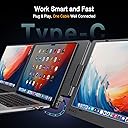
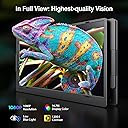
The KYY Laptop Screen Extender X90D is a portable 15.6-inch triple monitor setup designed for professionals on the move. Featuring a single-cable connection via USB-C or USB-A, it delivers full HD 1080p resolution across three screens with a 16:9 aspect ratio and 178° wide viewing angles. Its CNC aluminum alloy chassis ensures durability and a sleek profile, while 360° rotatable displays and adjustable kickstand provide ergonomic flexibility. Compatible with major operating systems and equipped with customizable OSD settings, this extender boosts multitasking efficiency by up to 300%, making it an essential upgrade for millennial managers craving productivity and style.


| ASIN | B0DK6HJ1TB |
| Additional Features | Eye Care, It does not limit the use of the place- whether you need it at home, office, meetings, travel work, or outdoor data processing, you can easily master it., Lightweight, Portable, Provide an amazing experience for Professionals, Players, Stock traders and Programmers. |
| Aspect Ratio | 16:9 |
| Best Sellers Rank | #7,694 in Electronics ( See Top 100 in Electronics ) #275 in Computer Monitors |
| Brand | KYY |
| Brightness | 300 cd |
| Color | Grey |
| Compatible Devices | Android Devices, ChromeOS Devices, Linus Devices, Windows Devices, macOS Devices |
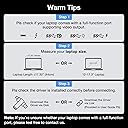
| Connectivity Technology | USB Type-C 3.1 for video transfer(Type-C Full Function Port), USB Type-C port for power charging |
| Contrast Ratio | 1200 : 1 |
| Customer Reviews | 4.4 out of 5 stars 840 Reviews |
| Display Resolution Maximum | 1920 x 1080 pixels |
| Display Technology | LCD |
| Display Type | LCD |
| Hardware Connectivity | USB 3.1 Type C |
| Image Contrast Ratio | 1200 : 1 |
| Included Components | 1 x 15.6" Portable Dual Monitor, 1 x 5V3A Power Adapter, 1 x USB Disk (with Display Driver), 1 x USB-C to USB-A Cable for Power Charging, 1 x USB-C to USB-C Cable with a USB-C to USB-A Converter Head for Video Connection |
| Item Dimensions D x W x H | 12"D x 17.3"W x 3.74"H |
| Manufacturer | KYY |
| Model Name | X90D |
| Model Number | X90D |
| Mounting Type | Desk Mount |
| Native Resolution | 1920x1080 |
| Number of Component Outputs | 1 |
| Picture Quality Enhancement Technology | Eye Care, Color Enhancement |
| Refresh Rate | 60 hertz |
| Resolution | FHD 1080p |
| Response Time | 1 milliseconds |
| Screen Finish | Matte |
| Screen Size | 15.6 inches |
| Screen Surface Description | Matte |
| Specific Uses For Product | 360° closer foldable angle to close together each screens to stand out in group presentation, Features USB-C cable with USB-A comberter head, compatible with most laptops via Type-C/USB-A ports, Multiple Modes for Productivity & Efficiency (extend/mirror/portrait/single 2nd screen/pre mode) |
| Total Thunderbolt Ports | 1 |
| Total USB 3.0 Ports | 2 |
| Total Usb Ports | 2 |
| Viewing Angle | 178 degrees |
| Voltage | 5 volts |
| Warranty Description | KYY Portable Monitor provides 12 months warranty & 30-days return policy for no reason , any question pls feel free to contact our 24/7 professional after-sales customer service team. |
U**R
Solid Construction and Truly Plug-and-Play
I spend a lot of time working from my laptop, and this KYY triple monitor extender has been a fantastic upgrade to my workspace. The first thing I noticed was how solid it feels. The aluminum alloy construction gives it a premium, durable feel that's much sturdier than the plastic portable monitors I've used in the past. It feels like it was built to handle frequent travel without worrying about damaging it. Setup was surprisingly easy. On my laptop it was essentially plug-and-play with a single cable, and I was up and running in just a few minutes. The instructions were straightforward, and once connected, having three full HD screens made multitasking so much easier. I can keep email, spreadsheets, and video meetings open at the same time without constantly switching windows. The 15.6-inch displays are bright and sharp, and the rotating screens and adjustable kickstand make it easy to find a comfortable viewing angle. When I'm done working, everything folds up neatly for travel. If you're looking for a well-built triple monitor setup that's easy to use and dramatically improves productivity and all in a well-priced package, this one is definitely worth considering. The solid construction and hassle-free plug-and-play setup make it an excellent investment for anyone who works from a laptop.
C**D
Great product and even better service.
I received the 3 monitor extender from Amazon overnight. Packaging is great. Setup including driver installation and connection a snap. Everything works as advertized. It is a compact, well designed product with a quality feel. However, one of the 3 monitors was intermittently half dark, suggesting an issue with the backlight. After exchanging a couple of emails, a full replacement device was sent without delay. I received it within 4 days and it is perfect. Bottom line: A great product with great service after the sale. Things can go wrong. Good people and companies admit the failure and make it right ASAP. They deserve my business and yours!
S**9
Love these screens!
These screens are the absolute best. Makes working from laptop so much better and having 3 screens allows to get done the work done easier!! So easy to set up, light weight and durable. Easy to throw in bag with laptop when traveling too. Picture quality is great too!! Overall, the best thing I’ve purchased for laptop! I did have an issue where the usb c > usb/usb c broke. I reached out to customer service via email. They sent me a new a cable and back to business I am! The turnaround time to receive was 3 days, which was amazing considering the time difference and via email!
P**R
Good monitors for Windows OS. Not great for Linux
Picture quality for this monitor is good for productivity. refresh rate is at about 60Hz. I purchased the X90D model. In Windows I had no issues with setting it up and having to use it. However in Linux it is another story. Drivers may be a little outdated and I am not sure, I haven't tried on their version of Ubuntu. Instead I tried it on 26.04. Both monitors are visible but any type of work will be laggy. Extremely laggy on the monitors themselves. Main screen has no issues. I attribute that to the drivers themselves. I've been using these for a while and had no issue. I don't care much about how portable they are however the handle makes it easy. care must always be taken when moving from one spot to another. As for folding them, there is a specific way. if not respected, damage can occur. Overall I am very happy with the purchase and one star was deducted only due to linux drivers.
F**R
I was very pleasantly surprised. It actually works exactly as advertised.
I bought this for working with my higher end Samsung laptop, because my desktop machine has six monitors, so I'm definitely not going to get by with just one on my laptop. I have owned, for a very long time, a USB single cable monitor that, for what it is, is pretty good-- that is, it's very lightweight and portable, and it gets the video signal and power off of one (or two) USB connections. The problem with it though is that it is lower resolution and has a slower refresh rate. For my purposes at the time, using it in portrait mode for reference, it worked great. I was expecting a similar kind of experience here, but I was very wrong. This thing really is plug and play, provided your laptop provides adequate power over the USB-C, or you plug the monitor set into power separately. I believe there are drivers to install. Oh, yes! I'm glad I remembered this. The unit came with drivers on a USB drive but the USB drive they give you is actually very nice. It's metal and is both USB a and C and has a cover that flips around to either end, and that cover has a loop on it that is, thankfully, sized properly to go on to a keychain if you wanted to. Unfortunately, it's only 512 MB, yes, not gigabytes. The USB drive contains drivers for all of its compatible systems, including an APK for Android. I believe this is the same common driver set that you use with almost any USB monitor, including docking ports that have a video out. On my windows laptop, the monitors set up beautifully, though I was trying some funky things with providing power, and testing it through USB hubs and things like that, and my best advice is just not to get too adventurous with it. Plug it in, and if the monitors don't come on and stay on, then plug in their power source. On my system, somehow, and perhaps it's just dumb luck, I didn't even have to arrange the monitors within Windows, it just knew that these external monitors somehow were one on the left, and one on the right of the main display. Each of them is full HD. I didn't stress test them for refresh rates, but I think I read somewhere that the refresh rate is surprisingly high. That's not really an area I care about on something like this, because I really just want the footprint. The one slightly unpleasant surprise, if you can call it that, and really I don't know what I was expecting, but it's that this three panel thing, which is a display on either side, and then a structural panel in the middle that has a handle through it, really needs to sit on a flat surface, and it makes it a little janky if you want to use the laptop in an area other than at a table or desk. I know there are some solutions to this, like folding one of the monitors closed, and using the other freestanding in portrait mode. I think I was kind of hoping for something that actually attached to the laptop, so the whole thing felt like one unit. In any case, with the panels folded out, there is a stand on the back of the center panel that lets you tip the monitor set back to a pretty good angle that you would typically use a laptop at. I wouldn't say the panels are of the very highest quality, but for a very thin, USB only display, I will say the difference is not so noticeable as to be distracting, and that is comparing it to a Samsung Book 3 Pro which has a high-end Samsung display in it. You can see a clear color difference between the native monitor and the external panels, but that is due to the eye saver turning the display to a warmer color, but the effect is much more subtle on the externals.
M**E
Excellent Screen, but a Protective Case Is Needed
It’s a very good product, but it would be even better if there were a way to raise it to eye level. My boyfriend, who is a handyman, made an adaptation for me, and it has helped a lot with the height adjustment. Other than that, the screen is excellent. It’s not too heavy and is easy to carry to different locations. One downside is that it does not come with a protective case. It doesn’t fit in any of the office bags I own, so I think a case should have been included, especially considering the price. There are options to adjust the color, image size, and screen extension settings, but everything was already well configured for me, so I didn’t feel the need to make any additional adjustments. Overall, it’s a great product and I’m very happy with it.
J**Y
Excellent product, probably best affordable option
This is an excellent product, I did quite a bit of shopping around to find one that both had high ratings and only required one USBC input from the computer and this is the one I picked. I'm happy to say I chose correctly, it is indeed a very nice product. It has one USB that goes into the laptop and another USB for extra power that goes directly to a wall plug or some other USB power input, So one USB-C for power input and a separate USB-C for video input. One thing I somehow didn't expect is that it doesn't actually attach to the laptop It's more like a stand that sort of props up on its own and you just kind of put your laptop in the gap between the two screens but it doesn't really have to touch it, per se. If there are any downsides it would be this one thing, that basically it has to sit at certain angles both in terms of how inward towards you it's pointed as well as how far back it's leaning on the main support element, because if those things aren't in balance it can sort of fall towards you. However, that is not really a problem because the angles at which those things work are precisely the angles at which one would typically be sitting in relation to the screens. Additional pluses are that the way it folds protects the screens when it is in transit and also it has a kind of handle gap that allows you to carry it more easily and reduce the likelihood of drops. Ultimately, for a product category for which there are not a ton of great options as far as I could tell from doing the shopping around that I did, I am fairly confident that I got the best affordable option for this product and I would encourage you if you want this kind of screen extender for your laptop to get this one.
E**H
Perfect for virtual teaching
Last year I started teaching online and I got by with my laptop screen and a monitor, but it wasn’t the perfect set up. I felt like the monitor was wasting space on what really is a rather large desktop. I didn’t always need it, but it was always there. I also had to split my screen in order to keep my teaching platform on one side and my lesson plan on the other. I used my second screen for the slideshow I used regularly. I really wanted a third screen to make teaching easier, but I couldn’t imagine wasting even more desk space by adding a second monitor to the system. When I traveled this summer and was forced to use my iPad as a second screen (uggh), my brother told me about laptop screen extenders. This sounded like the perfect solution for my problem, so I watched a bunch of YouTube reviews and this one kept coming up as one that is reliable and easy-to-use. It was a big expense, but if it made my daily life easier, it was worth it. It was so easy to set up on my own. I am not tech savvy, so I assumed I’d need my husband’s help, but the directions were clear and easy to follow. When I teach, I can keep my video platform on my main screen, my lesson plans on the left and slideshow on the right. Additionally, if I want to use my desk for a crafting project, I can easily fold everything up and have 62” of free space to work with. Lastly, because I can adjust the screens to go back 90°, I can mirror my screen so my son can see without having to sit right on top of me. It solved an issue I didn’t even know I had until I realized my son could work on one side of the desk while I worked on the other. Lastly, we are considering taking a 6-month cross-country road schooling trip, and because this extender is so lightweight (relatively) and can be folded down and put away, it will be a perfect solution to let me work on the road. TLDR; I love it. It has solved all my problems, even those I didn’t realize I had. It’s portable, easy to use, and functions beautifully. 10/10 would buy again!
Trustpilot
3 weeks ago
1 week ago