Buy anything from 5,000+ international stores. One checkout price. No surprise fees. Join 2M+ shoppers on Desertcart.
Desertcart purchases this item on your behalf and handles shipping, customs, and support to Tunisia.
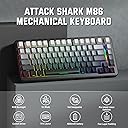
🎮 Elevate your desk game with the ATTACK SHARK M86 — where style meets pro-level performance!
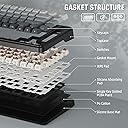
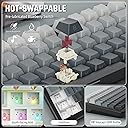
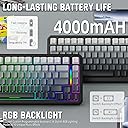
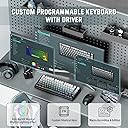
The ATTACK SHARK M86 is a premium 75% wireless mechanical keyboard featuring tri-mode connectivity (Bluetooth 5.0, 2.4GHz, USB-C), a gasket-mounted custom structure with 5-layer sound absorption for quiet, tactile typing, and hot-swappable pre-lubed strawberry switches. It boasts vibrant RGB backlighting with music sync, durable PBT side-printed keycaps, and full programmability, making it ideal for multitasking professionals and gamers seeking a sleek, versatile, and customizable keyboard compatible across Windows, macOS, iOS, and Android.


| ASIN | B0DMT4G94H |
| Additional Features | Backlit, Ergonomic, Hot-Swappable, Programmable Keys, Rechargeable |
| Antenna Location | Business, Everyday Use, Gaming, Personal, Programming, Student |
| Best Sellers Rank | #51,870 in Video Games ( See Top 100 in Video Games ) #2,478 in PC Gaming Keyboards |
| Brand | ATTACK SHARK |
| Built-In Media | Keyboard, Mouse, USB Cable |
| Button Quantity | 83 |
| Color | Moon Night |
| Compatible Devices | Gaming Console, Laptop, PC, Smartphone, Tablet |
| Compatible Operating System Family | Windows |
| Compatible Tablet Computer Models | AAUB P30 |
| Connectivity Technology | 2.4GHz , Bluetooth, USB-C |
| Customer Reviews | 4.6 out of 5 stars 21 Reviews |
| Enclosure Material | Plastic |
| Hand Orientation | Ambidextrous |
| Keyboard Backlighting Color Support | RGB |
| Keyboard Description | Mechanical |
| Keyboard Layout | QWERTY |
| Manufacturer | ATTACK SHARK |
| Model Number | a2914763-3d82-4533-949b-8e45a431f621 |
| Number of Keys | 83 |
| Number of Sections | 1 |
| Power Source | Corded Electric |
| Recommended Uses For Product | Business, Everyday Use, Gaming, Personal, Programming, Student |
| Special Feature | Backlit, Ergonomic, Hot-Swappable , Programmable Keys, Rechargeable |
| Switch Type | Mechanical |
| Unit Count | 1.0 Count |
K**E
Buy this , you won’t regret it !
This keyboard is everything expected & then some ! I love listening to my husband play his games now due to the clicking sounds of the keyboard. The lights are beautiful & it’s all & all an amazing keyboard! ❤️
C**R
Fantastic for Gaming
This keyboard is a great addition to my gaming setup. The customizable RGB lighting and hot-swappable switches are excellent for personalizing my experience. It's also comfortable for long gaming sessions, making it a good investment.
J**.
Good mid range keyboard
This is a nice keyboard. It has a clean and almost retro look to it. The side printed caps are nice and help with the clean look. The keys feel good and the action is nice. It's not very loud but it is definitely noticeable. The included cable is nice. It is braided nicely and has nice reinforced ends. The connector seems like overkill but this seems to be more for aesthetics than function. The coil does give an interesting look and allows for some slack while not having messy cable. But the nice thing is the keyboard can be used wirelessly so the cable is optional if it's just not for you. Once connected the keyboard responds great and can be configured with Attack Sharks software. The RGB is not as bright as others I have used but that's OK with me. It's a nice value keyboard that puts it better than a cheap low end, but lacks functions of the higher end. If you want a nice looking and functional keyboard that feels good to work on but you aren't necessarily into gaming, this is a good budget option.
R**S
Great Keyboard
This is a great option for keyboards. I really like the feel of the keys and the way it fits to my hands for both regular use and gaming. I'm not the greatest touch typer, so it's a little strange when I look down at the keys to have the letters/numbers printed on the front of each key rather than the top, but that was easy enough to get used to. It does mean that the keys will ot get as worn over time from gaming. I do own several keyboards that have had the wasd keys show some heavy wear over the years, and I feel this design helps avert that concern. The keys give a good amount of push back without being too stiff. Overall a great keyboard, and I'm glad I picked it up.
A**R
Weird cable, awesome keyboard
I'm sure there is some reason for the unusual cable, but it escapes me. Fortunately, it is optional. That aside, the keyboard is extremely nice. It would seem that a great deal of thought went into its design and an equal measure of attention into its construction. It is a joy to use and looks great with my retro PC build. Highly recommend.
L**G
feels great
I was pretty impressed, the keys on this keyboard feels really nice and smooth, it's probably one of my favorite feeling keyboards, and the sound it makes is also great. I really like that there are so many options and ways to connect it, I usually use a wire but it's always good to have the option to have it wireless. Now for the not so good, I only had 2 things that I didn't really like. 1. I didn't really like the design, i was hoping it whold be more clean, it kinda looks like an old retro one, but it didn't match my setup 2. The RGB lights are a good addition, but they are pretty dim unless the lights are off, they are not too noticeable
D**Y
Excellent
This mechanical gaming keyboard is excellent. Wireless, nice layout, and unique design and keycaps. Excellent typing and responsive feel. Highly recommended!
S**R
Good but not great
As a PC gamer I wanted to try out a new mechanical keyboard as my other is now a little dated, so I ordered the M86 Attack Shark. When it arrived I loved the premium feel it has. It has a good weight to it and the keys have a very satisfying thud to them as you depress and release a key. Set up was easy. It has a couple of switches on the back, one to select either Windows or Mac and one that selects the connectivity option; leave it in the middle for USB connectivity or to the left or right to select Bluetooth or 2.4ghz connections. If you leave it on USB, the power will not come on until you plug it in with the provided 2 piece cable. Select either Bluetooth or 2.4ghz and the power comes on automatically. To use the 2.4ghz you will need to plug in the USB dongle connector which is conveniently located behind the left hand flip out stand underneath. I like that it is secured by a magnet so it won't accidentally fall out. As far as USB connectivity goes, I have to say I'm not a fan of the coiled cable, or the aviator style metal connector. A long straight single piece cable would be preferrable, I really don't see the need for the connector? it makes zero sense. Any time you split a cable in two, it degrades the signal output (albeit minimally) to the connected device. That being said all connectivity options do work well, and I didn't notice any input lag from the keyboard to my computer using any connection methods. The lighting seems pretty basic and you have to use keyboard shortcuts to change the color schemes, of which it appears there are only a handful. Also, the keys are only backlit, so if you are playing in a dark environment finding a specific key is challenging. The letters on the keycaps themselves do not illuminate. The sellers photos seem to indicate that their is an accompanying app that goes with the keyboard that allows a lot of customization, however there is no mention of it in the instructions or on the box. A QR code with a link to the software would have been a great idea, also to online instructions, as the supplied instructions are printed so small I had to read them with a magnifying glass. Overall, I spent a few days using the keyboard for basic word processing and it works great. I tried gaming with it and it still worked great, but illuminated key caps would have been helpful to identify the keys used in my game. At $65.99 which is the price at time of my review, I feel the keyboard offers reasonable value for money, The instructions could do with being in a larger print, or have an option to be able to view them online. Plus lose the two piece cable, especially the coiled part. The listing claims that the aviator style connection gives a stable and fast connection, it very well may do, but a solid one piece cable that doesn't use any connector in the middle provides a much more stable and reliable connection.
V**L
Very comfortable to type
Very nice to type into and has that good sound when you type. Very comfortable and has very nice colour effect. Would recommend
T**W
Smooth typing, modern features and classic look.
I have been using this keyboard daily for several hours a day for the last week and it is going to continue to be my daily use keyboard for the near future. Included with the keyboard is: • A thin plastic cover that could be reused as a dust cover • A braided USB A - C cable with a coiled end and aircraft style metal fitting inline. • A keycap/switch puller • There is a 2.4 Ghz dongle under the foot on the bottom of the board itself • Instructions in multiple languages Some quick impressions: + Solid build + Effective Key dampening material + Good battery life + Smooth linear keys + Handsome USB Cable + Fairly decent value, great value on sale or with coupon - Indicator lights are difficult to see (caps lock, Bluetooth pairing etc.) - RGB Light strip has limited settings • No labels for hotkeys • The board weighs 747g without the cable, 13" wide. This is a triple mode keyboard so it is able to be used wired, or wireless using either 2.4 Ghz or Bluetooth with the selector on the back switching modes. On Bluetooth there are three saved banks that can be used to swap the pairing between three separate devices. There is another selector for switching between Windows and Mac layouts. This compact board has linear pre-lubed switches advertised as a "Strawberry" switch, though I can not figure out who exactly makes these switches and what their actual specs are. They are fairly smooth though, feeling above the typical budget boards with generic non-lubed switches, though not likely quite as creamy as higher end gear with custom builds. I do like the weight of them, but without the specs I can not say what that is. The entire case is a plastic build, but solid and everything fits together well. Two stage keyboard feet are underneath for the height adjustment. The stabilizers appear to be pre-lubed as well, which is nice. The space bar and left shift are probably the loudest, understandably, with a some stabilizer ping. It's not bad though, and better than most in this price range I would say. The board apparently has multiple layers of gasket material which helps keep the sound of the keys a bit softer and more muted. The key caps themselves are PBT and the legends are clear though they are not shine though on the White model here. Switch alignment appears to be generally pretty good. It is indeed hot-swappable and I pulled out a couple switches to get a closer look. There is RGB key lighting with preset animations/modes and the ability to cycle 8 colours on the board itself including RGB cycling on most settings. If you want to have some more precise control you'll have to download the Attack Shark driver from their site. It seems to save a custom slot on the board though for one colour you set though software, as I can cycle back to one I had set earlier. There is a small light strip on the right hand of the board that can also be adjusted somewhat, but with far less customization than the keys themselves. The lights under the keys also serve as status indicators, which given their location can make it difficult to see. Caps Lock for example turns white when active, but at a typical typing angle it is not really noticeable. The space bar key will also turn red while it is charging. At default using a wireless mode the lights will shut off after a couple minutes to save power, but this can be adjusted in software. There are also various hotkeys that can be used with the Fn key such as media controls, but as there are no labels on the board for those functions it is up to your memory as to what they are. Personally I don't use those keys much, and I think I prefer the cleaner look without said labels. After a few days of fairly consistent use (several hours per day with lighting on) I have only dropped about 20% of battery life. So far I am very impressed with the quality.
K**O
What to be expected.
It’s a bit too loud imo but overall not a bad keyboard…
M**O
Good keyboard
Keyboard so good fast shipping
H**R
A good 75% keyboard with a heavy mechanical key feel
I have found myself liking this keyboard much more than I expected. It is a 75% keyboard (with no numpad) with a heavy mechanical feels. It feels feels good to type on, and the sounds it makes are very satisfying. The gradient shades of grey on the keys with south-facing labels gives it a sleek minimalist look but allows you to still double check if you're tapping the right key. The keys use generic brown switches with LED lights embedded on the south side of the keys. The key travel is nicely deep and the key presses feel smooth and heavy. The insulated bottom makes the key presses less clackity. The only key that did not feel smooth was the space bar - it seems they use the same springs and resistance as the smaller and lighter keys, making that key push down a bit too quickly and loudly than the rest of the keys. The 2.4Ghz mode worked the moment I plugged in the wireless dongle. The dongle is tucked securely under the keyboard near the stands. There are two stands, one short and one long, nested in each other. Note that to switch from one stand to another, you have to close the stand that is flipped up first. The only stands are on the rear/north side of the keyboard. The keyboard was packaged with a plastic protective lid that doubles as a dust cover. The LED function will work even in wireless mode, although the lights will turn off after 2 minutes of inactivity. There are a variety of LED patterns that can be cycled through by tapping Fn-Enter and Fn-Backslash. Some are triggered by key presses. There is a LED light bar on the right hand side of the keyboard that cannot be configured or changed in any way. Note that if the keyboard is plugged in and your PC has USB power even when off, the keyboard will remain lit indefinitely unless you unplug it. When using the wired mode, you can use two metallic braided cables that are connected together with a 4 pin aviation connector, giving the cable an industrial feel. The cable that connects to the keyboard is USB C on the other end and is coiled. The cable comes with a rubber cable organizer. The other end is USB A. Thoughtfully, the coiled end was packaged with a hollow plastic tube inside it so it maintains its shape during shipping. This manufacturer appears to be the same one that makes Ajazz and Mamba Shark accessories. Manual has six languages, which is impressive. However, the manual is slightly incorrect about how to assess battery info. You need to hold down the Fn+Backspace, not tape it. Not mentioned in the manual is that this keyboard also has a program you can download from the Attack Shark website that allows you to update firmware and configure keys, the sleep timer, macros, and debounce delay. There is also an interesting sound sensitive mode you can only activate via this application.
Trustpilot
2 weeks ago
1 week ago