Desertcart purchases this item on your behalf and handles shipping, customs, and support to Tunisia.
🚀 Power-packed Mini PC for the Future-Ready Pro
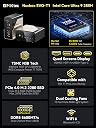
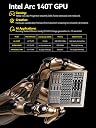
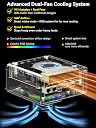
The GMKtec AI Mini PC Ultra 9 285H EVO-T1 is a compact powerhouse featuring a 16-core Intel Core Ultra 9 processor turbocharged to 5.4 GHz, 64GB DDR5 RAM, and a 1TB PCIe 4.0 SSD. It integrates an Intel AI Boost NPU delivering 13 TOPS for accelerated AI tasks, an Intel Arc 140T GPU for modern gaming and creative workloads, and supports quad 8K displays for expansive multitasking. With triple M.2 expansion slots, Oculink port for high-bandwidth connectivity, and advanced networking including 2.5GbE Ethernet and WiFi 6, this mini PC is designed for professionals demanding top-tier performance in a sleek, portable form factor.


| ASIN | B0FH54R8J3 |
| Additional Features | 64GB DDR5 SO-DIMM, Intel AI Boost NPU, capable of up to 13 TOPS, OCULINK PORT, PCIE 4.0 SSD Drive with 3x M.2 2280 Expansion slots |
| Aspect Ratio | 16:9 |
| Best Sellers Rank | #21,195 in Computers & Accessories ( See Top 100 in Computers & Accessories ) #733 in Mini Computers |
| Brand | GMKtec |
| Built-In Media | GMKtec Nucbox EVO T1 Intel Core Ultra 9 285H Mini PC Computer, HDMI Cable, Power Supply & Cable, User Manual |
| CPU Model | Intel Core Ultra 9 |
| CPU Model Number | Intel Core Ultra 9 285H |
| CPU Model Speed Maximum | 5.4 GHz |
| CPU Speed | 5.2 GHz |
| Cache Memory Installed Size | 2000 GB |
| Cache Size | 2000 GB |
| Color | Black |
| Compatible Devices | Headphone, Keyboard, Monitor, Mouse, Television |
| Connectivity Technology | Bluetooth, Ethernet, HDMI, USB, Wi-Fi |
| Cooling Method | Dual Cooling Fan |
| Customer Reviews | 4.6 out of 5 stars 156 Reviews |
| Display Resolution Maximum | 7680×4320 pixels |
| Display Type | LED/OLED |
| Graphics Card Description | Dedicated |
| Graphics Card Interface | PCI Express |
| Graphics Card Ram | 64 GB |
| Graphics Coprocessor | Intel Arc 140T GPU 2.35GHz |
| Graphics Description | Dedicated |
| Graphics Ram Type | VRAM |
| Hard Disk Description | PCIe 4.0x4 M.2 2280 SSD Triple Slots Max.24TB |
| Hard Disk Interface | PCIE x 16 |
| Hardware Interface | 3.5mm Audio, 802.11 ac/b/g/n, Bluetooth 5, Ethernet, HDMI, PCIE x 16, USB Type C |
| Human-Interface Input | Buttons, Keyboard |
| Item Weight | 2.24 kg |
| Keyboard Description | Gaming |
| Keyboard Layout | QWERTY |
| Manufacturer | Shenzhenshi Jimokekejiyouxiangongsi |
| Memory Clock Speed | 5600 MHz |
| Memory Slots Available | 2 |
| Memory Speed | 5600 mt_s |
| Memory Storage Capacity | 1 TB |
| Model Name | EVO T1 |
| Model Number | EVO T1 |
| Model Year | 2024 |
| Native Resolution | 7680 x 4320 |
| Number of Component Outputs | 4 |
| Operating System | OS |
| Personal Computer Design Type | Mini PC |
| Power Consumption | 90 watts |
| Power Plug Type | Type A - 2 pin (North American) |
| Processor Brand | Intel |
| Processor Count | 16 |
| Processor Series | Intel Core Ultra 9 |
| Processor Socket | FCBGA2049 |
| Processor Speed | 5.2 GHz |
| RAM Memory Installed | 64 GB |
| RAM Memory Technology | DDR5 |
| RAM Type | DDR5 RAM |
| Ram Memory Maximum Size | 96 GB |
| Resolution | 8K |
| Specific Uses For Product | Education, Multimedia, Video Editing, Everyday Use, Gaming |
| Specification Met | CE, FCC, UL |
| Style Name | Gaming PC Mini |
| Total Number of HDMI Ports | 1 |
| Total Usb Ports | 4 |
| Unit Count | 1 Count |
| Video Output | HDMI, USB-C |
| Video Output Interface | HDMI, USB-C*2 |
| Video Processor | Intel |
| Warranty Description | GMKtec offers a 1-year limited warranty for each mini PC, starting from the date of the purchase |
| Wireless Compability | 2.4 GHz Radio Frequency, 5 GHz Radio Frequency, 5.8 GHz Radio Frequency, 802.11ax, Bluetooth |
| Wireless Network Technology | Wi-Fi |
| Wireless Technology | Bluetooth |
G**.
GMKtec NucBox K10 Mini PC – Compact, Quiet, and Outstanding Value
I bought the GMKtec NucBox K10 after doing some digging, and I've been quite impressed with its performance, quiet operation, and overall value. This mini PC shines for productivity, development, and office tasks, especially for those who need solid power without taking up much space. I have several other GMKtec mini PCs and I keep coming back to them because of the build quality, performance, value, and support. The Cinebench results for the NucBox K10 speak volumes about its capabilities. The 13th Gen Intel Core i9-13900HK scores 118 points in single-core tasks, placing it at the top of the charts—it even outperforms Apple's M1 Max and M1 Ultra in that area. In multi-core performance, it lands at 856 points, securing fourth place overall—better than many desktop CPUs and trailing only behind workstation-class models. These results are impressive for such a compact device, making it perfect for demanding tasks like development and multitasking. My PassMark benchmarks further back up the NucBox K10's performance. It scored an overall rating of 5880.7, putting it in the 57th percentile. The CPU Mark hit 28,599 (79th percentile), Memory Mark came in at 4,000 (98th percentile), and Disk Mark reached 43,851.9 (90th percentile). While it's good for integrated graphics, don't expect it to handle gaming like a pro. In terms of noise, I measured idle noise levels at just 36 dB—barely noticeable—and full load at 43 dB—still very quiet. This makes the NucBox K10 an excellent pick for quiet offices or shared workspaces. Booting up is a breeze thanks to the high-speed NVMe SSD. Windows 11 Pro runs smoothly even with multiple heavy applications open. It's ideal for office suites, web development, software testing, and everyday productivity tasks. Plus, there are plenty of USB-A ports available for peripherals—which I find quite handy. One feature I really appreciate is how easy it is to open the bottom panel to access the expansion slots. Upgrading memory or adding additional NVMe drives is straightforward, making it simple to future-proof your setup or tailor the machine to your needs. At $560 USD, you really get your money's worth with the GMKtec NucBox K10. Competing mini PCs with similar specs often run $700 or more, especially models like Intel NUCs or Beelink with matching CPUs and memory configurations. Many alternatives either skimp on CPU power or come with less RAM and storage—and they usually cost more. For what you get in terms of performance and features, this mini PC is a steal. While I have this hidden behind my monitor, there are mounting slots on the back so you could easily mount it to a wall to keep it discreet. If I had to suggest one improvement, it'd be adding a USB-C port to the back of the computer. Right now, there's only one on the front—handy for quick access but not ideal for permanent connections like docking stations or monitors. With USB-C becoming more standard nowadays, having one on the back would make life easier. Still, having plenty of USB-A ports is definitely a plus for connecting various peripherals. The GMKtec NucBox K10 stands out as a compact mini PC that packs a punch when it comes to performance and efficiency while running quietly. It might not be geared towards gaming, but if you're into productivity and development work in a small form factor at this price point, it's hard to go wrong here—definitely worth considering if you need a powerful yet portable workstation!
J**E
GMTeck Mini PC Great Buy!
If you are looking for a small, semi portable powerhouse computer, this mini PC is a truly great buy. I have 3 of them for work and I run VMs on them, develop on them and host commercial services on them. I can take them with me very easily when I travel, and they have a myriad of features and capabilities. Way better than my gaming laptop which was also bought for develoment purposes and it is the same price with more horsepower and more RAM. I have had no issues with them and they boot quickly and are easy to set up and get on line with built in WiFI and Ethernet adaptors. They run very very quiet compared to my ROG Laptop and the heat output is less.
A**S
Quiet, stays cool,fast and much cheaper than other brands with all the fixins!
No complaints other than the GMKtech logo when I boot up. Fast. Light and small form. Still trying to figure out how to install it to the back of the display screen. Got it at a great price as well!
J**N
PC Intel Core i9 13900HK Powerful, Quiet Mini PC with Excellent Multi-Monitor Support
I just bought three of these units and have them all connected to multiple screen displays. The build quality is excellent, especially for the price. You get a compact form factor, it runs very quietly, and the Intel chip delivers plenty of performance. One of the best things is the multiple screen support. I can run several monitors at once, and it works smoothly with no lag or flicker. It’s perfect for having games, videos, browsers, spreadsheets, and apps all open at the same time and visible. There are lots of ports, so you have a ton of options for how to connect everything. The system feels powerful, smooth, and simple to use. Overall, it’s a great product and fantastic value. The machine is very powerful — 32GB of DDR5 RAM is a perfect sweet spot for multitasking, and the 2TB NVMe SSD provides plenty of fast storage for all my files and apps. I am a happy repeat customer, and I would definitely recommend GMKtec products to other computer users. Overall, it’s a great product and fantastic value.
J**T
Highly recommend GMKtec.
I’m a really big fan of GMKtec and their products. This k10 is a superb little machine. Currently using it as a family PC running Windows (yuck) in the living room. I would say it’s one downside is the Intel arc integrated graphics. It can still play some ok games but for anything fancy, you’ll need to cloud compute that graphics card. If you don’t game, it’s perfect. It’s small, powerful, fast and decently priced given the current market. 64gb of SOdimm ram and 1tb SSD WITH ROOM FOR UPGRADE! Three m.2 NVmE slots and 96 gb ram, can’t go wrong. Highly recommend GMKtec.
J**T
General PC use and video editing, not for gaming!
I wanted to wait a while before I reviewed this product, I bought this several months ago, and basically wanted to run it through its paces. This is a good mini PC if you are not a gamer, this is not made for gaming! Let's get that straight right off the bat, but I'm not a gamer and I didn't buy it for that, I bought it to process video which it does in amazing fashion! I have also processed some audio on the machine and it does that pretty good as well. If you need something to just watch streaming video on or just do General PC stuff, it will handle it. It has the capability of having four monitors hooked to it, but I only use two and it has two HDMI ports on it so that was not an issue. Intel did a pretty good job with this processor. It is very easily upgraded as well as far as storage, but the SSD 4 TB might as well be sticks of gold right now as much as they want for them, I'm going to have to wait until the price goes down, the machine itself has three bays in it and will handle up to 12 terabytes. It came with 32 gig of ddr5 that also is upgradable to like 96 or something ridiculous like that. More than I'll ever use unless I have to edit video for a major motion picture or something! But I have no doubt this machine would handle it! Since I've had it it's never even kicked into high gear, I've never even heard the fan take off not once. Well I take that back I did go into the BIOS and set it, and the fan did get a little bit whiny so I didn't leave it that way, and the manual says if you leave it set at factory settings it is there if you need it if your machine starts taxing heavily it will automatically adjust. So I just set it back l. I did not know that the machine came with Windows on it, I was going to install Linux, but when I booted it there was an operating system there so I just used it.
J**B
Unbelievable difference from an earlier model
The first mini PC I ever bought was an earlier NucBox with lower specs, and while I was basically happy with it, the slightly annoying issues with it were completely gone when I upgraded to this one. Right out of the box, the design was nicer and it looks more expensive than it is. Setting up was a breeze. Included is a small sticker warning you not to connect to a network until you’ve got your basics set up, then you can connect to get the inevitable Windows 11 updates. There are always at least a handful to install whenever you but a new PC, but the process went so much smoother because of the fast restart process. It’s just a few seconds until you’re back on the desktop. Where my previous NucBox had some problems hanging onto a wi-fi connection of the connection was spotty at all, this one has been no problem. It’s just never seems to drop even when other devices run into slow load times. The main complaint I see about mini PCs is about fan noise, but while my other one did whine and wheeze through heavy loads or hot days, they really seemed to have taken care of it with this design. The box stays cooler to the touch. I’ve been running intense graphics, video and audio software in a room with no air conditioning on the hottest days this summer and I could barely hear the fan running until I leaned in close. Running that heavy software, the processor far exceeded expectations. I thought I’d have some wait times on huge files or 4K video but even intense processes were done before I could even take a sip of water. There are plenty of reviews here that give some nice techy specs but if you just want to know how annoying it’s going to be to use a mini PC for graphic design, video production or audio production, as long as you’re not making a feature length film, you won’t have any trouble. This little guy packs a lot of power for the price. I’m glad I took the chance and upgraded.
K**Z
Super impressed!!
I am super impressed with the speed of this computer. It's handled everything I've thrown at it. I have a 44 inch wide screen gaming monitor that I was hoping it could handle. I also have a 34-in gaming monitor super high refresh rate and is 1440. This little machine handled both of those monitors. The top cover comes in two different colors, black or red. M.2 SSD one terabyte hard drive is right on the top and can be changed out for a two terabyte really easily. I'm going to run a network area storage with some hard drives connected to one of the many USB ports on this little computer. Boot time from hitting the power button to to the login screen is 10 seconds. I have an I-5 and a full-blown gaming PC that has an Asus motherboard, 32. Gigs of ram and gaming video card takes 15 seconds to boot up. And it has a Samsung m.2 SSD right on the board. So this little machine really performs well. Comes with windows 11 pre-loaded and just takes a few minutes to get through the initial setup. I haven't played any high-end video games but it's handled low-end video games fine. Not a huge gamer anyways. But this little PC is sure. Does free up a lot of space. If you're looking for a good solid PC that is expandable and is plug and play, look no further and hit the buy now button. I highly recommend this. And It has exceeded my expectations.
Trustpilot
2 weeks ago
4 days ago