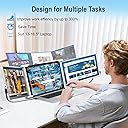
🚀 Triple your screen, triple your impact — work smarter, anywhere!
The QGE 14-inch portable triple monitor extender transforms your laptop into a powerhouse multitasking station with dual FHD IPS screens, 315° rotation, and plug-and-play connectivity compatible with most major OS and gaming devices. Designed for professionals on the move, it boosts efficiency by up to 300%, supports multiple display modes, and comes complete with premium accessories for seamless mobile productivity.


| ASIN | B0D8BLXG5N |
| Amazon 売れ筋ランキング | パソコン・周辺機器 - 518,507位 ( パソコン・周辺機器の売れ筋ランキングを見る ) ディスプレイ - 8,951位 |
| HDMIポート数 | 2 |
| UPC | 027685865182 |
| おすすめ度 | 5つ星のうち3.7 70 レビュー |
| アスペクト比 | 16:9 |
| カラー | AA1-GRAY |
| カラースクリーン機能付き | はい |
| コントラスト比 | 1000:1 |
| コンポーネントアプトプット数 | 1 |
| スクリーン表面の仕上げ | 非光沢 |
| ディスプレイの種類 | 液晶 |
| ディスプレイ方式 | 液晶 |
| ディスプレイ最大解像度 | 1920 x 1080 |
| ネイティブ解像度 | 1920x1080 |
| ハードウェアインターフェイス | HDMI, USB-C |
| ピクセルピッチ | 0.182 |
| ブランド | QGE |
| ブランド名 | QGE |
| メーカー名 | QGE |
| リフレッシュレート | 60 Hz |
| レンズマウントの種類 | デスクマウント |
| 互換デバイス | ノートパソコン、デスクトップ、ゲーム機、マルチメディアデバイス。 |
| 品目の寸法 (D x W x H) | 10.2奥行き x 25.4幅 x 38.1高さ cm |
| 商品の用途 | ビジネス、パーソナル、ゲーム、マルチメディア、旅行、リモートワーク、ビデオ会議。 |
| 商品の追加説明1 | 拡張/ミラー/横向き/ポートレート。 |
| 型番 | S1 |
| 形状 | 長方形 |
| 明るさ | 300 nit |
| 画像コントラスト比 | 1000:1 |
| 画質向上テクノロジー | IPS。 |
| 画面サイズ | 14 インチ |
| 画面サイズの単位 | 14 インチ |
| 画面表面の説明 | 非光沢 |
| 縦横比 | 16:9 |
| 視野角 | 178 度 |
| 解像度 | FHD 1080p |
| 通信・接続インターフェース | HDMI, USBタイプC |
C**R
Almost Feels like I'm in a Simulator!
I had a single portable screen to go with my laptop and it crapped the bed after a year or so. By then, I was hooked at being able to work in a multi-screen environment, especially when I went on the road. I needed an answer. So, I took a shot, spent a little more money and bought this dual add-on display system. I'm actually pretty pleased with these. They open up and give me two sidecar displays for a total of three. The LCD panel quality is pretty darned good, resolution is comparable to my laptop's main display if not a touch higher - and the color is very white (as a baseline), more so than my laptop's display (a Lenovo) that has a slight yellowish hue (I'm very critical, most people wouldn't notice it or be able to identify it). Since they hang off of the sides of my main display, when they are deployed and my laptop display is slightly tilted back to be comfortable, the wing displays are slightly canted upwards on the outside ends. At first, it takes a bit of getting used to, but after awhile it actually seems a bit more ergonomic as you tend to turn your head and tilt simultaneously naturally. And there's a cool little adjustable tripod leg in the back if I'm concerned about the stress on my laptop display - which I'm not as the frame and dual displays aren't very heavy. I love that this screen folds up into a package that is roughly the same size as a hardcover textbook. It's height and width comparable to my laptop and maybe a bit thicker but lighter. My only complaint is that the one screen rotates "back" so that when they monitor system is completely closed one monitor closes into the frame and is protected while the other sits on it's back on the backside of the frame with the display screen facing out. I have a case for it, but I'm pretty confident that a good blow is going to break that screen - which will piss me off because I'm growing pretty fond of these monitors. Know that you have to connect each monitor to a powered port independently. I use one on a USB-C port where it gets signal and power, but for the second monitor I use an HDMI cable and then a USB-C to USB-A and a wall block to power the other. I wish my laptop had enough USB-C ports, I'll make sure my next one has at least three. Would be kind of nice if the manufacturer made some type of USB-C power tap that I could connect the monitor to the incoming AC adapter USB-C and get both signal and power off of the primary port. All in all, I think this monitor system is well worth the price and I'll be very interested to see how long it holds up and continues to give the results I'm seeing now. If I can get two years or so out of it, I'll be thrilled.
G**.
Good product
This product took me a minute to get the cords coordinated correctly to make them all work. With a little patience, it’s good. FYI follow the picture step on the box versions the written instructions. It comes with a travel case.
C**S
Broken after a year of light use
After about a year and a half of very light use (under 10 times), the bottom groove that straddles the screen broke off rendering this device useless. It is a very heavy apparatus already so the screen tends to fall back. It was hard keeping it attached to the laptop in the first place, but now it's virtually impossible. One positive is that I like the carrying case.
M**S
Instantly increased my productivity
Game changing laptop accessory. Image quality is really great. It’s not 4K, but what are you watching on the accessory screens that needs to be that clear? Not so heavy that it knocks my laptop over, but not so light as to think it’s poorly made. I carry this with me all the time and the protective carrying case has kept it in great shape. Each accessory screen needs its own power and data chords and this set comes with them all. I use a USB-C to USB-C on one side and a USB to USB-C and HDMI to Micro HDMI on the other. Works like a champ.
J**S
It ain’t worth it
The idea is wonderful but the functionality is not the best. It’s heavy so I have to prop something under 1 of the monitors for it to not slide forward. I have changed cords because 1 screen is always going out even though my setting is showing 3 screen only two will display and I will not be able to access anything that was on the other screen. Overall I wish I would not have bought it. If I could get my money back I would.
Trustpilot
3 weeks ago
1 month ago