⌨️ Elevate your workspace with the keyboard that works as hard as you do.
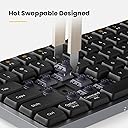
The Lofree FLOW is a low-profile mechanical keyboard featuring 84 keys with Kailh POM linear switches and a patented gasket mount for smooth, fatigue-reducing typing. Crafted with over 85% PBT keycaps and a robust aluminum body, it combines durability with elegance. Hot-swap compatibility allows effortless customization of switches and keycaps. It offers ambient RGB side lighting plus white backlighting, a slim 10mm profile, weighs only 568g, and supports up to 40 hours of wireless use on a single charge with rapid recharge capability. Certified to technical standards, it’s designed for professionals seeking style, comfort, and performance in one sleek package.


| ASIN | B0CJTV8P4Z |
| Additional Features | Backlit |
| Amazon Bestseller | #61,924 in Computers ( See Top 100 in Computers ) #970 in Computer Keyboards |
| Antenna Location | Business, Education, Everyday Use, Personal |
| Brand | LOFREE |
| Built-In Media | USB Cable |
| Button Quantity | 1 |
| Color | Silver |
| Compatible Devices | PC, latptop |
| Connectivity Technology | Bluetooth |
| Country of Origin | China |
| Customer Reviews | 4.4 4.4 out of 5 stars (256) |
| Enclosure Material | Aluminum |
| Generation | 1st Generation |
| Hand Orientation | Ambidextrous |
| Is Electric | Yes |
| Item Dimensions L x W x H | 31.6L x 12.6W x 2.5H cm |
| Item Weight | 1.25 Pounds |
| Keyboard Backlighting Color Support | Single Color |
| Keyboard Description | Gaming |
| Keyboard Layout | QWERTY |
| Manufacturer | LOFREE |
| Model Name | OE915 |
| Model Number | OE915 |
| Number of Batteries Required | 1 |
| Number of Keys | 84 |
| Number of Sections | 1 |
| Power Source | Battery Powered |
| Processor Count | 1 |
| Series Number | 1 |
| Style Name | Classic |
| Switch Type | Linear |
| Theme | Smooth |
| Total USB 2.0 Ports | 1 |
| Warranty Description | 1 Year Warranty Against Manufacturer Defects |
| Water Resistance Level | Not Water Resistant |
み**く
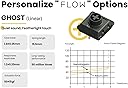
見た目高級感があり打鍵の際のコトコト音も良く、所有満足度が高いです。 セールの時に買ったので大満足ですが、 無線2.4Gに非対応&キーマッピングができないので通常価格だと少し高いと感じます。 打鍵音・打鍵感共にいいですが、デフォルトでついているGhost switchは”作動フォース:50±15gf”で押し感が深く、自分は入力を続けていると疲れてしまいました。 今はLofree公式からHeads switchを購入し、を付け替えて使用しています。 Heads switchは”作動力: 40±10gF”はGhostに比べ押し感が軽く、打鍵音がほぼしないので職場で快適に使用しています。
T**B
打鍵感がいい。慣れるまではちょっと打ちミス するところもあるが配置を覚えれば問題なし。
ま**さ
打鍵音が心地よい。 肌触りも良く満足。 音は心地よいが大きいので外出時の使用には向かないと思います。 気になる点は、一定時間使用していないとスリープ状態になり最初の1タイプが反応しません。そこが少しストレスになる人もいると思います。
A**ー
リニアスイッチを使ってます。 前は logicool の mx keys mini を使ってましたが、こちらの方がスイッチが軽くて押し心地が良いです。音もカチャカチャせず、コトコトと静かです。 初期不具合があったのですが、丁寧に対応してもらいました。
N**M
スリープ状態からの復帰が遅いという前評判があったが、思ったほどクリティカルなものではなかった。 ガスケット構造を謳っているが、丈夫なアルミ筐体も手伝って確かに底打った時の不快感はないが、期待したほど静かと言うわけでも無かった。静かなオフィスで使うにはかなり気を遣う。 それでも、外観の清潔感、独特の打鍵感、スペースキーでもブレなく精巧に動作するキー、これには星5を送りたくなるほどの素晴らしいもの。 惜しむらくは、商品ページの画像にあるホワイトのケースが売っていないこと。
A**ー
色々なキーボードのレビューを見漁って、迷いに迷ってこれを選んで結果的に大満足です 決して安くないですが、高級感、打鍵感、打鍵音、ライト調整、どれも最高です
み**ら
白く、ころっとしたデザインのキーが気に入って購入しました。 入力しているとコトコトと音がしますが、余分なノイズのない澄んだ音なのでさほど気になりません (職場などでは要注意と思われますが)。 難点はBluetooth接続で未入力の状態が続くと比較的すぐにスリープモードになってしまうこと、そこからの復帰が少し気になるくらい遅いことで、結局有線接続に落ち着きました。 また、私には50gfのキースイッチは重すぎたため、Lofreeの公式サイトから購入した40gfのSpecterキースイッチに差し替えて、ようやく好みのタッチになりました。姉妹品のLofree Flow LiteのキースイッチはSpecterなので、軽めのキーが好みであればそちらを購入するのもよいかもしれません。他にもHadesキースイッチに差し替えるとほぼ無音になりますし、追加の費用がかかるとはいえより好みの仕様に変えられる余地があるのはすばらしいです。
岩**一
打鍵音が気持ちいいです。 コトコト、というような音でタイピングが止まりません。 ただし、日本語が配列には対応していないところは要注意です。
N**.
Typing on the keyboard feels like massage sometimes on my finger. Each key press sounds like mahjong tiles hitting each other. The ghost linear switches is easy to type on, I would recommend this over tactile switchers on the black version
L**N
This is a nice, solid prebuilt low profile keyboard. It’s got all the foams so it has a creamier but not muted sound signature. The kailh ghost switches are relatively nice to type on and is further helped by the gasket mounting employed (and which is unique among low profile keyboards). I’ve heard others have criticised the Bluetooth connectivity - I can’t really comment on that because I don’t do anything that requires no significant input lag and it definitely is a con for some people (the workaround would be to use it wired). Anyway, from a keyboard build standpoint - it is all around a very solid low profile keyboard.
C**A
Muy buen teclado, tal vez lo único malo es que las letras de las teclas están pintadas y no se iluminan con la luz blanca de fondo del teclado Respecto al RGB solo se puede cambiar de las luces de abajo del teclado… la luz de las teclas se mantiene en blanco A pesar de eso, un buen teclado!
R**N
I'm used to a full profile mechanical keyboard with clicky switches that I've been using for a few years (a black-bodied, grey and white keycaps Hexgears K735 Redstone with Kailh Box White switches, just an awesome board for typing all day without any fatigue), as well as scissors switches on non-mechanical keyboards like those built into my MacBook Air; and also the switches in the lovely, non mechanical Logitech MX Keys Mini. But there existed a place in my keyboard toolkit for something not as loud or big as my clicky full-size (with numpad) keyboard and not as quiet or small as the Logitech (missed those dedicated Home/End/Pg Up/Pg Dn keys). I had tried a Keychron K10 Pro with brown tactile switches for almost a month, and then the following low profile mechanicals for a couple of weeks: Keychron K3 Pro (brown switches), Nuphy Air75 v1 (brown switches), and the Lofree Flow (both this one, the white with linear switches and the black model with tactile switches). This one, the Lofree Flow white model with linear switches, won me over. It wasn't an immediate win since I've never been a fan of linear switches and the feel is just so different on this keyboard compared to anything else I've tried (whether linear or whatever switches). But after having some real time working with each of the aforementioned keyboards, I realized I like this Lofree so much more than the other options. The keycaps feel so nice, kind of like piano keys. The keyboard action is just so...intriguing...in the nicest sense of that word. And the sound of the keys pressing down is just so lovely - it's quiet enough to not bother people you're on the phone/Zoom with, but gives such a pleasing low-pitched, percussive sound to you as you type (after watching a lot of footage about keyboards, I would say this the sound is BOTH thocky and creamy, like muted marbles). The build quality is solid. There were two YouTube videos I watched that complained about dents on the aluminum bottom plate in the same place for both buyers, but on both the white and black models I received in mid October 2023, those dents didn't exist. The keyboard has a nice weight to it and nice rubber feet so that it doesn't move at all when you type. I thought the lack of adjustable height would be a problem but it isn't for me at all - the typing angle and the low profile keys combine to work out for me. The fact that there's some backlight bleed through the keycaps showing a couple of dots of light per keycap doesn't bother me at all, in fact I like it - very distinctive. Since I generally steer towards clicky or tactile switches, I thought I'd end up liking the black Lofree with tactiles more, but that one just feels wrong to me - kind of heavy to push down on the keys, although it has found the favor of someone else in my household who will probably keep it for themselves. I bought this during Amazon's October 2023 Prime Day event for a really good price - there was a coupon of $34 off the normal price of $169.99 (so $135.99 before tax). I'm really glad I did. Would I have paid full price? I don't know...I've never spent that much on a keyboard...but is it worth the price difference over the other keyboards I tried and returned (the Nuphy was also on sale and the Keychron wasn't, it was $99.99 + tax)? Yes. Because a keyboard is something I use day in, day out, and using this one adds to my computing experience in such a positive way.
E**E
I'm typing this review on my Lofree right now, and let me tell you - after agonizing about which bluetooth keyboard to get, I'm so so SO glad I chose this one. It's the perfect mix of form and function, with a premium typing feel and a simple, clean aesthetic. THE PROS: -The typing experience. It really is like "typing on a cloud." I was skeptical of other reviews before me since I didn't understand what that meant, but there really is no other way to describe it. Buttery and smooth, each keypress is super satisfying that I don't want to use another keyboard ever again. I have dreams about it. My fingers go into withdrawal mode when I haven't typed in a while. It's that good. -The SOUND. Ohhhh my god. It's like butter. It's a thocky, creamy sound that's not annoying or pitchy. It's not super deep either. I spent hours trying to listen to multiple sound and typing tests on Youtube, but don't be like me. It's completely different in person. It's a good different. -The switches. I have a Drevo Calibur V2 with Brown Cherry switches. They were a good introductory switch and accurate for typing. But, the keys had a hollow springy sound and rattled sometimes. With the Lofree's red switches, each keypress is so soft and pillowy, and nothing rattles at all. I would still say they're more tactile than Cherry Reds, and although it took a day or two to get used to, you get used to it fast. Lofree claims that the switches also modify to your typing style, and after having it for 2 months now and using it on a daily basis, I do feel like some keys are now easier to press than others. -Bluetooth. I read so many complaints about it but I've never had an issue so far. The instructions took a little while to figure out, but only because it wasn't super clear - they say to press F+1, etc., and it confused the hell out of me. After pairing, to switch Bluetooth devices, you need to press these three keys at once: the Red Fn button, the + button, and then the number button assigned to the device (1, 2, OR 3). The blue indicator light on your caps lock will blink and immediately connect to the device it's assigned to. -The battery. I have not charged this thing once in the 2 months I've been using it. I use it daily for hours at a time. It is, at time of writing, at 45%. THE CONS: -Bluetooth. I know, I know - I just said I had no issues, and I don't, because this aspect doesn't bother me that much. But others may find it annoying that after the device is idle for a little while, there will be a second or two of "wake up time" when pressing a key. This is the keyboard reconnecting to the bluetooth device, and I assume it's to preserve battery in between. It's honestly not a dealbreaker at all for me considering all the pros in this little beast of a keyboard, BUT if that's an issue, you can ignore the bluetooth capability and use it instead with... -The plug cord. It's an ugly USB-C cord - pitch black and has a flat connector hinge. I tried to use another cord, but it didn't pick the connection up, so that might be the caveat to this keyboard. Apparently, there is no issues with latency like there are with bluetooth when the keyboard is left idle. I just ignore this function bc I specifically wanted a bluetooth keyboard. -The backlight. You've heard it before - no, this is not a good keyboard to get for backlighting. Yes, it does drain the battery considerably in comparison to having it off. Turning the backlight off was the first thing I did when I got it. If you want the RGB, cool transition lighting and having the light on 24/7, do not get this keyboard.
Trustpilot
2 days ago
1 day ago