Desertcart purchases this item on your behalf and handles shipping, customs, and support to Tunisia.
🖱️ Elevate your workspace with ergonomic precision and wireless freedom!
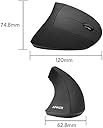
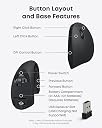
The Anker 2.4G Wireless Vertical Mouse combines ergonomic design with advanced optical tracking, offering 3 adjustable DPI levels (800/1200/1600) and 6 buttons including forward/back navigation. Its wireless 2.4G connection supports up to 8 meters range, powered by 2 AAA batteries (not included) lasting up to 18 months. Compatible with Windows, MacOS, and Linux, this right-handed mouse reduces wrist strain and enhances productivity for professionals seeking comfort and efficiency.


| ASIN | B00BIFNTMC |
| Amazon 売れ筋ランキング | パソコン・周辺機器 - 5,993位 ( パソコン・周辺機器の売れ筋ランキングを見る ) マウス - 183位 |
| EUスペアパーツの入手可能期間 | 8 分 |
| GTIN (Global Trade Identification Number) | 08536692579774 |
| OS1 | Windows, Mac OS X, Linux |
| UPC | 848061077438 848061079456 |
| おすすめ度 | 5つ星のうち3.6 52,054 レビュー |
| カラー | ブラック |
| スタイル名 | モダン |
| テーマ | 人。 |
| ハードウェアプラットフォーム | ノートパソコン |
| バッテリー付属の有無 | いいえ |
| バッテリ平均持続時間 | 18 月 |
| ブランド | Anker |
| ブランド名 | Anker |
| ボタンの数 | 6 |
| ボタン数 | 6 |
| マウス最大感度 | 1600 ドットパーインチ |
| ムーブメント検出技術 | 光学 |
| メーカー名 | Anker |
| メーカー型番 | AK-98ANWVM-UBA |
| ユニット数 | 1 個 |
| 互換デバイス | パソコン、ノートパソコン。 |
| 仕上げ | マット |
| 利き手 | 右利き |
| 商品の寸法 L x W | 12長さ x 6.3幅 cm |
| 商品の推奨用途 | ゲーム |
| 商品の追加説明1 | エルゴノミックデザイン、追加ボタン |
| 商品の重量 | 0.28 ポンド |
| 商品外装素材 | プラスチック |
| 型番 | AK-98ANWVM-UBA |
| 必要電池数 | はい |
| 接続技術 | ワイヤレス |
| 特徴 | エルゴノミックデザイン、追加ボタン |
| 色 | ブラック |
| 装飾機能 | LED、ロゴ。 |
| 通信・接続インターフェース | ワイヤレス |
| 電池の数 | 2 単4形 電池 |
| 電源のタイプ | バッテリー式 |
| 音域 | 8 meters |
C**O
Good quality, just a bit slippery
I like this mouse, it's comfortable to use and took only a little while to get used to the new orientation since this was my first ergonomic mouse. I also appreciate the ease of switching mouse speed, I use this at work so I can't install extra software and having this setting directly on the mouse and not a software change is perfect. Only bad point is that the coating on itakes it very slippery so I can't really rest my hand on it as it just slides away from my hand. Don't know how that could be improved though so it's fine.
R**A
エルゴノミクスマウスデビューにおすすめ
マットな質感のさらさらとした触り心地です。手の側面がべったりとデスクについてしまい、小指と手首の骨が痛かったので、リストレスト付きのマウスパッドと合わせて使ったところ、非常に使いやすかったです。手首をひねらないだけで腱鞘炎がかなり楽になりました。クリックするときカーソルが少し左にずれる点は気をつけなければいけません。この形のマウスでは仕方のないことだと割り切っています。指が届かないとかもなくちょうどいいサイズ感でした。お値段も安いのでエルゴノミクスマウスデビューにはおすすめです。
あ**け
滑る→握る力が入る→疲れる
今日届きました。さっそくリモートワークで使用。 1・表面がさらさらして滑る結果、握る力が入って掌が疲れます。疲れちゃダメじゃん。 2・エルゴマウスって傾斜とか様々なので一概にこれはダメあればダメはないのですが、自分は手を載せてリラックスして使いたい、手の平をマウスパッドで擦るような使い方をしたくないので(18時間くらいデスクの前いるので摩擦で手の平が痛くなります)、このマウスは向いてなかったです。 3・奥までしっかり手を差し込んで使う用に見えますが、多分半分くらい、手を添えるように使った方が使い勝手は良いですね。 4・サラサラに加え形状が丸くなっている箇所があり、滑る。これなければ、良いマウスなんですよね。。。 5・本当に人間工学かは疑問です。 6・比較対象は、仕事でも遊びでも使っているサンワダイレクト Bluetoothマウス 3台ペアリング エルゴノミクス 乾電池式 静音 Windows/Mac対応 シルバー 400-MABT102Sです。
吉**田
持ちやすい
とにかく持ちやすい。マットな質感で2000円に見えないし、クイック音が心地いいから作業が楽しい。
め**ん
腱鞘炎になるマウス
母指球が痛む 腱鞘炎に秒でなる 向き、不向きがあるのか、自分は全く向いてなかった。 イメージとしてはドアノブをずっと握ってマウス操作する感じ。 少なくとも、小さいマウスを探している方には確実にお勧めしません。
さ**し
数年でベトつくようになった。その点がなければ良い製品。
【良かった点】 ・腕を捻らずに手のひらを立てた状態で使え、手首というよりは腕全体で操作するので、腕の痛みがなくなった。 ・通信・レーザーの読み込み・反応は良好だった 【残念な点】 ・2年くらいで表面がベタつくようになりました(おそらく加水分解)。3年をすぎた頃に範囲もべたつき加減も我慢できない程度になりました(私は別製品に買い替え)。 ・私は分かった上で購入したのでマイナス評価ではないですが、BluetoothではなくUSBでの接続なので、人によってはその点が気になるかも。 【総評】 機能や特徴には満足だっただけに、ベタつきが残念です。 他のマウスに比べて高額という訳でもないので、買い替えながら使い続けるのもありかもしれませんが、私はベタつきでまたイライラしたくなかったので他製品に変えました。
M**.
にぎにぎしやすい
おててが疲れません。
あ**ー
手に合わず少し痛い
縦型マウスとしては握りやすく、操作もスムーズです。 しかし、自分の手には少し大きく、人差し指の付け根が当たって長時間使用すると痛くなります。 慣れれば使えるかもしれませんが、手のサイズに合うかどうかを確認した方が安心です。
A**D
تجربة مميزه
عملي وتجربة مميزه
J**J
Excellent mouse. So worth it....
This mouse has been a tremendous help for me. I didn't know such "ergonomic mice" existed, but recently my tennis elbow got so bad that I couldn't work and I had to find some alternative to a traditional mouse. I quickly found the Evoluent mouse, but since it costs to $100 and I had never tried an ergo mouse, I was unwilling to spend that much on an experiment. Then I found the Anker Vertical Mouse. It's not quite as vertical as the Evoluent, which I thought might an issue for me, but it was cheap enough that I thought I'd give it a try. i figured if it helped at all, I'd then give the Evoluent a shot. Based on a few weeks of use, I don't think I'll bother with the Evoluent and instead buy more of these. The relief was almost instant. I hadn't realized how uncomfortable I was with the regular mouse. The angle of the palm on the Anker mouse is enough to provide relief from the pain, and yet still "flat" enough that you don't have to learn to use the mouse. To make the cursor move left, you just move your hand to the left - just like a traditional mouse. I think the more-vertical Evoluent mouse might be better for my wrist, but then "left" becomes completely "toward your palm" which won't feel as natural. I have been using high-end Logitech mice for years. The Anker mouse feels very similar. The foward/back buttons under the thumb are right where they should be and work just like the Logitech. The scroll wheel feels just about like the Logitech as well. The button clicks feel "appropriate". I suppose the mouse feels a little cheaper than the high-end Logitech mice, but who cares? If I have any complaints, they are trivial. The mouse is maybe 3.5 inches tall. I keep knocking it off the desk as I shuffle papers or reach for the phone. Not really any fault of the mouse, but I do it often enough that I thought I should mention it. Also, the mouse itself goes to sleep after some time without use. I am used to waking up my PC by moving the mouse - this doesn't work. I now have to click a mouse button to wake up the mouse itself, then it will wake up Windows. A silly change in habits, but one I have yet to learn. I have big hands, and I wouldn't mind if it was a little bit bigger, but it's perfectly fine with me as is.
V**E
Game changer!
Total game changer. I had been suffering wrist pain and tingling in my fingers from using a standard mouse so my chiro recommended this type of mouse. It took about a week for my muscles to adjust properly but I’m now enjoying pain free computer use. Very comfortable and great quality.
X**N
My 2nd purchase
Got my second Anker Ergonomic mouse to use in the office. The mouse is easy to get use to and fit well in my hand. It did help release some tension in my shoulder. Price is affordable too.
A**N
Başarılı ürün
Çok memnunum.
Trustpilot
1 month ago
2 months ago