Desertcart purchases this item on your behalf and handles shipping, customs, and support to Tunisia.
🎞️ Scan Smarter, Create Brighter — Unlock Your Film’s True Potential!
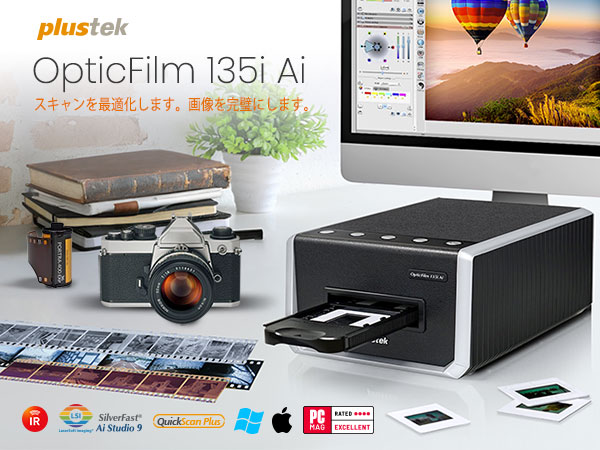
The Plustek OpticFilm 135i Ai is a cutting-edge 35mm film scanner featuring a 7200 dpi resolution and a newly developed 3rd-generation 5-group lens system for superior image quality. Bundled with SilverFast Ai Studio 9 software and advanced IT8 calibration, it supports batch scanning of multiple frames and diverse film formats including panoramic and half-frame. Designed for professionals and enthusiasts seeking unmatched detail and color accuracy, it streamlines digitization with Ethernet connectivity and versatile film holders.


| ASIN | B0DQXW6TWT |
| Amazon 売れ筋ランキング | パソコン・周辺機器 - 77,981位 ( パソコン・周辺機器の売れ筋ランキングを見る ) フィルムスキャナ - 38位 |
| UPC | 783064369640 |
| おすすめ度 | 5つ星のうち3.5 25 レビュー |
| スキャナータイプ | フィルム |
| ブランド | Plustek |
| ブランド名 | Plustek |
| メーカー名 | Plustek |
| モデル名 | 135i Ai |
| 保証内容 | 1年間 |
| 原産国 | 中国 |
| 商品の重量 | 6.2 ポンド |
| 型番 | 135i Ai |
| 接続技術 | イーサネット |
| 推奨メディア/file | USB |
| 最小システム要件の説明 | Windows, macOS |
| 解像度 | 7200 dpi |
| 通信・接続インターフェース | イーサネット |
8**I
やはり最新鋭機は違う!
ニコンのクールスキャンがついに動かなくなり、どうしたものかと思っていた矢先、CP+2025でこの製品の存在を知った。 ただ、約12万という値段がネックとなり、二の足を踏んでいた。クールスキャンですら8万程度だったのだから。 下位機種の8300Aiにしようかと悩んでいたところ、今回のセールで10万ちょっとで買えるとのこと。そんなこんなで清水の舞台から飛び降りた。 結果としては大正解。特に私が主に使うモノクロネガの画像が驚くほど美しく出て来る。お世辞抜きでクールスキャンを余裕で凌駕している。 値段は気になるが、外部にスキャニングを依頼するつもりなら、あっという間に元が取れることに気づいた。何しろ1000コマスキャンしたら、1コマあたり100円ですよ。 さすがに最新鋭の非球面レンズ搭載だけのこともあり、大満足です。悩んでいる暇があったら新製品のうちに買い、ですね。 これであと10年はモノクロフィルムで作品を作れる!
S**O
値段の割には?もしくは値段相応(Nikonのスキャナに比べたら)
スキャンスピードは速い。 フィルムフォルダの設計がおかしい(小さい)ので、 フィルムが反ってしまうのが最大の欠点。 SilverFastは自分には合わなかった。 色のコントロールが難易度高め。 でもそこそこの画像は導き出せる。
S**S
Superb!!
Since delivery last month, I've scanned 700+ 35mm slides (positives), some of which are over 60 years old, with the Plustek OpticFilm 135i Ai. The scanner was easy to learn and set up, and it has functioned flawlessly. Where it really shines is in the basic "Quick Scan Plus" software where you'll find an image enhancement tool called "Sweet" (access via the "Edit" function after the initial scan has completed - choose "Edit", then "Portrait" and then "Sweet"). Dark images and skin tones immediately come to life, and excessive contrast, which is a common problem with old slides, is softened. If needed, images can be further "sweetened" in Photoshop, but often this isn't even necessary. Photos below show before and after results of the "Sweet" feature. There are several useful tools in the software for achieving other remedial effects, as well. The scratch and dust removal function works well with small blemishes, but often misses larger particles and hairs. So it's a good idea to blow gently on each side of a slide or film strip to remove such detritus before placing it in the scanner tray. Other great features of this scanner are too numerous to mention. It is important to ensure the scanner has a "safe zone" in which to operate since the film tray protrudes out the back, as well as the front as it travels through the device during scanning. I'm using a piece of scrap 1/4" plywood, cut to the footprint of the scanner with outcroppings front and rear to maintain space along the path of the slide tray, and also to support the tray against careless hand movements (see photo).
B**L
Not for me.
Don’t get this of you have a Mac Mini M4. The Silverfast software doesn’t play nice. Couldn’t get it to work.
J**S
Great scanner...IF.....
I bought this scanner to scan thousands of old slides. I didn't really care for the generic software, so I tried Silverfast. It took a bit to figure it all out, and I thought it was working great, until I was doing some further editing in photoshop and noticed that in the really dark areas, there was no content at all. No matter how much I lightened it, just absolute nothingness. I did a lot of research, tried adjusting the gamma and the Auto Adaptive Contrast Optimization, but nothing helped. The only way I can get really great scans is if I scan in 48 bit RAW mode, then use PS to edit them afterwards. That is the only way I can get objects in the dark to show up. Another thing with Silverfast, it runs the tray all the way out and back in before every slide. If it just stayed on the slide it was scanning, or in RAW mode just scan all the way through without coming all the way back after every slide, it would be so much faster and I'm sure a lot less wear and tear on the machine. I attached a picture right off the scanner, then lightened it for the zoomed in pic. Look at the zoomed in picture of the legs of the table. So bad. The final pic was a RAW scan that I edited in Photoshop. Look at the detail compared to the others. This scanner has great potential, but needs some work on the software to make it faster and more efficient.
G**Y
Sent back to Amazon
Spent two hours trying to get to work with my macbook m4. 1hr with customer support and it scanned but would not save. They finally gave up and suggested return. On its way back to Amazon. When you pay this much you shouldn't have to spent time trying to get it to work. Silversoft software they suggested would work- they ship with it but you need to buy a license… no thanks. Good customer service.. terrible software implementation
A**R
Absolutely Worth It – Fantastic Results with iSRD!
Absolutely Worth It – Fantastic Results with iSRD! I’ve been scanning thousands of my old 35mm slides, and the Plustek OpticFilm 135i Ai has truly blown me away. One of my biggest concerns going in was dealing with scratches and dust—some of these slides have been stored for decades and show their age. But the built-in infrared scratch and dust removal (iSRD) works incredibly well. Just look at the before-and-after image I posted—it's like magic. The software intelligently removes the damage without softening detail or affecting the beautiful color gradients. In particular, skies and sunsets—often tricky to clean—come out smooth and pristine. Setup was straightforward, and the bundled SilverFast Ai Studio gives you tons of control, though there's a learning curve. Once you get the hang of it, the results speak for themselves. I honestly couldn't be happier with this purchase. It’s not just a scanner—it’s a time machine that brings my images back to life. Highly recommended for anyone serious about film archiving.
Trustpilot
1 month ago
3 weeks ago