🚀 Power-packed Mini PC that fits your desk and your hustle
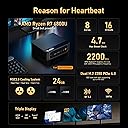
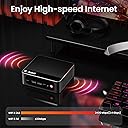
The Beelink SER5 Max Mini PC is a powerhouse desktop solution featuring an AMD Ryzen 7 6800U processor with up to 4.7GHz turbo, 24GB LPDDR5 RAM, and a 500GB PCIe 4.0 SSD. It supports triple 4K displays via HDMI, DisplayPort, and Type-C, and offers next-gen wireless connectivity with WiFi 6 and Bluetooth 5.2. Its compact design with advanced cooling technology makes it perfect for professionals seeking high performance in a space-saving form factor.


| Brand | Beelink |
| Manufacturer | Shenzhen AZW Technology Co., Ltd. |
| Series | SEI |
| Colour | Black |
| Item Height | 1.6 Inches |
| Item Width | 4.4 Inches |
| Screen Resolution | 3840 x 2160 |
| Resolution | 3840 x 2160 |
| Product Dimensions | 11.18 x 11.18 x 4.06 cm; 830 g |
| Item model number | SER |
| Processor Brand | AMD |
| Processor Type | AMD Ryzen 7 |
| Processor Speed | 4.7 GHz |
| Processor Socket | FP6 |
| Processor Count | 8 |
| Memory Technology | 24GB LPDDR5 |
| Computer Memory Type | DDR5 RAM |
| Maximum Memory Supported | 24 GB |
| Hard Drive Size | 500 GB |
| Hard Disk Description | SSD |
| Hard Drive Interface | PCIE x 4 |
| Graphics Coprocessor | AMD Radeon |
| Graphics Chipset Brand | AMD |
| Graphics Card Description | Integrated |
| Graphics RAM Type | Shared |
| Graphics Card Interface | Integrated |
| Connectivity Type | Wi-Fi |
| Wireless Type | 802.11ax |
| Number of USB 2.0 Ports | 2 |
| Number of USB 3.0 Ports | 2 |
| Number of HDMI Ports | 1 |
| Operating System | OS |
| Are Batteries Included | No |
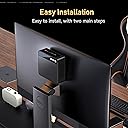
| Included Components | 1 x Beelink 6800U Mini PC, 1 x HDMI Cables(100cm ), 1 x US Power Adapter, 1 x User Manual, 1 x Vesa Mount with Screws |
| Manufacturer | Shenzhen AZW Technology Co., Ltd. |
| Item Weight | 830 g |
R**T
Powerful inexpensive computer
Very nice, full featured machine. Easy to configure and get to work. It has enough ports to use wired keyboard, webcam, mouse dongle, speakers without needing a hub. A great value and powerful computing. Win 11Pro. No noise in general use. I put it on my desk near the monitor to facilitate access to ports. It's a bargain.
H**S
Great value for a business environement. Just keep them cool.
These things are great for the price. I've purchased several over the last 2 years. I choose ones with the AMD processors and get 24 to 32G RAM. They come with Win 11 Pro. The Pro version allows you to configure them w/o having a Microsoft PIN. This is needed if you are deploying into a business -- which I am. The graphic card is built-in, so it will use some of the available RAM. I personally don't think 16G is enough for modern systems when multiple apps will be used. Even a single browser with a lot of tabs open (15-20) will chew up more memory than you'd think. Future proof yourself - get 32G or 64G of RAM. Remember, with these small devices you may be forced to remove RAM before you can increase it, thus increasing the cost of a memory upgrade down the road. Better to do it at purchase time. In a business environment I prefer to go with more RAM and less local drive space. 500G is enough when 'work' is stored on a network drive or file share. And the NVMe drive is fast. 2 things commonly damage electronics: Power cycling, and heat. To minimize the heat, go into the BIOS and turn of WiFi if you can (many businesses use Ethernet). Turn off Bluetooth also if you can. And place them where they get good air flow. I've not yet mounted one to the back of a monitor because of heat concerns. I believe if you run these cool, they will last a long time. These are also very quiet -- an attribute I really appreciate. Be aware, if you want to run multiple monitors, you will need diverse connections. These support up to 3 monitors, but you have to use one each of the HDMI, DisplayPort and USB 3 connectors. We use these with KVM's at some desks and they work well with KVM's that support digital video (DVI, HDMI, etc.) I'm very happy with these. They free up space and perform very well. I've been deploying these in a jewelry shop for the last 2 years, where they use CAD, 3D printing, and lots of high color picture editing in addition to their Point of Sale and office software. No issues so far. These exceed my expectations.
K**D
Liquid Metal Mess
We bought this for an office PC, and it was failing to install the Windows 11 25H2 update, powering itself off randomly. The employee using it also complained that it would just randomly power off in the middle of web browsing. I decided to take a closer look at the PC to see what the issue was. I replaced the no name SSD with a WD Black drive and attempted to do a clean install of Windows, but the installation was failing, so I checked the settings in BIOS. Secure Boot was disabled by default (suspicious af!) so I enabled this, set the UMA to Non-Legacy with a 2GB buffer, and after a few more attempts, I was finally able to get Windows installed. Next was the awful MediaTek 7920 WiFi card. It wouldn't accept any drivers I tried, so I had to Shift+F10 on the setup screen and force Windows be create a local account just so I could get into the OS and work on installing the drivers from there. No drivers I tried would take, so I had to replace the wifi card with a Qualcomm QuickConnect 7800 that I was fortunate enough to have laying around. The Qualcomm drivers installed just fine. Once I was attempting to do anything more strenuous than install the wifi drivers, the PC kept powering off, so I decided to re-paste the CPU to see if that would correct the issue. To my dismay, Beelink used liquid metal on this PC! Why?! Liquid metal on a low end PC like this makes zero sense, it will always cause more problems than it attempted to solve. And their "dam" around the CPU die was not containing the liquid metal either, it was all over the CPU and even in the resistors on the top of the CPU! Once I was finally able to get that mess cleaned up with a lot of q-tips and patience, I pasted the CPU with Artic MX 7 and reassembled the PC. Now, it's working great, so that leads me to believe that the CPU was either over heating, or shorting out due to the liquid metal having escaped the dam. I am really annoyed that I had to waste several hours of my life repairing a brand new computer, and I absolutely will not be buying Beelink again.
J**Y
Adequate performance for general office productivity tasks; bad power adapter
This mini PC handles office work, video calls, and light coding really well. My only real issue is the included power adapter. It is low quality and caused random reboots so I replaced it with a higher quality one. Even then, I had one restart caused by static discharge from my hand; so, the shielding could be better…if that’s a thing. It’s a good little machine overall, but factor in a little extra money for a better adapter.
D**4
Great PC
Absolutely powerful small mini pc, very fast loading times for games and software. It does sound like a jet taking off while under load but I have it hooked up to my TV so the sound is drowned out by the TV speakers. CPU stays cool under load, no worries about it overheating. I have mine dual booting Linux Mint and Batocera.
Trustpilot
4 days ago
1 week ago