Buy anything from 5,000+ international stores. One checkout price. No surprise fees. Join 2M+ shoppers on Desertcart.
Desertcart purchases this item on your behalf and handles shipping, customs, and support to Tunisia.
🎮 Elevate your workflow and game with silent precision and seamless control
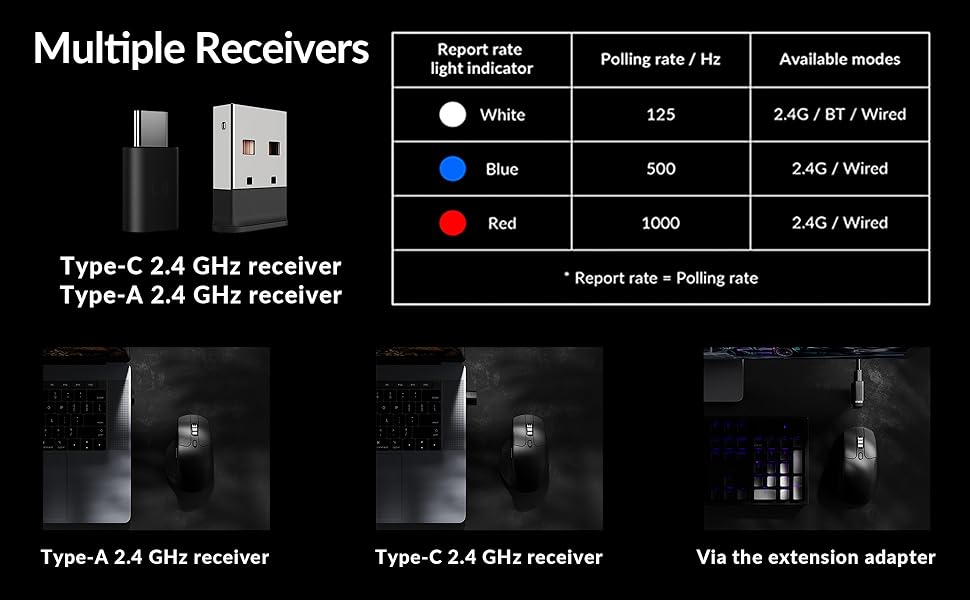
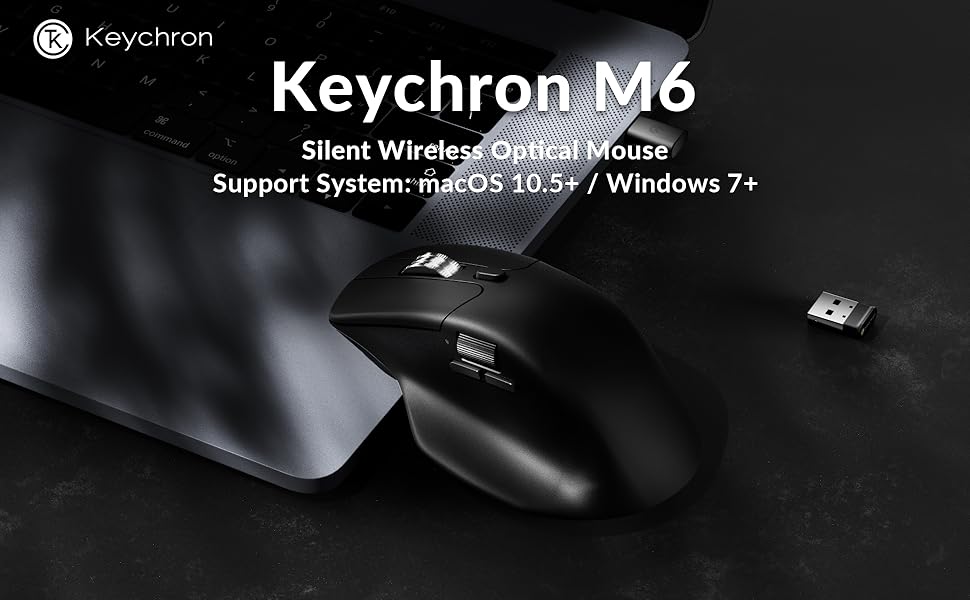
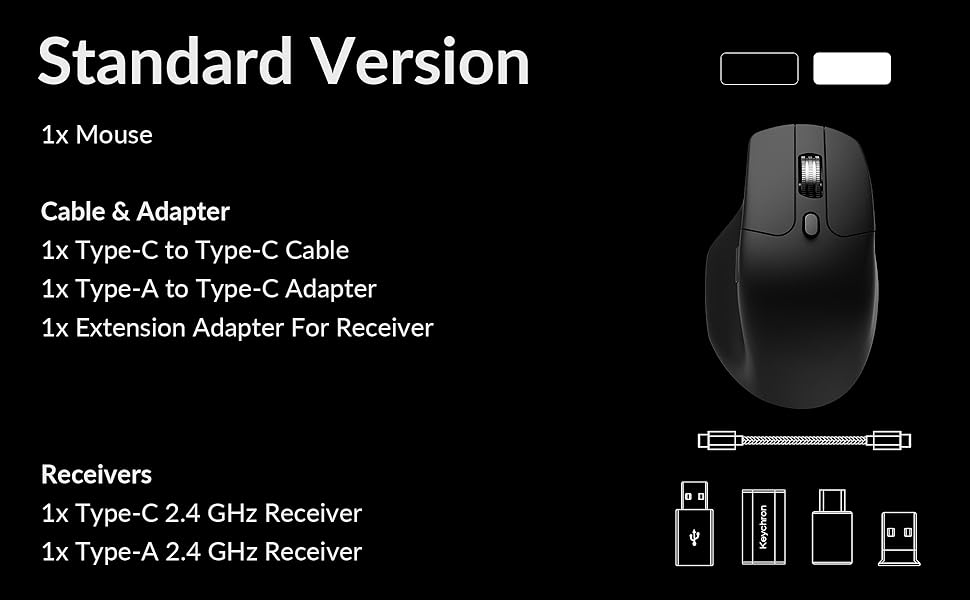
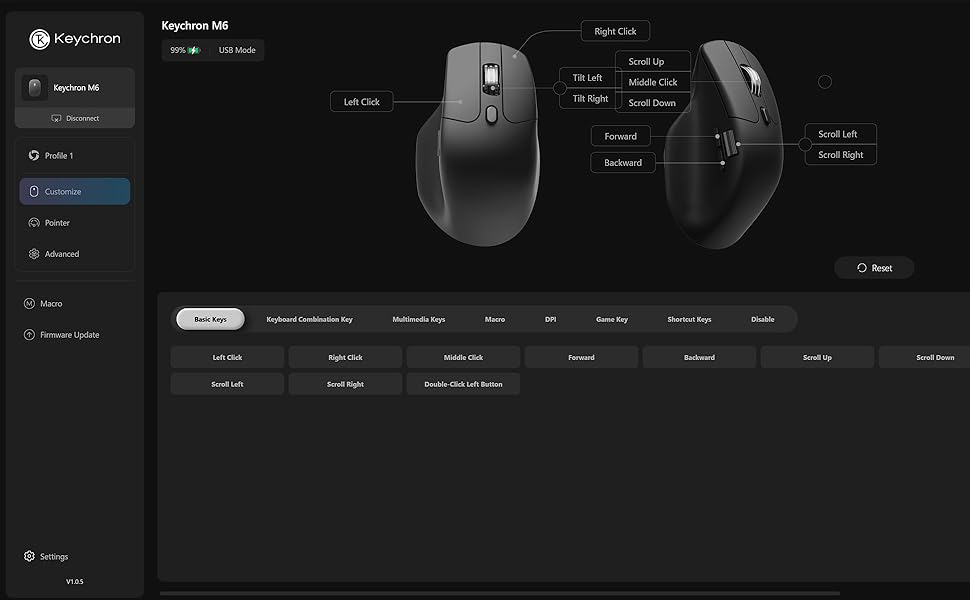
The Keychron M6 Silent Wireless Gaming Mouse combines ultra-lightweight ergonomic design with a whisper-quiet click mechanism, powered by a flagship PixArt 3395 sensor offering up to 26,000 DPI and 650 IPS tracking speed. It supports ultra-low latency 1000Hz polling over 2.4GHz wireless, Bluetooth 5.3 for multi-device flexibility, and wired connectivity. Featuring a premium metal infinite scroll wheel and over ten programmable buttons, it stores custom profiles on-board for plug-and-play use across Mac, Windows, and Linux systems—perfect for professionals and gamers seeking precision, comfort, and versatile connectivity.


| ASIN | B0FP2D8DW6 |
| Additional Features | Soundless |
| Antenna Location | Gaming, Indoor, Office |
| Are Batteries Included | Yes |
| Are Batteries Required | No |
| Best Sellers Rank | #102 in Computer Mice |
| Brand | Keychron |
| Button Quantity | 4 |
| Color | Black |
| Compatible Devices | Personal Computer |
| Connectivity Technology | Bluetooth |
| Customer Reviews | 4.2 out of 5 stars 91 Reviews |
| Enclosure Material | Plastic With Metal Accents |
| Hand Orientation | Right |
| Manufacturer | Keychron |
| Minimum Required Operating System Version | Mac OS 13 Ventura, Ubuntu 22.04 Jammy Jellyfish, Windows 11 |
| Model Number | M6S |
| Mouse Maximum Sensitivity | 26000 Dots per Inch |
| Movement Detection | Optical |
| Movement Detection Technology | Optical |
| Number of Batteries | 1 12V batteries required. (included) |
| Number of Buttons | 4 |
| Operating System | Linux, Windows, macOS |
| Power Source | Battery Powered, Wired |
| Range | 33 feet |
| Special Feature | Soundless |
| Style Name | Modern |
| Unit Count | 1.0 Count |
| Warranty Description | 1 Year Manufacturer |
J**Z
Great value for the features.
This is a great "do everything" mouse. Productivity work is excellent, easily customizable, and you can do it all on a web browser, so no software needed. I mapped the side scroll wheel to the left and right arrow keys for music production and it works insanely well. I love the tactility of the side scroll. I've had it for 2 months and charged it only once last week at around 40% while using it at least 4 hours a day. And up to 6-7 hours on the weekend using the dongle. And you can use it while it's charging (imagine that Apple). The mouse is really light which didn't bother me as much as I thought it would. The clicks are quiet, and feels really comfy in my hand. I used it for gaming in MOBAS and it's great. Biggest downside, is that there's only 1 profile. So if you want to map different buttons for different uses, it doesn't seem like you can. Not even on the software. Kind of a bummer but not a deal breaker for me. Either way. This is a solid mouse for the cost. Yeah you'll get a more premium experience with an MX master, but this is like 85% there at a quarter of the cost.
K**R
A decent, mid-range mouse with an uncomfortable shape
A decent and functional mid-range wireless mouse with top tier performance. I got this as a temporary replacement for my Logitech G502 hero wired as that mouse finally began double clicking and I had worn holes through the rubber siding. It was time. So far, this mouse has worked as intended. It's not too cheap but also not all that premium. You get premium functionality with a relatively cheap, lightweight build that's an awkward shape. I have small hands, by glove size, with long fingers, and the mouse just doesn't fit in my hand in any comfortable way if I try to palm grip it. The hump sits awkwardly in-between the first and second knuckle of my pointer finger, leaving a gap. If I push my hand forward, it's still super awkward and my thumb ivershoots the side buttons and scroll wheel. The left and right mouse buttons are very short and slender, so your third and pinky finger tend to sit off to the side at an angle. It doesn't hurt my wrist really, but it's not comfortable after a while either. It's just a very crunched mouse shape, I think they should have made it a bit longer/wider. It's really not at all comfortable for me. The matte black material doesn't stay matte for long, either. After a few weeks of light use and regular cleaning, my palm has already managed to wear away spots off the finish to leave shiny marks. Though, I do prefer plastic over rubber as rubber just wears away and gets gross over time. So I don't really care about the body material here. Build quality is solid and nothing creaks or bends. The metal infinite scroll wheel is a huge plus, though the button to release the lock on it has a hard and plasticy press thats not really pleasant. I wish they made the side button metal as well. It's not terrible but, it's not great either. I've used it for excel sheets. Gaming performance is great. I play shooters at low dpi, maybe 8-12,000 max with the 1000hz sensor and so far I haven't noticed any hits to my accuracy despite the wireless connection. Battery life is great as well. I haven't needed to charge it since I've started using it. If you need just a decent mouse that's under a hundred bucks and has the features this mouse has, I recommend it. I'll eventually upgrade to something that fits my hand better. Just know that keychron is a company that's excellent in making good quality, all-rounder products that don't really excel at doing more than one or two things at a time. So, you get what you pay for here.
D**N
Good quality. Good brand. Workhorse.
I wanted to be a cool trackball user, but the one i bought gave out after a year. I wanted just a simple mouse with good build quality, metal scroll wheel, etc. This turned out to be a really good choice. metal scroll wheel / button, two side buttons, and a side wheel. Im sure it has other features Im not using with DPI and stuff. its been pretty great out of the box. Battery life seems good. Been using it for a month and charged it once. Keychron makes good quality stuff. Less thrills, but solid and reliable. Been using one of their keyboards for two years, with no complains. They're the company Ill look for first when I need new stuff.
T**D
It's not bad but it's not for me.
I really wanted to like this mouse but after a week of using it, I just don't. I'm another that is coming from the Logitech MX Master 3s and something similar for less than half price is extremely attractive. Unfortunately, this just isn't the mouse for me. Pros: The lightness of the M6 is nice. The MX Master 3s is HEAVY and a day of swinging that thing around wears out your grip. At times my thumb would even cramp up, something I don't experience with the M6. Battery life is good. I've been using this every day for the last week and have yet to charge it. It's still running on whatever charge it had from the factory. Cons: Why am I returning it... 1. It turns itself off to save battery. The problem with that is it takes 6 seconds to turn back on. If you watch a YouTube vid that is longer than 10 minutes, you have to wait for the mouse to wake up to select the next one. If you watch several vids, you have to wait each time. A couple hours of this can get very frustrating. I would be fine with the mouse sleeping when the pc sleeps but the mouse going to sleep every 10 minutes is annoying. I don't know but it might be possible to turn this 'feature' off in settings but then you lose battery life. 2. While the M6 is lightweight, it's very hard to pick up. The sides of the M6 are smooth plastic and there's nothing for your fingers to grip against. With multiple monitors, you sometimes have to slide, pick up and reposition, then slide again to cover the whole width of the monitors. That pick up and reposition is a problem. The Logitech has rubberized sides that are easy to hold on to. Again, I really wanted to like it but I just don't.
J**N
Switched to the M6 from MX Master 3S
I am one of many who switched from the Logitech MX Master 3S to the Keychron M6 and I am happy with my decision. While the MX Master 3S felt slightly more premium than the M6 the M6 is still well built and very comfortable to use. The shape is very close to the shape of the MX Master 3S. The middle vertical scroll wheel feels and works nearly the same. The horizontal scroll is a bit stiffer on the M6 but still works well. The button clicks are slightly more audible on the M6, but still very quiet. Finally, I never used any of the Logitech app functions, so I won't miss those or the app being installed. So for less than half the price of the MX Master 3S the M6 is great choice.
L**.
Keychron PixArt 3395 1K (All Silent) vs MX Master 3S
Important note before unboxing ------------------------------------- Don’t let the box fool you. Keychron seems to have some printing errors that they really should fix, otherwise they will face many unnecessary returns. In my case, the box says M6 LITE, SKU M6S-A1, and lists the PixArt 3311 sensor, including all specs for that sensor—which is incorrect for my mouse. Because of this, I almost returned it and even opened a support ticket. They suggested I try the mouse first. After testing, I realized the mouse was actually the PixArt 3395 1K version. Here’s how I confirmed it: - In the online Keychron Launcher, I was able to set DPI up to 26,000 - The firmware version installed is exclusive to the PixArt 3395 1K So yes, it was clearly a printing error (come on, Keychron 😅), and I decided to keep it. Why I started looking for an MX Master 3S replacement ---------------------------------------------------------------- There were two main reasons: Right click issues: 1. The right button started to become unreliable. Sometimes it wouldn’t register clicks depending on how the button was pressed. 2.Terrible 2.4 GHz connection: The wireless connection on the MX Master 3S is a nightmare unless the dongle is less than 10 inches from the mouse. During work, it would randomly become laggy. Turning it off and on temporarily fixes it—but expect the issue to come back. After discovering that the same 2.4 GHz dongle is used for the MX Master 4, I concluded this is likely a protocol issue. That’s when I decided to try another brand. Why the Keychron PixArt 3395 1K is better than the MX Master 3S (and possibly MX Master 4) ------------------------------------------------------------------------------------------------------------- - Much smoother gliding than the MX Master 3S. I use a PU leather desk mat, and the difference is huge—mouse movement feels far more pleasant. - Great materials: The Keychron plastic feels premium and solid. In contrast, the rubberized coating on the MX Master started peeling after about one year. - Left & right click buttons: Very different from standard mice. They have more travel and better tactile feedback, which I personally love. - Middle button: Hard to describe, but noticeably easier to press than on the MX. - Side buttons: Forward and back buttons are much easier to press compared to the hard MX Master 3S buttons. - Weight: It feels significantly lighter—almost weird at first—but I ended up really liking it. - Polling rate: 125 Hz (MX) vs 1000 Hz (Keychron). Pointer feels softer and more responsive - Connectivity: Keychron: 5 devices (3 Bluetooth + 2.4G dongle + wired) MX Master: 3 devices (2 Bluetooth + 2.4G dongle) The Keychron 2.4G connection is stable 60 inches away with no lag. - Software: No more glitchy software. Keychron Launcher is free, web-based, and works flawlessly. Being picky ------------- - The metal scroll wheel on the MX Master 3S rolls more smoothly. - The side wheel on the Keychron feels a bit stiff when scrolling.
B**.
MX Master 3 replacement
Switched to this after my MX master 3 started rattling and the click button started working intermittently. I’ve used a couple months now and decent alternative. I splurged on the Logitech and always kept it in a case but still broke. This one seems sturdy but is more lightweight. Which is fine, but doesn’t feel as robust, and like a heavier mouse. Connecting was super easy and would recommend. Bert quiet. Only con is the grip. Just feels a bit off somehow. Maybe just my hand or used to the MX master, but been a few months and still feels odd. Definitely useable though, just longer adjustment than I anticipated. Hope it last longer than the Logitech, but for half the price I am ok to purchase another if it breaks.
C**A
One of the best mice ever!
Easily one of the best mice I used ever. I think I had 10 mice in the last 5 years, and this one is by far the best one. Ergonomics is perfect. The firmware they use is the perfect one, no Razer or Logitech bloat ware, just works with all customization you need.
Trustpilot
3 weeks ago
2 days ago