


💧 Stay dry, stay ahead — never miss a leak with smart alerts!
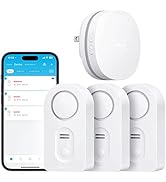
The Govee WiFi Water Leak Detector 3-Pack offers a smart, scalable solution for home water protection. Featuring a robust WiFi gateway that supports up to 20 sensors, it delivers instant app and email alerts alongside a powerful 100dB adjustable alarm. Designed for easy setup with battery power and customizable sensor naming, it’s ideal for basements and homes seeking proactive leak detection and peace of mind.
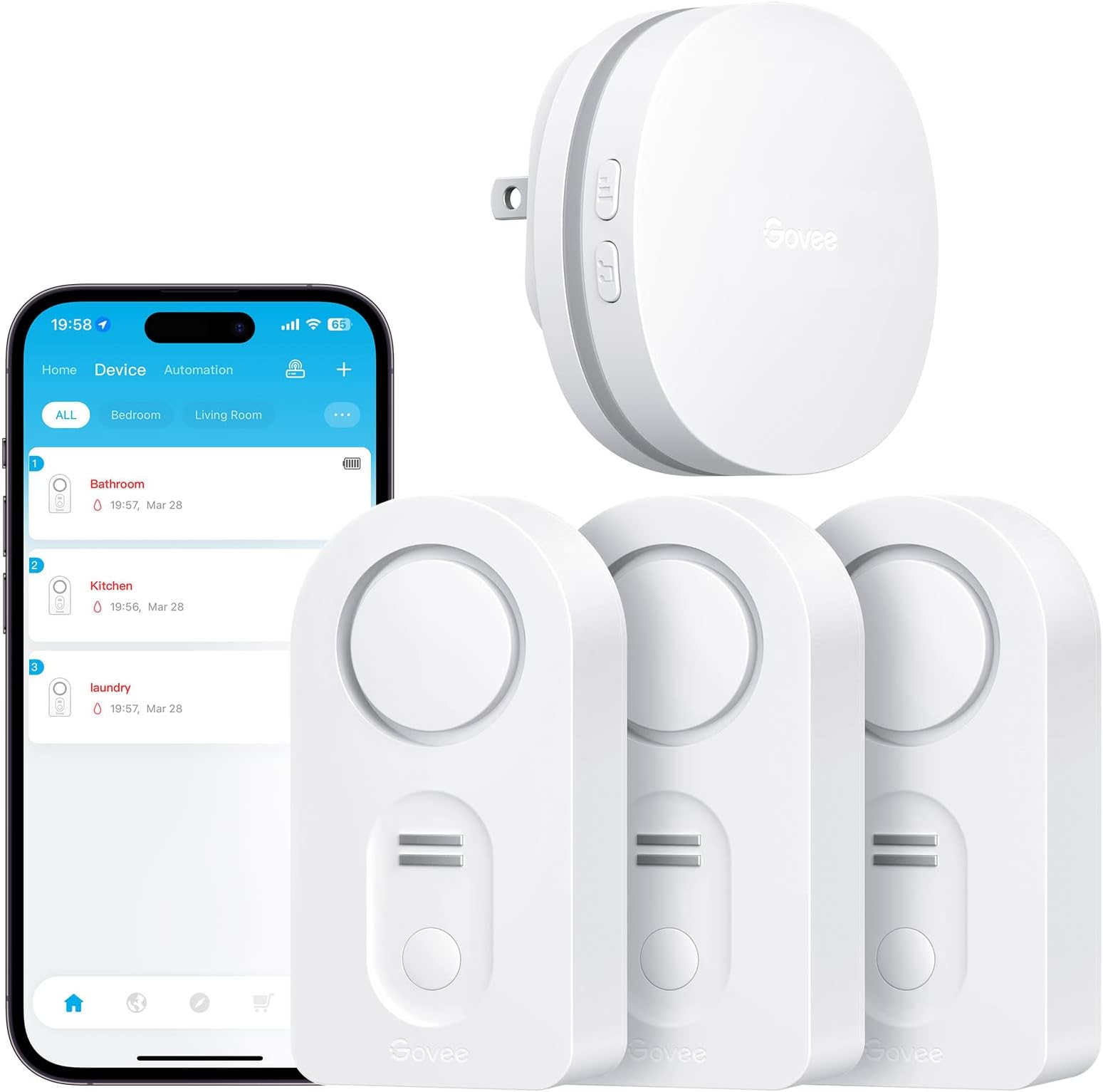







| Asin | B07J9HZ5VN |
| Audible Noise | 100 db |
| Battery Description | Alkaline |
| Best Sellers Rank | #35,147 in Tools & Home Improvement (See Top 100 in Tools & Home Improvement) #36 in Water Detectors & Alarms |
| Brand | Govee |
| Color | White |
| Compatible Devices | Smartphone |
| Control Method | App |
| Customer Reviews | 4.2 4.2 out of 5 stars (15,043) 4.2 out of 5 stars |
| Item Dimensions L X W X H | 3.46"L x 1.77"W x 1.04"H |
| Manufacturer | Govee |
| Maximum Range | 196 feet |
| Mfr Part Number | B5040101 |
| Model Number | H5040+H5054 |
| Mounting Type | Tabletop Mount |
| Number Of Batteries | 6 AAA batteries required. (included) |
| Power Source | Battery Powered |
| Sensor Technology | Contact Sensor |
| Unit Count | 3 Pack |
| Upc | 799953927983 |
User
Saved me 💲💲💲
I should have reviewed these years ago (had them about 6 years) but better late than never. These leak protectors have saved me thousands of dollars in repairs catching leaks before they flood my basement. One caught a pinhole in a cast iron pipe I would have never seen, the other has caught my main line backing up before it causes any damage. Super easy to set up and run. Alets to the phone make it so you know even when you aren't home. I recommend these to ANYONE with a basement, old pipes, plumbing systems. It will save you money!
User
Your piece of mind is worth this little gadget
I have been struggling with an undiagnosed and intermittent leak from my dishwasher. We are leaving for vacation and I was stressed. What if?! I found this Govee Wifi Water Detector and thought I would give it a try.Installation and Connecting to the Hub: No brainer. Similar to other connected home devices so the process should be familiar to you. Don't over think it and it works great. I downloaded the Govee Home app to my Pixel 6 and it worked as expected. Relatively intuitive. I have no issues with the interface nor the included printed instructions.Functionality: I needed to KNOW that these worked (I got two) so I tested both of them. I even took my phone off of my home wifi network when I tested the alerts. I put a small amount of water under the probes and an alarm sounded. Instantaneously I received an alert on my phone via the mobile network. If I am away from home, good to go! Just don't forget to leave a key for your friend to get in and address the water issue.The audible alarm is plenty loud at the high setting (default). Leave it there. Shuts off temporarily when the button on the face of the device is pushed. Remove it from the water source and dry and no more alarm.Proximity to the hub seems very reasonable. I plugged the hub in closer to my router and there are at least four walls and a floor between the hub and one of the devices. No issue.Price: Well worth it. It is going to cost me several hundred to repair the few flooring planks so this is much cheaper.Things to Consider1. Get the wifi version with the hub. What is the point if you are not home when the washer hose breaks?2. To my knowledge this does not integrate with Google Home or Alexa. These connected home devices should really be universal in their integration with at least those platforms.3. My purchase had two leak detecting units only identifed by their model number and four more digits. I triggered each one individually and saw which was which by the notification. Small inconvenience and easily solved. I renamed them for their location.Overall, super happy.
User
It worked!!
Bought these back in 2023 and put them in the obvious places. Water heater and under sinks. I was awaken on a Saturday morning (June 2026) at 3:38 am. Had no idea what the noise was until I traced it to my laundry room where the water heater is located. Turned off the water heater and the infernal beeping still was going off. Finally remembered the leak detector and dang if it wasn’t sitting in water! Yep my water heater has developed a leak in the early hours of a Saturday. But the device worked!! Now I’m vacuuming up the water in the tray under my water heater every few hours until the plumber comes on Monday. But again the device worked!!
User
Please read my recommendation
I received the item and a box of five more sensors about an hour ago. I am professional at home construction, including the plumbing trade. Here's what I found.After setting up the first sensor to the internet, I proceeded to place that one under my kitchen sink. I looked under the sink with a flashlight and didn't notice anything on the bottom of the sink cabinet, so I slid the sensor to the back of the cabinet. On doing so, I felt a dampness on the palm of my hand as I placed the sensor. There was a film of water on the bottom of the cabinet. I waited to see if the sensor would go off, as it did when I tested it by wetting a finger and putting it across two of the terminals on the bottom of the sensor. Well, that film of water did not trip the sensor. Wondering why, I placed the sensor on a flat piece of plastic on my work bench and I could see there is a 1/16 inch or so of space between the sensor probes and the flat plastic sheet I put it on. That's the problem right there. A film of water on the bottom of a cabinet will not set the sensor off. The probes will not contact the water surface.Here's what I did. I removed the little rubber plugs from each of the four feet of the sensor. Use a sharp object. I placed the sensor on a piece of sand paper on a very flat surface. Rubbing down on the sand paper I sanded the plastic feet down to the same level of the metal probes under the sensor. Now the probes will touch the surface the sensor is resting on. I tried the sensor under the sink again and it immediately tripped the water alarm. A slow drip will not make a puddle of water in a cabinet. It will most likely coat the bottom of the cabinet as it's being absorbed into the wood or leaking out at the seems of the cabinet.Something about kitchen cabinets: The bottom of kitchen and bath cabinets is usually made of cheap particle board or some material equally water absorbent. A small drip will not form a puddle of water as you might think. The bottom of the cabinet will absorb a small water leak, like a very slow drip, for MONTHS. Probably until the bottom of the cabinet is ruined. You will be able to tell by the bottom of the cabinet sagging down. But here's what I do with my sink cabinets. I put a heavy bead of caulk around the edge of the inside of the cabinet where the bottom of the cabinet meets the sides. Then I apply two or three coats of varnish to the bottom of the cabinet (we're talking INSIDE the cabinet here). What this does is make the bottom of the cabinet somewhat water proof, enough that the cabinet material will not absorb a small leak. And a larger leak will run out the FRONT of the cabinet, rather than down the seams between the bottom and sides of the cabinet. And you will notice it before damage is done.Now, the Govee setup. I did find the setup a little confusing I'll admit. Especially when setting up to the internet. The app wanted me to connect my phone to the wifi of the gateway unit that comes with the sensor. I'm thinking, do I want to do that? And lose my home wifi on the phone? I ended up backing out of the setup. But going back into the app again, I found it was working. I pushed the buttons as directed and setup the 6 sensors I had without issue. As you do each one, and are looking for it in the app screen, pull down the screen to refresh it and you'll see the device you connected.I gave four stars because: The directions could be a little more precise with the wifi setup of the gateway. The sensor probes should be lowered to pick up any amount of water.Note: The first sensor I installed saved me a big headache had the dripping fitting decided to break sometime down the road. This one find paid for the sensors I put in today. An overall excellent product. Just sand down the feet.UPDATE: 6/29/21 - I had a sensor alarm in my bathroom vanity sink cabinet. I removed the stuff stored under the sink and didn’t see anything around the sensor. I moved the sensor and carefully felt the area with my fingers. With no visible water, the area felt slightly damp to the touch. I took a closer look at all the plumbing with a flashlight, and sure enough, one sink supply connection was the slightest bit wet. Maybe one drop per hour.My description above on how I modified the sensor probes to touch the surface (floor, etc.) had allowed the unit to alarm well before any water started to puddle and soak into the wood and ruin the cabinet.I highly recommend these water sensors and that you modify them as I suggested above.
User
Protection from water leaks
The device took me a while to get it connected! I didn’t think the sensors had connected to the gateway BUT I found out I just needed to be more patient. Everything got connected. I tested the sensors. The alarm on each sensor went off as required and I’m very pleased.
User
SECURITY RISK. CAN'T RECOMMEND AT THIS TIME.
Update 10/7Govee got back to me. If this Support Engineer's description and troubleshooting steps are right, no one should buy this kit at this time. First off, if you use an Eero, as I said before, it won't work out of the box and it requires a support call to them to disable 5GHz (shame on you Eero for not making that a user toggle, BTW).But here's the issue -- look at #6(A). The password recommendation is 8 characters, numbers and letters only. From what I can tell so far, that isn't a temporary thing. If you want Govee to stay on your network, you have to basically give your WiFi the security of a piece of Swiss cheese. No WiFi password in this day and age should be 8 characters. With access to a botnet or AWS instance farm, a WarDriver or your neighborhood script kiddie will have it cracked in minutes, or in the best case for them, a couple of days. This is unacceptable and I don't know how this could have scored an 'Amazon's Choice' banner with that level of insecurity.I've responded asking if there is a way to reload the firmware on the device and if they have anything in a Beta stage that could be tested to resolve these issues. If not, this is getting returned.Here are Govee's troubleshooting steps and notes:If the gateway is unable to connect to WiFi, please follow this troubleshooting:(1) If the mobile phone WLAN/Wi-Fi switch is not turned on during setup, there is no WiFi list selection, please go to the phone settings page to re-open the mobile phone WLAN/Wi-Fi until the prompt disappears.(2) In the WiFi setting interface of the APP, please fill in the your home WiFi account and password correctly. If you need to switch WiFi, please do not choose the WiFi named "Govee_gateway_XXXX";(3) Please check if the network standard is 5G network, please switch to 2.4G network standard and restart the router. (No supports 5G)If the router supports dual-frecuency, please turn off 5GHz before connecting:)(4) Please check if the WiFi network is normal. Please use the mobile phone to connect to the WiFi network to confirm that the network communication is normal.(5) Please check if the WiFi network account and password are correct or not, and enter the correct account and password to reconnect.(6) If the WiFi account number and password are not compatible, please mo-dify them to a simple (number and letter combination) account and password before connecting.A. The password length is recommended to be 8 digits. There can't be any special symbols (eg: '=&<>"" {}) in the WIFI name and password.B. If the router has the anti-mite network function enabled, please disable it.C.Please chan-ge the encryption method in the router settings to TKIP&AES;D. Due to the difference of routers, if the above methods can not solve the problem, please restart the router or chan-ge a router to have a try;(7) When APP prompts you to connect a WiFi starting with Govee_gateway_XXXX, and you can't find it in the WLAN setting, please check if the light on the gateway is flashing slowly blue or not. If not, press long the WiFi pairing key for 3 seconds until the blue indicator light flashes slowly.(8) If the router is not compatible with the device, please use the mobile phone hotspot to connect.(9) Please turn on GPS/location and Bluetooth.(10) Please log in to the router and enter its security settings interface to disable Mac address filtering.(11) As for IOS, please note that there will be an extra blank, please de-lete it when you enter WIFI password, thank you!(12) One example from our customer: complete setup if I disabled mobile data connection on my phone.Gateway to WIFI: https://youtu.be/m_A_4Fg0Jd0Update 10/4I spent over an hour on the phone with Eero Support working through this and they turned off the 5GHz band completely, and the gateway still wouldn't connect, and they never saw it try to connect during the setup process. Still haven't heard back from Govee despite two requests within the app and multiple emails directly to Support. About to return this.I had high hopes for this little kit, and it looked like it was precisely what I needed. I read the reviews and ignored the negatives thinking 'surely, in a network as well built and modern as mine, there won't be issues, after all, I've not had any problems with other 2.4GHz only devices'. Don't make that mistake.It seems that this system works if you have a 1994 WiFi setup with horrible security, no band steering and don't use a mesh of any sort. If your WiFi setup is in any wise modern, don't bother. I don't generally say flat-out to not buy a product, but I have yet to get something even close to working or get a response from the company.I run an Eero Pro configuration and have terrific WiFi throughout the house. The system supports both 2.4GHz and 5GHz bands simultaneously, with band steering technology in place. The WiFi 5040 gateway Govee has built simply will NOT connect to it, no matter what I do. I have other 2.4GHz only devices, some of them pretty old, that work flawlessly with Eero. I don't think it's an AP/Mesh problem, it looks to be a client problem entirely.I thought it was the password being too complex, based on some reviews that said simplifying their password helped. Turned on Guest access with a horrific password, and it didn't make any difference.Thought maybe the beta band steering I have enabled was causing an issue, so I turned that off and started again. Nope, no dice.I happen to have a mobile hotspot that operates in a fixed 2.4GHz band for WiFi, still wouldn't connect to that, though I'm still suspecting that connection issue is related to the complex password I have on that device, but it's too troublesome to change that for me to keep troubleshooting.Support? They don't reply if I log a problem via the app or an email, so I can't really say they have good or bad support, because from my perspective they have NO support.What's so painful to me is I'd be willing to help them figure out what's going on if they'd only respond. I work in the tech space, and troubleshooting these sorts of things is something I do all the time. As it is I'm going to have to explore other solutions.
User
A Smart Way to Catch Leaks Early
I picked up the Govee WiFi water leak detectors (3-pack with gateway), and honestly, these things give some real peace of mind.Setup was straightforward—connecting the gateway to WiFi and pairing the sensors didn’t take long at all. Once everything was up and running, the app made it easy to monitor each sensor and know exactly where they’re placed.What really stands out is how loud these are. When they detect water, there’s no missing it—the alarm is strong enough that you’ll hear it even from another room. On top of that, I get instant notifications on my phone, which is huge if I’m not home when something happens.That combination of a loud local alarm plus remote alerts is exactly what I was looking for. It’s one of those products you hope you never need—but if you do, you’ll be glad you have it.Overall, very happy with this purchase. These things are loud enough to make sure a small leak doesn’t turn into a big problem… you could say they really know how to make a splash when it matters.
User
Few show stopping gaps makes otherwise great product one that should serve only as a 'backup'
Gave this a go as the stellar price and seemingly solid features make it worth trying. Sadly I won't be sticking with it due to some show stopping product gaps and lacking app.Good:- Excellent price relative to many competitors who want as much as $50 per sensor.- Nice, small sensors have a contact point on the top as well as the bottom.- Very loud and adjustable volume isn't a common feature (though you should really leave it on full blast as every seconds can make the difference of thousands of dollars of damage if you have something burst).- Sensor pack coming pre-paired- Phone notification seems to work as expected- Setup experience was ok. Not great but much better than may other iot devices I've triedBad:- No integration with anything else is a show stopper. Water alarms are beyond critical. Water causes many times more loss than fire does and so we need the ability to not just get a little ping on our phone. We need to be able to have Google/Alexa sounding an alarm (or your actual connected house alarm) if we are sleeping, we need the ability to connect directly or use Hubitat/Home Assistant/Smartthings/IFTTT to kick off automation an automatic shut-off valve. If the hub had zwave or zigbee to integrate into a smart home hub and the web portion offered integration into google and alexa this would be a near perfect product (aside from the led light strip app you have to tolerate).- No sensors with rope/extensions is a show stopper. There are areas that a box like this simply can't be places or you would have to place a number of them to surround the thing as you aren't sure which way the water may come out. A long sensor is critical for areas like around a washing machine, under the kitchen sink that can go through to under the dishwasher. It requires that you buy another companies sensors that it won't integrate with so you might as well go with that company for everything else so you have one system to deal with.- The App was made for their rainbow vomit LED strips and advertising every unrelated product they have. It is extremely clear that the water sensors are shoe-horned in. 95% of this app has nothing to do with this product.- The app does not come with any notification sounds so you are stuck with the little quick soft chimes that are easy to ignore as they could be hundreds of non-urgent things. You will have to figure out other options if you want it to sound an alarm to ensure it gets your attention.- The app shows the sensor number (1,2,3) but also a name that seems to be a serial number but it doesn't correspond to anything you can see. I also had two sensors with the same serial number. wtf? Strange things don't inspire confidence in quality manf process.- Password only supporting letters and numbers, no symbols like punctuation, is absurd and makes me very concerned about the quality of their programmers and their ability to code securely.
User
Productazo!!!!
Resolvio todos mis problemas con fugas avisandome en tiempo real cualquier accidente
User
No warranty
After 9 months of use, the gateway keeps on disconnecting without connecting back to the WiFi. Became useless.Contacted the seller for warranty. Was told to contact Govee directly, who said this seller isn’t an authorised one and warranty is void... A joke... Avoid this seller by all means.The product itself is nice. Buy directly from Govee and you’ll be on the safe side.
User
Cost-effective excellent Wi-Fi enabled water leak detectors
Govee WiFi Water Sensor 3 Pack, Water Leak Detector 100dB Adjustable Alarm and App Alerts, Leak and Drip Alert with Email, Wireless Detector for Home, Basement(Not Support 5G WiFi)These are cost-effective Wi-Fi enabled water leak sensor devices. This pack comes with three wireless sensors that check in to a single Wi-Fi plug-in hub. This type of design allows you to buy many sensors for a cost-effective price. There are other water leak sensors that have Wi-Fi built into the leak sensor itself however the obvious trade-off here is that each of those are typically 40 to $70. With this type of design each water sensor uses a 433 MHz RF signal to the central hub. And the hub itself connects to Wi-Fi using 2.4 GHz Wi-Fi.Because of the low RF range it is quite capable to be placed pretty much anywhere in your house and reach the Wi-Fi hub.The water detection is very quick and it notifies your phone and sends an email. Within 10 seconds of detection you will get a phone app notification as well as an email and obviously you will hear the siren go off loudly.The water leak sensors have three volume levels for the siren. Basically you would want to set this to the high level. Each of these sensors uses two AAA batteries. The anxiety that one day you will run out of batteries on a sensor is eliminated by the fact that it checks into the app and your phone app displays the battery level of each sensor independently. Each sensor can be labeled to however you want to be descriptive. In order to figure out which sensor is which, you basically trigger the water sensor and the app tells you which one is firing and from that point on you know which sensor to label.This is a very nice water leak detection system not only because it works quickly, but it being wifi enabled to your phone with minimal notification delay, is just invaluable.Disclosure: I own a few dlink water sensors which are all stand alone wifi enabled detectors and they cost 70$ each!!! Quite frankly this govee system works better and notifies you quicker even! I also own non connected water detection sirens..they work great too , you just never know when the battery is dead ... And you never know if it's going off when you're not home.I recommend this over D-Link and any other non wifi enabled devices. .Hope this helps
User
A Must-Have for Home Protection
One of the best features of this detector is its seamless integration with the Govee app. The app is intuitive and easy to use, providing instant notifications directly to your phone when a water leak is detected. Whether you’re at home, at work, or on vacation, you’ll always be informed of any potential issues.For times when you’re at home, the device has a loud built-in alarm that immediately alerts you to the presence of water. The sound is sharp and effective, ensuring you can quickly take action to prevent any damage.The setup process is straightforward, and the sensor itself is compact and durable. It can be placed in key areas prone to leaks, such as under sinks, near washing machines, or in basements. With its excellent sensitivity, it detects even small amounts of water, offering an early warning system that could save you from costly repairs.
User
Good Value but Room for Improvement
Overall, these are good value with lots of nice features.But there is one really glaring missing feature that Govee needs to add if they want a full 5/5 rating:The android app does not show sensor signal strength to gateway, nor does it show status. So the app shows all the sensors regardless if the gateway sees it or not. So if a sensor is in a puddle of water but the signal is not getting through, you have no way of knowing there is no signal, and of course it does not signal that it detects water. So it creates a false sense of security.I have sent the suggestion to Govee support but no answer. I suggested showing signal strength for each sensor, status of each sensor, and an alarm option if a sensor drops off. I am hopeful they see the logic and add this feature to the app.After final placement of the gateway, I tested each sensor with a plate of water, at the sensor location, to make sure each has a proper signal where they are placed. A painfully tedious process to make sure each is within range, which could be avoided if I had some way of knowing the sensors have adequate signal strength. But even with that precaution, I have no way of knowing if there is a sensor barely within signal range.It is unfortunate that such a overall good system has such a glaring flaw.Otherwise I think it is a pretty good system. Instructions are quite good, so setup was quite simple. And I overall like how the alarm is audible, goes to your phone, and sends an email.Normally I would give a 3/5 rating for such a big flaw, but it is overall a pretty nice package so I give it 4/5.I am sure I am not the only one requesting these additional features, so I am hoping that Govee listens and adds the features in a future update.
Trustpilot
3 weeks ago
3 days ago