Buy anything from 5,000+ international stores. One checkout price. No surprise fees. Join 2M+ shoppers on Desertcart.
Desertcart purchases this item on your behalf and handles shipping, customs, and support to Tunisia.
โ๏ธ Cool smarter, not harder โ power up your airflow game!
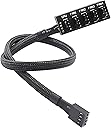
The ThreeBulls PWM Fan Hub is a 15.7-inch 1-to-5 splitter cable designed to extend and multiply your PCโs fan connections. Compatible with both 4-pin PWM and 3-pin fans, it features a durable black nylon braided sleeve for a clean, professional look inside your desktop. Ideal for compact builds or any setup needing extra cooling, this splitter supports up to five fans from a single motherboard header, helping prevent overheating and optimize system performance.
| ASIN | B07M5P7VHG |
| Best Sellers Rank | #252 in Internal Fans & Cooling Components |
| Brand | ThreeBulls |
| Brand Name | ThreeBulls |
| Cable Type | Coaxial |
| Color | 1 to 5,1 Pack |
| Compatible Devices | Desktop |
| Compatible Phone Models | No Compatible Phone Models |
| Connector Gender | Male-to-Female |
| Connector Type | 4 Pin/3pin |
| Customer Package Type | Standard Packaging |
| Customer Reviews | 4.6 out of 5 stars 4,446 Reviews |
| Indoor Outdoor Usage | Indoor |
| Item Length | 15.7 Inches |
| Item Shape | Round |
| Manufacturer | ThreeBulls |
| Maximum Voltage | 12 Volts |
| Model | 8541606340 |
| Number of Items | 1 |
| Number of Pins | 4 |
| Other Special Features of the Product | Braided |
| Outer Material | Nylon |
| Part Number | 8541606340 |
| Recommended Uses For Product | Connecting and extending power supply to PC case fans, particularly suitable for 4-pin and 3-pin fans in desktop computers. |
| Special Feature | Braided |
| UPC | 786705448292 |
| Unit Count | 1.0 Count |
| Wattage | 1 kWh |
P**P
Solid Fan Splitter for Small Builds
I picked up this ThreeBulls PWM Fan Hub for my ITX build and it does the job. Right now, Iโm running three fans off itโtwo in the front and the top exhaustโand itโs working fine. Just a heads-up: make sure your fan cables are long enough, especially if youโre building in a tight case like an SG13. I had to get some extension cables because things got unplugged when I put the case back together. At one point, I actually stripped a fan connector and had to swap out the fan, but after that, no issues. The cord length was perfect for my ITX build. This splitter isnโt powered, so I wouldnโt run more than three fans off it. Four might be pushing it and could stress your motherboard header. For what it is, though, itโs great for squeezing in extra cooling on a small build. It comes with a sticky pad so you can mount it wherever you need I have mine stuck in the back corner of my case and it hasnโt budged. Build quality is decent. Itโs just a basic splitter, nothing fancy, but it gets the job done. If youโre working in a small case and want to add more fans, this is definitely worth picking up. I might grab another one if I need to add more fans down the line.
G**S
Small, cheap, and works.
Itโs still new but itโs a slim design that works and is cheap. It gave me enough length to finish plugging in my side case fans with decent cable management.
J**U
It works wonderfully and gets the job done.
It works as intended and runs great. If you are looking into this as a way to power a pump on an AIO, I HIGHLY suggest you do not buy or use this product for that. That being said, the adapter itself has 5 headers, allowing you to power 5 fans off 1 MB header. I personally would not recommend running more than 3-4 fans off this product, especially if you're new to building PC's. Note that the first header labeled " CPU " must be the first fan position when using this product. After the first 3 headers, the 4th and 5th will supply power, but will not run your fans at full power. If you have an experience like others on in the reviews of the product catching fire or so called " exploding " then you are either running too much power to the product or your MB cannot supply 5 fans on the product. As for the wiring itself, it's very well sleeved and protected. It's length however is rather short so definitely plan ahead on your fan placements and header locations on your motherboard. The sleeve on this product is very difficult to bend and manipulate, I suggest you only bend the cable at areas that are not directly near the header or the actual board itself, it felt fragile. I would recommend this product to anyone intending to add more than 5-10 fans within their build, just make sure to check your MB support.
S**E
Great Fan Hub, But Hard to Hide
This fan hub does exactly what I neededโlets me add more fans to my PC without any issues. The build quality is solid, and the sleeved cables make everything look clean. Installation was easy, and all my fans are running perfectly. The only downside is that itโs a bit tricky to hide if you donโt want it visible through the glass panel. It would be nice if it had a more compact or low-profile design for easier cable management. Other than that, itโs a great product and does the job well!
G**E
It's good
It's been working pretty well, it's able to provide power to all the fans I'm not sure but when I connected the last fan it seems like it slowed everything down a little bit but overall it's a pretty good item if you only have one fan plug on your motherboard, it's small and has a sticky part on the back to fit wherever you like it looks pretty nice, if I had to say the power degrades the more fans you put but overall it's good for three at least
J**C
Easy way to add more fans
If you want to add more fans to your case and you don't have any more fan headers this is an easy solution. It allows you to link PWM fans unlike some of the splitters that don't have 4 wire PWM connections. It is good for connecting multiple fans to a single header to control fan speed without having to set up each individual fan from BIOS. Just use one setting for all the connected fans. Just be careful. Connecting 5 fans to one motherboard header might have to much amperage on one header. Usually you do not want to go over 1 amp per header. This means for a .3 amp fan you can only safely connect 3 fans to this hub. Check your mobo and fan specs to confirm. Most fan specs list the amperage per fan. It may be harder to find the specs on the mobo but I wouldn't go over 1 amp in that case to be safe. The only case I see connecting 5 fans would be 92mm fans that draw .12A each, you can safely connect 5 fans. If it is a .3A 120mm Corsair fan connect no more than 3 fans. Check your fan specs to be sure. Other than that it works great and has a nice braided 4 wire PWM cable with a decent length. A good part to buy a few extra and keep when they are needed.
A**K
For PWM to work properly - you have to have the one labeled "CPU" connected
Update: A recent update to the FanControl software enabled a new type of calibration that won't work with this adapter unless you have a fan plugged into the one labeled CPU. They really should rename them to FAN1-5 to avoid that problem. So as one other reviewer first mentioned - you have to have something plugged into the "CPU" fan for it to work right. Original Review: It's got the 4-pin PWM connector, but it's not PWM, it's DC. Works great with case fans where you just want them to all spin at the same speed. Where ever you plug it into the motherboard, just set the fan type to DC mode in BIOS. For Windows folk, you can use the FanControl software to either have the fans speed at a steady rate or set it to change based on a temperature source. I've got mine set to a steady 55% - and the system keeps cool and the fans are inaudible. Of course, depending on the fans you are using YMMV. Either way - very good result for the price.
G**R
It works
The connectivity is perfect.
S**D
BEST SYS FAN HEADER HUB
It will be very helpful if you have a lack of sys fan header and i like it because itโs very simple and you can install 4 fans
C**J
Excellent fan hub, perfect for multi fan setups
I recently installed the ThreeBulls PWM fan hub to connect multiple case fans in my PC and it works really well. It lets me run up to five fans from one motherboard header without any power issues. The cables are nicely sleeved and the build quality feels solid. Setup was easy and I did not need extra adapters or splitters. The PWM control works as expected and the fans adjust speed based on temperature with no flickering. Everything stayed neat and tidy with the included cable ties. The only minor thing is the hub is a bit longer than expected so I had to find space behind my motherboard tray. It did fit in the end and does not interfere with any components. Overall I am very happy with this hub. It is reliable, well made, and makes managing multiple fans simple. I would buy it again and recommend it to anyone looking to improve airflow in their PC.
C**.
Works as it should
Literally no issues with this product at all. Comes with 2 adhesive strips (one on the product and 1 extra in case you get a new case or something). Its a 3M adhesive so it'll stick really well, just be sure to wipe down the area a bit with some rubbing alcohol or something. It feels sturdy, but the wire connections could maybe be done a bit better? Might didn't come off or anything, but just don't play around with it too much. The connector is a PWM connector and would fit on a motherboard, but I would actually recommend against doing so. Most motherboards have an average amp rating for 1 fan header at around 1 amp or so. Many non-LED fans will pull around 0.15 - 0.2 amps and some LED fans will pull a bit higher around 0.2 - 0.25 amps. If you do the math, having 5 fans at 0.25 amps running off a single 1 amp rated header will cause issues and COULD potentially fry your board. My recommendation is either; A) double check your user manual and see if your fan headers can handle a bit more power than most. I know some gigabyte motherboards are rated for around 1.5 amps. or B) do what I did and plug a molex to fan connector into it. If you wanted to adjust the speed of all the fans, just use one of the little resistor extension cables (that reduce RPMs) that come with most fans in between this product and the molex connector. All the fans will run at the same speed. Anyways though, good product and does everything it should.
A**Q
Lose fit
Didn't fit the CPU fan adapter well.
V**C
Perfect
Works nicely. Cables fit nicely into every pin and now both of my case fans work.
Trustpilot
1 day ago
2 weeks ago