

Desertcart purchases this item on your behalf and handles shipping, customs, and support to Tunisia.
🚀 Elevate your wired network game with the hEX S — speed, security, and power in a compact package!
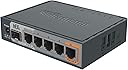
The MikroTik hEX S (RB760iGS) is a compact, high-performance wired router featuring a dual-core 880 MHz CPU, 256 MB RAM, five Gigabit Ethernet ports, and a 1.25 Gbps SFP cage. It supports advanced RouterOS configurations, hardware IPsec encryption at ~470 Mbps, USB 2.0, microSD storage, and PoE output on port #5, making it ideal for professionals seeking secure, fast, and reliable wired networking without wireless distractions.
| ASIN | B07F7HDRKX |
| Antenna Location | Home |
| Antenna Type | Internal |
| Best Sellers Rank | #3,425 in Computers & Accessories ( See Top 100 in Computers & Accessories ) #131 in Computer Routers |
| Brand | MikroTik |
| Built-In Media | 24V 1.2A power adapter |
| Color | Multicolor |
| Compatible Devices | Personal Computer |
| Connectivity Protocol | Ethernet |
| Connectivity Technology | Ethernet |
| Control Method | Touch |
| Controller Type | Push Button |
| Customer Reviews | 4.7 out of 5 stars 1,271 Reviews |
| Data Transfer Rate | 1000 megabits_per_second |
| Frequency | 880 MHz |
| Frequency Band Class | Dual-Band |
| Global Trade Identification Number | 02000001011881, 05903148913131, 07540000000349 |
| Item Dimensions L x W x H | 4.45"L x 3.5"W x 1.1"H |
| LAN Port Bandwidth | 1000 Mbps |
| Manufacturer | Mikrotik |
| Maximum Upstream Data Transfer Rate | 1000 megabits_per_second |
| Mfr Part Number | RB760IGS |
| Model Name | RB760iGS |
| Model Number | RB760IGS |
| Number of Items | 1 |
| Number of Packs | 1 |
| Number of Ports | 5 |
| Operating System | RouterOS |
| Other Special Features of the Product | WPS |
| RAM Memory Installed | 256 MB |
| Router Firewall Security Level | Advanced |
| Router Network Type | Wired |
| Security Protocol | WPS |
| Special Feature | WPS |
| Unit Count | 1 Count |
| Voltage | 57 volts |
| Warranty Description | No Warranty |
| Wireless Communication Standard | 802.11a |
| Wireless Compability | 802.11a |
C**S
Gigabit throughput Confirmed Working!
I purchased this after upgrading my 75Mbps Comcast service to 1Gbps. My Sonicwall NSA220 could not handle the 1Gbps throughput. Was getting around 250Mbps max with the Sonicwall. So I went on a venture to find a cheap solution. The Comcast cable modem rental box that was given, was very basic. I could not change DNS, etc. So I returned the Comcast monthly rental. Purchased my own Arris SB8200 DOCSIS 3.1 cable modem, and this Mircotik Gigabit router. Worked like a charm! I now have gigabit speeds, and no longer paying Comcast monthly rental fees to service my Comcast modem. I suspect I will recoup all my cost in 1.5 years. (PROS) - Cheaper then a Sonicwall TZ500 (MSRP $1,200) - Did I mention how inexpensive! LOL - Getting Gigabit speeds with basic setup, a few NATs and DDNS setup! - Small footprint size. - Fast boot times. - Has a quick setup for very basic setup, for non IT people. - Built in DDNS like service, for dynamic public IPs, that have a need to check security cameras, NAS boxes, servers, VPN, etc. Eliminating the need for dyndns.org, no-ip.org etc.. Reminds me of Synology quickid service, etc. - 5 port gigabit switch. I used port 1 as Comcast WAN Input, and the remaining 4 as LAN. - I did all my config and management via web browser at 192.168.88.1. i.e. I did not download and use the winbox config software. (CONS) - Interface OS is not as polished as Sonic OS, but works. But I am biased. - Not as many interfaces as a Sonicwall TZ500. - Interface / OS requires IT knowledge. Basic End user, like my mom, wife, kids, grandparents, etc.. would NEVER be able to figure it out. - I, as an enterprise certified Sonicwall Systems Engineer, had to watch youtube videos on how to create hairpin destination NATs, etc. Its just not as obvious. Or you have to get to know where to find things, and how their OS works, but its manageable, once you get to know their layout and methods. - The power adapter is a basic barrel plug into the Microtik Router. Power cable has fallen out a few times, while moving the router around. It is fine if left untouched. Just wish they would have added some type of quick release power connection, as the majority of these devices do.
D**T
I love Mikrotik
It took almost a week to get all the configs correct for my home network. I swapped from Unifi mesh to Mikrotik with CAPsMAN running on this firewall. Holy bulletproof batman. Once I got all the configs correct, I've only had to touch firmware updates. I have symmentrical gig fiber at the house and this router handles all of it with some room to spare. I thought about making this 4/5 because of the very steep learning curve, but decided even with that, I'm so happy with all my Mikrotik gear that everything is 5/5 for what I bought from them. 1 hex s, 1 CloudRouter 8 port switch with a 48 volt power supply to power the WAPs POE. and 3 cAP access points. I thought about upgrading the WAPs to the 6th gen for faster wifi, but I get 350 down and 500 up on my iPhone 15 from anywhere in my house after optimizing the config. If you don't know anything about networking, look for a simpler option, but if you know a bit about networking, this is your ticket.
E**E
Get it!!!
Absolutely no regrets. First off, it doesnt require an SFP module. I bought the module anyways for ethernet, but didnt test different speeds based on the port as my understanding is that it just allows different connection types like phone line or fiber, but really just adds another port. That being said, dealing with a fair amount of paranoia and studying hacking a good chunk of my youth, I know the router is the first node you really hit when connecting to an IP, other than the modem itself. TP-Link routers were kinda awful security wise even if your admin panel wasnt facing the WAN. I bought this so I could have a bit more defense in my network from outside threats. Paired with a gl.inet MT3000 travel router, and a TP-Link TN841N? 2.4GHz wifi router, as well as a Wi-Fi Deauthentication-detector, i feel quite good about the network separation. There are a lot of options and they can feel kind of overwhelming, even with my techxpertise. However, most of the options arent relevant for most of what i needed, and it was actually minimal configuring and minimal tinkering to get it to work as expected. Hopefully I dont ever have to buy another one, but if I need to, I’ll GLADLY buy one of these again. Really happy I found MikroTik. Doesn’t include wi-fi at all. And the speeds were better than my ISP provided router, even with the ISP having separate modem device and separate router. (not a modem-router combo from my isp.) Ran everything I through at it!
C**R
Unbelievable how much you get for the price.
Let me start off by saying that I've also deployed one of mikrotik's cloud core routers at work. I'd expected this small home version to be less customizable, but that was not the case. RouterOS and winbox are extremely powerful tools which offer the same (if not more) network customization options and raw throughput as Cisco devices that are 2-4 times the price. This little home network router has pretty much the same features as a $1200 Cisco router, but obviously with less packet processing power. Now this thing isn't just plug and go in case you're looking for a simple home router, but I think if you can use a computer without having to call your nephew for help every week you'll be fine. There's a quick automatic config option for beginners. 10 minutes on YouTube and you'll have a gaming router for half the price. I was tired of using comcast's weak modem/router. The webui was buggy and slow. I've now got load balancing, QoS that can be customized by client, connection, traffic type, and even level 7 application protocol. If you want to set up a mesh wifi, hot spots, or controlled access points you can (with added hardware of course). If you want to set up VPNs, generate certs, maintain blacklists and whitelists, prevent port scans flood and brute force attacks, and use syn cookies, you can. If you want to monitor network traffic, set up vlans, maintain multiple local networks, and block specific applications, you can! In a $60 router! And that's maybe 20% of what you can do. Did you break the config? Cool just reset it and load a backup. Hardware died? Cool just load your backup onto a new mikrotik router. Most settings are compatible even between different models. I loaded the config from the cloudcore router at work to this hexs and had it working on 15 minutes. I'm sorry if this is kind of long winded but I love these routers!
E**H
Complex interface, but powerful
I got this because the brand is highly-recommended online. I use it for basic home internet usage, including streaming via Moonlight, PSN, and Xbox. I also specifically chose this one for the SFP port for running fiber to my garage, and it works great for that. The setup interface is VERY in-depth, and you can do pretty much whatever you want with it. That said, it is not as simple to setup as your average Netgear or TP-link router. If you know what you’re doing, or don’t mind doing some research to figure things out, then by all means have at it. But if you are just looking to get online, I would recommend going with a big brand from a box store.
B**B
Great performance, terrible setup process
The hardware itself gets a 5/5, but I'm knocking this down a star for the UI and support documentation which left me wanting something better. You basically need a degree in network engineering to configure this yourself, especially if you need something sliiightly outside the norm. The Wiki has some relevant information but not all of it applies to the Hex S. The wiki has a lot of outdated information that isn't marked as such. The GUI is extremely informative and easy to use, but the actual layouts for each window are samey looking and that makes it very confusing to navigate. Almost everything is labeled in network engineering terms and there are no useful tooltips or help windows to speak of with comparable layman's terms or explanations (that I could find). I bought this unit because of the customizability of IPv6 networking, and I eventually got it doing what I needed, but in order to configure it properly I had to learn a few dozen networking terms I'd not used before (I work in IT tech support, and hadn't heard of PPPoE for example), and read dozens of outdated Wiki pages (trying to identify optimal firewall configuration was a complete pain, and I had to do it for both IPv4 and IPv6), and cross-reference those to multiple forum threads posted over the last few years. Eventually I got a good set of firewall rules that blocks what I want to block and I can make exceptions for exactly what I want. I'm kind of stunned that nowhere is there a complete "guide to set up Mikrotik router for a typical home network behind a typical American modem". All that difficulty aside, this thing is a beast once it's set up. Despite more than a dozen firewall rules it still easily handles full gigabit bandwidth, which is great because my internet connection is 1 gigabit fiber. It also beeps when it reboots which is a nice audible cue to have.
Z**Y
This thing is awesome!
I think it's important to emphasize with this product that if you want to use it you should know what you are doing. Or at the very least be willing to put in the time to learn how to use it. I had to put in the time to learn but thankfully there are A LOT of videos and guides for using RouterOS out there. Now to my review: I was looking for a vpn router that would allow me to send Magic Packets to my home network to wake up any machines I wanted to access while I was away. MikroTik makes this SUPER easy because each router comes with it's own web address that's tied to the routers serial number so I didn't have to go through services like noip.com. Using the WoL functionality is also a breeze. I really like the windows client "Winbox" used for router management. I like it way better than the web interface. All in all this thing is well worth the money you spend on it considering no other router really comes close to this functionality for the price. I would highly recommend.
T**G
If a gift like this was received!
Awesome product, great addition to my home lab. Integrates well with my home lab setup. Provides robust, granular control allowing a fair amount of flexibility. Ability to use the command line to apply the changes is a high point for me. If you've been looking and are considering this device, I highly recommend it. The implementation of VLAN's I was able to put to use with ease. Pushing to OpenWRT based device and serving multiple wifis on different VLAN's. Will need to give device a short break, if not can spend all day thinking about what and how you can do something.
A**R
Hex s, absolutely amazing Lil router!
Where do I start with this.... The hex s is an absolute power house, don't let its small form factor fool you...... The features of this router is well beyond every consumer router out there. Tho it is not for the faint of heart, I mean, you can plug and play and be on your way...... But going beyond that....steeeeep learning curve, but if that's your thing, like myself, I came into this thinking I knew a lot about networking.....nope..... Been an amazing learning tool, and the community is super helpful. Routeros on this is so customizable its insane, 1000% recommend!
A**J
Fantastic flexible hardware, far better with OpenWRT
With proper fibre to the premises finally arriving, my trusty Draytek 2860 became a chokepoint in the network - it just wasn't capable of handling 300Mbit/s. The Hex S definitely is - my connection (nominally 300M) is around 320 symmetric. I work from a home office and have numerous servers and other network gear hosted behind this router, spread over 4 VLANs as well as the usual myriad devices of a modern family home. The biggest asset of this device in my opinion is the sheer flexibility on offer; in terms of power it can be run off anything from 12V to 57V, supplied either through a standard barrel plug or through a PoE injector on port 1, or both simultaneously - this lets you connect it to multiple PSUs to provide redundancy and I can confirm that it will seamlessly continue to work if one PSU drops out. I have mine powered by a 802.11AF injector which means I can also use the router to power a UniFi access point from port 5 on the router - extremely convenient. If you use a suitable PSU on the barrel jack input it can also provide 24V "passive" PoE on port 5, another potentially useful option. In terms of software, I am not a fan of Mikrotik's RouterOS; it is certainly flexible and powerful but configuring things like VLANs is frankly a nightmare no matter which of the many configuration interfaces you use. I do use RouterOS on some devices but with this one I fairly quickly decided it wasn't worth the hassle and flashed the Hex S with OpenWRT. This works perfectly and I would strongly recommend it for most use cases of this router. In summary, I'm delighted with the performance of this router as well as the flexibility of the design and at this price it is excellent value for money.
S**R
Best Device!
Best device ever. If you know how to configure this, its a very powerful device! Much Satisfied!
S**A
Ottimo Router
Adoro Mikrotik , non è il primo che compro, secondo me sono prodotti eccellenti, versatili e molto stabili. Alcuni Router sono accesi da anni e non mi hanno mai dato problemi. Cosa mi piace. -Se siete in grado di farlo e ne avete la necessità , potete usare anche configurazioni complesse. -Se siete neofiti , la configurazione di base consente di avere la Wan sulla ethernet 1 e la Lan su tutte le altre porte. Successivamente nulla di vieta di usare configurazioni più complesse una volta capito come funziona. Attenzione, in configurazione base, questo tipo di router non deve essere esposto su internet se non è stato opportunamente messo in sicurezza. Nulla di complicato, con un pò di pratica e sfruttando le numerose guide on line potete renderlo sicuro e stabile. -Se volete migliorare la vostra comprensione sul networking , con due o tre di questi router vi potete divertire parecchio. -Mikrotik ha dei server ddns. Abilitando la funzione cloud , potete raggiungere facilmente il router da remoto, anche con IP dinamico. Non potete decidere il nome host o i dominio , il nome host corrisponderà al numero di serie del router , ma per determinati scopi va benissimo anche così, anzi, si possono implementare configurazioni fantasiose ed utili per gestire le address List , per raggiungere un router remoto senza ricordare il suo ip o il nome host , o per configurare l'' Hairpin Nat , tanto per citarne alcune. -Mi piace molto il firewall, posso avere tutto sotto controllo. Credo di aver letto su internet che il suo funzionamento ricorda vagamente le iptables di Linux, che conosco molto poco, anzi per niente, ad ogni modo i comandi mikrotik, secondo me, sono ben strutturati e molto comprensibili. Usando winbox, il software di gestione del router, si può essere spiazzati inizialmente, ma con il tempo esso fornirà una panoramica chiara , strutturata e comprensibile della configurazione del firewall e di tutte le altre funzioni. Cosa non mi piace -Per ottenere certi risultati ci sono strade diverse per una stessa funzionalità, questo perché il router supporta diversi protocolli e metodi e qui la situazione si complica, e non poco. Ad esempio, per le per le vlan occorre comprendere che alcuni tipi di configurazione hanno un impatto più elevato sulla cpu ma sono semplici da implementare. Altri metodi, invece, sfruttano le capacità hardware del chip che gestisce lo switch e quindi non pasano sulla cpu, ma la configurazione è diversa, più complicata, ed i chip installati in questi router non sono tutti uguali , a seconda dei casi essi possono avere diverse capacità di gestire un certo numero di host table , vlan table e rule table. Per questo motivo , prima di acquistare un router sarebbe meglio andare sul sito Mikrotik , cercare "Manual:Switch Chip Features" , stabilire quali sono le vostre esigenze e le vostre aspettative e soltanto dopo decidere quale tipo di router comprare. Sul sito ci sono informazioni dettagliate su quale tipo di Chip Switch è installato sui vari modelli. Trovo questo metodo e questa trasparentza eccellenti, perché prima di acquistare posso decidere cosa comprare in funzione di ciò che mi occorre , ma questo richiede tempo, pazienza e pò di studio se siete neofiti. Lo stesso discorso vale per altre funzionalità , ad esempio le vpn. Ci sono diversi modi per configurarla, mi vengono in mente wireguard ed openvpn. Ho fatto diversi tentativi con entrambe ma non ci sono riuscito , sicuramente a causa di un mio limite o a causa di errori concettuali. Ho configurato 2 router mikrotik diversi su lan diverse , che si affacciano ad internet con 2 IP pubblici diversi ottenuti via client pppOe (attestati alla stessa linea). Non ci sono riuscito , ma ripeto , sicuramente sbaglio io. Ho successivamente creato un altra vpn, con wireguard ed usando 2 peer, il router stesso ed un cellulare, e qui funziona perfettamente e con ottime prestazioni. In questo modo, raggiungo il NAS senza esporlo direttamente ad internet. - Su Mikrotik , si possono installare funzionalità aggiuntive ma alcuni modelli non hanno memoria sufficiente per installare tutti i pacchetti che vi vengono in mente , ad esempio su questo modello che ha solo 16 MB su scheda madre (hEXs - RB760iGS) ho installato il pacchetto "The Dude" , si tratta di un network monitor con il quale ho sotto controllo tutta la rete. È stato necessario comprare una micro SD per salvare i database (se non ricordo male si può usare anche una pen drive o un hard disk USB) e comunque sia ho esaurito la memoria interna del router e non posso installare altro. Non è consentito installare pacchetti aggiuntivi su micro sd esterna, quest'ultima consente solo di mappare unità da usare come storage di dati. Ad ogni modo , per esigenze particolari si può optare per router più performanti e costosi oppure si possono usare più router ed assegnare a ciascuno un compito diverso, se possibile. In conclusione , se conoscete Mikrotik , sapete di cosa parlo , se non la conoscete , potete tirare su un laboratorio per studiare e mettere in pratica tutto quello che vi viene in mente e comunque sia , avrete un router valido ed affidabile per gestire la vostra rete personale usando il router del vostro ISP solo per ottenere la connettività internet.
F**O
Não é para iniciantes
O equipamento funciona muitíssimo bem! Aqui está cumprindo o papel de fazer o balanceamento dos links de internet, além de fazer a separação das redes da casa e do homelab. Mas a curva de aprendizagem é íngreme, não é muito intuitivo e mesmo algumas coisas que deveriam ser lógicas, não são muito.
Trustpilot
5 days ago
2 weeks ago