


Desertcart purchases this item on your behalf and handles shipping, customs, and support to Tunisia.
🔗 Connect Like a Pro — Elevate Your Display Game Instantly!
The DTECH DVI to HDMI Adapter is a compact, bi-directional converter supporting high-resolution video up to 4K@30Hz and 1080p Full HD. Featuring gold-plated connectors for enhanced durability and secure thumbscrews for stable connections, it effortlessly bridges HDMI and DVI devices including monitors, gaming consoles, and laptops. Perfect for professionals seeking reliable, plug-and-play video conversion without audio support, this adapter is a must-have for seamless multi-device setups.
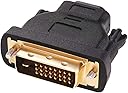
| Asin | B07MJDYH21 |
| Best Sellers Rank | #5 in DVI-HDMI Adapters |
| Brand | DTECH |
| Color | Black |
| Compatible Devices | Desktop, Gaming Console, Laptop, Monitor, Television |
| Connector Type | DVI, HDMI |
| Customer Reviews | 4.6 4.6 out of 5 stars (3,557) 4.6 out of 5 stars |
| Finish | Matte |
| Input Voltage | 4.8 volts |
| Item Dimensions | 5 x 5 x 0.5 inches |
| Item Type Name | DVI to HDMI Adapter |
| Item Weight | 0.27 g |
| Manufacturer | Guangzhou DTECH Electronics Technology Co.,Ltd |
| Mfr Part Number | CB0228 |
| Model Number | CB0228 |
| Number Of Items | 1 |
| Number Of Ports | 2 |
| Package Quantity | 1 |
| Power Plug Type | No Plug |
| Specific Uses For Product | older Monitor, projector, PC, Computer, Desktop, Laptop, TV, PS4, PS3, Xbox, HDMI Splitter, KVM Switch, cable box, docking station,Raspberry Pi |
| Unit Count | 1 Count |
| Upc | 714131651825 |
| Warranty Description | 12 months warranty |
| Warranty Type | Limited |
User
Works fantastic!
This adapter worked connecting my monitor to my desktop. The material is durable and the price is great.
User
It works, but only one screw fit
I should’ve bought two and use it as an extent adapter for the monitor that I just leaving so if I have to go elsewhere, I have a travel one
User
It functions as designed
This worked really well to allow my old tower with DVI port to work with a monitor's HDMI port.
User
Works like advertised
I recently purchased the DTech DVI Male to HDMI Female Adapter Bi-Directional DVI-D Port Converter and I have to say, I am extremely impressed with its performance. This adapter allows me to easily connect my DVI devices to HDMI monitors or TV screens, giving me the flexibility to use my devices in various settings.The build quality of this adapter is top-notch and I can tell that it is made to last. The connections are secure and I have not experienced any signal loss or interference while using this adapter. I also appreciate the compact design, making it easy to carry around in my laptop bag or backpack.Overall, I highly recommend the DTech DVI Male to HDMI Female Adapter for anyone in need of a reliable and high-quality adapter for their DVI and HDMI devices. It has definitely made my life easier and I am extremely satisfied with my purchase.
User
Perfect for RaspberryPi HDMI to DVI
Works perfectly for connecting a raspberry pi’s HDMI to an older DVI display! Nice quality component. Nice and secure connection between the display, the adapter and the HDMI cable. It won’t just drop or slide out.Perfect price point and I’d gladly recommend to anyone who needs an HDMI to DVI converter.
User
Great for my needs!!
I recently had to replace a failing KVM with a new HDMI/USB KVM. My 2 old computers had videos cards with DVI output, but no HDMI - so I bought 2 of these to connect to the new KVM. They are working perfectly well for me. I do not attempt to run sound through them and I don't think that they support it.Either due to the adapter or the KVM I do have a split second lag bringing up video when changing KVM source, which is of no consequence to me. I run 1980x1024 on all computers to the monitor and KVM and have seen only one hiccup so far in the first week (resolved by switching to another PC then switching back) but that was on the KVM port of a newer PC without this adapter.No configuration was done or needed during installation or use of these adapters. Truly plug and play. ;)All in all I am very satisfied with the delivery and performance of these adapters and recommend them. Really good price/performance units.
User
Good
Worked amazingly
User
Fixed “Generic Monitor” 640×480 issue on Windows 11 (ASUS VS247H-P)
I bought this for an older ASUS VS247H-P monitor that would not behave with a Windows 11 Pro mini PC over HDMI→HDMI. Windows only detected it as a Generic monitor and would get stuck at 640×480 (unusable), even though the same HDMI cable/monitor worked perfectly with my MacBook Pro. The mini PC also worked fine with a newer monitor, so it seemed like an EDID/handshake compatibility issue with this older ASUS.This DVI (male) to HDMI (female) dongle solved it immediately. I plugged the dongle into the monitor’s DVI port, connected a normal HDMI cable from the mini PC, switched the monitor input to DVI, and Windows instantly offered the correct 1920×1080 @ 60Hz resolution.If you’re dealing with “Generic PnP monitor”, “stuck at 640x480”, “Windows 11 won’t detect monitor properly”, or an older DVI-capable monitor that won’t negotiate correctly over HDMI, this is an easy fix. Note: DVI doesn’t carry audio, so plan audio separately if needed.
User
Does what it says it will do
Works perfectly.Picked this up to make use of an older monitor that would otherwise have gone in the bin.Dirt cheap, does what it says it will. Can't ask for much more
User
A must have if you have old monitor
This item works perfectly to convert your HDMI to HDMI cable to "DVI/HDMI" cable, as modern display cards and device may not have DVI port, and then old computer monitor may only have DVI port.
User
Makes my HDMI monitor work with my DVI computer slot just great
I didn’t know I’d end up wanting to have 3 monitors when I bought my new computer last year, but a year later that’s exactly what I ended up needing. (Or wanting anyway!)My first monitor was HDMI to HDMI, second monitor was VGA to VGA (also known as D-Sub), when it came to adding a third monitor the only port left on my Computer’s Motherboard was a DVI.I bought this converter, plugged it into my DVI port, then hooked up my 32” Samsung monitor using the HDMI cable.I think that DVI ports don’t carry sound, but I have sound from all three monitors no problem (I’m not sure exactly how that works, possibly carried through the first HDMI cable, I’m not that savvy with computers)I wasn’t sure if I was buying the correct converter at the time so hope this helps anyone in the same boat.
User
A+
Works perfectly!
User
Recommended.
Work as described .
Trustpilot
2 weeks ago
5 days ago