Buy anything from 5,000+ international stores. One checkout price. No surprise fees. Join 2M+ shoppers on Desertcart.
Desertcart purchases this item on your behalf and handles shipping, customs, and support to Tunisia.
💼 Elevate your storage game—power, speed, and control in one sleek enclosure.
The Syba SY-ENC50119 is a professional-grade 8-bay hard drive enclosure supporting both 2.5" and 3.5" SATA drives up to 24TB each. Featuring USB 3.0 with 5Gbps transfer speeds, smart thermal management with a quiet fan, and independent power switches for each drive, it offers a reliable, scalable storage solution ideal for archival, backup, and multi-drive management without RAID complexity.


| ASIN | B07MD2LNYX |
| Best Sellers Rank | #203 in Enclosures |
| Brand | IO CREST |
| Built-In Media | (1) 8 bay USB 3.0 Enclosure, (1) Power Cord, (1) Screw Driver, (1) USB 3.0 Cable, (32) Screws for 2.5" HDD |
| Color | Black |
| Compatible Devices | Desktop, Laptop |
| Connectivity Technology | USB |
| Customer Reviews | 4.0 out of 5 stars 531 Reviews |
| Data Transfer Rate | 5 Gigabits Per Second |
| Enclosure Material | Alloy Steel |
| Global Trade Identification Number | 00857426008215 |
| Hard Disk Form Factor | 3.5 Inches |
| Hardware Interface | USB 3.0 |
| Hardware Platform | Linux; Windows; Mac OS, PC; Network, Server |
| Item Type Name | Syba 8 Bay Tool Less Tray Hot Swappabe 2.5" 3.5" SATA Non Raid External USB 3.0 Enclosure SY-ENC50119l |
| Item Weight | 10 Pounds |
| Manufacturer | IO CREST |
| Material | Alloy Steel |
| Memory Storage Capacity | 24 TB |
| Mfr Part Number | SY-ENC50119 |
| Model Number | SY-ENC50119 |
| Supported Devices Quantity | 8 |
| UPC | 857426008215 |
| Warranty Description | 1 Year Warranty |
R**I
Glad I made this purchase.
I have had mine for over 6 months and it has worked flawlessly. The drives were very easy to install as well as connecting the USB 3.0 to a port on my PC. I like that I can individually turn the drives on and off as well as turn the complete rack on and off. I used a label maker to identify each drive which helps remembering which drive is plugged into what tray position. The unit runs cool and quiet, the sound from the fan is very low. The design fits nicely on my desk, looks nice and clean, and does not take up much space. I would definitely recommend this product. It is a very good value for the money as you can't beat the price.
R**Y
Perfect for Archival
I had a bunch of legacy drives and was swapping out my computer, I didn't want my new huge tower to be stuffed with hard drives for various reasons. This connected with USB quickly and all my drives showed up in Linux. It even works with LUKS (encryption) without problem. Just a note: This isn't RAID nor did I want it, but in certain cases transferring files will be slow. Especially between drives in the same tower -- the nature of USB is that the processor has to handle it and send it down the same wire. Imagine a 1 car tunnel on a two way street. One side passes, then has to yield to the other side. Yeah, it's gonna be slower than a seamless flow of 2 way traffic. It'll eventually get it done but is not something for speed demons. For a faster exchange of data from drives into the tower to another, I would suggest keeping the drive you are transferring data to from the others via a seperate cable - whether internal to your computer tower or a seperate single enclosure - I had various external drives that I just took apart and put the new HDD in without much problem. As it is, it's perfect for those drives you put the random files on or archive. I'm reading about those who are putting SDDs in these and expecting speed -- USB is not appropriate for speed in the first place. That's what SATA/eSATA is for at the least, although NVMe is fastest. Second, you're not gonna split 4/8 drives and get cutting edge speed. Does not happen. Great for archival, transfer of files if you have time, and storing HDDs out of the way but still usable. Bad for getting the most speed out of your drives, especially if accessing 2+ at a time.
P**!
Runs great...until it doesn't
The 8 drive bay worked beautifully with 6 of my drives attached, a 10 TB, 8 TB, 2x 6 TB, and 2x 4 TB. Thermals were good, fans were whisper silent, speeds were slow but acceptable (despite USB 3.0 on paper supporting 600 MB/s transfer speeds, this gets around 150 MB/s shared across ALL drives). Why the one star? It gets I/O errors randomly. There is no real rhyme or reason to it, but every so often a drive would disconnect entirely and disappear from Explorer OR it would appear, show my folders, but any attempt to open them was met with an I/O Disk Read Error. These drives had no issues before being placed in the enclosure and after being put BACK into my machine (originally got this since I wanted to swap my case but finding a mid-tower with 6+ 3.5'' bays like my Phantom 410 is not an easy task anymore) leads me to believe that the enclosure is at fault. There also is a nasty little design flaw that Syba informed me WAS expected behaviour: The drives will enter sleep after a certain amount of inactivity regardless of any settings in Windows be it USB sleep settings or hard disk sleep settings. This is an issue if you're using these for a media server like I was. There's a noticeable delay when the drives spin back on and almost all of the times I got that dreaded I/O error was when a drive was waking. If given that I/O error the only way to fix it was to physically turn either the drive on and off or the whole enclosure. Not an ideal solution, and I couldn't safely eject any time I did this as Windows would tell me the drive was in use. If you value your data, I would steer clear using this as a daily driver. Maybe as an on-site backup, but if you want to actually USE the drives installed regularly, look elsewhere.
F**N
Nice box! It does exactly what I wanted it to do.
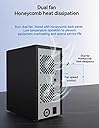
I have had several external drives hooked to my iMac for various purposes, and for this reason, I've always been short of USB ports and really tired of all the power bricks for each drive. I had power strips and USB hubs and cables everywhere. This box is the perfect solution for that problem. I have mounted 5 bare drives in the 8 slots of my unit, getting rid of 4 USB port cables, an extra USB hub (that often gave me issues) and 5 separate power bricks. This thing cleaned up my computer setup immensely. The box is quiet (actually silent sitting on the floor next to my computer desk), compact, and in the month since I bought it, it's worked perfectly. No unwanted disconnects, and hey, it just works! It has a master power switch on the lower left corner of the front, to shut off power to the entire unit. And each drive slot has a switch to power down just that drive. This is very handy, since the drives are hot-swappable, and this allows you to power down only the drive you want to change out, and power up a replacement when you're ready. Within a minute or so of powering it up, the new drive appears in the computer's drive list. This also allows you to have drives "off-line", but ready to go at the touch of a button. All without dismounting the other drives in the unit. This enclosure is NOT a RAID device. Each drive shows up as a separate disk as if it were separately connected to the computer. You could create a RAID array with RAID software if you want, but the enclosure has no such capability built in. It's a JBOD, "Just a Bunch Of Drives," which is exactly what I needed. It's not a NAS, either. It's connected directly to the computer through USB (or a eSATA connection of you want), not to the network router. Its volumes can, however, be shared just like any other external drives within the capabilities of whatever OS you're using. It works like a charm on my iMac, running Mojave, and the mounted drives show up fine in Windows 10 running under Parallels. (If you do as I did and use external drives removed from Seagate's proprietary cases, you'll probably have to reformat them once, because the Seagate interface does something funky to how they communicate. This box has a standard SATA interface for each slot, so any bare SATA drives will slip right in and work like a charm.) It works just like a generic external enclosure for each drive. Yes, the box has a plastic bezel in front, but the rest of the case is made of sturdy steel. (It looks and is made much like a black medium-sized tower PC case. ) The drive trays are made of fairly light plastic with a small metal insert at the front where the latching mechanism lives. But the latches are easy to operate (squeeze from the sides), and the trays are easy to insert and remove. If you're just a bit careful with the trays when they're removed, they will work fine. It would be nice if Syba sold the mounting trays separately, but to my knowledge they do not. The drive mounting trays do fit into the box well, the latches work, and there's plenty of ventilation for the drives, with the high/low speed selection on the internal fan. The trays will work with standard 3.5" drives or 2.5" laptop-sized ones, and they are "toolless", since you don't need screws to mount standard drives. There are springy plastic fingers on the side of the tray that snap into the mounting hole locations on 3.5" drives. The trays have holes in the bottom (and they give you little bags of the proper screws to mount 2.5" laptop drives.) I did have one issue when I mounted a laptop drive. The back right side spring pin hit the side of the drive since there's no hole there, so when you try to install the tray, the spring pin sticks out and makes it quite difficult to slide in. I think that particular spring pin would probably end up broken off if you did that very often. But if I was going to use those drives often, I'd probably just snap that back pin off in those trays anyway, because even with only 3 of the 4 pins in place, the drive would be more than adequately secured. So, small problem, easy solution. My only small gripe was that there was no natural place to put labels on the front of the drive trays to indicate what drive is where. You get up to 8 drive slots, depending on the configuration you buy, and after a while, it can get clumsy to keep referring to an external key as to what drive is in what slot. I solved that by designing and 3D printing a small 1-1/2" wide by 1" high T-shaped name plate that slides into the cooling vent between the latches (there's plenty of other space for sufficient airflow). I put a printed DYMO label on each that's easy to change if I need to. Now it's easy to tell what's where. I did order a longer USB 3.0 cable, because the 1m/3ft. cable that came with it wouldn't easily reach to the back of the computer. When I test the speed on the drives, they are exactly the same speed as when they were individually connected before. (I didn't test the eSATA interface.) All in all, this is exactly what I needed. I'm very happy with this Syba drive enclosure. Update: 10/2022 I'm now using a PC vs. my old iMac, but this box is still exactly what I need. It works just as well with the PC as it did with the iMac. Of course, I had to reformat the drives, but that's because of the change of operating systems, not a fault of the device. The speed is based on the interface you connect it to. I'm. My case, it's USB 3.1, and the transfer speed to WD spinning drives is about 100-12MB/s.
R**E
Great deal, works GREAT!
This enclosure is fantastic and great for Plex users. In the past I've bought a couple of inexpensive 5 bay HDD enclosures for my Plex server and was always disappointed with the build quality and ability to cool the drives. This 8 bay Syba enclosure really exceeded my expectations for the price. It's well made and thought out, easy to set up, silent, keeps my drives cool, has mechanical power switches so the drives turn back on after a power outage, and though rated for 16TB, I have 20 TB drives installed and the entire drive is recognized. My only issue is once the drives are inserted it's very difficult to pull some of them out. Being USB 3.0, copies are not as fast as I'd like but that's the problem with USB and big files, not the enclosures fault. Highly recommend!
J**E
8-Bay Review. HDD Supports 3.3V Reset Pin
This review is specifically for the 8-bay SYBA External Enclosure (All three models: 4, 5, and 8 bays all have different features and ARE NOT similar. Make sure to read the details before buying your chosen product.) Tested on Windows 10: PROS --Works as a JBOD only device as what I wanted (This is not a raid device & its advertised as so). I personally did not need the additional features and price premium raid provides for my specific use-case. --This is a USB 3.0 only model. Tested HDDs by doing a scan to all the drives at the same time. Realistic speeds seems to top-off at about 240~300MB/s total. This speed gets shared between all the drives. (Could be faster for other people - but this was based on my scenario and computer). --USB 3.0 doesn't seem to "use power" beyond the PCI-E built in power (This is a good thing). My built in PCI-E USB 3.0 card does not have the additional power plugged into the card. With other devices this causes my drives to drop offline or even cause BSODs. This specific model's built in power supply does the job & properly only uses the USB cable for data only and not for additional power. --This specific 8-bay model has a power button switch for each HDD bay. --Power button does in-fact stay pressed in and will turn back on when power is back on (other reviews mention it doesn't). --WORKS WITH 10TB --Tested with those shucked White Label 8 & 10TB EasyStore external drives with the known 3.3V Reset Pin or known as the power disable feature. Hard drive shows up without issue (The competitor Mediasonic advertises they DONT support this. I took a gamble and turns out SYBA external enclosure does in fact seem to support it). --SMART data does get passed onto the OS. (StableBit Scanner can properly scan and read SMART data). --Works with StableBit Drivepool --Because its JBOD was able to properly use Windows Bitlocker Encryption without issue --The trays make it somewhat easy to install the HDDs tool-less. I found the easiest way is to put the HDD first on one side. When putting the other side you can lift the little "side tabs" so it pulls back the clip enough for the drive to fall into place then push the plastic into the screw hole without hassle. Defiantly better then other brands that don't have this movable piece as other brands force you to bend the plastic making it easier to break. This brand you do not need to bend any of the plastic to insert the HDD. CONS --Expected the fans to be a bit more powerful on high. I know for most people super loud fans are annoying, but I prefer louder fans as opposed to hotter HDD temperatures. Got a HDD running at 114.8F in this thing while the HDD is running @ 100% for several hours. (BUT still an improvement from the 118F+ I would get in a standard External EasyStore enclosure inside a hot server cabinet). --No documentations NOT TESTED --Unable to test ejecting the drive from within the OS (As my computer says drive is in use) NOTES --The screws included are for the 2.5 to the 3.5 tray mounting. (Found out using SYBA's website).
T**.
It works. Mostly.
For the first two months of use, this device worked great. Around that point, though, the top bay decided to stop functioning; the blue & green lights went out, and the drive was not detected by my OS. Successfully swapping that drive with another bay indicated that the hardware is defective. I would love to send this unit back and have it replaced with a fully functioning one, but it's clear that nobody is willing to help. The Amazon seller, KART IT, refuses to even help troubleshoot because the order was fulfilled by Amazon. Because this problem occurred outside of their standard 30-day return window, Amazon refuses to help too, even though this is not a standard return. The original manufacturer, Syba, has a website which doesn't appear to be maintained, and a broken URL for their RMA form. Nobody is willing to help, and I'm not confident that more problems won't arise soon. In hindsight, I should have avoided this product.
A**I
Solid, simple, strong.
I bought this thing in 2020 and it is still going strong. I just wanted to add drives to my file box. I didn't want to pay for hardware RAID that I wasn't going to use (I use ZFS or software RAID so I'm not depending on some piece of hardware if I need to recover), and this tower fit the bill. Caveats: Depending on your OS/Kernel, it might not support SMART. On my old server, it didn't. Now running Xubuntu 24.04 LTS and it does. Also support SMART under Windows. Other thing to consider: because this is a no-name manufacturer, buying at a different time might mean different internal hardware. There's no way to be sure. However, as long as it presents the disks to the OS, all should be fine if you're running software and organizing your disks by unique IDs and not by OS-given names (like sda). Finally, this is not hot-swappable in the way I understand "hot swappable" under normal use cases. I mean, you can remove or power down a disk while the tower is running, but dog help you if you haven't unmounted it first and the system is trying to write to it.
J**O
Funciona perfecto en MacOS X
Pensé que me estaba arriesgando al comprar este producto después de leer algunas reseñas. Estoy usando este enclosure con MacOS X sin ningún problema, todos los discos son detectados correctamente y estoy usando las 8 bandejas con una mezcla de discos de diferentes marcas, capacidades y tamaños. Le estoy quitando una estrella solo por el hecho de que los discos duros de 2.5" hacen que las bandejas no entren y salgan como lo hacen con los discos de 3.5", esto es por un error en el diseño que esta hecho especialmente para los discos de 3.5". Con los discos de 2.5" los clips plásticos que tienen las bandejas quedan un poco extruidos por el lado donde va el disco y esto hace que tengas que meter y sacar la bandeja a presión como forzando la entrada y salida. Fuera de eso todo ha funcionado muy bien y confirmo que los abanicos del enclosure son bastante silenciosos.
M**E
easy to use
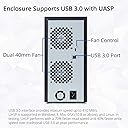
i bought this to replace 1 that was starting to drop harddrives. its not very big which i was surprised about because the 1 it is replacing is bigger even though they both hold the same amount of drives. each drive has its own power button which is great for switching out drives if you need to and the case has a power button if you want to switch everything off. the harddrives are easy to install, although the tray that the harddrive sits in is plastic so you need to take your time putting a drive into a tray. no screws required. the case itself is sturdy and made of metal and the two fans om the back so far seem to be really quiet.. each bay has its own power light and activity lightso you can see which drive is being accessed. i live in the UK and the plug is NOT UK compatible, but if you have an old kettle plug say from an old PC that works fine as that is what i had to use. all in all a nice bit of kit and i would recommend this to anyone.
C**.
Ni lo compres, se desmontan los discos.
Este articulo parecia una excelente solucion para tener 8 discos duros en un espacio pequeño, ventilados y por USB... Pero no lo fue. Los discos se desmontan aleatoriamente. Se tiene que reiniciar cada 2 o 3 horas para que aparezcan todos los discos. Intente instalar el ultimo firmware directamente de Syba, no funciono. Cambiar de discos y tampoco. Cambiar los lugares de los discos y tampoco. Usar otra computadora y tampoco. Usar otro sistema operativo... Y es lo mismo. Tanto en Windows, MacOs y Linux es lo mismo. Acabe perdiendo muchisimo tiempo. Ahorratelo tu tambien
C**N
Dead item.
Got my item, as I tried to install the hard drives, the shelves were drilled wrong and you are unable to screw in the hard drives for secure holding, and also came with an non-UK power cord, forcing me to go out and buy an adapter to allow me to use the item, once the enclosure was plugged in, to electricity and pc, the enclosure was dead, not turning on at all.
J**E
Works ok
It has issues when more than one drive is accessed as the same time, and has to be reset. Hard to figure out how to update as the instructions are hard to follow, perhaps that will resolve the issues.
Trustpilot
3 weeks ago
1 month ago