


Desertcart purchases this item on your behalf and handles shipping, customs, and support to Tunisia.
🚀 Triple your screen, triple your impact—dock like a pro!
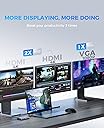
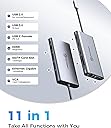
The UtechSmart USB C Docking Station is a compact, 11-in-1 powerhouse designed for professionals craving triple monitor setups, ultra-fast data transfer, and smart charging safety. Crafted from durable aluminum, it supports dual 4K HDMI or triple 1080p displays, 100W PD3.0 charging, gigabit Ethernet, and multiple USB ports, making it the ultimate portable workstation hub compatible with Windows, Mac, and Chrome OS devices.





| ASIN | B07PRJJNGF |
| Best Sellers Rank | #5,496 in Computers & Accessories ( See Top 100 in Computers & Accessories ) #419 in Laptop Docking Stations |
| Brand | UtechSmart |
| Built-In Media | 1 * Traval Pouch, 1 * Triple Display 11 in 1 USB C Hub, 1 * User Manual |
| Color | Gray |
| Compatible Devices | Windows&Mac OS |
| Customer Reviews | 4.3 out of 5 stars 4,239 Reviews |
| Hardware Interface | Ethernet, HDMI , SDHC, USB 3.0, USB Docking Station , USB Type C, VGA |
| Item Dimensions L x W x H | 6.7"L x 3.7"W x 1"H |
| Item Highlight | 11 in 1 Triple Display USB C Hub with Dual HDMI, VGA, PD3.0, SD/TF, 4 USB Ports Adapter Compatible for MacBook and Windows |
| Item Weight | 0.16 kg |
| Manufacturer | UtechSmart Technology |
| Mfr Part Number | UtechSmart |
| Minimum Required Operating System Version | Windows 10 |
| Model Number | UCN3270 |
| Number of Items | 1 |
| Number of Ports | 11 |
| Product Dimensions | 6.7"L x 3.7"W x 1"H |
| Total Number of HDMI Ports | 2 |
| Total USB Ports | 4 |
| Total Usb Ports | 4 |
| UPC | 850004875094 |
| Warranty Description | 18-month warranty by refund or replacement |
| Wattage | 100 watts |
S**W
VERY impressive product, throwing away all my other dongles!
I was skeptical about this product at first, given the seemingly complex nature of all the functions they put into it (dual HDMI, networking, fast charging, USB ports, card readers, YIKES!) - but, after a few days of HEAVY use and testing, I can verify that this hub is, in fact, the real deal. So much so that I am tossing my SD card reader, old USB hub, HDMI splitter, network adapter, AND charger for my HP spectre 360 and switching to just this. PROS: 1. Small. It's VERY small, particularly impressive given everything that's crammed into it. 2. Quality feel. It has a high quality feel, too, nice and solid without the usual cheap plastic feel of similiar products being sold these days. The ports are all rock solid, no wiggle, and plugs & memory cards click firmly into place. 3. Speeds are verified. USB 2.0 and 3.0 speeds match specs. This is actually quite rare in USB hubs, even high-priced models from more recognized brands. The speeds even seem to hold up during multi-card transfers (IE, copying data from an SD card, USB 2.0 stick, AND USB 3.0 external HDD simultaneously - something I do pretty frequently). As a professional photographer, this kind of speed actually makes a difference in my workflow, and enables me to simultaneously copy photos off my card and back them up to an external HDD at full speed. 4. Warranty. This little wonder has a 12-month warranty, and I actually know from experience that utechsmart stands behind their warranties (they will usually just ship you a new one, very few questions asked). 5. HDMI outs. I plug my HP Spectre 360 into this, and BAM, I am outputting on two monitors. SO COOL. I cannot verify the 4K nature of the HDMI ports, but it definitely works at 1080P without a problem. CONS: 1. Price. It is a little expensive for what, at first, appears to be "just" a USB hub - BUT, if you use this as intended (to replace a docking station for something like a HP Spectre 360), you will see that it is SO much more than just a USB hub and also VERY reasonably priced. If you are looking for just a USB hub, there are definitely cheaper options. 2. Temperature. It gets pretty hot during use, especially when charging the laptop and using 2 monitors simultaneously. Not sure if this will affect the long term effectiveness of the unit. 3. SD card speed. While the USB ports definitely transfer files at full spec speed, the SD card reader is linked to the USB 2.0 bus and is therefore slower than you might expect. If you need faster SD card transfers, find a USB 3.0 SD card dongle and plug it into this unit's USB 3.0 port. So that's about it. Great little unit! Highly recommended, if you are in a position to use all the features. Of course, they also make smaller units with less/different features, so check out their full lineup to find something that might meet your needs a little better (if this one doesn't).
R**L
Perfect for a Chromebook or a Laptop!
Update 10/27/2021 - This device continues to impress! Ended up getting a second one for a new laptop I'm using to work from home (Dell Inspiron 13 [5310]) and can confirm that I can extend two monitors via one of the Thunderbolt 4 ports on the laptop. The only thing it doesn't do is power USB-A peripherals such as a keyboard or mouse. Aside from that, I'm very happy with it and feel it's a great device for the price for those who need additional ports/are working from home. Bought this to allow my daughter to use an external monitor and keyboard/mouse with her Pixelbook Go while still letter her charge (when needed) while she was remote learning for school. This was the perfect attachment! It is as plug and play as you can get and does not run hot! Granted, it just has a single monitor and a wireless keyboard/mouse receiver on it, but it is precisely want my daughter needed to have a functional setup while attending school remotely. What's nice is that when she isn't using it, I can grab it and use it with other USB-C devices I have to take advantage of the other ports! I tested this with my work laptop and confirmed that I could run a dual-monitor setup, which is huge in being able to replicate (as best as possible anyway) my office setup while working from home during the pandemic. All in all, you can't go wrong with this device - can't speak for older devices, but if you're running fairly recent tech in the last couple years then this device should work for you without any issues. Highly recommend it!
J**.
Versatile Docking Station
I purchased this docking station as a part of my new home office configuration. My criteria was functionality, versatility, durability and cost. After much research and reviews I decided on this product. My original goal was just to connect my basic hardware for home office work purposes. That was a laptop and monitor. After having used it and since this year (2020) and working from home, I've expanded my goals to configure a high productivity power home/work workstation. This includes connecting different devices (laptops, tablet, dual monitors, Bluetooth). The hub is working well with my configuration and no compatibility issues so far. My hardware: Laptop: Dell and Lenovo (USB 3.0) Monitors: Dell Ultrasharp 25" (HDMI) Table: Samsung Galaxy (USB 3.0) Pros: 1) Versatility and usability. 2) Price. Cons: 1) I didn't have a need for the USB-C power port. At least not yet with the hardware that I have. 2) I didn't have need to the VGA port. Could use for additional USB. 3) I don't use SD that much any more. Could use for additional USB. 4) Hub unit does get warm. What I haven't tested yet. 1) I haven't tested Ultra-HD/4k action video or video gaming display performance. Wish List: 1) Switchable USB ports. Overall, a good hub. I would recommend.
K**0
UPDATED: Newer release-WORKS LIKE A DREAM
UPDATED REVIEW: I have updated my review from 3 to 5 stars. Here is why: 1) customer service is above and beyond. I wrote about my original product (released about 5 months ago and had some issues. The techs immediately contacted me and made it right. A newer model was sent for no cost and no shipping which resolved all of the issues I had with the first one that was seemingly incompatible with newer software updates. This one - no issues. 2) the newest model release is running with no issues. The unit does not get hot anymore and it is recognized automatically update computer update and restart without having to unplug and plug back in. 3) the dual HDMI connections are instantly recognized. 4) no more quirky disconnects on the new version. HIGHLY RECOMMEND THIS HUB. GREAT FOR CONTINUAL AT HOME USE AS WELL AS TRAVEL. 2 HIGHSPEED USB PORTS AS WELL THAT WORK LIKE A DREAM FOR DATA TRANSFER. IF YOU HAVE A CHOICE BETWEEN AN EARLIER RELEASE AND NEW ONE, GET THE NEW ONE. AND SHOUT OUT TO ANNIE, GOT THE JOB DONE. BEST CS EXPERIENCE YET. OLD REVIEW NOW UPDATED: I purchased this hub because I needed to connect two HDMI monitors to my laptop. I debated between this and a docking station, and after 4 months of use, I think I am going to get a docking station instead. The reason being the following: 1) if the computer restarts (due to updates or whatever), the USB C hub is not recognized and I have to unplug, wait about 20 seconds and plug it back in again and wait for my monitors to be recognized all over. sometimes this does not happen on the first try. 2) There is not sufficient wattage to charge an iPhone adequately and many times the iPhone will not recognize the device 3) if the thing gets bumped, it "disconnects" from the laptop and needs to be unplugged and reset 4) it does get fairly warm to hot with continuous running which is worrisome. This is probably best used for travel as a USB extender in a pinch, but not a long term solution to multiple monitor desk setup long term.
G**G
Pretty good, feels a bit pricy
I got this as an Ipad/Desktop add-on. For my desktop, My Wacom Cintiq 16 has USB-c ports which are more useful with different ports. more USB-A ports are nice and are useful and the Micro SD/ SD slots work well. I don't have a need for the Ethernet port BUT when plugged into my Ipad Pro 2018 it does pop up as 10/100/1000 possible connection. Officially, it does NOT support Ipad Pros, but it kind of does. the ports all work for the Ipad, plug in a micro sd/SD card and it will open up the photos app to import pictures. If you plug in a keyboard to the USB- A ports (normal USB ports) the keyboard will work. If you plug in any USB hard drive/ flash drive it will not work correctly but that is an apple issue. My two complaints are minor, I wish it had an AUX port. More Apple devices are ditching AUX and adding that in somewhere would have been a better move than a micro sd slot since most micro SD cards come with an adapter to SD. It also seems to require additional power when connecting the Ipad to a monitor, which is fine since it has USB-C power in, but you need to plug it in this order: HDMI, USB-C Power, USB-C to the device. Edit/Update: After talking to their support we discovered that a setting on the ipad needed to be turned on and then it would support 4k. Works great just wish it was a little cheaper. Pros: Works well Fast connections Easy to use Nice/ Simple Design 4k Support Cons: No Aux port too many video output options (and using VGA downgrades the HDMI to only 1080p option for all monitors) Gets fairly warm when used for long periods of time under heavy workloads.
D**A
So Far, So Good. Easily Handles All My Peripherals
I recently purchased the UtechSmart USB C Hub, and I couldn’t be happier with my choice! This 11-in-1 docking station has been a fantastic addition to my setup. With dual HDMI, VGA, and PD3.0, it easily handles all my peripherals without a hitch. The setup was straightforward, and I love how affordable it is for the features it offers. So far, everything has worked seamlessly—from connecting multiple displays to charging my devices. The triple display functionality is a game changer for my productivity. Overall, I highly recommend the UtechSmart USB C Hub for anyone in need of a reliable and versatile docking solution. It’s exceeded my expectations and has become an essential part of my workspace
P**M
Very disappointing
I'm honestly surprised that this hub has 60% 5-star reviews. I (IT guy) bought this to go along with a brand new Dell Latitude 5520 (Win 10x64) for my boss, so as to give him additional ports and fewer things to plug/unplug every day. It has not performed as expected. 1. It has two HDMI ports, but if you plug a monitor into both of them, the computer locks up (not a BSoD; simply frozen and unresponsive). The only way to unfreeze it when this happens is to unplug the hub itself, i.e. even unplugging the second monitor from the hub does not unfreeze it. Note that having one monitor plugged into the hub and one monitor plugged into the laptop's onboard HDMI port is fine; it's just two on the hub simultaneously that doesn't seem to work. 2. The RJ-45 Ethernet port loses connection for a minute or two multiple times per day. This problem doesn't happen when using the laptop's on-board RJ-45 port. And there's nothing in the network's DHCP logs suggesting lease renegotiation issues or anything like that; the port on the hub is simply losing connectivity for unknown reasons. Price was one of the determining factors when I made the purchase, and clearly we got what we paid for. Edit (2024-Jan-02): A coworker bought one of these also, in late 2022, and also had trouble with the network connection dropping. He told me at that time that he had contacted the manufacturer, and they sent him a replacement free of charge. I happened to stop by his office last month, and noticed that he was VPNed into the network via wi-fi, and not connected to Ethernet; when I asked him about it, he said that the Ethernet port on the replacement hub was also unable to maintain a reliable, consistent connection. So that's three separate hubs with a bad Ethernet port, folks. Make of that what you will.
M**S
It works well, mostly, but it's quirky
I bought this to use with my work-issued Dell Latitude 7400 (instead of paying hundreds for the port replicator that Dell makes specifically for their laptops) and a dual monitor setup. It works great, except for when it doesn't, but that's only in a few instances: - By default, when I plug the replicator into my laptop, I get the Windows 10 desktop across both screens (which is what I want), however if have it plugged in prior to starting up the laptop or the laptop is awaking from sleep, it goes to screen mirroring mode, where both screens are the same and is not what I want. - There is occasionally a situation which causes my screens to both go blank, and it is definitely tied to a condition on some web pages/sites, because when I close those tabs, the screens return to normal. This has happened in both Chrome and Firefox, so it's not tied to one browser, either. I haven't been able to nail down exactly what those conditions are, but if I can, I'll update this review. Other than the above, it's fine, although I find a couple things lacking that would make it a better product: - Supply power through the USB-C port. As it is now, I have to separately power the laptop using the Dell adapter. - Make the USB-C cable longer or provide an extension cable. I would prefer to hide the port replicator unit (and all the cords going into it) under my desk and just have a single cord coming from it, but this isn't possible as it currently is since it's so short (6 to 7 inches, I'd say)
J**A
Very versatile little usb hub
Love this device. Small, reliable and much cheaper than the main brands.
K**A
Does the job
Good strong cable
A**Y
Monitor(es) Instável(is)
Produto apresenta instabilidade após algum tempo de uso com o monitor ligado com conexão via cabo HDMI. Ressalto que é um cabo direto conectando o monitor através da porta HDMI até o hub na porta HDMI (sem utilização de conversores). O mesmo ocorre com monitor ligado através da conexão VGA. O monitor começa a ficar instável apresentando falha, desligando e ligando a tela de forma intermitente com intervalos de segundos. Impossível usar na dockstation. Quando ligo os monitores diretamente na placa do notebook, os mesmos funcionam ligado direto por longo tempo sem qualquer instabilidade. Pena que só veio apresentar esse "defeito" após o prazo de troca pois, tive que aguardar para fazer uso do produto devido problemas particulares.
D**S
Ruckelfreie Bildübertragung
Funktioniert sehr gut und ohne Ruckeln. Gute Variante für eine günstige Docking Station
J**R
Un oggetto insostituibile e di livello professionale
E' da due anni ormai che utilizzo questo hub/docking station usb c con il mio Dell Latitude 7200 e non posso che reputarmi soddisfatto in pieno. Cercavo una docking station che aggiungesse le funzionalità di rete cablata, uscita video vga e hdmi, nonchè qualche porta usb aggiuntiva, ma senza avere l'ingombro e la scarsa trasportabilità di una docking station classica. In due anni di utilizzo non ho mai e ripeto, mai, avuto un problema con questo device. Nel mio utilizzo quotidiano sono connessi due monitor esterni (vga e hdmi), cavo di rete, tastiera, mouse e cuffie/microfono usb. Il tutto funziona in modo talmente stabile da far pensare a connessioni dirette su una motherboard. La velocità di trasferimento della componente di rete è nella norma di un medio adattatore di rete e le prestazioni sono sempre ben superiori a quelle che possa offrire un medio adattatore wifi. Le uscite video fanno il loro dovere e non lasciano mai perplessità sulla resa a monitor. Le prese usb sono in linea con la qualità di tutto il resto e garantiscono ottime performance di input/output, in presenza di device/storage usb di buon livello. Ne consiglio caldamente l'acquisto per un ottimo uso professionale.
Trustpilot
1 month ago
1 month ago