

❄️ Keep your cool and stand out with Corsair’s airflow powerhouse!
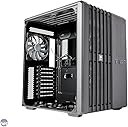
The Corsair Carbide Series Air 540 is a high-airflow ATX cube case featuring a unique dual-chamber design that optimizes cooling by isolating heat-generating components. It supports extensive fan and radiator configurations, offers spacious and organized cable management with rubber grommets, and includes multiple drive bays for versatile storage options. Its large tinted side panel window lets you showcase your build, making it a favorite among enthusiasts who demand performance and style in one sleek package.


| ASIN | B00D6GINF4 |
| Antenna Location | Business |
| Best Sellers Rank | #3,250 in Computer Cases |
| Brand | Corsair |
| Case Type | Desktop |
| Color | Black |
| Compatible Devices | 120mm; 240mm; 280mm; 360mm | H55, H60, H75, H80i, H90, H100i, H105, H110 |
| Cooling Method | Air |
| Customer Reviews | 4.7 out of 5 stars 2,079 Reviews |
| Enclosure Material | Alloy Steel |
| Fan Size | 14 centimeters |
| Global Trade Identification Number | 00843591039765, 05705585174508 |
| Hard Disk Form Factor | 3.5 inches |
| Internal Bays Quantity | 8 |
| Item Weight | 7.4 kg |
| Light Color | rgb |
| Manufacturer | CO7LH |
| Material | Alloy Steel |
| Mfr Part Number | CC-9011030-WW |
| Model Name | CC-9011030-WW |
| Model Number | CC-9011030-WW |
| Motherboard Compatability | ATX |
| Number of Fans | 5 |
| Number of Items | 1 |
| Number of Packs | 1 |
| Other Special Features of the Product | Built-in speaker(s)^Hot-swap^Side window |
| Power Supply Mounting Type | Bottom Mount |
| Recommended Uses For Product | Business |
| Supported Motherboard | ATX |
| Total Expansion Slots Quantity | 8 |
| Total USB 3.0 Ports | 2 |
| Total Usb Ports | 4 |
| UPC | 809394262755 843591039765 808112928881 012301324235 013591040324 734911365148 034893356784 031112557144 734911144835 803982736451 |
| Unit Count | 1 Count |
P**Y
Corsair 540 - it makes building your own computer EASY!
Background: I just started learning how to build computer systems. I am a physician of a small medical practice that has three offices. I like to game and enjoy watching people on YouTube build computer systems. Thus, when our computer systems in our offices started to reach the end of their lives and needed to be replaced, I volunteered to use this as an opportunity to build the computer systems from the ground up. The old computers for mostly Dell and HP systems that were running windows XP on fairly slow and small mechanical hard drives. The systems themselves were of such an age it wasn't worth it trying to replace individual components such as swapping in a solid-state drive into such an old system. Also I wanted to learn how to assemble a computer from the ground up and what better opportunity. I started with a lot of research. I used websites such as part picker, Life hacker, Linus tech tips, and Tested. There are multiple others and YouTube is a fantastic resource. Now to the case. The Corsair 540 is quite a well built device. It looks fantastic, it's more of a cube or square shape. Has a giant beautiful glass window to show off the pretty bits of your computer build. Is neither large nor small. It actually uses efficiently the space of the cube quite efficiently. Here are my bullet pros and cons: Pros: -lots of flexibility for modding the case to your need -well built - most screws used are thumb screws making assembly easy -although others have dissed the tool-less assembly, I love it for it's simplicity and speed. -designed to work well with Corsair coolers (again less hassles with assembly) -awesome air flow design: good for over clockers or those builds with heat generating bits (Multiple mechanical hard drives, CPU, GPU ect ) -did I mention how pretty the case is? -large area to work in behind the motherboard --section where wires are supposed to be hidden and routed along with optical drives + solid-state drives. Some have again not favored this design because it is a fairly large section, has little of the great air flow design of the rest of the case. I, however loved all the space to route cables, and hide bits I don't want displayed in the window. You could throw a fan in to exhaust heat but again airflow not great here. -multiple USB3 / 2 ports - can never have enough -comes with quality fans included: good airflow and quiet - should be easy to clean and remove dust Cons: -shipped in a box with hard styrofoam front / back caps. Very cheap + poor protection for the less than gentle UPS delivery handling. I purchased four cases for my builds. Of the four cases one came with a box that had a large gash/dent. When I opened the package the window panel was shattered and thus the case had to be return. Also every time you remove the case with the Styrofoam generates an enormous static charge. I had several painful shocks taking the case out of the box. That said, Amazon is awesome with the return policy. Just follow the online instructions, drop off the damage goods at your local UPS store free of charge, and Amazon at the same time sends a new package free of charge rush delivery. My damaged goods only cost me about a day and a half in wait time. -large cut out holes under the swappable hard drive bays: With the hard drives in place the holes are covered up but it does make the box look a little less in quality. They don't add to airflow or to aesthetic design. -footprint of the case will limit where it can be placed: I am using these cases for computer builds for our billing department. They have limited desk space on top but large amounts of room underneath the desk. The Corsair 540 will fit nicely and look great underneath there - so I've already thought out the limitations here. Unless you have quite a large area of deskspace the 540 will not fit too well on top of your desk where you keep your monitor and keyboard. My other builds have space limitations. For example our nurses and the front desk check-in checkout area have very little below desk and on desk space so I have gone with a smaller case build. Again I think most people looking at these reviews will see there is very little to complain about with the Corsair 540. I would read the reviews and notice the theme that repeats itself listed in most peoples' Cons remarks. They could be deal breakers for you when considering a case purchase. After learning how to build about a dozen computers, I would have to say the money is well spent: saves time, effort, damage to your knuckles and fingers from poor quality material. Hi recommendation from me!
A**E
One of the best mid-size cases, no contest.
Seriously, I was pretty excited to get this case coming from a history of stock, base-model cases that came with a pre-built machine, or cheapy, weak, badly designed cases. My previous case that I just replaced with this was absolutely awful. I though I bought a full ATX size case, but it was mis-labeled and I bought a very cheaply made VERY slightly above average mid-size case with almost no airflow at all. I pretty much took the entire case apart just to get some type of air into it, and it still managed to build up heat, especially with summer just now starting. This case in particular caught my eye pretty fast while browsing around, largely because of its cube shaped design. I was used to the standard rectangular cases that were usually tall, however this meant that if I wanted more space, I'd end up with a taller case. The multi-level desk I have only has so much height on each shelf, so I needed a case with more room, AND still fit within the height of my bottom desk shelf. Thanks to the way this case is shaped and spaced, it fit PERFECTLY (and I mean barely even centimeters of clearance left), and gave me plenty of room for my components. The main problem came from my latest PC part: A GTX 780ti. This card is massive, and generates a bit of heat. Combined with my AMD 8350 CPU (yes, I replaced the stock fan with an aftermarket cooler. I'm not insane.), that made for a lot of heat in an already cramped space, with only a CPU fan, the GPU fan, and one hard drive bay fan trying to flow air through a mess of cables and PCB. With this case, I have NO issues with space and cable management. The Corsair Air 540 is split into two separate compartments: One for the motherboard and components, and One for the power supply, cables, and SSDs. This means the power supply doesn't take cooling from the motherboard, and the cables flow through the back, into the front where the motherboard is, and only as needed. This makes cable management a breeze, and it looks great! The motherboard side has two trays for two mechanical hard drives, that just slide right out, and already have convenient slots for the power. The amount of space this case has is more than enough for my single 780ti, and I would be able to fit one, MAYBE even three if I wanted to. As far as airflow goes, which was one of the main reasons I bought this case, it comes with three fans: Two in the front of the case, and one in the back, making air move directly through the case and out the back. This, combined with the extra space, has cooled down my components by about 5-10C. Working inside this case is a dream. There is almost nothing to get in the way, the sides come off with thumb screws, and both side panels come off for easy access and simple CPU mounting. The design isn't incredibly flashy, but it is rather classy and nice to look at, and it has a nice, large window on the side panel so you can see inside. Overall, this case is amazing. I'm very happy I bought it, and it's nicely priced. Corsair has not let me down with anything of theirs that I have purchased, and this case shows their sign of quality.
J**A
Great case with easy organization & spots for everything.
Very roomy case. Easy cable management. Tons of air flow. Included Corsair fans are silent to barely audible at top speed (around 1,000 rpm). This system is completely air cooled & will run any game (even while streaming) I've thrown at it (over 200+ titles) with the Graphics Settings on Maximum with over 100 FPS (generally 130 FPS) & the component temps ALL stay below 65 C. The system (built May of 2018) mainly for gaming with workstation, video editing, & streaming capabilities: Corsair Carbide Series Air 540 High Airflow ATX Cube Case with High Airflow AF140L fan x3 max max. 24 dBA (using 2 on top & 1 at back). Front of case 3x Noctua NF-F12 industrialPPC-2000 IP67 PWM 120 mm Fans (if you desire a silent system these are not for you, however even at top speed these are easily blocked out by a headset max. 29.7 dBA). ASUS ROG Strix Z370-E Gaming Z370 ATX Motherboard Intel Core i7-8700K OC to 4.8 GHz on 1.25V Cryorig R1 Universal Dual Tower CPU Heatsink with XF140 & Xt140 Fans max 23 dBA (Very effective & efficient, but will be replaced with an IceGiant ProSiphon Elite CPU Cooler pre-ordered) ASUS ROG Strix GeForce GTX 1070 Ti 8GB GDDR5 Advanced Edition (Slight OC at 1781 Mhz Boost Clock & 8080 MHz Memory Clock, also loudest fans in the build max 47 dBA. Strongly recommend creating your own cooling profile). Carbon Fiber Edition Graphics Card GPU Brace Support PCI Slot Bracket holding 2 Noctua NF-F12 industrialPPC-2000 IP67 PWM 120 mm Fans max 23 dBA (Extra cooling on GPU) EVGA Supernova 850 P2 80+ Platinum Corsair Dominator Platinum RGB 64GB (4x16GB) DDR4 3200MHz C16 on 1.29V (Removed RGB fan & RGB bars to make compatible with IceGiant Cooler) ASUS BW-16D1HT Blu-ray burner Samsung 960 PRO NVMe M.2 512GB SSD addlink S70 2TB SSD NVMe PCIe 3x4 M.2 2280 Internal SSD Seagate FireCuda 2TB Solid State Hybrid Drive Performance SSHD (Depending on needs, will be replaced with 4TB SSD) Seagate BarraCuda Pro 10TB Internal Hard Drive Performance HDD DEMCiflex Dust Filter Kit Corsair Air 540 (8 Filters) Dell Gaming S2716DGR 27.0" Screen LED-Lit Monitor with G-SYNC Logitech C922x Pro Stream Webcam
E**D
It's a good case! -A Review By A Gamer
The Corsair Carbide Series Air 540. Ahh, what a case. I've found it to be a great choice for building a pc, yet I haven't even put my components in there. Shipping and handling: I got this through Same Day Delivery, meaning I was up until about 9:00 waiting for this case. It came just as 9:00 struck, meeting amazon's time limit. I was very pleased. However, despite this, they didn't knock on my door, meaning It could have been stolen if I wasn't lucky. Opening it up: The packaging was very simple to open, and made for a easy grand reveal of my case. It's not like I needed amazon's Frustration free packaging, am I right? *Wink Wink, nudge nudge.* First Impressions: This case is HUGE! It's not bad, though. It just means that there's alot of cable management space for me when I get all the parts for my build. It's glass panel is very nice, meaning I can see the beauty of my PC in all it's glory once it's done. Tarp: I feel like a child for adding this, but when the PC is done... I might use the tarp in the packaging to make a grand reveal. The Case itself looks pretty neat, but I personally find the sideways drive bays to be a small hassle, as disks and other items might fall out without any protection, which isn't very fun. Overall, the case itself is mostly for someone with alot of space wherever they plan to build their PC, and a great place for cable management noobs like me. Oh yea! It's got dust filters, hot-swapable HDD bays. Cool! I'm now going to post the specs of my build once I recieve all the parts: Case: This, obviously. PSU: Corsair RM Series 1000 Watt Power Supply Mobo: ASUS ROG Maximus VIII Hero Processor: Intel Core I7 "Skylake" 6700K CPU Cooler: Corsair Hydro Series H110 280mm RAM: Kingston HyperX Fury DDR4 RAM GPUs: 2 EVGA GTX 980Ti in SLI config Storage: Samsung SSD for 1 TB, and 6 TB of WD Black OS: Windows 10 Pro
A**R
This is the best case. You should buy this case.
I've built probably around 50 or so computers in my time, and have dealt with a whole mess of cases in varying sizes and shapes. I can say that, hands down, this is my favorite case I've ever worked with. It is SUPER easy to get your mobo placed in this spacious thing; the middle screw isn't actually a screw, it's a little plastic peg to help you get your mobo centered on all the stands perfectly. Brilliant. It has the best cable management options I've ever seen in a case by putting the power supply behind the motherboard. It has some routing cutouts with rubberized grommets for running power connectors and such to the mobo area. The power supply fan is totally disengaged from the guts of the rig in this case; it has a grill on the side panel for facing your power supply fan out the side. Some might think that's weird, but the latitude having this setup gives you in terms of keeping the mobo side of the case looking clean is second to none. I have an older 1000W power supply that lacks those fancy new modular power rails that can be removed, and so it just has tons of connectors hanging all over the place, and always looked like crap in any other case. In this case, you simply do not see any of that rubbish because everything is hidden behind the motherboard, save the little bit of cable that runs from the back to connect to the board. The presence of such wondrous organization options makes you even more organized, I got everything not connected to something wrapped up in a nice circle and zip-tied to one of the loops in the case to keep them out of the way (yes, the zip ties are included!). It also has this super slick hookup for your 3.5" SATA HDDs. In the bottom, there are two 3.5" trays; when you put the tray on your HDD and slide it into the slot, it slides right onto a SATA power and data connector. These things are in the back for you to connect to the power, and route through just the little bit you need to connect them to the mobo. Talk about slick. There are only two of these, so if you plan on JBODing 20 old HDDs together this might not be the case for you. There is plenty of space for 2.5" drives behind the mobo, however, with a nice little tool-less rack to hold up to 4 SSDs. Almost entirely screwdriver-less, the only thing that doesn't use big thumbscrews is the mobo itself. You can remove panels from both sides and the top, so always super easy to get at anything in it. This case is an absolute pleasure to work with. What else is there; fantastic airflow, quiet, easily liquid cooling friendly, plenty of fan expansion options, very nice packaging, unique and highly stable format, yep this case pretty much has it all. I really can't see myself going back to any other design after having experienced this gem.
A**A
I really like this case!
I finally decided to build my own computer with NOooooo experience with PC building or its internal components. With the help of my brother, YouTube and PCparts picker, I bought the parts. I started researching cases that would allow me to add a CD/DVD optical drive and this case came up. I read the reviews and many people pretty much said they loved the case and it was easy to build in. Some said it was good for beginner builders. So I searched for it and when I saw Amazon had it new, I purchased. When the case was delivered, I thought to myself this is a BIG case. I guess I went all out on this one, which was not my intention. I bought a rolling cart to sit the PC onto because I didn’t want it to take up too much space on the desk. So it sits next to the desk. The case seems quite sturdy and was very spacious for me to build inside. The other side of the case is big enough to manage wires & cables and is where the power supply is housed. So many people said they changed the fans because the fans weren’t so great. I did the same and replaced them with argb fans. I like how the bottom of the case has 2 drive bay trays that will allow for 2 hard drives or 2 sata SSDs to be easily installed, with the power & sata connection cables already pre-installed in the case. There is a SSD SATA bay that will hold up to 4 drives. The screws that hold the case panels in place were easy to screw and unscrew with my hands. A few of the panels were like magnetic and slid into place. The one thing I wish the case had was 1 or 2 USBc ports, but wast a deal breaker for me. Maybe I’ll check to see if it’s ok to add a USBc pcie card. If any beginner PC builder ever found this case, I’d say get it…. If you don’t mind the large size. Maybe experienced PC builders may like it as well. Shout out to the seller who responded to all of my inquires about this case. I hope my review helps! .
S**R
An ideal case for beginners and experts alike
What an amazing case! I finally upgraded after a 5 year stint with my last PC and I was ready to treat myself with a real upgrade. I went with this case because full and mid tower cases always felt too messy to me. Cable management is an art that I am apparently not adept at; the idea of working my PSU cables just perfectly drove me up the wall on my first build. I had enough space on my desk to fit the width of the case so I made the plunge. The case comes with a ton of hardware for all your building needs. The motherboard tray is quite roomy and installing a full ATX board is easy. Access to the back of the CPU socket depends on your individual board, but there is a decent gap there that allows some boards the room to work on a cooler with the board installed. People have mentioned that the 3.5" trays gave them problems but I think it just takes some caution with the tabs when you are removing them. I have pulled out the HDD in that slot a number of times with zero problems. I like the idea of having the stationary SATA connections in the rear without having to worry about loose cables. The cable grommets provide a nice finished look to the tray without gaping holes and give way to cables easily. The other chamber with storage and the PSU is really nice. There isn't a window back there so barring some really heinous management you don't have to worry what it looks like back there. In the interest of convenience it is helpful to remove the 5.25 drive bays when you are running your cables to the sata and power ports on your motherboard. Speaking of, it was the presence of these physical media drives that solidified my decision to stick with the 540 rather than the 240. The SSD bays are pretty simple as well and there are enough of them to get a nice little RAID setup going. The PSU sits on the bottom, out of the way and has an adjustable brace. Airflow through this thing is a dream. Without harddrive cages and drive bays in the way it is easy to engineer a good setup for water or air cooling. I have a hot 280x and an overclocked 6600k under an EVO 212 and I have zero heat problems just using the stock fans. Being a recent corsair product there are ample locations to bolt up their AIO systems if you feel the need. Cube cases are really something. The smaller ones are good for tight spaces but if you can budget the surface area a case this size will make your life easier.
E**T
Great case upgrade for a powerful system
tl;dr: Great airflow for high performance gaming rigs and aesthetically pleasing, however lacking in space for those who wish to use more than two 3.5" HDDs. Aesthetically, this case is both clean and unique. It supports two 3.5" disks in the main chamber and up to four 2.5" disks in the SSD cage. (I would recommend a small fan be added if 2.5" HDDs are used) I needed an upgrade from my old CM 430 elite case that just didn't have the air flow for a powerful setup, and the direct airflow and dual chamber design looked promising. Rig specs: Motherboard - Asus p8z77-v wifi version CPU/cooler - i7-3770k @ 4ghz (1.05v), CM hyper 212 evo cooler, stock fan push, sickleflow pull GPU - Gigabyte windforce ghz boost 7950 (1ghz, 1.15v) Memory - 16gb (8x2) corsair vengeance 1600mhz ram SSD - Samsung 840 series 120gb HDDs - 1tb seagate barracuda and 1.5tb WD PSU - ABS 1000W semi-modular The first thing I noticed when assembling this case was how easy the assembly was. It isn't the least bit cramped and is extremely easy to work with and has all the cable management room you could ever want. I moved the 2x AF 140mm fans from the front to the top as intakes and added 3x 120mm CM sickleflow 2k rpm fans as intakes. The GPU and CPU both top out at just under 60C with max load in 28C ambient temperature. There are almost no extra cables in the main chamber because of the large amount of grommets for cable management. The bottom slot, however, does not have a grommet, which although a minor annoyance, is not a great issue. My only complaints are the lack of top filter, openings below the 3.5" bays, no grommet in the bottom slot, and that my specific PSU did not match up with corsair's tool-less PSU mounting hardware, though it screwed in place just fine. Thinner SSDs will need screwed into the cages.
A**O
Le boîtier ultime pour le refroidissement et le câble management !
Après avoir monté plusieurs configurations dans différents boîtiers, ce Corsair Air 540 reste de loin mon plus grand coup de cœur. Sa conception originale est une pure merveille pour quiconque cherche des températures minimales et un confort de montage absolu. Le secret de ce boîtier réside dans son architecture à double chambre : • À l'avant, la chambre principale accueille uniquement la carte mère, le processeur et la carte graphique. Comme il n'y a aucune cage de disque dur ou bloc d'alimentation pour faire obstacle, le flux d'air des ventilateurs frontaux traverse le boîtier en ligne droite pour refroidir directement les composants. Les performances thermiques sont tout simplement exceptionnelles. • À l'arrière, la seconde chambre dissimule l'alimentation, les baies de stockage (SSD et HDD) et l'intégralité des câbles. C'est le paradis du cable management : même avec une alimentation non modulaire, l'intérieur côté vitre reste d'une propreté chirurgicale sans aucun effort. L'espace interne est immense, ce qui permet d'installer les cartes graphiques les plus longues du marché ou d'épais radiateurs de watercooling en toute sérénité. La qualité des matériaux est au rendez-vous, le châssis est rigide et la grande vitre latérale met magnifiquement en valeur les composants. Bien qu'il soit plus large qu'une tour classique en raison de son format cube, ce choix esthétique et technique est largement récompensé par l'efficacité du système et le plaisir de montage. Je le recommande les yeux fermés !
E**F
BUEN GABINETE, ADEMAS MUY AMPLIO
este gabinete es muy amplio (razon por lo cual lo compre) por lo cual tienes la posibilidad de mover todo el cableado comodamente acepta todo tipo de placa madre, desde la atx , mini, itx y eatx . excelente para montar cooler liquidos con radiadores desde hasta 360mm en la parte frontal y de 240 en la parte de arriba. o puede montar 3 de 120 en la parte delantera (si tienes tarjetas de video con este tipo de enfriamiento). como su nombre lo dice el flujo de aire es muy notorio (en rendimiento pc) un producto muy recomendado...
A**R
Great dual chamber case!
This is still a great case considering it came out in 2013. Airflow is really good. I was looking for a dual chamber case and I bought this one because it has two 5.25" drive bays which I still use for my build. I would have preferred a glass side panel instead of acrylic but it still looks great with my RGB lighting. Cable management is great. There is so much room in the second chamber. The price was a little high for me but this model is so rare (9 years old) that I had only found it on Amazon. I'm very satisfied.
U**K
Inmensa! Magnífica! Perfecta!
Esta caja es de otra galaxia. Primero por su diseño casi cúbico, que rompe con todo aquello a lo que estamos acostumbrados. Luego por su tamaño, ¡ES INMENSA! Cabe de todo en ella. La tengo montada con una GEFORCE GTX 1060 FTW de EVGA y aún sobra espacio. Además, está dividida en dos secciones, una para placa y dos discos duros de 3.5 y otra para fuente, discos SSD y espacio para organizar el cableado lo que hace que la temperatura en la sección de la placa muy contenida y no suba demasiado. Trae de serie 3 ventiladores muy silenciosos y que ayudan a mantener todo el sistema bien ventilado. Los materiales son plásticos y metálicos lo que hace que sea mas liviana de lo que parece. La ventana te permite decorar el interior con LEDs y tener todos tus componentes a la vista. Por ponerle una pega, diría que no me gusta el hecho de que las unidades de 5.25 estén en vertical pero una vez la monté, se me olvidó este detalle :)
A**A
Eccezionale air flow e spazio infinito
Sono passato a questo case per avere più spazio e che dire fa egregiamente il suo lavoro è davvero enorme , nessun cavo in vista grazie al secondo scomparto dove va alloggiato il psu e quindi non vedo più tutti quei cavi in giro per il case. Parlando di aerazione il mio vecchio case sempre corsair spec 03 non è minimamente paragonabile all’airflow che ha questo per non parlare che montando una scheda madre msi m7 z270 sul tope sul retro non potevo montare neanche un raffreddamento a liquido da 120mm perché andava ad urtare la scheda madre invece in questo la scheda madre e molto più in profondità dalla posizione delle ventole che sia top retro o fronte , e ho potuto montare e constatare che non va a battere su di nessun punto sulla scheda madre un 360mm
Trustpilot
5 days ago
1 day ago