🌟 Elevate Your Air Game with Geek Aire!
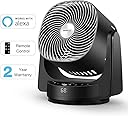
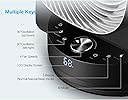
The Geek Aire Fan is a high-velocity, smart air circulator designed for whole room cooling. It features 3D oscillation, voice control compatibility with Alexa and Google Home, and multiple airflow modes. With a sleek design and user-friendly controls, it’s perfect for enhancing your living space while providing a refreshing breeze.


| Asin | B07MX4ZNRY |
| Blade Material | Plastic |
| Brand Name | Geek Aire |
| Collection Name | Home,Summer,Winter |
| Color | Black |
| Control Method | App, Remote, Voice |
| Controller Type | App Control, Remote Control, Voice Control |
| Customer Reviews | 4.2 4.2 out of 5 stars (134) 4.2 out of 5 stars |
| Electric Fan Design | Floor Fan |
| Finish Type | Matte |
| Included Components | Remote |
| Manufacturer | Geek Aire |
| Model Number | 681413919389 |
| Mounting Type | Floor Mount |
| Number Of Blades | 5 |
| Number Of Speeds | 4 |
| Recommended Uses For Product | Air Circulation, Home, Office |
| Room Type | Office |
| Style | Modern |
| Upc | 681413919389 |
User
Awesome Smart Fan (works with Alexa)
I've only had the fan for two days, but so far, so good! It's just as described, has 4 speeds and will oscillate up/down or left/right. It also has a smart mode and timer.Below is how I got it to work with Alexa! Another reviewer listed how they got it to work, but that didn't work for me, I had to set the Fan up from the Smart Life App from the App Store instead of the suggested HE App.** The HE App found the Fan and I could control the Fan from it but I wasn't able to find that on the Smart Life Skill so I wasn't able to have Alexa control the Fan - which is a BIG reason I got this one.My Instructions:step 1: Download Smart Life App from the App Store and create an account.step 2: Select to add a device, click on "Small Home Appliance" and select FAN.step 3: Plug FAN in but DO NOT turn on the power.step 4: Hold down the smart mode button, on the far right until the little WIFI icon blinks (in the display, right side of temperature) -- you will also hear a beep when it's ready to pair.step 5: On phone, click 'Confirm indicator rapidly blink' buttonstep 6: Enter Wi-Fi password (you may have to change network first, if not using 2G) then press 'Confirm' button - at which time the phone will show it's connecting.step 7: Add the Smart Life Skill in your Alexa app and link to your account - if you don't already have it.step 8: If you already have the skill, like I did, then once fan is connected to WIFI Alexa will immediately discover it, otherwise, once you've linked the Smart Life Skill to Smart Life App - close the Skill and Alexa should automatically discover the device.I love this and recommend to all!
User
Experience Ultimate Cooling and Smart Convenience with 3D Oscillating Floor Fan!
The Geek Aire Fan is a game-changer when it comes to staying cool and comfortable during hot summer days. This high-velocity stand fan combines powerful performance with smart features, making it a top-notch addition to any household.One of the standout features of this fan is the 3D oscillating technology. The fan head moves both horizontally and vertically, ensuring that air is evenly distributed throughout the entire room. This impressive 3D oscillation creates a pleasant breeze that reaches every corner of the space, making it perfect for large rooms or even open-concept living areas.The fan's compatibility with Alexa and Google Assistant is a true game-changer. With voice commands, I can easily adjust the fan's speed, activate the oscillation, or set the timer without having to get up from my seat. It also works with the Geek Aire app, allowing me to control it remotely from my smartphone. The AI Mode is an innovative feature that adjusts the fan speed based on the ambient temperature, making it energy-efficient and convenient.The four-speed settings offer plenty of options to find the perfect airflow for any preference. From a gentle breeze for relaxation to a powerful gust for rapid cooling, this fan caters to all needs.The built-in 6-hour timer is a useful addition, especially for bedtime use. I can set the fan to automatically turn off after a specified time, ensuring a comfortable night's sleep without worrying about leaving it running all night.The Geek Aire Fan's design is sleek and modern, easily blending into any home decor. The stable base ensures that it stays firmly in place, even at the highest speed settings.In summary, the Geek Aire Fan is a fantastic investment for anyone seeking a powerful and efficient cooling solution for their home. The 3D oscillating feature, smart compatibility, and customizable settings create a comfortable environment in every room. Whether it's using voice commands or adjusting settings remotely via the app, this fan delivers a seamless and enjoyable experience for staying cool during the hot summer months.
User
FAN-tastic! With a couple of quirks that can be worked around.
LOVE this fan. Focused air pattern, quiet at low levels, lots of features, and it works with Alexa.There are 2 reasons for 4 instead of 5.1. The Wi-Fi setup isn’t intuitive and the instructions are unclear. As a technical writer, I know what works and what doesn’t. The setup doesn’t. Everything else is clear. Read ALL instructions before you start because hidden toward the end of the setup is a critical fact about which buttons to press.2. The fan won’t maintain network connection well. I’ve tried moving it around, but that doesn’t seem to make a difference. When I use the app, I get one action and then it drops the network. So I close the app, reopen it, and do another. 👎🏼 Alexa does better, but Alexa doesn’t support all features. I’m ok with that because she supports the ones I use.
User
Keeps the entire room cool
The air circulator fan is awesome. I’ve used it in my living room but mainly in my bedroom as my bedroom stays hotter than the rest of my house for some reason. With the fan on it’s very cool now. It cools the entire room. It does get a bit loud on level 3 and above. The video is on level two. Level 2 is more than enough to cool the room though. What I don’t like is the breeze or nap cycle. It starts and stops and I find it distracting rather than relaxing but that’s a personal reference. I definitely recommend it and to me it’s worth the price.
User
Not worth the money as does not function as advertised
Garbage, great idea but does not work as advertised. Instructions provided do not match the device so trying to resolve the Alexa connection was impossible. The tech support was horrible, high level lack of knowledge was frustrating coupled with lack of willingness to dig in and help figure out a solution we’re the final deciding factor on returning the product. I was frequently put on long holds and then disconnected by tech support indicating they did not want to work with me and decided to hang up,, several times. I have an abundance of patience and was very respectful but this did not matter especially at the end of their work day. Per the instructions misinformation the steps to connecting to the home network was impossible. Tech support played to dumb on this and finally wore out my patience. In the end a full refund was provided but they tried to force a restocking fee. After a couple weeks of tech support nightmare it passed the return date. I had to fight for full refund based on the time I spent trying to find a solution. It is unfortunate as the fan worked great otherwise. Good power, great range of motion and quiet we’re it’s positives. Just did not provide ability for network and Alexa as advertised.
User
Smartest Fan, nope. But it’s got smarts where it counts.
Yes Amazon, I could mention "warmth", "value for money" and "thickness", but only one of them applies.This fan is awesome. I have it in my garage where I tend to hang out more then most places, and it does a knockout job at its core function of being a fan.The smart features only add to that. But how much is up to you. Routines set with Alexa are great when paired with my Wyze Sense kit. When I walk into the garage it activates for 30 minutes. Every bit of motion it detects resets that timer. When I leave, I know it will continue to cycle the air for another 30 minutes, then drops down to minimal speed. It’s great.
User
Great Fan, but Half-Baked Alexa Functionality
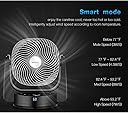
First of all, let me start saying that the fan itself is quite good; it blows an impressive amount of air that can range from Soft Spring Breeze to Angry Jet Turbine, and even if it can get a bit loud on the last setting, it's still subtle enough to be used as a white noise to mask, say, an annoying neighbor's backyard TV.However, the main reason I got this fan instead of just a normal fan was because of its "Smart" capabilities, and in those it's quite lacking. First of all, the App it comes with DOES NOT WORK, and I have to use another App other reviewers here suggested.Then comes the fact that the user manual OUTRIGHT LIES on how to do the WiFi pairing process (I managed to eventually figure it out, but I am an IT Support Specialist; I highly doubt some less Computer-and-WiFi savvy person would had figured on their own) which also requires the now-almost-obsolete 2.4GHz WiFi, which not everyone has anymore (I have it because my router is ancient).Finally, the only things Alexa can tell it to do are 3 things, turn on, off and set the speed; no command to enable any of the oscillation, and since whenever you turn the fan off, it "resets" to Speed 2 with no oscillation, you can just turn it on and have it go back to how you left it.This last part is very weird, as you DO have those options available from the phone app, just not from the Alexa skill.Finally, its special modes (Smart, Sleep and Breeze) have fixed temperature settings, which would work very well on cold climates (where home temps are 65F or lower), but here on Hell's Antechamber South Florida, where 75F is considered "cold" they are always stuck on the strongest setting with no possibility of them ever going down.So, to sum up; yeah, very good fan, but not so smart.Maybe if the Alexa skill ever gets updated and/or the phone app gives me the chance of setting those temperatures, I will change my review to a higher score...
User
Unable to connect with google home nor Alexa need I instructions.
The instructions are bad and wrote emails to their office for instructions how to connect it with Alexa or google home which was the main reason I bought it. Several other customers have the same connectivity issues. I am very surprise their help nor their website address this obvious issue. Good fan but misleading advertising about Alexa and google home. I which quality control can address this simple but critical issue.
Trustpilot
2 weeks ago
5 days ago