Desertcart purchases this item on your behalf and handles shipping, customs, and support to Tunisia.
๐ Elevate your workspace โ power, display, and speed in one sleek hub!
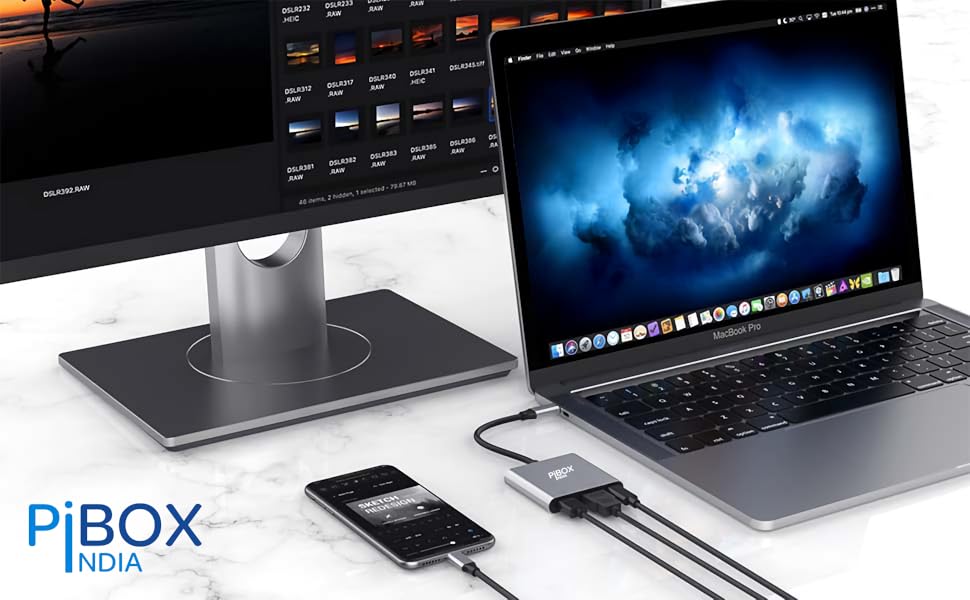
The PiBOX India USB C Hub 3-in-1 is a compact multiport adapter featuring a 100W USB-C Power Delivery port, 4K@30Hz HDMI output, and a USB 3.0 port with 5Gbps data transfer. Compatible with a wide range of laptops, tablets, and smartphones supporting DP Alt Mode, it enables seamless multitasking by extending displays, charging devices, and connecting peripherals simultaneously. Its durable aluminum build and plug-and-play design make it an essential travel companion for professionals seeking efficient, high-quality connectivity.


| Asin | B07SVVR598 |
| Best Sellers Rank | #4,291 in Computers & Accessories (See Top 100 in Computers & Accessories) #78 in USB Hubs |
| Box Contents | USB C - HDMI / USB 3.0 / PD multiport Hub |
| Brand Name | pibox India |
| Colour | Silver - 3 in1 |
| Compatible Devices | Desktop, Keyboard, Laptop, Monitor, Mouse, Projector, Television |
| Connector Type | HDMI |
| Country Of Origin | China |
| Current Rating | 3 Amps |
| Customer Reviews | 3.8 3.8 out of 5 stars (7,777) 3.8 out of 5 stars |
| Importer Contact Information | Discount Bazaar India, Jalahalli, 560013 |
| Input Voltage | 240 Volts |
| Item Dimensions | 10 x 10 x 10 Centimeters |
| Item Package Quantity | 1 |
| Item Type Name | USB C - HDMI / USB 3.0 / PD multiport Hub |
| Item Weight Unit Of Measure | 50 Grams |
| Manufacturer | Discount Bazaar India, Discount Bazaar India, Jalahalli, Bangalore |
| Manufacturer Contact Information | Discount Bazaar India, Jalahalli, Bangalore |
| Manufacturer Part Number | PI-D6318 |
| Model Number | PI-D6318 |
| Number Of Items | 1 |
| Number Of Ports | 3 |
| Packer Contact Information | Discount Bazaar India, Jalahalli, Bangalore |
| Power Plug Type | No Plug |
| Product Finish Type | Glossy |
| Specific Uses For Product | Monitor, Keyboard, Mouse, TV, Projector, Samsung DEX mode |
| Unit Count | 1 Count |
| Warranty Description | 1 Year manufacturer warranty with registration |
| Warranty Type | Limited |
User
PiBox never let me down
Great at what it does, could have used one more port or could have replaced the pd with one more 3.0 port but still a great product and really helped me fix my cable management
User
Value for money product
Yes I would recommend the PiBOX India USB C to HDMI Adapter HDCP SUPPORT Aluminium Type C USB hub 3.1 to HDMI 4K very easily to anyone looking for HDMI Adaptor, This product meet most specifications and connects very easily. To your laptop, monitor, or TV etc,. It is not the top end product in it's category. But it is nothing less., looks is like that of an expensive high end product, also check the packaging nothing as such to disappoint, and aluminum color case with white cord matches perfectly. I have used this product for 3 months works absolutely perfect for me. I like this product.Thank you
User
Stopped working in 2 months but got replacement
I bought the product 2 months back, it started working immediately and i was super happy with the ease of use.within 35-40 days the usb started showing issues, stops working and after 4-5 hrs automatically works again. then completely stopped. HDMI was working fine even though USB had issue. then after 3-4 days HDMI stopped working too.To claim warranty you have to whatsapp them, got reply on mail to whatsapp the issue, they responded after a day and asked me to send the product back and they will issue RMA. I sent the product back by courier(i paid the cost), sent them tracking number too, and the stopped responding.edit: Received the response from the team and got replacement after that. they do respond comparatively faster on whatsapp than on mail. but thing get resolved. Happy with the new product received will update again if i see again some issues with the replacement product.
User
Good
Good
User
Seamlessly Connect and Enjoy High-Quality Displays
recently purchased a USB-C to HDMI adapter to connect my mac to an external display, and I have been quite pleased with its performance. Here's my detailed review of the USB-C to HDMI adapter:Compatibility and Connectivity:The USB-C to HDMI adapter is designed to connect devices with a USB-C port, such as laptops, tablets, or smartphones, to an HDMI-enabled display or projector. It offers a convenient and reliable solution for expanding your screen real estate or enjoying content on a larger display. It is important to note that your device must support video output over USB-C for the adapter to work effectively.Ease of Use:Using the USB-C to HDMI adapter is a breeze. It is a plug-and-play device, meaning there is no need for any additional drivers or software installations. Simply connect one end of the adapter to your USB-C port and the other end to an HDMI cable, then connect the HDMI cable to your display or projector. The adapter provides an instant and stable connection without any hassle.Video and Audio Quality:I was impressed with the video and audio quality delivered by the USB-C to HDMI adapter. It supports high-definition and resolutions, providing crisp and vibrant visuals on the external display. The adapter also supports audio transmission, allowing you to enjoy synchronized sound through the connected display or external speakers. I experienced no noticeable lag or degradation in the video or audio quality.Sturdy Build and Portability:The USB-C to HDMI adapter I purchased features a sturdy build quality. The connectors feel robust and secure, ensuring a reliable connection. The adapter is compact and lightweight, making it easy to carry around in a laptop bag or pocket. This portability is especially useful for individuals who frequently travel or need to connect their devices to different displays on the go.Compatibility with Additional Features:Some USB-C to HDMI adapters may come with additional features. For example, certain adapters may include an extra USB-C port or USB-A ports, allowing you to connect additional peripherals or charge your device simultaneously. It's worth considering if you have such requirements, as these added features can enhance the overall usability and convenience of the adapter.Value for Money:USB-C to HDMI adapters are generally reasonably priced and offer good value for money. They provide a cost-effective solution for connecting your USB-C devices to HDMI displays without the need for expensive docking stations or specialized cables. Additionally, their versatility allows you to use the adapter across multiple devices, making it a worthwhile investment for both personal and professional use.Conclusion:In conclusion, the USB-C to HDMI adapter has proven to be a reliable and convenient tool for connecting my USB-C devices to HDMI displays. It offers seamless connectivity, excellent video and audio quality, and is built to last. With its ease of use and portability, it has become an essential accessory for me, enabling me to enjoy larger screens and enhanced visual experiences wherever I go.Note: They send a gift with it which was a mobile stand.
User
7 month update: USB port is dead. Make sure you register the warranty for replacement.
Works perfectly with my Dell Latitude 5480. Plugged HDMI into the adapter and adapter into the laptop's Thunderbolt port. Laptop detected the external monitor immediately.I've used the USB-A port for Logitech mouse receiver only. Yet to test with a storage device. I also plan to get a USB 3.0 or 3.1 hub soon. So hoping the USB port supports hubs.I don't have a USB-C PD charger, so couldn't test the power-in.Very well constructed, came with a small carry pouch as well. All in all, a very good device at a reasonable price.******** Update after 7 month use: ********Was using it with a USB hub to plug in my keyboard, mouse & USB headset - so that I need to plug in just 1 cable into my laptop, instead of 4 (HDMI & 3 USB). Worked perfectly fine till yesterday. Today morning I turned on my laptop, and the HDMI out still works fine, but the USB port seems to be dead. The hub I was using is still fine. So the issue must be with the USB-A port on this.For 900 bucks, I expected it to work much longer. Deducting just 1 star because of the dead USB port.
User
Worked well for 6 months , now temperamental
Received it yesterday and the screen mirroring was not working for netflix as I have a mobile only plan. The trick is to use the Samsung dex feature for netflix. Works well after that. If someone can tell me how to fit the phone screen on the TV, that would be great. At the moment the image on the TV are cropped at the ends.Edit- it worked fine for around 8 months but in the last 3 months it has become very unstable. It works but any slight touch and the screen becomes blank. The usb-c port has probably worn out and the contacts are not stable. I make it work by not moving the phone at all but i expected a more robust device, not a 6 month stable experience. Changed rating from 5 to 3 star.
User
VFM product with very few set backs
For anybody having n Samsung Galaxy Note series 8 and above and want to view the movie contents on a big TV, this small gadget is a very useful tool.So, let me share my experience after using it for nearly a month now, in PRO & CON format, as usual.First, CONs:1. If you expect out to work like a Dex Station, you'll get disappointed, because Dex app is not supported in this. I am using Samsung Note 8. It just mirrors the mobile screen and full Dex mode is not available in this.2. Frequent disconnections. Yes. It frequently disconnects for no reason.3. Gets overheated when you connect even your original Samsung Type C charger.4. When you connect it to TV, call cannot be attended using a headphone, because Dex mode don't allow call connectivity. So, you have to either disconnect or use the speaker in the phone to attend your call on Dex mode.Now, PROs:1. Without the need for costly Google chrome cast you can simply mirror your Samsung Note to your TV using the HDMI port.2. You don't even need a separate power connection for this. Only if you need to charge your Note, you have to attach the charger. Otherwise, no need.3. You don't need any internet connection or WiFi for mirroring to TV. It's as easy as connecting a headphone to your Note.4. Using the USB port, you can connect either a wireless remote/keyboard or even a weird set using USB hub. I have tried both. And i tried Air Mouse also. All working very well. Air mouse is a breeze to use.5. Cost: Very reasonable price compared to the other even lowest featured models. So, i can say it's VFM.If you have Note 8 series and above and want to use Miracast without a separate dongle or wifi this is the best.Strongly recommend.
Trustpilot
1 month ago
1 month ago