


๐จ๏ธ Print smarter, live sharper โ your all-in-one creative powerhouse
The Canon PIXMA TS5350 is a compact, stylish multifunction inkjet printer offering high-resolution 4800x1200 dpi color prints, automatic duplex printing, and seamless wireless connectivity via Wi-Fi and Bluetooth. Designed for professionals and creatives, it supports cloud printing and scanning through the Canon Print app, delivering fast, reliable performance with long-lasting photo quality using Chromalife100 inks.
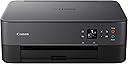


| ASIN | B07WP5X1WY |
| Additional Printer Functions | All In One |
| B&W Pages per Minute | 13 |
| Best Sellers Rank | 69,584 in Computers & Accessories ( See Top 100 in Computers & Accessories ) 146 in All-In-One Printers |
| Box Contents | All-in-one printer โ PIXMA TS5350 Series, FINE cartridges, Power cord, Set-up CD-ROM, Manuals |
| Brand | Canon |
| Brand Name | Canon |
| Color Depth | 24 bpp |
| Color Pages per Minute | 6.8 |
| Colour | Black |
| Compatible Devices | Smartphones |
| Connectivity technology | Bluetooth, Wi-Fi |
| Control Method | App |
| Controller Type | Android, iOS |
| Customer Reviews | 4.2 out of 5 stars 715 Reviews |
| Display Type | OLED |
| Dual-sided printing | Yes |
| Duplex | Automatic |
| Hardware Interface | PictBridge, USB |
| Ink Colour | Black |
| Item Dimensions D x W x H | 12.4D x 15.9W x 5.8H centimetres |
| Item Type Name | Multifunction Printer |
| Item Weight | 5 Kilograms |
| Manufacturer | Canon (UK) Ltd |
| Maximum Copy Resolution Black and White | 1200 dpi |
| Maximum Copy Resolution Color | 4800 x 1200 dpi |
| Maximum Print Resolution Black and White | 1200 dpi |
| Maximum Sheet Capacity | 2 |
| Maximum Supported Paper Size | 12.7 x 12.7 cm |
| Maximum print Resolution Color | 4800 x 1200 dpi |
| Model Name | TS5350 |
| Model Number | 3773C008AA |
| Model Series | PIXMA |
| Model name | TS5350 |
| Network Connectivity Technology | Bluetooth, Wi-Fi |
| Number of Trays | 1 |
| Other Special Features of the Product | Auto-Duplex |
| Output sheet capacity | 2 |
| Paper Size | Rear Tray: A4/A5/B5/LTR/LGL/20x25cm/13x18cm/10x15cm/13x13cm/8.9x8.9cm, Envelopes(DL,COM10) [Custom size] width 55mm - 215.9 mm, length 89mm - 676mm |
| Power Consumption Size | 19 Watts |
| Print media | Glossy photo paper |
| Printer Output Type | Colour |
| Printer Type | Inkjet |
| Printing technology | Inkjet |
| Product Warranty | 1 Year |
| Resolution | 4800 x 1200 |
| Scanner Type | Photo |
| Special feature | Auto-Duplex |
| Specific Uses For Product | Creative and craft projects, photos, multi-function tasks |
| Total USB Ports | 1 |
| Unit Count | 1.0 count |
| Wattage | 19 watts |
A**R
Good price, smashing printer
I bought this to replace my trusty Canon Pixma, a good old workhorse which suddenly threw in the towel. When it arrived I did think it looked a bit flimsy compared to the solid Pixma, especially the paper filling tray, but at least itโs lighter and more compact. Set-up: a doddle. You could use the quick set-up booklet provided, but I found the video instructions clearer. At each stage of the set-up a QR code appears on the small screen and takes you to the next video. Every little step is clearly shown, and you canโt go wrong. Even cack-handed dummies like me. Once initial set-up was done, I used the on-line manual to complete the Air Print and scanning stages, bit of a faff, but before long I was Airprinting and scanning from iPad and laptop with merry abandon. The printer/scanner/copier functions are fast and responsive and so far the print quality seems good. The action is generally quicker and smoother than my old Pixma. You can do double-sided printing, and all the usual options are available. The two ink cartridges consist of a large black and a large colour one. I preferred the small individual colour cartridges on the Pixma but it was not to be. Thereโs a rear feeding tray for photo paper and a USB port in the back. All in all itโs simple enough to operate, does what it says on the tin - and very efficiently too - and a great price. You really donโt need a more expensive one, this does it all.
F**A
Good printer for its price point!
First time having my own printer, and I wanted a cheaper one to print my notes and a few images here and there. This printer is a good price and works well. Prints with good detail and sharpness, colour is accurate and good and no issues with alignment. The set up was extremely easy, follow a few steps on the booklet and youโre ready to go! Itโs also very easy to connect to your phone and laptop took about 5 mins to download the software and thatโs it. Print speed is quite fast however when printing bigger pictures (like the two I have attached) when printing it with my phone it was very speedy but on laptop it took a minute I donโt know why. The only fault I have seen so far is that the images print with lines throughout the page, most printers do this so itโs not an issue for me but Iโll still include it. Overall great printer for a good price!
J**E
Great bit of kit
After a long succesion of cheap printers, i decided to go for a more upmarket one, as i do a lot of photography and want to display some of my photo's. Looked at a lot of different printers, and not liking the way HP supply thier ink, decided on this one.Well it arrived, on time and was left in the safe place as requested, thank you Amazon, unpacked it made a cup of tea and READ THE INTRUCTIONS.... Some of the reviews said it was a nightmare to set up, no it is not, simply loaded the disk, plugged printer in pressed the WPS button on the router and let the machine do it's thing. Then simply paired it to my laptop and, after the printer does the head initializing bit was ready to rock and roll. Pairing to smart phone is just as easy, get the app, and follow the intructions, simples. Noise .... we it sits bout 3 feet away from me, and if i have tv on or music playing, i have to check it's still working, so no issues there. Scanning is also really easy, and does both sides too, did'nt know that at time of ordering, so bonus there.As for ink usage, seems to be fairly reasonable so far, have done a lot of printing, photo's and documents and the ink is still going strong. All in all, am really pleased with it, it does what it says on the tin, and if you go for one, read the instuctions, thats what thier there for, take your time and let the machine do it's thing. Thanks for reading this JC
I**L
great inkjet printer very easy to install with Windows 10
Despite some of the reviews of this product, I found it very east to install by following the instructions. This is in a home Windows 10 environment. The downloaded install program finds the printer and attaches it to your home wifi network, installs all the printer drivers and printer management and scan utilities, and you're ready to print. Tales less than half an hour from opening the box to first print. Only slight complication is for the second and subsequent PCs. Don't follow the same install process as on the first PC or you will effectively re-install the printer and the first PC will no longer have access to the printer. On the second and subsequent PCs let Windows find the already networked printer and make sure you have the TS printer drivers available then all is well. I had a Canon MG series printer for 5 years or more which was the predecessor to the TS range and I was very pleased with that. Unfortunately the TS uses different printer cartridges as I had just bought new ones for the MG. Compared to the MG, the TS is much better at duplex (double sided) printing, and I much prefer the removeable paper cassette on the TS to the paper feed on the MG.
T**!
Fab Printer but watch out for a scam. NOT CANON but some other scammer
BEWARE!!!!! During WiFi set up the progress bar showed a fatal error. Next a "Support Bot" appeared and asked how the software download was going. I typed in that a fatal error banner had appeared. I was advised to call a number. A man asked me to give him permission to look at my security as I did not have a Firewall on my router [untrue but I did not know this at the time] like an idiot I let him. After a lot of messing around he offered me Firewall software at ยฃ159. I declined. End of the call. Later I tried to follow the instructions again but the fatal error didn't appear and carried straight on to connect. Just be careful. It is not Canon's fault and I have reported this to them. Lovely printer, love the auto duplex!
H**Y
Total Rubbish!
Do not waste your money, this printer is the worst that I have ever used! Having had a Canon MG5350 for at least ten years, I wanted to replace it with a newer Canon model. I've simply gone from brilliant to the very worst printer that money could buy! It's temperamental, always difficult to use and constantly has to be re-installed. The print quality is simply awful, especially compared to the MG5350 that I've used for a greeting card business for over eight years! the MG5350 never missed a beat with superb quality pictures, but is no longer for sale sadly. How Canon have managed to go from excellent to 'trash' I really don't know! Having owned this printer for four months it has decided to go faulty and won't recognise paper! The worst bit is, that it's only been used about ten times in this time as I've had no option but to default back to my ten year old printer. Seriously this printer is junk and Canon should be utterly ashamed of selling such rubbish! Please do not waste your money as I did and find a better printer for your money, or may be that's a better brand?????!
A**R
Poor quality
Bought this to replace an old Epson printer that had been simple to use, but had come to the end of its life. Maybe I have been spoilt with good printers in the past, but this Canon just seems really poor quality. The set up was not simple - it took forever and it's really fiddly to keep having to scan QR codes for instructions at every step (just put it all in the manual!!). The wifi set up didn't work at all (it didn't pick my wifi up, and wouldn't let me enter the details manually), so I have gone old-skool and resorted to using USB. The paper cartridge is fiddly, with too many bits that fall off or stick out, it just seems really flimsy and cheaply-made. The digital display constantly says I don't have A4 paper in there when I definitely do. The rear feeder doesn't work at all, the printer just refuses to recognise when there's paper in there, even when you programme it to take paper from there. It usually takes a couple of attempts to get it to print anything, but when it does, it's a good quality print, but that's really the ONLY thing going for it! It also makes a lot of random noises even when I've not sent anything to it, like it's got a mind of its own. I'll give it a chance, but will probably upgrade to something more sturdy/reliable at some point.
R**D
Depending what you want, from a domestic printer - a PIXMA TS5350 is working well, for us
For us, the back story to this purchase includes bad experience with Epson Workforce Pro's, two successive machines failed after around two years light domestic use, with print head failure which is uneconomic to repair. Hence bricking the machine, and for us, no more Epsons. HP domestic printers also have a justified poor reputation, HP not being the company it once was. So, looking at Canon's Pixma range, on the TS 3350 the scan resolution is low, whereas the 6350 and 5850 are both 5-ink machines, for higher quality photo printing, at higher cost. Leaving the 5350 as the most suitable choice for many, including us. Setting it up, my technically competent better half found this straightforward, using her phone as per the instructions, with several of our devices, a few minutes each. And so far, the printer has performed well. While not having an ADF, there is a mode for scanning a series of pages to a single pdf, which works fine. The cost per page won't be the cheapest you can find. But, one reason is that each new pair of ink cartridges comes complete with - wait for it - two new print heads. So.... no more self-bricking ! If, like us, your print volumes are relatively low then you may be happy to bear this cost, for a printer which (may) be better quality and more reliable, than certain other makes.
Trustpilot
2 months ago
2 weeks ago