Desertcart purchases this item on your behalf and handles shipping, customs, and support to Tunisia.
โ๏ธ Keep your Pi cool, your setup cooler.
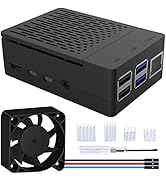
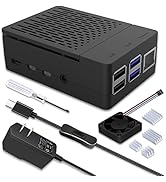
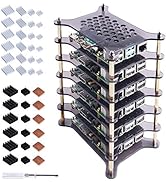
The GeeekPi ICE Tower Cooler is a high-performance cooling solution for Raspberry Pi 4B/3B+/3B featuring a 5mm copper heat pipe, multi-layer aluminum heatsink, and a 7-blade RGB fan. It reduces CPU temperatures by up to 50%, supports easy installation with included mounting hardware, and runs quietly at 30 dB powered directly from the Piโs GPIO 5V pin. Perfect for overclockers and makers seeking both function and style.


| ASIN | B07ZCW27VK |
| Best Sellers Rank | #371 in Computer CPU Cooling Fans |
| Brand | GeeekPi |
| Brand Name | GeeekPi |
| Compatible Devices | Raspberry Pi |
| Cooling Method | Air |
| Customer Reviews | 4.6 out of 5 stars 271 Reviews |
| Item Dimensions L x W x H | 3.15"L x 3.54"W x 2.36"H |
| Manufacturer | GeeekPi |
| Material Type | Copper |
| Maximum Rotational Speed | 2200 rpm |
| Model | EP-0107 |
| Noise Level | 30 db |
| Number of Items | 1 |
| Number of Packs | 1 |
| Part Number | EP-0107 |
| Power Connector Type | 2-Pin |
| Product Dimensions | 3.15"L x 3.54"W x 2.36"H |
| UPC | 703501203931 |
| Unit Count | 1 Count |
| Voltage | 5 volts |
M**W
Wow this is cool!
I have a Noctua NH-D15S chromax.black in my desktop, so I bought this just because it looks cool and thought it would be a fun compliment. I was halfway thinking this was just a gimmick and wouldn't actually have a real benefit. I installed this on a new Raspberry Pi 4B 4GB. To take the install over the top, I sanded off most of the paint on the base with 400 grit sandpaper and then polished it with 1500 grit to get a nice smooth surface for mating to the CPU. Rather than using the supplied thermal adhesive I used some NT-H1 thermal compound that I had laying around. Attempting to follow the pictures in the installation guide I assembled the mounts backwards the first time, but it was easy to correct. Following the install I thought it would be a good idea to run some thermal stress tests. The case that I ordered is still in transit so for now it is sitting on my desk in open air, ambient temperature is ~24C. I used Stressberry to run 3 tests, Fan Unplugged, Fan connected to 3.3V, Fan connected to 5V. Because I was so excited to install the heatsink I didn't run any stress tests without it installed. Fan unplugged: Idle 33C, Stress 44C 3.3V Fan: Idle 30C, Stress 39C 5V Fan: Idle 29C, Stress 36C At these temperatures there was obviously no throttling. These were short 15 minute tests so I may not have reached stability. Once I get the Pi installed in the case I'll run longer tests to determine how I want to run it long term. I bought a Noctura 40mm fan that I'll be testing as well, just to increase the cool factor a little bit more. If you want your Pi to run cool or just look cool this is the cooler to get. Is it overkill? Yes. Am I happy with my purchase? Yes.
S**C
Awesome cooler but only contacts CPU with thermal pads or paste.
Previously was using the Vilros passive cooling case with a Sandisk Extreme 32gb card, stock CPU settings. Liked the case as it came in contact with the CPU, ram, ethernet and usb controllers. Looks good too. For my use, got so hot the pi kept slowing down and becoming unresponsive. Too bad. Added this cooler, same conditions but added my own heatsinks to the other chips as this cooler only contacts the CPU. Rock solid at 1.5ghz. Not a single issue. Never overclocked a pi before so gave it a try. Ramped up to 2ghz. Temp never got over 40ยฐC! Run this command via command line to monitor temperature: watch -n 1 vcgencmd measure_temp Even when stressed with near 100% CPU load at a full 2ghz, never skipped for 12 hours and only touched 44ยฐC for a short time. Was performing large file transfers (large and small files, 5 bay raid usb 3.0, four simultaneous transfers and random speedtests via chromium) to test. System is running full Raspbian and OMV (wired ethernet, 5-bay usb 3.0 enclosure). Very usable as a workstation (and background server) for light office use, not video editing or heavy tasks. That is what a PC is for. Fan is a quiet hum and barely noticed it running. Nice touch on the color changing LEDs. Would highly recommend the cooler and would like to know if anyone has tried Retropi while overclocked? Would be interesting.
A**X
Really good
Works supper well and cools better. Love the customization. Love the work
K**R
AWESOMENESS on a SBC
This thing is awesome I tell you! Included an extra NON rgb fan, base plate and brackets. I flipped the brackets around and ground away on the some with the grinder and was able to relocate the cooler to fit on a ROCK64. Sits a little high as others say, but 2 of the 3 included pads was all that was needed. Tiny SBCs don't need lapped or perfect contact for cooling but I used some premo paste as well. Serious drop in temps! Looks just plan cool as heck! Black was deff the right choice! Plugged fan into 3.3v to be near perfect silent and 5v was slightly audible.
M**Y
No cooler than this!
Heatsink cools the pi to very low temps. Even without fan running! Install is 1,2,3 easy! You cant get cooler for the cash.
A**Y
Amazing Heatsink!!
My base temps with OpenELEC installed was 50C. Installed on skin and it idled at around 52C. After I installed this heatsink my idle temps dropped to 33C. Streaming 4k movies my temperature has never passed 35C. I have not overclocked my 8GB Raspberry Pi 4. There really is no reason to overclock it for OpenELEC. I brought this small heat sink kit for the copper heatsink. https://www.amazon.com/gp/product/B079FV2RH3/ I brought this small tube of Grizzly Kryonaut Thermal Paste. https://www.amazon.com/gp/product/B011F7W3LU/ I also had other heat sinks from ordering my Raspberry Pi. First I scraped the paint off the bottom of the heatsink with some sandpaper. It takes like 30 seconds to get to the copper. I then placed the 0.5mm copper heat sink on top of the CPU and, spread a thin layer of the thermal paste on top of it. I matched up the other heatsinks to place them wherever they would fit. Everything has a heatsink on it. I had to slide one heatsink slightly off center for it to work with the install. I also ordered a case off of Etsy made for the Ice Tower. I did see the plans to print it yourself with a 3d printer are on thingiverse. I do have a 3d printer but it is temporarily in the attic. So I went ahead and brought one.
R**H
A Good Cooler for the Raspberry Pi 4 with Cool RGB Lighting Effects
Decided to act a lot younger than I am and buy a couple of these power coolers with RGB lighting effects for my Pi 4s. My initial inspection when they arrived left me a little concerned that the base that would face the processor didnโt look all that flat and wouldnโt make good contact. After some fiddling to get the lower supports turned to give access to either the camera slot or the GPIO. Either Iโm dumber than I thought or you have to choose which you want to be ale to use after the tower is installed. Anyway, I choose camera for one and GPIO for the other and after putting only a single thermal pad (comes with three pads) and tightening all the four nuts was pleased to see that the base seemed to make good contact. I run distributed processing software (think seti at home) on all my computers and the RPI4s seemed to be running pretty hot. I didnโt take the time to do a bunch of before and after temperature measurements but ICE towers did seem to cool things down maybe 10 ยฐF or so. The fan runs quiet and I found I enjoyed the slowly changing RGB illumination.
A**R
I had originally thought that $15 was too much to pay for this...
I had originally thought that $15 was too much to pay for this, however after needing an overkill solution to cpu heat. I gave in. Let's just say, I have no regrets! For starters, it looks cute the LEDs on it transition really smoothly and look nice it does a really good job at heat management. Even under heavy load, my pi cpu hardly goes over 50c it's really quite! Extra bonuses include, an extra (non LED) fan comes with it, an extra standoff and screw, and came with a tiny screwdriver. I'd highly recommend this
L**O
Improves cooling significantly
Highly recommended if your raspberry pi is running hot. Previously running at about 60-65C range with my current workload (case with fan, heatsink). With this it stays well in 40-45C range.
D**P
Must Have for your Pi
I've been using my RPi 4 as my Homebridge device for my home and it'd get pretty hot sitting in my rack. This cooler has dropped the temp. by 10 degrees and under heavy load only hits about 40 degrees max now. Great product for the price. Definitely recommend. Keep in mind, it will not fit in any case but the ICE branded cooler or larger.
O**W
The fan works great.
Went together easy and ran great keeping the pi 4- 4gb at a modest 39 to 41 degrees I just feel more relaxed now when stressing the pi.
J**.
Perfect
Works as advertised. My pi an run hd videos for hours and the temps never exceed 32-35. Fantastic addition.
A**H
Very good product!
Earlier, I was using metal case with 2 little cooling fan which failed in 1 year. Ever since then, my RPi 4B has been running without fans and reaches ~ 50 to 54 degrees under medium load. After, installing GeeekPi RBG Cooling Fan, it instantly dropped to ~ 35 degrees and never exceeds 40 degrees. Best part is, it comes with extra black (non-RBG) fan, incase if the RGB one fails. Rating is 4/5 because the thermal pads are very thin and this cooler doesn't support cooling for memory module. What I run? Multimedia Stack - Jellyfin, Jellyseerr, Prowlarr, Radarr, Sonarr, Lidarr, qBittorrent, MeTube VPNs. Everything running as docker containers on Ubuntu Server LTS.
Trustpilot
5 days ago
2 weeks ago