![M602 Gaming Mouse, Ergonomic RGB Gaming Mouse Wired with 7200 Adjustable DPI, 9 Programmable Buttons, Professional Software for Gamer Office [Black]](https://m.media-amazon.com/images/I/614timipKAL._AC_SL3840_.jpg)


Buy anything from 5,000+ international stores. One checkout price. No surprise fees. Join 2M+ shoppers on Desertcart.
Desertcart purchases this item on your behalf and handles shipping, customs, and support to Tunisia.
🖱️ Level up your game and work with precision, comfort, and style!
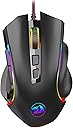
The Redragon M602 is a wired ergonomic gaming mouse featuring a high-precision 7200 DPI optical sensor, 9 programmable buttons with macro support, and customizable RGB lighting with 7 modes. Designed for both gamers and professionals, it offers durable build quality, software-driven customization, and a comfortable grip that fits nearly all hand sizes. Compatible across Windows, Mac, and Linux, it delivers pro-level performance at an unbeatable value.


| ASIN | B011HMDZ0Q |
| Additional Features | 7200 Adjustable DPI, Macro Editing, Programmable Buttons, RGB Lights |
| Antenna Location | Gaming, Office |
| Are Batteries Included | No |
| Are Batteries Required | No |
| Best Sellers Rank | #389 in Video Games ( See Top 100 in Video Games ) #9 in Mac Gaming Mice #26 in PC Gaming Mice |
| Brand | Redragon |
| Built-In Media | User Manual, Software Download |
| Button Quantity | 8 |
| Color | M602 |
| Compatible Devices | Gaming Console, Laptop, Personal Computer, Tablet |
| Connectivity Technology | USB |
| Customer Reviews | 4.6 out of 5 stars 33,668 Reviews |
| Embellishment Feature | LED |
| Enclosure Material | Plastic |
| Finish | Glossy |
| Global Trade Identification Number | 04895173505492 |
| Hand Orientation | Right |
| Hardware Platform | Linux, Mac, PC |
| Item Dimensions L x W | 5"L x 3.2"W |
| Item Weight | 0.29 Pounds |
| Manufacturer | Redragon |
| Mfr Part Number | M602 |
| Minimum Required Operating System Version | Windows 8 |
| Model Name | M602 |
| Model Number | M602 |
| Mouse Maximum Sensitivity | 7200 Dots per Inch |
| Movement Detection | Optical |
| Movement Detection Technology | Optical |
| Number of Buttons | 8 |
| Operating System | Linux, Mac, Windows |
| Power Source | Corded Electric |
| Range | 6.0 feet |
| Special Feature | 7200 Adjustable DPI, Macro Editing, Programmable Buttons, RGB Lights |
| Style Name | Classic |
| Theme | Video Game |
| Unit Count | 1.0 Count |
C**L
Great mouse-super functional!
Works great! I have had this mouse for years, and it's worked like a champ! Grip is comfortable, the scroll wheel is still in working order, and has no issues with function. It's a good, light weight, and good size for the hand, which makes it easy to move. I love the multiple pattern of lights and my kids liked it so much, they bought one for themselves.
H**S
Redragon Gaming Mouse beats all the other gaming mice
Redragon Gaming Mouse Beats Other Gaming Mice To start off with, I think that the Redragon gaming mouse is one of the best mice as of right now. I have owned this mouse for about 3 years and it is just as good as brand new. When looking at the price of this mouse compared to other gaming mice, this is cheaper, durable, longer-lasting, and has most of the features as the other expensive mice have. I would most certainly recommend any interested buyers looking for a gaming mouse to buy this product. First and foremost, I think that the Redragon gaming mouse is one of the best mice as of right now because it’s cheap and affordable. When looking for a desktop gaming mouse, you should always research and look for other products that might be similar, less expensive, and easier to use especially when it comes to gaming mice. One of the popular gaming mice that is competing against the redragon mice in the market as of right now would be the glorious model o. This mouse comes around $100 in the market and functions similarly to the redragon mouse. The redragon mouse comes in around $20 as of now due to inflation as well. There isn’t much of a difference between the two mice besides the shape, size, and price. Paying $80 more isn’t worth it if most of the controls, and key features function the same way. Some of the key features that the glorious model o can do as well as the redragon gaming mouse are drag click, butterfly click, has the same amount of sensitivity, and DPI. The main difference between these two desktop gaming mice is that the glorious model “o” feels much lighter and sturdier. The redragon mouse feels a little bit heavier however, it is a decent size for any beginners or experienced gamers. It also has side palm grips for you to keep your thumb, ring finger, and pinky finger on support giving you the most comfortable experience as well. Some of the features that both mice can do that interested buyers would look forward to is having the mouse double click, drag click, and butterfly click. Furthermore, this mouse is very comfortable and durable for a long period of time. The gaming mouse's texture is matte which makes the gaming experience even better. There are also side buttons to change the RGB color or lighting to whichever settings you’d prefer with 7-8 different color options. All of these features are adjustable just by downloading the app or software if needed. After owning this product for 3 years, I have not felt the need to buy another mouse yet at all because of how well-made it is. However, despite all of the pros mentioned, there are always a few flaws or cons since nothing is perfect. One of the cons I experienced by owning this product would be that when gaming, some of the clicks on the redragon gaming mouse don’t register due to how big it is. Even though it is recommended to have lighter-weight desktop mice when gaming, it makes it harder to click while having some clicks not register. Over the past 3 years of owning this product, I have noticed that there is also a solution to fixing this problem. I have improved my gaming skills and it has made clicking faster and much easier for me. I would most definitely recommend this product to gamers who are at least experienced a little bit and have fast clicking hands to enjoy the full experience.
M**Y
Great after long term use
The Redragon M602 Griffin is an absolute steal for a high-performance gaming mouse at this price point. I love the ergonomic design and the textured thumb rest, which make long gaming sessions much more comfortable. The 7200 DPI sensor is snappy and precise, and the RGB lighting adds a nice touch of customization to any setup.
H**Y
Chasing Rainbows or Dragons? My Encounter with the Redragon M602 White
My experience with the Redragon M602 White has been quite a journey. There are certainly areas where it excels, but it does have its pitfalls. To start, the software and driver support for the M602 White is a nightmare. The mouse doesn't have dedicated software, and despite my efforts to navigate Redragon's unorganized website for a compatible program, I came up empty-handed. Interestingly, this product isn't even listed on their Global site but is available on their American site. It's a rather perplexing situation. The mouse shows up as a "HID-Compliant Mouse" in Windows 11. When attempt to use software made by RedDragon to connect to the mouse for button remapping and RGB control you are told "Gaming mouse disconnected" when it's clearly not. There is no software or driver for this mouse. It's purely a plug and play device. It's not even recognized as anything more or less then a generic mouse on Windows 11. I strongly advise against trying to install software not specifically designed for this mouse model. I tried to do just this for writing this product review. My attempt at installing M602-RGB software resulted in a catastrophic lockout of my mouse clicking capabilities on my Windows 11 machine. I had to fix the issue by navigating using only the keyboard and TAB key to uninstall the software. It was a nerve-wracking ordeal. Without any RedDragon software installed, the M602 White, along with my other computer mice, work fine. The M602 is equipped with on-board controls for adjusting the RGB lighting and DPI settings, located beneath the scroll wheel. The color modes and DPI are controlled via a series of button presses. Understanding the interplay between DPI changes and color cues was tricky at first, but the product manual clarified this. Cycling through the color modes leads to my favorite - the rainbow setting. For its price point, the M602 is a decent investment if you're seeking a cheap, stylish, RGB-enabled mouse. I almost returned it but decided to keep it for its aesthetics. While I would have preferred a black model with a higher DPI range, the existing DPI level of the M602 works fine for my non-competitive gaming needs. The RGB elements are a major plus for me, especially the bright colors and smooth transitions of the rainbow setting. I even wrapped the long connecting cable in a gold plastic wrap to enhance its aesthetics. Despite being one of Redragon's cheaper models, the quality holds up. The durable plastic container that comes with the mouse has been also been repurposed for other uses thanks to some added magnets. I am pleased with the M602 White, and I would consider buying a higher-end model from Redragon again when I need a new computer mouse. RedDragon may not produce flawless products, but the quality is solid for the price. I would recommend the M602 White, but with the clear warning about its software issues.
J**B
Satisfactory
The middle mouse button requires a much harder press to actuate than any mouse I've used. Otherwise it's satisfactory. The left and right mouse buttons as well as the side buttons feel solid and responsive. I'm also pleased to see one of the built-in RGB presets is "off", and so doesn't require downloading software to turn off the lights. Of note, it appears the sensor LED is always at full power, unlike other mice where it dims when the mouse is picked up. Also, you *must* remove the plastic protecting the bottom pads or the mouse will have a lot of friction, and will not glide across any surface (wood or mousepad) as well as expected. The mouse is clearly designed for a palm grip, and will not be as comfortable to use with a claw or fingertip grip.
A**L
Plug-and-play, ergonomic and great quality
Purchased for my son, not necessarily for gaming, but to help with his laptop usage for his homework. Of course, it turned around to be mostly used for gaming purposes, and mostly by my husband. The size is great for all shapes and sizes of hands. It is slightly weighted down, which I like because it allows you to add confidence to your moves, rather than flying all around the place. It has a quality feel and intuitive usage. Overall, I'd recommend this mouse for game and work enthusiasts alike.
A**R
Super buy
The mouse is a super buy. Nice shape , perfect size, setup is easy , scroll wheel works fine and far less expensive then the alien mouse I had .
C**N
Great product
5 years of heavy use and it’s just perfect for the price
J**H
GOURGUES
idk ho to write gourges xddd But its sooo gooooddddd iloooveeee itt
Y**D
عمره الافتراضي وسعره ممتازين
يمكن لي ثلاث سنوات مشتريت واستخدمه بشكل يومي العاب واستخدام عادي وممتاز ما يشتكي من اي شيء نفس يوم شريته، انصح فيه
S**7
Nice comfortable mouse
Very nice mouse for the price. Buttons are crisp ,scroll wheel is smooth. tracks well. Over all a great gaming mouse that looks and works great!
P**M
Lindo e de ótima qualidade!
O fio é protegido contra o ressecamento e a quebra, há diferentes níveis de sensibilidade e a escolha de luzes é bem legal também. Eu compraria novamente sem pensar duas vezes! Muito bonito, resistente, funcional e durável como promete.
Q**D
Mouse
My daughter love it!
Trustpilot
1 week ago
1 month ago