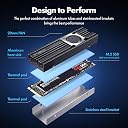
![ineo Aluminum M.2 2280 SSD Heatsinks with 20mm Fan for M.2 NVME SSD [C2600 Fan]](https://m.media-amazon.com/images/I/7172tWrtQiL._AC_SL3840_.jpg)


❄️ Keep your SSD chill and your workflow unstoppable!
The ineo Aluminum M.2 2280 SSD Heatsink with a 20mm high-speed fan and pure copper strip delivers industry-leading cooling with up to a 43°C temperature drop, preventing thermal throttling and boosting sustained SSD performance. Featuring a groove-designed aluminum alloy heatsink with nano silicone thermal pads, it fits desktop M.2 NVMe 2280 SSDs perfectly, combining advanced thermal conductivity (560 W/mK) with quiet, adjustable fan control for gamers and professionals demanding reliable, high-speed storage.




| ASIN | B0827PM9VR |
| Best Sellers Rank | #393 in Heatsinks |
| Brand | ineo |
| Brand Name | ineo |
| Cooler Heatsink Material | Aluminum |
| Customer Reviews | 4.2 out of 5 stars 548 Reviews |
| Item Dimensions L x W x H | 2.95"L x 0.94"W x 0.24"H |
| Item Weight | 22.14 g |
| Manufacturer | ineo |
| Model | 2600Fan |
| Mounting Type | Chassis Mount |
| Part Number | 2600Fan |
| Product Dimensions | 2.95"L x 0.94"W x 0.24"H |
| UPC | 797716581632 |
J**Z
Massively over-delivers on its promises.
The product description claims a fan speed of 10,000 rpm and thermal performance of 8°C - 25°C. I was skeptical about both the fan speed and the possibility that a fan the size of a dime would actually make a significant difference, so I did some testing. I was wrong. SSDs run hot, but without really pushing them you'll never know just how hot they can get. I used HWiNFO 64 to measure fan speed and SSD temperature, and Atto disk benchmark to measure SSD performance. In order to ensure the SSD was stressed as much as possible, Atto was configured to use a 32 GB test file. Testing with no cooler, the SSD reached a temperature of 105 °C and began thermal throttling roughly one third of the way through the benchmark run. Throughput before throttling was roughly 2.9 GB/s write, 3.3 GB/s read. After throttling began throughput dropped to roughly 1.1 GB/s write, 1.5 GB/s read. Still pretty fast, but well below the drive manufacturers promised throughput. This is normal for SSDs. Drive manufacturers advertise peak throughput and leave out the details about sustained throughput. This particular drive actually performed excellent; when stressed in this manner, some SSDs throttle back to speeds that make hard drives competitive. With the cooler installed, HWiNFO reported a fan speed of just over 15,000 rpm, substantially higher than the advertised speed. The Atto benchmark run was completed with no thermal throttling, and the SSD's peak temperature was 62°C, a 43°C difference. Obviously, this is substantially better than the cooler manufacturer's 8°C - 25°C performance promise. Fan noise from the cooler at 15k rpm was just enough to be annoying. The cooler is designed to plug into any motherboard fan header and doing so gives you control over fan speed. Changing the fan speed to 8000 rpm eliminated the noise, still eliminated thermal throttling, and yielded a peak temperature of 74°C. This is 31C better than running the SSD with no cooler, and once again, better than the manufacturer's performance promise. In both cases the cooler reduced idle temperature from 70°C to 56°C. A passive heatsink may meet your needs as well as this cooler while costing less, and installing this cooler is moderately more complicated than installing a passive heatsink. But a passive heatsink is potentially bulkier, less effective, or both. This cooler is compact and delivers substantially more than it promises. If you don't stress your SSD, you probably don't need a cooler at all. If you do, you should definitely consider this one.
S**K
Much butter than my old JEYI
I had a JEYI NVMe M.2 SSD Cooler Heatsinks with 20mm Fan Powerful Cooling that had a failing fan that was annoying the heck out me making a squeaking noise. Replaced with this, and wish I'd have done it much sooner! This is cooling my SSD about 17 degrees C more than nothing, about 8-10 more than my old JEYI. This also has a nice long 4pin fan connector that should be able to reach any open FAN connector you have on your mobo. Edit: When this is at 100% RPM it's kinda loud/annoying. I also have a very quiet system because I have AIO water cooled CPU fan. I manually set it in my BIOS to only run at 60% (lowest my mobo could go). SSD is only like 1-2 degrees warmer (only 43), and it's much nicer sound wise so sticking with that. I almost wonder if I'd have been better off with a PCI slot Graphics Card Cooling Bracket Chassis Heat Dissipation Side-Blown Bracket Vertical Cooling Fan Mounting Bracket Supports type thing though. In my setup, I'd be able to do 60mm fans instead of the 20mm this has.
A**R
Cooler is great but the fan is a little too loud (even with speed control)
The cooler was simple to install and it did help with temperatures, but my only gripe was the noise with the fan. Even without the fan, it does a great job on keeping things running cool. Other than the fan noise, the product was great and it is sad to see the fan not in use.
D**N
Works fine if you keep your case temperature down
Using this to cool a Samsung NVMe 970 PRO. Magician showed the SSD to be running at 51C and labeled it as "hot." I installed the ineo heatsink per instructions. The instructions said nothing about removing the clear plastic cover from the conductive tape, but my ASUS motherboard instructions stated that the plastic needed to be removed on their conductive tapes, so I removed the clear plastic covering. After installation the temperature showed as 49C. Big disappointment. I also cleaned the computer case fan and filter during the ineo isntallation. They were filthy. A couple of hours later I realized that I had reinstalled the case fan backwards. I changed the fan back to where it was blowing in - I have a second fan at the back that blows out - and brought up Magician after running the computer for a couple of hours. The temperature went from 49C to 42C. This was a worthwhile purchase. The bottom line: The ineo cooler can only cool your SSD down to near the temperature inside your case. As an aside, don't forget to calibrate the fans in your BIOS if you have an ASUS motherboard.
C**S
Better than no heatsink, only slightly better than stock Asus heatsink
I bought this as a replacement to the heatsink that came with my Asus Dark Hero MB to cool my Samsung 980 Pro M2 to see if I could drop the peak temperatures from the high 60s C to under 60 C. What I can say for sure is that this isn't any worse than the heatsink that came with my MB, but isn't much better either. I think the thermals of my case are such that even the best heatsink is only going to make a 1-2 degree difference and heat up a bit slower and cool down a bit faster. That's what happened here in my testing. Temperatures were the same or down 1-2 C and it took longer for the Samsung 980 to warm up and it cooled down a bit faster when the video card load stopped (my video card stays in the 40s C when not under load, but heats up to 76-79C under heavy load). More details As you can see from the picture my M2-1 is next to the back of my 3080Ti which tops out at about between 76-79 C under heavy load. All that heat has to go somewhere and my M2-1 is so close to where all that heat is generated and radiates off the card that there's really no way any heatsink is going to keep anything in the M2-1 slot cool without cool external air blowing over it. Because my case is a Lian Li OD11M, my cool external air comes from the bottom (which is good for my bottom M2-2 that stays in the low 50s C max with the standard Asus heatsink) and from the side not from the front. As as a result there's no cool air directed toward my M2-1 to cool it. Instead hot air behind the video card is being pulled up and back over the M2-1 heatsink by my rear and top fans to expel it from the case, which significantly limits cooling when my video card is under heavy load and generating lots of heat. The bottom line is how much this product helps you will depend almost entirely on the airflow (or lack thereof) in your case, and how much heat generation is happening next to your M2 heatsink.
M**E
Keeps temperature down under gaming load
I recently upgraded to a Samsung 970 EVO Plus and running/idle temperatures were 42-44C at idle/using light applications. Using while gaming the temps maxed out at about 65C. With this heatsink installed running/idle temps were down to about 39-42C, but never got above 50C while gaming. You definitely will need to adjust the fan settings in your BIOS for this. I had mine run at about 6volts at 39C up to 12 volts at 48C. Installation was pretty straightforward but the instructions could be a little bit clearer about the silicone thermal pads. There are two clear plastic films you have to remove, one is really thin and, the other is thicker and keeps the pad from bending while applying to the heatsink. Sort of a pain to get it applied because it doesn't truly 'stick', but I did mine with no problems. Happy with it and would probably buy another if the fan on mine goes out.
B**.
Actually made things Worse!
Product that I purchased: "ineo Aluminum M.2 2280 SSD Heatsinks with 20mm Fan and Pure Cooper Strip for M.2 NVME SSD [C2600 Fan]" I purchased this product to solve a problem I have with my M.2 Samsung 970 EVO Plus 1TB SSD. The only slot on my Gigabyte X570 Aorus Xtreme for my M.2 that won't take up any additional PCIe lanes is the top slot. However, that slot is less than 3 millimeters above the main PCIe x16 slot that houses my EVGA RTX 3080 Ti. Because of the bad location, My M.2 was getting to about 60c after gaming for about 45 min. However, after installing this product, I noticed that after 7 minutes of gameplay it shot to 62c! That's 2 degrees hotter at 1/6th the time needed. I had to completely stop what I was doing and close out of every app just to keep the temperature from getting worse. I installed this product by following every step provided in the instruction booklet. I even visually confirmed that the fan was spinning at the time that I saw the temperature was at 62c. I will give them props for one thing, they provided 2 things that I wasn't expecting. They provided a velcro cable tie, and a screwdriver in the box. That in my opinion was above and beyond. Too bad everything else falls way short. I have already tried to contact the customer phone number that was provided in the box, however, it went to a personal phone number in California and I was immediately sent strait to voice mail. After this fiasco, I went to my amazon product order page and clicked on the "Get Product Support" button. I selected call back, and amazon called me right away and after explaining all of this, offered me the option to return the product for a full refund, which i did. For anyone wanting to get a heatsink. Beware of this product. If you buy it and it fails on you like it did with me, don't say I didn't warn you. At this point, I will NOT be buying anymore products from Ineo PERIOD! I needed this product to work, it was strait forward about how it should have worked and yet it found a way to completely fail at it's job/purpose. Buyer Beware! P.S. I am attaching a screenshot that I took of what my M.2 temperature was at after 7 minutes of gaming.
J**A
Lowers Temps by 30-40C (for me)
so, first i should say i have a unique situation where my ssd (970 pro plus 2 tb, MSI z490i unify) shares heatsink with the chipset which gets hot. i removed the top part of my motherboards heatsink to use this device. WORKS AMAZINGLY, even cools the chipset as well by adding another piece of heat tape below the drives underside. came with 4 pieces of heat tape and the fan even at 100% is near dead silent. im ordering 3 more for all my other pc's asap! (i have the heat pipe version)
F**T
Good stuff with a real heat pipe
The fact that it has an actual heat pipe instead of copper pipes like in the Sabrent was a positive point. The fan is slightly loud at full speed, however, I have a bunch of Noctua low noise adapters and it is almost inaudible after plugging it in. It successfully brought my SSD a small, hot mini-ITX box under control, whereas 3 different passive heatsinks I tried previously failed. I'd recommend that you swap the thermal pads for Gelid's 1.5mm and 0.5mm thick ones, as they are much better at conducting heat, and softer to conform height differences of the controller and NAND. You might also want to cut around the DRAM on the bottom as the 0.5mm thick pads will not be able to compress enough. Product origin: China Company origin: Taiwan
K**R
Works great! However...
The heatsink does it's job on cooling down my M.2 SSD. The only problem was that mine did not come with any thermal pads in the box. Not sure if I got a resealed heatsink or it was missed in packaging the product. I ended up having to use my own thermal pads for assembly. Not too upset by it, as I have a plethora of PC parts laying around, including thermal pads. Just be on the lookout for missing items in the box. Would recommend to those who don't have a heatsink to use on their SSD.
ح**ن
كويس
يشتغل
ブ**チ
温度が劇的に下がりました!
TS1TMTE240Sを簡易なヒートシンク(ファンなし)を取り付けたのみで使用していましたが、何もしていない状態でも55度程度、少し負荷をかけるとあっという間に70度くらいまで到達してしまい、怖くてまともに当該のPCでの作業ができませんでした。 こちらの製品を取り付けたところ何もしないときは30度程度、負荷をかけても50度を超えることはありません。 大変満足しています。
J**A
Excelente producto
Este disipador en lo general pienso que mantiene una temperatura de entre 5 y 10 grados centígrados mas abajo de la temperatura normal que pueda tener un disco de estado solido M2. ya tengo algunos meses usando este disipador y mi disco M2 mantiene unas temperaturas de entre 35 y 45 grados dependiendo de lo que estés haciendo en tu PC. los acabados del disipasdor se ve que son de buena calidad.
Trustpilot
1 month ago
3 weeks ago