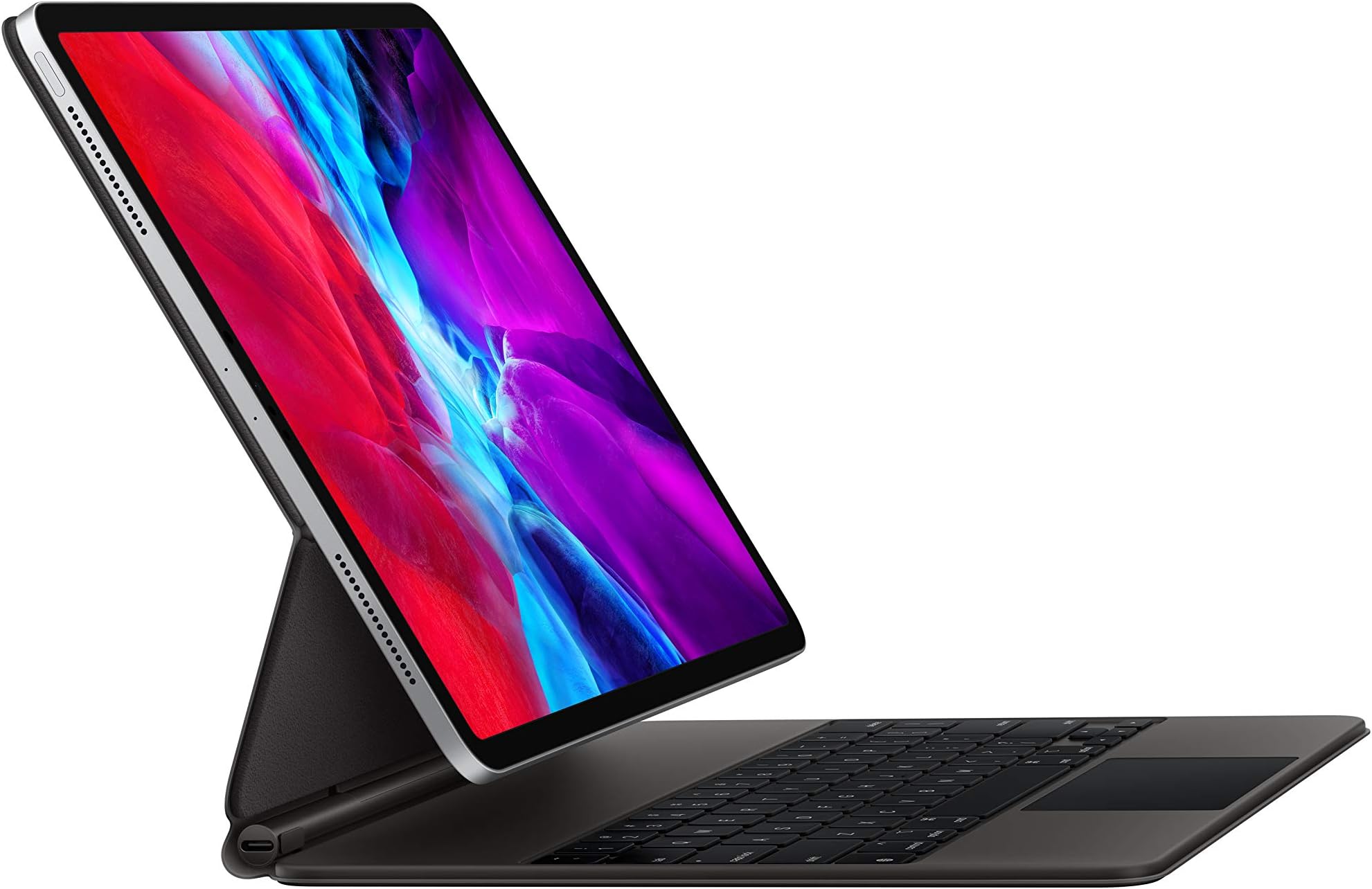



⌨️ Elevate your iPad Pro to laptop-level productivity — type, track, and charge in style!
The Apple Magic Keyboard for 12.9-inch iPad Pro (3rd & 4th gen) combines a premium backlit keyboard, precision trackpad, and a magnetic floating cantilever design that lets you adjust your iPad to the ideal angle. Featuring a USB-C pass-through charging port, it protects your device front and back while delivering a laptop-like typing experience tailored for professionals who demand versatility and style on the go.
| Brand | Apple |
| Compatible Devices | iPad Pro 12.9-inch (3rd generation), iPad Pro 12.9-inch (4th generation) |
| Connectivity Technology | Bluetooth |
| Keyboard Description | Flexible, Integrated, Gaming, Mechanical, Multi Functinoal, Multimedia, Wireless |
| Special Feature | Backlit, Ergonomic, Foldable, Rechargeable |
J**H
Magic Keyboard with an iPad Pro 12.9” Generation 3 (2018)
Ordering the Magic Keyboard The Apple Magic Keyboard that I ordered through Amazon on July 15, 2020 arrived this evening about 5:15 p.m. I first ordered it through Apple with an arrival date of August 1, 2020, but then saw that it was $20 cheaper though Amazon with a three day shipment date. The shipment arrived through Amazon on July 18, 2020 as scheduled with no requirement that I be home to receive the product. With products that I have ordered through Apple there has generally been a requirement that someone be home to receive the product. Amazon doesn’t have that restriction, apparently assuming the risk of theft or loss through its delivery policy. I appreciate this feature of Amazon delivery, since I can’t always be home when it is convenient for the delivery person. Packaging The packaging was typical Apple and I have grown to expect no less. I’m like a kid when I open new Apple products and today was no different. The Amazon shipping carton contained the white box of the Apple packaging wrapped in a very thin folia within which was the product wrapped again in a translucent plastic sheet with a tab for removing it. There is a paper spacer between the keyboard and the magnet mounting surface with a special little compartment for the instructions, which I judiciously ignore. I do save all the packaging for a period of time just in case the product has to be returned for some reason. I opened the keyboard and placed my iPad Pro 2018 on the magnetic back and shifted the iPad to a position that I found comfortable. Many people have been impressed by how rigid the hinges work. I didn’t notice that at all, but did notice that the main large hinge snaps into one place and the secondary hinge then moves independently, but I was surprised by how little tilt the whole arrangement allows. Everyone, including Apple, mentions the maximum angle of 130 degrees, but I didn’t realize from reading how little that actually is. No big deal, because the “default” angle, and there is one, seems just about perfect. The weight is not a factor at all, though the set up is a little heavier than the Smart Keyboard set up. Realistically it takes two hands to carry the 12.9” iPad Pro and Magic Keyboard around while it is open, though if you wanted to prove a point you could probably do it with one hand. There is no problem closing the keyboard and carrying the iPad around closed, one hand or two. I compared holding my MacBook Pro 13” and the iPad Pro 12.9” with Magic Keyboard and the latter seemed slightly heavier. Granted this test was not scientific, but go figure. That’s the way it seemed to me. I’m not going to actually weigh each to get real data, for feel is more important than objective data in this regard. Typing on the Keyboard Once I started typing it took me a little while to get used to the action, and I’m still hitting a key wrong on occasion, but not often and not anymore than I do typing on either my 15” or 13” MacBook Pros or my Smart Keyboard for the iPad Pro. As has been noted in other reviews, the number keys are underneath the cantilevered iPad Pro and it takes a few minutes of typing to get used to that, but within minutes I had learned how to sneak my fingers into the cantilever gap and hit the numbers that I need to. I am a touch typist so the first thing that I did was turn the backlighting for the keys down as far as I could. I don’t look at them anyway, but it still leaves a very minimal amount of backlight on. From time to time would still hit my typing fingers on the bottom of the iPad Pro while trying to type numbers, but it really is nothing, and as I get used to this keyboard it won’t be a problem at all. Also, I notice that from time to time I don’t hit a key hard enough for it to register. It is not that one has to pound away on the keys, but if you have a very light touch you might have to get used to pressing a bit harder than one would on a well oiled MacBook Pro. Once again, this is just the newness of the feel of the keys. I also find that it helps a lot if I take a second to get the right posture at the keyboard with my fingers on the home keys, before I start hammering out sentences and paragraphs. The feel of the keys is definitely much nicer than Smart Cover Keyboard for the iPad Pro, but I wouldn’t say it is immeasurably better than the keyboard on a MacBook Pro. Unsurprisingly, the more I type on the Magic Keyboard the more I like the feel of the keys. Trackpad Let me just say right off that not having to use my clumsy fingers to move around most apps on the iPad screen itself is a game changer for me. The trackpad is good for this, but I broke down and also bought a Magic Mouse 2 to go with the new set up. I find myself using the mouse a lot more than the trackpad. It is simply more convenient, but I think that this is a matter of taste. I haven’t used a mouse with my MacBook Pros for years, relying solely on their trackpads. So I can use the trackpad with the Magic Keyboard. I just don’t. Note that when the Magic Mouse 2 is paired with another device (MacBook Pro) it will not work with the iPad Pro. In that case you have to use the trackpad on the keyboard to move around (or go back to your finger on the screen). Battery Life The iPad Pro did not lose much power when I left it off the charger over night. It had 100% when I went to sleep and 8 hours later it had 96%. That is about the same as when it has been attached to the Smart Keyboard. After 6 hours of steady use typing this review, answering emails, checking twitter and some news sites, and reading some pages on the web, the gauge is showing that I still have 68% battery left. Overall Impression So far I like the Magic Keyboard a lot. Perhaps even more than I thought I would. I’m glad that I bought it for two reasons. I like the cantilevered angle that the iPad sits at on the cover and raised position closer to eye height, and I like the feel of the keys. I can definitely type faster than I can on the Smart Cover. I’m glad I spent the money, but not everyone will find that the benefit to cost is worth it. I spend so much time in front of my iPad Pro that any improvement to the experience is well worth it. Does It Make the iPad Pro a Notebook? Not by a long shot, but not because of the hardware. If all one does is type reports and format them oneself, or surf the web, or watch movies then it is fine as a sole machine. However, I work with many different companies and they all have their own styles that they insist be used in documents. With Microsoft Word one can just take any report that uses the style and import it into any documents that have been properly set up using the the “Styles” feature of Word. My impression is that most people do not use the Styles feature in Microsoft Word, though I may be wrong about this. I’ve never taken a poll, but on different projects that I’ve worked on people don’t use the feature. I use it all the time, but the mobile Word App does not incorporate a “global” Styles feature. Also, there are accounting and tax programs for a notebook that don’t exist for tablets, or don’t have full functions for tablets. When I use a program or app I tend to learn how to use most of the features. I do not use a computer as a typewriter as many do. I employ most of the nifty innovations that word processing has introduced over the last thirty years, and they just aren’t there for a tablet. On one assignment overseas I brought only my iPad Pro 12.9 (2018) and did all my writing, research copying and pasting, and document management with the tablet. The split screen was a tremendous asset for legal analysis, having the law on one side and my report writing on the other. But ultimately I had to do all of the formatting on my MacBook Pro.
A**R
Suddenly: A Laptop
I’m writing this on the keyboard in question, which I’ve been using almost nonstop since i got it. It really has the feel and performance of a laptop keyboard, and a very very good one at that. The layout and spacing is great, with the only gripe being the lack of a dedicated ESC key. Still, using CMD . works too, and with one CMD on each side of the space bar, its no sweat. Again, while I’m still searching for an F5 key that isn’t there, I can accept it given how incredible this keyboard is. Complementing the keyboard is a trackpad that has a good feel and smooth multitouch performance. Lazily scrolling one-handed while watching tv is already a new guilty pleasure. It enhances an already impressive device, alongside the Apple Pencil, and really feels and performs like a dream. Part of that feel is the way the iPad is secured, and the dual-hinge design gives you huge freedom in viewing angles, while staying where you put it even when you’re taking your iPad off and popping it back on. I’ve tried this on a desk (perfection), a lap-desk (really feels like a good laptop), my lap (good, but had to work to get the right position), and on my folded legs covered in a comforter (fantastic, viewing angle and ergonomics are really good). All told this thing is extremely versatile, and when you consider that you can easily detach it and reattach it, it feels empowering in terms of what you can do weigh the iPad. The only downsides are: It is heavier than other cases and keyboards, but you wont be using this as a case for most of your needs that don’t involve typing, so you wont be holding it anyway. It can’t bend back over itself, so really while it can be used as a case, it is sort of a keyboard/trackpad and dock more than anything. With that in mind, and for a pretty sizable amount of money, you get a keyboard that makes the iPad Pro a really credible laptop that can, from moment to moment, become a tablet with digital pencil, and back to a laptop. It’s great!
D**.
A premium, worthwhile product, but do your research.
I'm puzzled by some of the negative reviews on here. You should know, before buying this, that there are no function keys, that it is heavy, and that it can be awkward to open in the usual way. Reports of excessive battery drain by the case are sporadic enough that I feel like they have to be the exception, not the rule; I've had no issues with this myself. Regarding the keyboard, I will compare this to the keys on the smart keyboard folio, a mid-2012 Macbook Air, and the bluetooth Magic Keyboard (second generation) from Apple, the latter two which also use the scissor switch mechanism. I had previously owned the folio keyboard, and enjoyed typing on it, but, no question, this keyboard feels far far superior, and I find myself able to type much faster and more accurately on it. As for the other two, you can definitely feel the difference in the redesigned scissor keys - the keys on my 2012 Air are fine, but slightly mushier compared to this; in contrast, the bluetooth Magic Keyboard's keys feel somehow sharper and more clackity compared to the iPad Pro Magic Keyboard. I think I like this keyboard slightly better. Where the scales tip, though, is the integration of the trackpad with the keyboard. With the folio, you'd have to interact with the screen directly for anything that couldn't be done using hotkeys (even if you remap the globe key as the Escape key, there are some limitations). But having a quick way to scroll, navigate the screen, and engage the usual swipe gestures right there by the keyboard eliminates most of these issues. So nice. Regarding the function keys, yes, it'd be nice if they were there, but it's not the issue some are making it out to be. The Escape key can be mapped to the globe key; the only other ones I really miss are volume and brightness control, and, using the trackpad, it's quite easy to click on the battery percentage indicator at the top right of the screen, which drops down the control center for easy adjustment of either setting. Not perfect, but more than good enough. Finally, the passthrough charging. I hadn't thought I'd care much about this, since I'm not using the side-port for anything now; what I hadn't considered was how this feature effectively gives the iPad a sort of wireless charging; leaving the keyboard case open and plugged in on the desk, I take the iPad off when I want to use it in tablet mode, and then just pop it back on when I'm done, and it's instantly charging. A few cons: I found that this keyboard isn't as enjoyable to use in the lap, compared to the smart folio; something about the number of moving parts makes it feel more shaky/less stable to type on, and the weight distribution is such that it wants to lean backwards when it's not on a stable foundation. That said, on a desk, it is superb. Also, when I first started using it, I ran into the issue of occasionally hitting my fingers against the bottom of the iPad while typing (especially when reaching for keys on the number row); I've gotten used to it now, but, some might find this annoying.
Y**A
Beautiful keyboard with both English and Arabic keys
So far I love it. The iPad just snapped on and the TouchPad revealed a mouse on the screen. Best of all the keys have both arabic and English and they both light up with led lights. The keys are sensitive to the slightest greese. The base and cover have a soft matte rubbery plasticy feel to it. The iPad folds easily and upon use, it can easily be used on the lap without any worries of it falling over. It's sturdy and I was afraid at first that I might break the magnetic cover upon bending it backwards but that's just how it is. It's tough and secure. The keyboard itself doesn't bend at all. It lays flat with no flexibility which I like. I'm a novice with the apple keyboard itself and will get used to using it but I can't wait to discover all the tricks this things got! It's expensive, I bought it at 333.00 but it's so worth it to me. It came in original packaging. I plan on getting protective stickers for the keyboard as well as a case for travel.
J**N
Great if you want to use your iPad pro like a laptop
This is the perfect product to turn your iPad pro into a Laptop. The keyboard is great to type on. It is very stable on a table or other flat surface. It works great on your lap as well. Makes your iPad much heavier. It is VERY easy to take off and put on. Extra USB C PD port which frees up the original iPad USB C port for other things. The touchpad is nice with the keyboard. PROS Works very well Easy to put on and Take off Extra USB C port Touch pad is a nice touch Keyboard is very easy to type on Keyboard is back lighted Very Sturdy Cons Difficult to use as a tablet with this attached Really difficult to use as a drawing tablet (but luckily it is very easy to remove) Too expensive unless you can get it on sale Touch pad is a bit small (but still very usable) Seems to eat up a lot of the battery on the iPad when using The keyboard is missing a lot of keys especially the Top row that many use for media control or brightness level Can only use in landscape mode. May be or not be an issue for you. Over all this is a great but expensive way to get a flawed laptop experience. A lot of this is due to iPad OS and not this hardware. But it DOES increase the functionality that the iPad provides without removing any of the original functionality such as the touch screen. This way you can have a tablet and a sort of laptop using the same device.
M**O
Disregard most negative reviews, it’s pretty great
A lot of the reviews I had read noted that their main issues with the magic keyboard was that it was too heavy and there wasn’t enough adjustability for your screen angle. Honestly, the keyboard is really not that heavy at all, it’s extremely sturdy, and comfortable to use on your lap or a flat surface. Regarding the screen angle, you’re able to adjust the angle that the iPad sits over the keyboard pretty nicely to any reasonable angle. There is not a whole lot of adjustability, but the amount that the keyboard offers allows for a comfortable viewing and usage experience regardless so it’s not something you really need to worry about. Most notably, I love how big the keys are, I’m someone that likes a larger keyboard and this one is a reasonable size for an iPad that still makes it significantly easier to carry around and use in place of a conventional laptop. I was surprised by how sensitive the trackpad is. Other trackpads I’ve used in the past require more effort to move the mouse where as this trackpad is fast, reliable, and easy. I wish there was a way to exit out of apps with the keyboard to make the experience completely touch less at times, but perhaps I haven’t discovered that function yet. I’m not sure why it’s a whopping $329 but this price was still cheaper than through apple and it’s a worthwhile keyboard if you’re looking to get the most out of your iPad Pro 12.9 in as a replacement of your laptop.
M**.
MAGIC KEYBOARD OR AN ILLUSION?
Being new to the Apple product line, I’ve taken every aspect of my experience with this product into consideration. It was purchased in concert with the IPad Pro 12.9; along with accessories including the Apple Pencil, Wireless Mouse and a few others. There was great expectation for the keyboard considering I’m a conventional laptop user; and didn’t want to sacrifice too much hardware familiarity by going with a new brand. The keyboard arrived in cleanly designed packaging; which was a plus for me as a new consumer of Apple products. After opening the packaging, the product was immediately available for utilization with a simple attachment of the IPad Pro. This was another plus. As some other reviews have detailed, it’s VERY solid. Key strokes feel very natural; and the USB-C charging port configuration is a design element that shouldn’t be undermined. The trackpad is responsive; which is a plus for a laptop user. The Magic Keyboard feels very secure while in use; and its weight doesn’t seem to be a hair past necessary. It’s not overwhelming; nor burdensome. It doesn’t leave you concerned about whether the Ipad is secure; which is a plus when considering the protection of your technological investment. There are (3) things in particular that can be addressed though: -The Ipad sits flesh with the face of the keyboard when closed; which leads to a flicking of the seam line around the keyboard when trying to re-open the unit. It would be a nice add-on if Apple were to include a finger indentation on the sides, or front, of the keyboard for easier opening. -The keyboard sits very flesh, or low, to surfaces on which it’s placed. This calls for a seemingly raised-hand typing posture; and not the relaxed posture that bulkier laptops or desktops tend to allow. However, this is more of a give and take in the design. A trade that’s not too bad. It just takes a bit of getting use to. -It would be great for Apple to offer keyboards of various colors; but this may be something in the works for future models. Overall, the product seems well built. It functions as intended while still giving you the feeling you’re using something designed with modernness and innovation in mind. The appearance of the tablet attached to the keyboard gives off the vibe that laptops and computers of bulk will soon fall out of grace with respect to portability, style and convenience. Views on the current price point are subjective; but will surely vary by user based on the degree of use the product receives in contrast with its “accessory” label. -MW
K**E
Just buy it
So I wanted this iPad case immediately , as soon as it came out, but I thought the price was ridiculous and I HATED the fact that you couldn’t use it to write on while in this case. I do use my Apple Pencil a lot, so I didn’t buy it. I bought about four other cases and I mostly used the smart folio apple case. I finally caved and bought this one, promising to return it if I didn’t like it. Well, that is not happening. It pops off the case SO easy, drawing on it is a non issue. The mouse is a game changer, and because of it I am using my iPad 10x as much and I am actually using it for work as well, when I was not prior. My only regret is waiting so long to get it. If you have been going back and forth just try it. I love the pass through charging, the battery lasts. The keys are AMAZING. The mouse function is super intuitive. I love how easy it is to pop it out of the case. It seems really sturdy. People complain about the weight and that it is top heavy but for me, neither is an issue. I do type in my lap a lot and it is 100x more secure than the apple smart folio.
A**S
Do you need this and is it right
Over the years I have had just a about every flagship phone and tablet, from most of the leading brands. Fitment and Quality Over the years I have come to learn that with Apple you get what you pay for quality and after support the keyboard is expensive but I bought this when it was £174 show it was an absolute bargain. I am using this on a brand-new 2021 M1 iPad Pro with a glass screen protector. I bought this as I figured I could return it if it didn’t fit and it was a lot cheaper than the brand-new fifth-generation one and it fits absolutely perfect. I have owned and I return the Logitech keyboard for this the keys are much better the sturdy base allows you to have it on your lap the fact the screen is lifted and closer to your face just enhance his experience. Cost There are cheaper alternatives out there but they don’t match the quality. As said in the sale for 174 this is a bargain, The reason I put this as a 4 out of five is because it is almost a price of a cheap laptop I’m not shame it’s not worth it I’m just saying it’s expensive if you pay full price. Usability At the time of writing this I’ve only had it a day or so but i am easily able Put this on the end of the armchair and work. I was not able to do with the Logitech keyboard as it does not have a solid base. I have this stored inside of Tom toc folio case, so that added protection let me sleep at night. The lack of protection around the frame was a concern that left me in two Minds if I wanted this, but after ordering a skin and storing it in the folio case I don’t see an issue. New M1 fitment I have done this is a separate category as it is something I spent hours searching reviews for and found no answers. The fitment on the brand-new M1 iPad 12 point pro seems to fit perfectly to me I also have a glass screen protector and I’ve enclosed a photo. I can’t understand why you would buy a brand-new model at double the price my suggestion is by this now while it’s on sale
K**U
Was eine geile Tastatur!! 🌟🌟🌟🌟🌟🌟🌟🌟😄👍🏻🔝
Ich habe etwas gezögert, der Preis ist einfach - wie immer bei Apple - ganz schön happig. Wer das iPad aber quasi als Laptop-Ersatz nutzt und viel schreibt am iPad, für den ist DIESE Tastatur die absolute Kaufempfehlung. Ich habe an diversen iPads schon diverse Tastaturen ausprobiert. So richtig zufrieden war ich bislang mit keiner. Vor allem störte mich immer, dass ich den Betrachtungswinkel nicht freier einstellen kann und dass das schreiben z. B. auf dem Schoß in der Bahn oft so wackelig war, dass man es besser gleich gelassen hat. Und ich schreibe leider viel unterwegs ohne Schreibtisch oder zumindest einen vernünftigen Tisch. Hier ist die Lösung, die diese Probleme komplett beseitigt! Diese Tastatur macht das iPad rund in der täglichen Nutzung. Dazu hat die Tastatur seitlich (links im Gelenk) einen Anschluss zum laden und so bleibt der Anschluss am iPad frei um Zubehör anschließen zu können. Außerdem kann der eingebaute Akku genutzt werden, um das iPad mittels Kabel zu laden wenn es mal knapp wird mit dem Akku-Stand. Vorsicht ist dabei allerdings geboten - die Ladeleistung entspricht bei weitem nicht der guter Powerbanks oder gar eines Anschlusses an das Stromnetz. Es reicht aber, um ein paar Prozent drauf zu packen, wenn grad keine andere Möglichkeit zum Laden verfügbar ist. Die Tastatur ist beleuchtet, lässt sich gut tippen, Anschläge sind gut (können in der Reaktionsempfindlichkeit in den Einstellung geändert werden), Trackpad arbeitet präzise und das iPad wird dadurch nicht wesentlich dicker. Gewicht ist im Vergleich mit anderen Tastaturen auch nicht zu bemängeln. Handhabung ist mehr als simple und absolut selbsterklärend. Einige bemängeln bei der Tastatur, dass das iPad nur auf der Vorder- und Rückseite geschützt ist und keinen umlaufenden Rand hat, der das iPad wie ein Rahmen umschließt. Ja, stimmt, macht diese Tastatur nicht. Aber das ist klagen auf hohem Niveau. Im geschlossenen Zustand ragen die Außenkanten der Abdeckung ganz leicht über das iPad hinaus und zumindest ist damit ein gewisser Schutz bei anstoßen gewährleistet. Sicherlich aber nicht, wenn das iPad vom Tisch fällt, aus der Hand rutscht oder sonst sowas passiert. Mir persönlich fehlt das eher eine Halterung für den Stift. Der Pencil hält zwar magnetisch am iPad, aber das ich doch eher geeignet, wenn man das iPad wie ich jetzt gerade zum arbeiten vor sich hat und nicht viel bewegt. Um das iPad in der Tasche mit angepapptem Pencil zu transportieren, ist der Magnet am Pencil nicht stark genug und liegt irgendwo in der Tasche. Hier hätte ich mir eine Lösung von Apple gewünscht - vor allem bei dem Preis!! - der den Pencil ebenfalls besser hält oder dass er an der Tastatur befestigt werden kann. Ich habe mich beholfen, indem ich eine kleinen Halter aus dünnem, elastischem Gewebe auf die Oberseite der Tastatur geklebt habe und dort ist beim Transport nun der Stift untergebracht. Klappt super, ist vom Design her allerdings etwas fragwürdig. Die Funktionalität wird aber null eingeschränkt. Fazit: Alles in allem ein Top Zubehör - lohnt sich aber aufgrund des Preises aus meiner Sicht eher für diejenigen, die wirklich viel am iPad schreiben. Wer es eher zum Filme gucken, Bilder gucken, lesen und spielen nutzt, ist mit günstigeren Tastaturen ebenso gut bedient. Letztlich muss das aber jeder für sich selbst entscheiden was im die Handhabung mit einer Tastatur wert ist. Ich würde sie definitiv wieder kaufen. ✅👍🏻
K**A
Trasforma un iPad Pro in un comodo notebook
Magic keyboard è davvero il massimo per il vostro iPad Pro: tastiera, trackpad e cover, allo stesso tempo, per il vostro dispositivo. Ho provato la versione da 11 dopo aver visto da vicino quella del 12.9. La cover è davvero eccezionale, nonostante il prezzo davvero esagerato. I tasti rispondono in modo eccezionale. Purtroppo sono le dimensioni del trackpad a convincere poco in questa versione da 11”. Molto meglio, invece, nella versione da 12.9”. In definitiva, consiglio l’acquisto a coloro che non hanno proprio voglia di rinunciare al trackpad; in caso contrario, meglio optare per la Smart Keyboard senza trackpad
G**O
Es la opción indicada para trabajar en movimiento.
Me permito aclarar que esta reseña valora las características del producto enfocadas a mis necesidades como usuario, por ende a mis expectativas especificas. En el aspecto estético no hay mucho que decir, como siempre es uno de los puntos fuertes de Apple, con materiales de calidad y apariencia impecable. Sobre la funcionalidad, el trackpad funciona de maravilla siendo quizá su punto mas fuerte ya que logras ejecutar todas las funciones que harías en la pantalla con el mismo movimiento de dedos, lo cual era imposible con cualquier mouse externo, salvo el Magic Trackpad. Respecto al teclado, la retro iluminación es eficiente, las teclas se sienten bien, sólidas, el teclado se recorre fácilmente casi como uno de escritorio sin embargo me decepciona que no cuente con teclas de función en la hilera superior (el Magic Keyboard para Mac si las tiene). Otro punto cuestionable es el espacio que queda entre el borde inferior del Ipad y la fila superior de teclas, es muy pequeño. En cuanto a su función como funda protectora, bordes y esquinas del iPad quedan totalmente expuestas lo cual lo hace vulnerable. Si pretendes usar un dongle que se fije en la esquina del iPad será imposible debido al grosor de la funda. Otro punto negativo y que le resta carácter de “portabilidad” es que al final iPad + Magic Keyboard se sienten increíblemente pesados. La carga de la batería dura un 30% menos al usar activamente el teclado. Perspectiva según mi experiencia de usuario: compre un iPad Pro de 12.9 pulgadas y un Magic Keyboard con la intención de sustituir el uso de una laptop y quizá fue la decisión acertada. Mi trabajo como médico implica estar constantemente en movimiento ausentarme de mi lugar y cargar con el dispositivo a un nuevo escritorio o cabecera del paciente, uso el iPad para revisar desde la red bases de datos de imágenes a las cuales hay que editar. En menor medida uso procesador de texto para hacer notas, lleno formularios y hojas de datos, leo y edito PDF, funciones que se cubren perfectamente con el Magic Keyboard. Para viajar es práctico, no necesitas nada mas. Como dije mas arriba, quizá resulta demasiado pesado para que sea cómodo, pero es funcional. Si tu trabajo no implica desplazamientos, probablemente sea una mejor opción un Magic Keyboard para Mac y un Magic Trackpad -también para Mac- ya que por un precio menor (alrededor de 6mil pesos) obtienes las mismas funciones y quizá mayor versatilidad. El día de hoy si tuviera que tomar una decisión, me inclinaría por invertir en una MacBook Air (26mil pesos) para cumplir las funciones mas complejas de mi trabajo y complementarla con un iPad Air (16500 - 20700) o un iPad Mini ( 10900 - 15200) para mantener la portabilidad de un dispositivo poderoso y quizá más enfocado al ocio, ya que la inversión de iPad Pro + Magic Keyboard es de aproximadamente 39mil pesos.
W**N
A case with many uses.
I got an IPad Pro 12.9 for Christmas. It is mostly for personal use, and I love it. I could not get over how big the IPAd is and needed a case for it. My son recommended the magnetic keyboard, and so that was exactly what I got. I love having a keyboard for typing and navigation. The most important thing for me was to be able to watch TV or stream while in bed. This case is so solid, does not fall over and is easily adjustable. This is a great product, but I certainly need to learn a lot more about the thing.
Trustpilot
5 days ago
2 months ago