Desertcart purchases this item on your behalf and handles shipping, customs, and support to Tunisia.
🚀 Elevate your home network to pro-level speed and coverage—because buffering is so last decade!
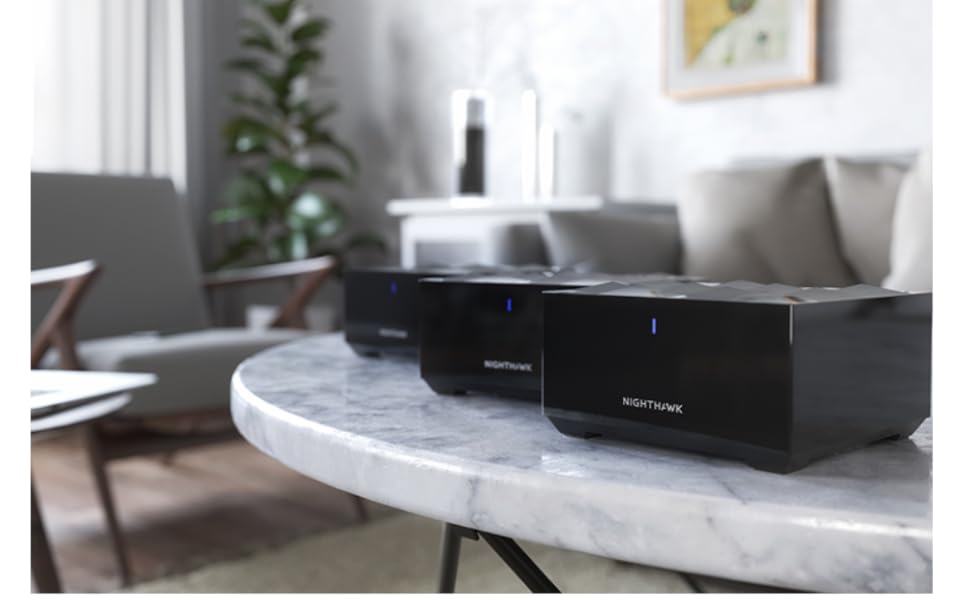
The NETGEAR Nighthawk MK63S AX1800 Mesh Wi-Fi 6 System delivers up to 1.8Gbps speed and covers up to 4,500 sq.ft, supporting 25 devices simultaneously with advanced OFDMA technology and secure WPS protocol. Ideal for seamless HD streaming, gaming, and smart home connectivity across a single, easy-to-manage network.


| ASIN | B086ZN5R6P |
| Antenna Location | Gaming |
| Antenna Type | Internal |
| Best Sellers Rank | #12,030 in Computers & Accessories ( See Top 100 in Computers & Accessories ) #208 in Whole Home & Mesh Wi-Fi Systems |
| Brand | NETGEAR |
| Color | Black |
| Compatible Devices | Personal Computer, Smartphone, Tablet |
| Connectivity Protocol | Wi-Fi |
| Connectivity Range | 4500 square_feet |
| Connectivity Technology | Wi-Fi |
| Control Method | App |
| Controller Type | App Control |
| Coverage | Whole home coverage |
| Customer Reviews | 4.3 out of 5 stars 1,853 Reviews |
| Data Transfer Rate | 1.8 gigabits_per_second |
| Frequency Band Class | Dual-Band |
| Item Dimensions L x W x H | 11"L x 7"W x 6"H |
| Item Weight | 4.3 pounds |
| LAN Port Bandwidth | 1 Gbps |
| Manufacturer | NETGEAR |
| Maximum Upstream Data Transfer Rate | 1800 megabits_per_second |
| Mfr Part Number | MK63-100NAS |
| Model Name | MK63-100NAS |
| Model Number | MK63-100NAS |
| Number of Antennas | 6 |
| Number of Items | 1 |
| Number of Packs | 3 |
| Number of Ports | 3 |
| Operating System | Linux |
| Other Special Features of the Product | WPS |
| Router Firewall Security Level | True |
| Router Network Type | Mesh |
| Security Protocol | WPS |
| Special Feature | WPS |
| UPC | 606449144680 |
| Unit Count | 3 Count |
| Voltage | 100240 volts |
| Wi-Fi Generation | Wi-Fi 6 |
| Wireless Communication Standard | 802.11ax |
| Wireless Compability | 802.11ax |
S**E
NIGHTHAWK SAVES THE DAY!
I work remote and it's extremely important to have a strong Wi-Fi connection. I was using all of the hardware provided directly from the internet company. During the day, my system would disconnect from the wi-fi and I'd have to log back in. If I left my computer for 2 mins., it would disconnect. I've spent count less hours on the phone with tech support, adding extenders and moving everything around for the best possible signal. Then came along, Nighthawk! The mesh system is so incredibly easy to hookup. My internet signal is super strong and I am happy to report zero drops with my system. The mesh system is truly a lifesaver and I HIGHLY recommend using the NETGEAR Nighthawk Mesh System. I'd be absolutely frustrated without it.
E**W
Easy to Install and Works Great
With my wife and I both working from home and the kids starting school on-line, I upgraded our Internet bandwidth to 500mbps plan that would accommodate all the video calls that were going to be happening simultaneously. My old Nighthawk router couldn't handle the increased bandwidth even though it advertises up to 900mbps. I researched new mesh wifi 6 units and many were very expensive. The new Nighthawk mesh wifi 6 system had a range of different reviews but popped up on several on-line best of 2020 rankings and seemed to be a good value, so I bought it to try out. I've had the unit for about a week now and it has worked very well . It was easy to set up and I have a strong signal throughout my 3,200 sq ft home and in our back yard. As reviews state, the wifi is strongest near the base unit and diminishes the further away you get from it, but I've gotten wifi speed tests of up to 360mbps next to the base and the lowest it drops from the furthest points of my house and backyard is around 100mbps. I tried it again today while all four of us were on video calls with similar speeds. I'm very happy with my purchase so far.
S**9
MK63 enhanced coverage!
After doing detailed research on the MESH systems I decided to go with the MK63 (contains MR60 router & 2 MS60 satellites). The packaging was very clean and it arrived within 20 hours of ordering from Amazon. The setup was extremely straightforward via the Android app. The 3 units covered almost all dead zones very well in our 4000 sf house with 2 levels. The router location is in one corner of the house on the lower level and I placed one satellite in the middle of the house on lower level and 2nd one in the middle on 2nd floor. I think I may need 1 more satellite to cover the other end of the house for a stronger signal. But overall the units are great and it uses the 2.4g & 5G in a SMART auto manner depending on the content being streamed to a device. It is only 1 week since I have been using it and so far it is great. I will watch it for few weeks and report any issues later. The ONLY negative part is that it does not have USB ports for external storage sharing across the network. But I was able to overcome that by using my old R7800 router as a SWITCH and directly connecting it's ethernet to the ethernet port on the MR60 router. Now I can access the ReadySHARE drive on the R7800 across the network!
T**R
Product with lots of potential, yet can be aggravating for the typical end-user
I have been using this product for over six months, experiencing different results from time to time. I have seen it perform exceptionally well and total failure. The use of this product might depend upon the complexity of your network or what you intend to do with it. As a standalone, it probably functions pretty well for its intended purpose. Out of the box, the installation is fairly straightforward. If you have a smartphone, it will walk even the most non-tech savvy individual how to get it functioning. Advanced or power users such as myself, tend to see the setup as very vanilla or basic. One thing that should be highlighted bar none in the setup and is worthy to note is that each satellite will operate wirelessly independent of the router, however, it will operate exceptionally better if hardwired for ethernet backhaul. When I originally purchased this unit, the problems were fairly intense with disconnections almost all of the time. The satellites would not stay synced. I strongly considered returning the product and getting three independent routers to do the same thing. I read somewhere that there was going to be a firmware update that would correct these issues. Within thirty or so days, the firmware patch was released correcting the vast majority of issues. Over the course of six months, there have been a few updates, nothing as major as the first one. I did discover through experimenting, that while in the bedroom I could pull a max speed of 80mbps off a gig connection over wifi, but when I attached an ethernet cable to the back of the satellite from the router, the speed increased to 700mbps. In the manual, it will tell you that you can connect one satellite for wired ethernet backhaul. You can connect as many as you want, provided you use a network switch from the main router MR60 to the satellite's MS60s. In my particular setup, I needed coverage in my master bedroom and a playroom. Since both of these rooms are on the first floor and my main router (RAX120) is on the second floor, we had sporadic coverage at best. I have been utilizing the MR60 as a secondary router (by turning off the DHCP and statically assigning the MR60, MS60s their own ips) and sharing the same SSID and Password. This way the internet is fluid to work no matter what room I am in or what device I am on. These little units work well for the most part in this configuration, however, from time to time, the connection acts stagnant requiring a reboot. At times I can not access the MR60 page over wifi, but I can over ethernet. Sometimes it will go for months with no issue and other times it will just give issue after issue. In one of the latest firmware updates, they allow you to run the device as an access point, which is the proper way to do it, however, through further testing my connection speed drops by 25%, utilizing it this way versus using it as a secondary router. I would like to see the firmware steadily be improved for more reliability. My ratings are as follows, 4 stars over all for the product as it is not the worst and offers a lot for a package deal in comparison to much more expensive setups. 4 stars on the signal, when it works it works really good, when it doesn't it isn't good at all, improved firmware could make this even better. 3 stars on tech support, as I don't use tech support, most of the people don't speak well or listen to the problems the user is facing, partly because they simply do not know the product they are representing, 3 stars for the mobile app, it is good and looks appealing, however, I simply use the GUI because I can not access both the RAX120 and MR60 on the app at the same time and I don't use the app. The GUI is the only way to support both routers at the same time
A**R
Great Product
My house was plagued with dead zones with my previous router and after spending more money on extenders that hardly worked my wife and I were fed up. I did some research and from reviews, found this mesh system to be competitive on price and high on performance and quality. They were all correct in their assessment! This system is the real deal and solved my problems instantly. Easy to set up and I’m pulling up to 100 mbs from the satellite points in separate areas of my house. Very satisfied with the product and already recommended it to my neighbors. Buy this now you will not regret it!
J**D
Would give 0 stars if able
DO NOT BUY THIS PRODUCT! We have been netgear customers for a very long time and that is stopping right now. We rebought this mesh WiFi in August after a power outage fried our last one and it worked great until last night. The WiFi randomly stopped working and every attempt at fixing it didn’t work. We were getting a strong signal from our internet provider but nothing from the mesh. We waited to see if it would resolve itself in the morning but no such luck. We called netgear, when they looked he said it was a “configuration issue not a hardware issue” and that because we were out of the 90 day window the only way they would fix a confiduration issue was if we pay $90 for their tech support. It seems like a scam to me, for the Wi-Fi to magically change its configuration settings (settings we can’t change by the way) and then be sold the fix to a problem they created. The person on the phone also said “you can buy the technical support and I guarantee that by the end of this call your product will be working” like REALLY just out and admitting that they caused the issue. STAY AWAY FROM THIS BRAND!!!!
K**J
Newbie proof installation
Plug-n-play Just follow the plain english instruction and pretty soon you'll have speed-of-light internet connectivity!
W**T
Pretty solid router
I was having trouble getting a consistent Wi-Fi signal in my two story house because my router had to be one one end rather than the center. Tried bridging with Linksys AC 3200 routers but backhaul performance was terrible. This mesh system solved the problem for me and has been pretty stable. The app isn’t the best and I would prefer to have more freedom to configure the router. So if you use more advanced tools like a VPN or want to mess with router configuration then this might not be the setup for you. For those who want to do minimal configuration this seems to be pretty solid and simple. Had one issue where a firmware update caused the router to become unstable and the satellites couldn’t connect. Had to reset back to default and start over. Been solid since.
F**A
funciona muy bien
tengo buena señal en toda la casa
M**Y
Buen producto
Una casa de tres niveles y en cada uno ya existe señal y velocidad constante, aparte estéticamente son mejores que un módem.
D**S
Excelente un poco caro
Vale cada centavo Cubre toda la casa, fácil de usar
A**N
Muy bueno, no excelente
Un gran producto. Lo compré principalmente porque la diferencia entre los Mbps que recibía en mi módem (cerca de 200 Mbps) y lo que llegaba en el resto del departamento (90 Mbps) hacía evidente el gran desperdicio de velocidad que pagaba respecto a la que experimentaba. También tenía un área en la que señal prácticamente no llegaba, aún con extensores Netgear Ac1200. Compré entonces un router Huawei Wifi 6 y la verdad bueno. Recibía casi los 200 Mbps pero a los 5 metros de nuevo se caía la velocidad. Finalmente me decidí por estos Nighthawk, por ser de malla para cubrir más area, ser Wifi 6, estar a buen precio (cuando lo compré, costaba 2 mil pesos más económico que la versión Mk62 que sólo trae dos equipos, este trae tres) y ser de marca Netgear que en el pasado me ha demostrado ser de calidad. El resultado fue muy bueno. Este sistema de malla me entrega ya 195 Mbps en cualquier lugar del depa y ya no hay zona sin señal. El único inconveniente para mí fue que, resulta que este sistema te deja ambas redes 2.4 y 5 en una misma, con el mismo nombre y clave y no es posible separarlas. Esto fue un problema puesto que estoy automatizando mi depa con muuuuchos smart swirches, smart plugs y smart lights, y dos Echo de Amazon (Alexa), pero varios dispositivos, sobre todo los smart plugs, sólo funcionan con red 2.4. El resultado es que pocos plugs funcionaron. ¿Que tuve que hacer? Dejar todavía funcionando uno de mis extensores Netgear AC1200 a donde se conectaron todos mis dispositivos smart. La historia acabó bien pero, ¿qué necedad de Netgear de no dar la opción de diferenciar ambas redes, como cualquier otro sistema?
G**A
Cumple con las características
facil de instalar y configurar
Trustpilot
3 weeks ago
2 weeks ago