Buy anything from 5,000+ international stores. One checkout price. No surprise fees. Join 2M+ shoppers on Desertcart.
Desertcart purchases this item on your behalf and handles shipping, customs, and support to Tunisia.
🚀 Stay connected anywhere, anytime — don’t let slow internet hold you back!
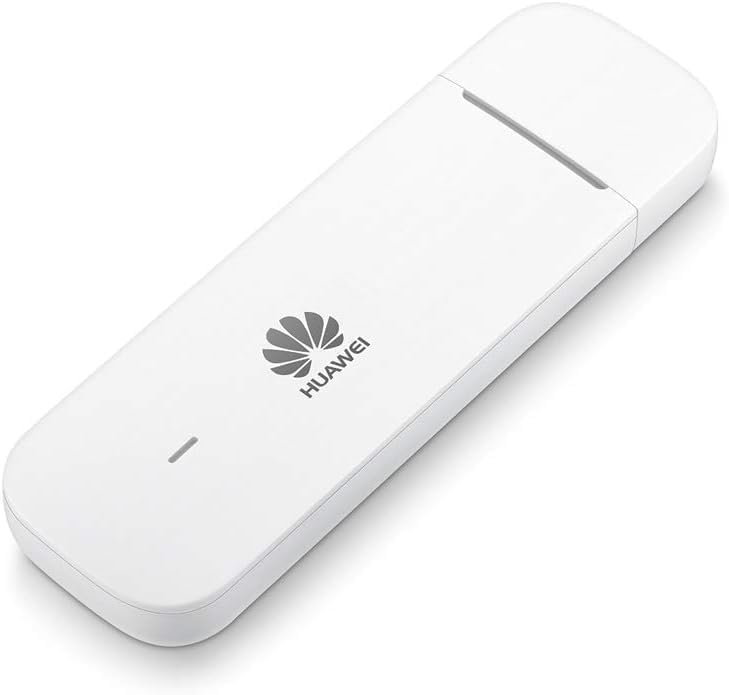
The Huawei E3372h-320 is a compact, unlocked 4G LTE USB dongle delivering up to 150 Mbps download speeds and 50 Mbps uploads. Its sleek design fits easily in your bag, offering plug-and-play convenience with no software hassle. Compatible worldwide and featuring a microSD slot for added storage, it’s the perfect travel companion for professionals who demand fast, reliable internet wherever they go.


| Antenna Location | Home |
| Antenna Type | Internal |
| Asin | B085RDTZMP |
| Best Sellers Rank | 8,090 in Computers & Accessories (See Top 100 in Computers & Accessories) 18 in Mobile Broadband Devices |
| Box Contents | 1x Huawei E3372h-320 (White), 1x Quick Start Guide, 1x USB Charging Cable |
| Brand Name | HUAWEI |
| Colour | White |
| Compatible Devices | Laptop |
| Connectivity Protocol | Cellular (4G LTE) |
| Connectivity Technology | Wired, Wireless |
| Control Method | App |
| Controller Type | Push Button |
| Coverage | Europe, Africa, Asia |
| Customer Reviews | 4.0 4.0 out of 5 stars (1,853) 4.0 out of 5 stars |
| Data Transfer Rate | 150 Megabits Per Second |
| Eu Spare Part Availability Duration | 2 Years |
| Frequency | 2.4 GHz |
| Frequency Band Class | Dual-Band |
| Has Internet Connectivity | Yes |
| Is Modem Compatible | Yes |
| Item Dimensions L X W X H | 15.8L x 7.9W x 1.3H centimetres |
| Item Type Name | 4G Dongle |
| Lan Port Bandwidth | 150 mbps |
| Manufacturer | Huawei |
| Manufacturer Part Number | 51071SMK |
| Maximum Upstream Data Transfer Rate | 75 Megabits Per Second |
| Model Name | 51071SMK |
| Model Number | 51071SMK |
| Operating System | Huawei HiLink |
| Other Special Features Of The Product | Works with Draytek Vigor Routers |
| Ram Memory Installed | 16 GB |
| Security Protocol | WPA2-PSK |
| Unit Count | 1.0 count |
| Voltage | 12 Volts |
| Wi Fi Generation | Wi-Fi 6 |
| Wireless Compability | 802.11n |
User
Solid improvement on old 3G version
Very good plug and play. Unlike the older Huawei modems where you have to set up desk top icon to connect or find the dongle connection above wifi networks list, just plug in and run autorun.exe once from the stick. I used with Windows 8. After that, every time you plug it in, it just connects.You can configure networks, check data usage and update firmware via browser tab, no desktop icon needed. Fast as well on 4G, I noticed the difference compared to 3G. Build quality is a little flimsy, and it is quite bit bigger than the old 3G one. But it does come with a slot for micro SD card (not supplied), so it can double as storage stick. If you are going to be putting it in your bag/pocket a lot or dropping it on the floor, I'd only give it 3 or 4 stars for build, but kept safe from abuse it's a good performer.
User
Helped me connect to windows 10
For years i had used an old E1550 dongle on my windows vista laptop but a couple of weeks ago i decided to purchase a refurbished windows 10 desktop computer. Rather disappointedly windows 10 wouldn't recognise my old dongle and so with no connection i was thinking of returning my desktop for a refund. In the end i wondered if buying a newer dongle would help, so i purchased one from "livewire telecom limited"; with no instruction it took me a while to work out how to open it (undo clips on side, then slide open, then slide sim in end). When i inserted my new E3372 dongle into the desktop computer it connected instantly. So of course i'm very relieved and very pleased with this purchase.
User
Not compatible with all travel routers
The product was okay it required a bit of work finding out the apn values for the sky sim car I had and manually entering in the values. At this point it then worked on the computer. This USB stick struggles for compatibility with a lot of devices. I tried it on my asus rt-ac66u to use as a failover option for backup when my internet goes down. Unfortunately it would work by manually switching but not as a failover option. I then tried it with the tp link ac750 which worked using the wifi option but the ethernet port on that device does not work with 4g. I then tried it on the TP-Link TL-MR3020 V3 which has a dedicated 4g mode. The ethernet worked but this dongle would not stay connected to 4g whilst on that device. I gave up and purchased a 4g router which I put the sim card into directly TP-Link TL-MR6400 which works perfectly. I would not reccomend this device for compatibility with many routers however if you plug it into the computer it should work fine.
User
One to avoid
A white elephant, does not install Manager as described in Quick Start Guide, configuration is done via web browser and is:So appaling bad as to be uselessIncredibly slowTimes out selected function and reveryts to the home page before you read and understand the settings option the optionsOnly finds O2 despite supposedly being unlockedN0o full guide available anywhereThree week on from supplying Huawei with requested details and screen shots there's been no response apart from a "delivered" receipt fo my email with this information.I've wasted a couple of whole days at least trying to get it to work and got nowhere so returned it.
User
Used with Fritzbox 7530 as a mobile internet source
I haven't tried using this with a PC at all, just the router. I had my fritz box router provided by my ISP and from what I'd read the firmware version may have caused me issues.To prevent this (I don't know if it would have been a problem) after reading reviews online about updating the fritz box software I tethered the fritz box to my phone in wi fi bridge mode and did an auto update, plugged in the modem to the USB and just works perfectly... I don't know about longevity, but it's been my main source of internet in a heavy use household with a decent 4G signal using a couple of cheap external aerials for 10 days now and haven't had any issues whatsoever, because of the price i was slightly dubious as it seemed a bit cheap, but very happy so far!Takes a full size sim card, running on GiffGaff network no issues.
User
Great for standalone pc/laptop users in strong 4G area. Bad for users in poor 4G area and/or router users.
I have done lots of research on this device in the last week since I received it from Amazon. I wish I'd done more of it before I bought the device, because I am a little frustrated with it if I'm honest.Let me explain first that I bought this specific device because it has a port for an external antenna - two in fact. I live in a very rural situation where the only option for broadband is 3G/4G mobile. I purchased this stick to plug into one of the two usb ports in my new ASUS router (RT N66U), to act as my sole WAN.Now what I hadn't realised until after the purchase is that this stick comes in two distinct flavours, the E3372h, and the E3372s. This stick (E3372h) is I think intended to be plugged directly into your pc/laptop. By all accounts it does not work well routers. Huawei have designed this stick to be as user friendly as possible, and it is - assuming you want to just plug it into your computer and go. On my Linux machine you just plug it in and it works, no settings, no APN entry nothing. It presents itself to the pc as an ETHERNET connection.. as if you'd just plugged in a network cable. For the average (Linux, I can't speak for the Windows) user, this is almost perfect, albeit with a 3G/4G selection caveat I will mention below.The problem with using this device in a router is that this model (apparently) has some routing functionality incorporated itself that means it has it's own NAT layer. Rather than delivering a public ip as an old-school modem would, this model delivers a specific IP address (namely 192.168.8.100), which has already been NAT'ed. I will say that my understand in this area is limited, but from what I gather, this means that router users such as my self will have a hard time getting this to play ball if you want to do things like DDNS, VPN, port-forwarding for gaming etc. because one you'll end up with a double-NAT situation.Anyway, apart from that issue, the web page (and only way) you use to control the device is somewhat limited. I also have another 4G Huawei MiFi device (E5776s-32) and on the similar web-style interface you can choose how you want to connect (ie. 3G only, 3G preferred, 4G only, 4G preferred etc.). On the E3372h however, you CANNOT FORCE IT TO STAY ON THE 4G connection (for this web/sw firmware anyway). Your options are a tick box for "LTE support", and choosing either AUTO or Manual under the network connections. If you choose manual, the device searches for 2/3/4G masts and providers from which you can select one, however even if you select a 4G band, the device seems to revert back to the 3G band from the same provider if it decides the strength is better. While this sounds like a good idea, it's not always. In my situation I happen to know that my relatively poor 4G signal is still 8 times faster than the stronger 3G signal from the same network provider. So I WANT TO CHOOSE which signal to attempt.I think also I am losing packets because it is switching back and forth between bands when I select "LTE Support", although I can't see for sure because I can't see what's going on when it's plugged into my antenna and router because I can no longer access the web page behind the router/ double NAT.After much frustration, I have ordered the other flavour of the same device, the E3372s (sorry Amazon). This I am told, will act more like a modem than a router, and my router (that supports 3/4G usb modem) should be able to order it around in "modem language", rather than it being subservient to the E3372h's routing whims.Apparently, Windows users can (with a bit of googling and determination) flash the "sitck" or "s" version of the firmware onto this device. I must admit I did try to do this in a Windows session within a VBOX on my Linux host, but I (along with many many others) were unsuccessful with getting the Windows guest to recognise the device.As far as the actual speed is concerned (when attached to a 4G signal), it performs well - hence me sticking with the other variant of this device.More expert people with more determination might be able to get this working properly with their routers, but I personally have wasted too much time trying.Hardware version: CL2E3372HMSoftware version: 22.200.05.00.1080Web UI version: 17.100.11.00.1080
User
Amazin product
First time I've ever used one of these. I bought it with a 12 GB mobile data SIM card, slotted the SIM in, plugged it into a USB port on my Macbook and... nothing. Until an install window popped up, I allowed it to make a system change and that was it, instant internet.The dongle has a nice simple interface where you enter the amount of data you bought and start date and it meters data usage. Nice.I was a tad disappointed that it's only 3G but internet connection is superfast, faster than fibre I have at home, so not an issue.Being unlocked you can buy mobile data SIM cards from any operator, just check coverage before choosing, they are all around the same price.So a great product, well worth the money spent.
User
Runs like a dream- straight plug and play
Needed for remote working during COVID situation as broadband is a little shaky. Used in a laptop. Perfect - unlike others doesn't need a degree in patience to set -up. Really is plug-and-play. Works with no fewer than 6 different SIMS- that is all of the 4 UK carriers and a couple of MNVO. The beauty of an unlocked dongle. Worth paying the slight extra money as I had purchased a cheap one through Amazon before which was poor and I had to return and got refunded. Go for this if you want a reliable dongle. It doesn't create a wifi hotspot , if that is what you are looking for - just works brilliantly for the one device.
User
Pratique et performant
J'ai installé cette clé 4G sur un routeur Asus pour qu'elle me serve de secours quand ma ligne ADSL est coupée, il faut d'abord la connecter 1 fois sur un ordinateur pour faire quelque réglages et lancer la mise a jour automatique de la clé. Après elle fonctionne parfaitement et me permet grace aux connecteurs pour une antenne externe d'avoir 35mbps dans une zone ou la réception n'est pas idéale.Produit performant et de bonne qualité
User
Modem de calidad
Funciona correctamente. Configuración sencilla.
User
Super Alternative
Einfach einzurichten und hilfreich wenn man kein WLAN Router oder Vertrag möchte.Ein anderer Stick hat bei der Einrichtung nicht funktioniert. Dieser hat sich selbst eingerichtet und funktioniert ohne Probleme. Hab sogar Videokonferenzen damit halten können.
User
Bien mais chauffe
Fonctionne très bien sur réseau Free, cependant chauffe l'été lorsqu'il faut chaud, comme tout ces systèmes de clé 4G malheureusement
User
nie kupujcie bo nie ma wbudowanego wifi
brak wifibrak zabezpieczeń
Trustpilot
1 month ago
1 week ago