Desertcart purchases this item on your behalf and handles shipping, customs, and support to Tunisia.
⚡ Power Your Home Network Without Losing an Outlet!
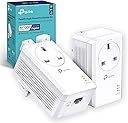
The TP-Link TL-PA7017PKIT transforms your home’s electrical wiring into a high-speed 1000 Mbps network, delivering stable wired connections ideal for 4K streaming and online gaming. Featuring an integrated power passthrough socket, plug-and-play setup, and an energy-saving mode that reduces power consumption by up to 85%, it’s the perfect solution for professionals craving reliable connectivity without sacrificing outlets or complicated installation.


| ASIN | B089DKK2K7 |
| Best Sellers Rank | 1,377 in Computers & Accessories ( See Top 100 in Computers & Accessories ) 9 in Powerline Network Adapters |
| Box Contents | TL-PA7017P KIT |
| Brand | TP-Link |
| Brand Name | TP-Link |
| Color | White |
| Colour | White |
| Compatible Devices | Desktop, Laptop, Smartphone |
| Compatible Operating System Family | Linux, Windows |
| Compatible devices | Desktop, Laptop, Smartphone |
| Country of Origin | China |
| Customer Reviews | 4.4 out of 5 stars 2,817 Reviews |
| Data Link Protocol | Gigabit Ethernet |
| Data Transfer Rate | 1000 Megabits Per Second |
| Data link protocol | Gigabit Ethernet |
| Hardware Interface | Ethernet |
| Hardware interface | Ethernet |
| Item Dimensions L x W x H | 12.6L x 7.1W x 7.2H centimetres |
| Manufacturer | TP-Link |
| Manufacturer Part Number | TL-PA7017P KIT |
| Minimum Required Operating System Version | Mac OS 10.12 Sierra |
| Model Number | TL-PA7017P KIT |
| Number of Items | 1 |
| Number of Packs | 2 |
| Product Warranty | 3 year Manufacturer |
| Product dimensions | 12.6L x 7.1W x 7.2H centimetres |
| Unit Count | 1.0 count |
S**U
Recommended
In short, it does the job and solved my poor connection and lag issues. My room is directly above the living room which is where the router sits. My brother and I play games both casually and competitively online. His room is right next to mine yet somehow gets perfect connection whereas I barely even get a bar of signal wirelessly. I've had to rely on a WiFi extender to boost my connection, but even then I still lag consistently. A lot of my friends are from America so it makes it really difficult to enjoy gaming sessions with them while being in the UK and experiencing terrible lag. Even playing on EU servers I still have 100 ping. I eventually gave up and decided to go wire up my PC to the router with an ethernet cable, after having disconnected 20 times in 5 minutes while I was playing VRChat on my VR headset. My parents did not like the look of the wire going through the house and said it was "ugly" so I tried to look for other solutions, without having to go back to the WiFi extender. I was recommended a similar product to this, probably the one without the passthrough and gigaport, but I didn't want to sacrifice a socket hence getting the passthrough and I was advised that gigaport was better due to it being able to reach up to 1000mbps instead of 600mbps.I probably didn't need it and could have saved £8 on it because when I was directly wired from PC to router, I would get 110mbps on an internet speed test, but with this product now I get about 52mbps, so half. I can't confirm if it will really provide you for up to 1000mbps since I'm only getting half of what I had, so I gave it 4 stars for WiFi signal but 5 stars for everything else since it is super easy to set up, just plug and play after pairing the two adapters. Another thing, I bought separate CAT 7 ethernet cables to replace the the CAT 5 ones provided since the CAT 7s have higher speeds up to 10000mbps, not sure if anything would be affected if I switched to the CAT 5s. Overall, I'm not so bothered about getting half of the mbps I had when wired since I'm no longer lagging when playing on servers in a different country, I don't think I have even seen the latency sign come up so I honestly have no complaints. This is honestly one of the very few products I feel that is actually so worth buying, I recommend it.
D**M
Proper Gb Ethernet over the powerlines!
Proper lifesaver - no more ethernet cable stitching across the house! Do Ethernet - through your mains! I've bought 3 pairs, instantly had use for 4 of them, and within 2-3 months - all three pairs now are put to good use. Extremely solid and easy setup and do-it-once-and-forget config. Until you need to add a new unite to the mains mesh, had looked at the plugs 0 times - stable, solid, just works.
P**Y
Surprisingly good so far
Can;t rerally run wires through the house, and living near an airport the wifi can be a bit flaky sometimes so i thought i'd try these. Obviously as wtih any powerline system, the speeds you will get depend on the wiring in your house. If you have an old house with old wiring, or a weird layout to the circuits, you may come across issues. That said, in the 50s/60s ex council house i am currently in, i am getting an average of 75mbps while the receiver is plugged into an extension cord on opposite corners of the house., so i'm pretty impressed. connecting the two was very easy, plugged them both in in the same room, pressed the pari button on the bottom of them both and within seconds the two lights stopped flashing. unplugged the receiver and took it upstars and plugged it in. again, within a coule of seconds, both lights lit up and when i connected the cable to the receiver, it connected right away. time will tell if they last, and i have no idea if adding any more to the system will cause any issues or cause the speed to go down, but they are working for me! Not sure when you'd ever get the 'gigabit' speed, but i suspect you;d need much more recent wiring than we have, abnd probably would need to be on the same ring circuit to minimise interference, but for most people it will be more than enough. just need to reorganise the room or get a longer ethernet cable so i can plug the receiver directly int a socket. They are a bit large, so if your socket has limited clearance below it, you may run into problems as i have due to furniture. i can plug it in, just, but no space to then connect the cable where the ethernet socket is underneath.
P**K
Reliable wired connection without running new cables
This has been a straightforward way to extend a wired internet connection to another part of the house without having to run a long Ethernet cable. Setup was simple: plug one adapter in near the router, connect the second where the connection is needed and pair them. The connection has remained stable for streaming, gaming and other everyday internet use. The passthrough socket is particularly useful because the adapter does not permanently take away a wall socket. Actual speeds will depend on the electrical wiring in the property, but it has worked reliably for me and is much more consistent than relying on weak Wi-Fi.
A**O
Excellent Solution for Fast & Stable Internet Upstairs
Bought this for my daughter’s house where the router is downstairs in the living room and her computer is upstairs in the bedroom. Running a long Ethernet cable through the house wasn’t practical, and the Wi-Fi signal was too slow and unstable for gaming and streaming. Setup was incredibly simple — literally plug and play. Within a few minutes everything was connected and working perfectly. The connection speed has been excellent so far, much more stable than Wi-Fi, and the gigabit port makes a noticeable difference when downloading files or watching 4K content. The passthrough socket is also very handy because it doesn’t waste a power outlet. Overall, a very reliable and convenient solution for extending internet access around the house without drilling holes or running cables everywhere.
C**R
Brilliant piece of kit , simple to fit with no expertise required.
Works like a miracle! I am approaching 80 and a couple of years ago bought an H P computer with which I used an ethernet cable from the BT hub because I thought only laptops worked with just wifi. This week the broadband changed to fibre and Openreach engineer ran a new cable from the telegraph pole to the house. Then a wire from the roof to the bottom of the wall and set up the hub on the windowsill instead of around the room and into the study as before. She said the signal would reach everywhere. The model of computer I bought did not have wifi and ethernet. Several people on the internet were complaining that usually both are standard in UK but apparently not in USA. So I asked GPT what to do and it advised this TP link. Dubiously I bought from Amazon expecting to enlist help from someone with technical nous. So I plugged it into the socket and plugged the hub into it ( meaning I didn’t need to worry about additional wall socket) and attached the supplied wire into the hub and the TP. Then repeated the action with the computer, placing the supplied cable into the computer and TP then using the same wall socket for the TP link and computer. When I switched on the computer, the internet had magically installed itself just as before! This is a wonderful device and if it just lasts the four years some other reviewer complained about then I will be looking to buy a new computer with wifi (if I’m still around lol!).
A**R
Stable wired connection without long cables – ideal for multi-storey homes
I bought this when trying to run LAN games with my son, as our Wi-Fi connection just wasn’t stable enough and kept dropping out. We live in a three-storey house, so running a long Ethernet cable wasn’t practical. I came across these and honestly didn’t even know they existed before, but they’ve been a great solution. Setup is simple – you plug one directly into a wall socket near your router and connect it via Ethernet, then plug the second unit into another wall socket where you need the connection and run a cable from that into your device. A really useful feature is that you don’t lose a plug socket, as the unit includes a pass-through plug. One important thing to note is that it needs to be plugged directly into the wall – it doesn’t work properly through extension leads. In terms of performance, the connection has been very stable, which is exactly what we needed for gaming. Speeds may be slightly slower than Wi-Fi for large downloads, but the reliability more than makes up for it. Overall, a great solution if you want a consistent wired connection without trailing cables through your house.
S**.
They work!
Edit: Reduces to 3 stars due to their short life. Bought in May 2023, over Christmas they began to drop the link from time to time with them finally giving up on January 3rd. I did spend 30 minutes online chatting with TP-Link as the only option Amazon gave me was to talk direct to the manufacturer. However, at the end of the troubleshooting, they stated the product was faulty and to request a replacement from Amazon. I stated the only option given to me by amazon was direct with TP-Link but they insisted it was Amazon's responsibility (which by law it is). So I inlaying chatted with Amazon and they told me to send them back for a refund after which I was to reorder them myself. I'm not particularly impressed that the kit lasted just 8 months, but at least I have another set to keep me going. These manufacturers need to improve the design of these things though as this will be my forth set (they don't last very long). It's really bad that these things have to be recycled so often. I had a set of older TP-Link branded Powerline adaptors, (TL-PA7020P) that helped me transfer my outdoor camera stream to my switch indoors, however, one day they just stopped working. I tried a full reset and various other things including firmware updates but nothing worked. They would connect in the house when plugged into the same double socket, but as soon as they were apart, the signal would just drop and the LED would go red. Why do I say this? Well, in case you have had the same issue as me frankly. These things seem to work for a finite time and then begin to break down with flaky connections. Enter this set. I just needed a fairly basic set of powerline adapters and settled on these. They were, after all, just bought to see if a new set would work, or whether it was something to do with my electrics (unlikely as the house is less than 4 years old). I plugged the first adapter in the garage and plugged the ethernet cable in from my EAP-110 outdoor antenna, two LEDs came on. I went indoors and plugged in the second adapter to the socket near my switch, plugged the Ethernet cable in and two LEDs came on. I waited 60 seconds, nothing, no third LED to show they were linked. All I can think of is these things take several minutes to find each other as, just as I was giving up, the third LED lit up! I checked, and all the cameras worked fine, a lot faster than they were before as I was using a TP-Link Deco X55 in the garage to try to get the signal through, it was only reading one bar so not a great signal. So I'm very pleased as I don't need to purchase the Outdoor X50 Deco now (an expensive test that might not have worked so well). So it seems these things do have a finite life, but I would rather buy a set of these every two years than faff about with trying to get a wi-fi signal into what is effectively a Faraday cage (a house with foil lined insulation throughout). And if you had a set of these that suddenly packed up, buy a new set, you might just solve the problem.
Trustpilot
2 weeks ago
3 weeks ago