Desertcart purchases this item on your behalf and handles shipping, customs, and support to Tunisia.
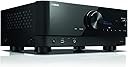
🎬 Elevate your home theater to legendary status with Yamaha RX-V6A!
The Yamaha RX-V6A is a cutting-edge 7.2-channel AV receiver featuring advanced HDMI 2.1 inputs for 8K and 4K120Hz video, multi-room MusicCast streaming, and voice control compatibility with Alexa, Google Assistant, and Siri. It delivers immersive Dolby Atmos and DTS:X surround sound, supported by robust wireless connectivity including Wi-Fi, Bluetooth, and AirPlay 2, making it a versatile centerpiece for any modern home entertainment setup.


| Asin | B08CKJKKBY |
| Audio Encoding | DTS |
| Audio Output Mode | HDR10+, 8K/60Hz and 4K/120Hz |
| Audio Output Type | Speakers |
| Best Sellers Rank | #7,690 in Electronics (See Top 100 in Electronics) #11 in Audio Component Receivers |
| Brand | Yamaha |
| Built In Media | Remote Controller |
| Color | Black |
| Compatible Devices | Game Console, Smartphone, Speaker |
| Connectivity Technology | Yes (SBC / AAC) |
| Connector Type | HDMI, RCA |
| Control Method | Voice |
| Controller Type | Apple HomeKit |
| Customer Reviews | 4.2 4.2 out of 5 stars (727) 4.2 out of 5 stars |
| Format | WAV |
| Item Dimensions D X W X H | 6.25"D x 17.3"W x 14.9"H |
| Item Weight | 4.5 kg |
| Manufacturer | Yamaha |
| Mfr Part Number | RX-V6ABL |
| Model Number | RX-V6ABL |
| Number Of Channels | 7 |
| Number Of Items | 1 |
| Other Special Features Of The Product | Built-In Bluetooth |
| Output Power | 100 watts |
| Output Wattage | 100 watts |
| Supported Internet Services | Pandora, Spotify, Napster, SiriusXM, TIDAL, Deezer, Qobuz, Amazon Music HD |
| Surround Sound Channel Configuration | 7.2 Channel |
| Total Number Of Hdmi Ports | 8 |
| Unit Count | 1 Count |
| Upc | 027108959009 |
| Video Encoding | H.264, H.265/HEVC |
| Warranty Description | 3 year manufacturer |
| Wireless Technology | AirPlay, Bluetooth, Wi-Fi |
User
Very customizable
Lots of settings for customization.Manual doesn't come with it, instead everything is online. Good luck if you need to find something on it in the distant future.Other than the online manual, and the complicated manual setup, it sounds pretty good with small bookshelf speakers as long as you have a powered sub to go with it.I'll eventually upgrade my speakers, but for now, the little home-theater-in-a-box speakers I have work well enough. This receiver does a good job of driving them and has room to grow when I'm ready.Make sure you buy a powered sub... It's required with this unit, if you want a sub.
User
Great receiver for money!
I got this to replace my lackluster Onkyo TX-NR6050 I purchased from Costco. Three areas stand out for me with the Yamaha receiver:1: Audio, movies sound great, dialogue is clear. Action scenes are impactful and dynamic.2: Picture quality, bright, vibrant and beautiful colors from my PC and from my Firestick.3: Ease of use, out of the box ready to go. Menu is dated (no gui really just an overlay, which is fine by me). Renaming inputs, adjusting speaker settings and setting EQ preferences super easy. Took about 20-25 minutes to fully setup. In those 20-25 minutes I was already way ahead of the Onkyo.Great value for the price! Volume is very easy to set!Still have to test PS5 performance, Bluetooth connectivity, USB settings, WiFi and a few other items. I’ll probably end up buying a Blu-ray player since this was so easy to setup! Or maybe use my PS5/Xbox One :)
User
Review
So far I’ve been very pleased with the unit although I only use it for powering two large front 4 ohm external speakers while listening to music streaming on apps in the TV. Unlike AVs from both Denon (who I believe has the best tech support) and Onkyo that I returned, when I turn on my Sony Bravia TV with settings enabled for eARC, the Yamaha unit does not automatically turn on and subsequently switch sound to the external speakers. Perhaps it’s possible but it’s not something that I wanted. Additionally, I came to learn that both Denon and Onkyo are owned by the same parent company, which may explain their common behavior. However, the Yamaha receiver does automatically switch to the external speakers when I power it on and I am able to control the AVR volume with my TV remote control. Additionally, with the settings I have on the TV and AVR, when I turn off the AVR, the sound automatically switches back to coming from the TV speakers, and the TV does remain on. Again, something I want to happen. In general, I’ve found that these devices are very complicated with their myriad number of settings on both the TV and the AVR, and it can be very challenging to properly set them. I’m retired now but my undergraduate degree is in electrical engineering from an Ivy League school at a time when we used slide rules to do the mathematics. I would say that it’s not easy to learn how to use the devices with eARC. If you only want to improve the TV sound, I'm guessing that's it's a lot simpler to use a sound bar. In my case, I've had large and expensive 4 ohm front speakers that I wanted to continue to use (my old AVR does not have any HDMI connections) so a sound bar was not an option for me.
User
A great A/V receiver at a great price. Too bad Amazon Customer support is horrible.
Pros,1. A 7.2 channel A/V receiver that can do 5.1.2 Atmos. It also support DTS-X as well.2. 200 watts total power. Don't let that fool you. It powers my 5.1.2 speaker setup far better than my previous Onkyo TX-NR5100 that's supposed to 80 watts per channel. Also sounds a lot better and clearer.3. 7 HMDI inputs and 1 HDMI eARC output that support 8k/60hz and 4k/120hz with Dolby Vision. Additional speaker inputs for extra zones for run into other room.4. Uses banana plugs for easy installation.5. Has both WIFI and Bluetooth. Also includes an AM/FM antenna as well as a speaker calibration mic.6. Has two RCA subwoofer input jacks for dual sub units.7. Very well built and very sturdy unit. Looks very nice.8. Includes an extremely nice remove control.Cons,1. It's not the easiest to setup nor the most user friendly. Once setup you should be good, but it's a matter of the learning curves.2. Make sure you get the latest firmware. You may get unlucky, get an older unit, wonder where all the features are at and why they're not available.3. Lastly Amazon customer support is utterly horrible and useless. I order this produce and later that day they offered a discount. I called up customer support for a price match and THEY REFUSED TO DO IT!!!! I ended up canceling the order and reordering at the better price and Amazon ended up losing money because they were getting ready to ship the first order. LEARN TO PRICE MATCH LIKE YOUR COMPETITION!!!!!!!!I have this hooked up to my computer for movies and gaming, it works great because of the 120hz pass through. Other than horrible customer support the receiver is great and otherwise I'd have rated it a 5 star. I took one star for the customer support.
User
Sound is fine thus far, but the rest is an exercise in irritation
I selected this receiver based on spec sheet comparison to other receivers in its general class and price point, as well as reading through ‘professional’ reviews and assessments of various levels of dubiousness. The general specs as far as features and performance were the biggest factor. But there are things that can’t be discovered in ad copy and that are frequently omitted from even the most genuine and considered review.tl;dr: This is a device with an incredible range of functionality that is hidden from the end user by poor documentation practices, and irritating design choices that bury critical menus under unstated tech dependencies. You must have an Android/iPhone capable of running their apps, and a display connected via a video out to get good output from anything but the headphone jack.Thus far the sound output has proven quite satisfactory. It is these other factors that are dragging the rating into the proverbial pit.The display is a bit cheap, and the backlighting across the panel tends to wash things out about half as much as it illuminates. It’s very old tech—but forgivable if the result is better components elsewhere. Still, the display on my mini battery powered air inflator is a crisp full color OLED, so I have my doubts that that is the case here.The biggest problem is the lack of a physical manual. There’s something of a quickstart guide, but when you consider that most of the controls are via the remote and hidden in menu systems and that those menus have a certain opacity to them, it’s not enough information by long shot, especially if you’re not an experiential learner who strongly prefers to dive into the action and see what happens. If you prefer a more studious approach where you don’t even touch a button until you have some idea what it might do, this is going to be more challenging.There are digital manuals. You can get access to the manual via the Yamaha website, or by downloading via an app that exists to serve up Yamaha manuals. This dependence on screens for vital information is grotesque and should be considered unacceptable. There are multiple problems with this approach.One is the assumption the end user is going to have a suitable phone and be comfortable downloading an app and having a manual on a poor screen for reading technical information and diagrams on. I’m also averse to the idea of my manual requiring adequate battery power, and the only touch navigation I find acceptable in a manual is turning a page; for clarity, I mean physically moving a paper page, not tapping or swiping. Call me old fashioned, call me old, but I’ve had failures in these things before. I’ve never had a book fail to work without it being destroyed.Another issue is longevity. I’ve had too many devices outlive the availability of their digital documentation to be on board with that being the only way it is available.An app is also a requirement to get access to bluetooth as an input. Or at least, that is the only way I was able to get it to work, and then only because I decided to see if the “Musiccast” thing was going to get me access to bluetooth. If there is another way, it wasn’t documented, not that the way I found was particularly well documented. There was nothing saying that that was how to get access to bluetooth as an input, only a short sentence saying you had to set the input to bluetooth for it to receive audio over bluetooth—but cycling through inputs via the remote or the dial on the front never reached a bluetooth input until I had set up Musiccast.Musiccast requires a phone with a working wifi radio to connect to it.Once again, this dependence on an app on a phone, and presumption the end user will both have one and be willing to link it up this way is an obscenity. But it’s made worse by having basic labeled functionality hidden behind it, and poorly documented at that.There are at least two separate menu systems, and two means of accessing them. It is possible to access them from the front panel, using a dial, but the interface is incredibly cramped on a tiny display with bad contrast and worse use of space. The other method is using the remote to trigger an overlay on video out, assuming you are using the HDMI out of the receiver to connect to a display. Ultimately, this is required to have full access to to all the settings. The menu on the unit itself is absolutely tiny in what it can do compared to the full functionality of the unit.For example, it is required you access the on screen menu to select which speakers are in use, what kind they are, and whether or not you are wired for Bi-Amp. If you don't set these settings and your setup doesn't match the default setup, you're going to have issues. The app doesn't cover all of this, and for a device that places such heavy emphasis on it's ability to play music, it is very annoying to have to have a display hooked up to have access to critical setup functions--granted, they really want you to buy into their Musiccast eco-system, so much so that the app is only suitable for setting up Musiccast branded speakers.I don't object to having to set things up. While it would be nice if the unit could sense whether or not an output was connected, I realize that with some of those outputs, knowing it is connected isn't sufficient as they might be put to several uses--still, that could be handled with a switch or a system menu on the device itself.There are a few buttons on the front of the receiver, but all but the power button are capacitive buttons, marked in faint white print with poor contrast. I only discovered them when peering at what I had thought was a blank face looking for the “Connect” button called out in the manual to get Musiccast working. These are terrible buttons, and it’s clear the engineers knew it when they made the power button physical.Internet Radio was apparently also locked behind the Musiccast app connection as it didn’t show up as an input until I connected the Musiccast app—again, not documented beyond saying you had to set the input to Internet Radio to use it.Another irritating grievance hidden in menus only accessibly by poking around the on-screen menu, only accessible if you have a display hooked up: Eco mode. In its default state, this will partially shut down after 20 minutes of not processing sound. If hooked up to a display, this will then go to a pass-thru mode, and it will not automatically pick back up again once audio signal is again being sent.For example, you have a console or PC hooked up to HDMI in, and the display hooked up to HDMI out/eArc. If you are using those devices in a video only mode, with no audio signal, whether it's because you paused a game, or simply got lost reading something and the music stopped, after 20 minutes, the audio processing will shut down, there will be a bit of a flicker and a snap as internal routings are switched around, and the unit will no longer output sound. All sound will iinstead be sent to the display as if the receiver didn't exist. This will persist even if you do start sending audio again. It will not turn itself back on even if you swap inputs, though other inputs will work as normal. The only way I've found to get it out of pass-through for that input is power cycling either the receiver or the sending unit.Fortunately this can be changed, unfortunately, you absolutely have to have a display hooked up to access the menus to do so.Overall, the user experience has been underwhelming at best with poor documentation where it exists, an absence of physical documentation, and some terrible choices in terms app dependency. I absolutely hate that I have to use my phone to get access to not just full function but a basic function like being able to pair a bluetooth source to the receiver for playback.
User
Great replacement to my older 5.1 Yamaha receiver.
Great replacement for an older Yamaha. My previous unit lasted 10 years and I see no reason why this new one wont last another 10. Familiar features and setup to other Yamaha receivers. Zero issues with setup and contrary to others, you can use all the features without the app. While the app does add some features for streaming, the unit is fully usable as a receiver for movies, surround, etc. without the app. Overall the sound improvement is spectacular, the high slew rate really makes a difference and DSP much improved over the older 10 year old unit I had. Solid hardware, solid setup and while I'm not about Brand Loyalty, the Yamaha still had better features, reviews and quality than the other major brands. I would have no issue recommending this to unit to anyone. Remember, these units are about the sound they offer, not the the wiz bang features you see in some other units. Reliable hardware, reliable sound and a rich feature set makes this unit a no brainer.
User
Works as advertised
I had a 5.1 then upgraded to this 7.1 because it has ATMOS. Little bit more power. The music cast is ok. I like the ability to plug in two subwoofers. I went with two klipsch subwoofers and ceiling speakers, and regular Yamaha speakers for the others. When I tune to Netflix, Hulu etc. the decoder stalls and it takes like 5 seconds for the audio to come on. With the cable box no issues. There’s update every couple of months. I think the on tv interface could use some updating. It’s very bland and dated. (The way it’s presented not the type of options you have) Even next the wife spends more time in the TV ROOM.
User
Not Yamaha's Best Effort
I had such high hopes for this unit. Have been a Yamaha customer ever since I bought my first CR-2020. So far, I haven't heard one thing through it (except a test tone) and am nothing but disappointed. Whoever designed the speaker attachment plugs needs to go back to engineering school. Unless you use banana plugs, the pass-through holes were not designed for specialty cable ends nor does 12-gauge low-oxygen copper (either stranded or solid) fit well either. The network set-up is for the birds. Ethernet has been around 50 years and yet somehow, they managed to screw up this implementation. It creates its own network name for what reason I have no clue (let me describe how that messes up having a second router and firewall on your home LAN) and, although it pulls an IP address via DHCP, try and find a device name (the manual says it should be a specific format...yeah, right.) Can't get Bluetooth to connect and I think that has something to do with the network setup although why that would be escapes me. The MusicCast feature is nothing like I had hoped. The only thing I've seen so far is a list of 240+ radio stations I never heard of or care to. They're not organized by any measurement that I can figure, and you wind up scrolling and scrolling unless you use the "filter" feature, which appears cobbled together with old Java software they had lying around. The included instructions for setting up Spotify didn't work (again, pretty sure it has to do with the network configuration.) I was expecting the unit would support other apps for interfacing to hi-fidelity Internet streaming services and, if that feature exists, I have yet to figure out how to set it up. The owner's manual has dead ends and menu options that don't exist, and I resent I have to use my phone and install apps just to access the manual (used a laptop and a browser instead.) If I could return this unit, I would (it is an out-of-state gift.) It gets a three because it did manage to communicate with the outside world and update the firmware without crashing, which I guess is something. Eventually I'll figure out why nothing else network related works, how to stream hi-fidelity, and maybe how to get DTS to decode with a movie. But for now, all I can hear is a test tone. Oh, and without a TV connected to see the on-screen menu, absolutely forget about trying to setup using the front panel. The messages read as if the translation between Japanese and English didn't go well.
User
Highly Satisfied with Product
Excellent output, worth buying , thanks to Yamaha
User
Works well enough
Has some weird glitches and annoying hangups on occasion, but we have a lot plugged into it
User
Facile da istallare e suono professionale
Mi è arrivato prima del previsto, ben confezionato. Molto intuitivo nei collegamenti e facile da posizionare. App Yamaha molto bella e facile da usare. L’amplificatore suona veramente bene (casse Sonus faber minima come front e monitor audio per le restanti casse) nella scatola mancava il microfono per la calibrazione ma ho contattato il rivenditore ufficiale che ha risposto prontamente sulla spedizione del microfono da parte di Yamaha. Amplificatore che consiglio assolutamente.
User
Una maravilla.
La verdad ya tenía rato sin un receiver de ésta gama (entrada alta) y no decepciona. Me atrevo a decir que es el mejor receiver que he escuchado en mucho tiempo y que lo hace todo y bien. Porque hay algunos que están muy centrados en proporcionar una experiencia inmersiva cinematográfica acompañándola con un audio envolvente. Y se quedan con un sonido raropara la experiencia musical. Pero este no, y en particular cuando se calibra usando el YPAO y se usa la app para mandarle audio de alta calidad de una plataforma de streaming. Me falta probar la experiencia Atmos pero puedo adelantar que el sonido desde la configuración 5.1.1 ya es buenísimo.
User
Satisfeito
Excelente produto e entrega muito rápida. Show
Trustpilot
2 weeks ago
5 days ago